
What Is Real Time Image Processing for E-commerce
What is real time image processing and why it matters for e-commerce catalogs. Learn latency, edge vs cloud, and how batch AI pipelines keep listings consistent
You've got hundreds of product photos waiting in a folder, and the launch date isn't moving. Every image needs a clean background, consistent framing, marketplace-ready dimensions, and a final quality check. Editing one photo carefully is manageable. Repeating the same work across an entire catalogue is where the process breaks.
Start by defining the output contract before choosing a tool. Decide which marketplace each image targets, what “ready” means, and how quickly a usable result must appear after upload. That's the practical answer to what is real-time image processing for e-commerce. It isn't fast editing. It's a controlled workflow that produces predictable results while the rest of the catalogue is still processing.
Real Time Image Processing Starts With a Deadline, Not a Speed Number
A seller uploads a new product photo before a listing review and needs the first usable image quickly. The pipeline may remove the background, correct color, resize the file, generate a scene, and check marketplace requirements. A workflow that returns results only after the full catalogue finishes still behaves like a batch job. A workflow that delivers completed images as they are ready, shows progress, and keeps delivery times predictable supports real-time catalogue work.
The technical definition is a latency-and-throughput constraint. Each image must pass through upload or capture, decoding, preprocessing, transformation, validation, encoding, and delivery within a bounded response time. Image quality remains part of the contract, but timing determines whether a seller can review, correct, and publish the result while the rest of the catalogue continues processing.
Video provides a familiar reference point. A traditional stream commonly runs at 30 frames per second, leaving approximately 33.3 milliseconds per frame for capture, processing, and display, as described in this technical overview of real-time image processing. Repeatedly missing that interval causes delayed output, dropped frames, or a growing processing backlog.
Product catalogues run on a different clock. They usually process independent uploaded files, not a continuous camera loop. The useful deadline is the time between an image entering the queue and that image becoming available for review, export, or listing upload.
Define the seller-facing contract
Set the contract before sending the full catalogue through the pipeline:
- Time to first image: How long until the first completed product photo is ready for inspection?
- Per-image latency: How long does each file take from ingestion to a usable variant?
- Batch throughput: How many images finish during a defined period?
- Validation status: Does the system flag incorrect dimensions, color values, framing, or platform-specific pixel rules before export?
These measures expose different operational trade-offs. A pipeline may deliver the first image quickly while processing the remaining queue slowly. Another may clear the batch efficiently but delay the first reviewable result. Sellers often need both early visibility and predictable completion, especially when a marketplace rejects files for dimensions or formatting.
Practical rule: Measure performance from the seller's upload event to the delivered image, not only from the AI model's start time to its finish time.
A workflow built around improving catalogue workflow efficiency applies the same discipline repeatedly. The target is a dependable relationship between upload, processing, validation, and delivery, with latency, cost, and visual quality measured together.
The Four Numbers That Actually Define a Real Time Pipeline
A product catalogue can feel “real time” when the first edited image appears quickly, yet still leave the seller waiting on the remaining files. Latency, throughput, jitter, and frame interval expose different weaknesses. Together, they show whether a pipeline supports asynchronous catalogue work or only performs well in a small test.
Latency
Latency is the end-to-end time from image ingestion to delivery of the finished variant. Count upload handling, decoding, resizing, AI processing, encoding, storage, and delivery. Model inference is only one stage.
A system can report fast inference and still deliver slowly when files wait in a queue, move between memory locations, or need expensive encoding afterward. Track both average latency and high-percentile latency, such as p90 or p95. A few slow images can delay approvals, exports, or listing uploads. The importance of measuring both individual stages and the complete path is documented in this real-time image-processing performance paper.
For sellers, time to first image often matters as much as the average completion time. An early result lets the operator check background removal, cropping, and colour treatment before the full catalogue runs.
Throughput
Throughput is the amount of catalogue work completed over time, such as images processed per minute or per second. It answers how quickly the service can clear a queue.
Throughput alone can hide a poor review experience. A system may process a large batch efficiently while withholding the first finished image until much later. That delays quality checks and gives a faulty background-removal instruction more time to affect the rest of the collection.
Capacity also depends on concurrency, model size, image dimensions, and the available CPU, GPU, or storage path. Raising concurrency may increase batch throughput while making individual results less predictable.
Jitter
Jitter is the variation in per-image latency. Stable completion times make staffing, review, and listing schedules easier to plan than a queue that sometimes finishes quickly and sometimes stalls.
Jitter commonly rises as concurrency increases. Memory pressure, GPU scheduling, transfer time, and queue depth can push late results far beyond the average. NVIDIA benchmark documentation illustrates why average and p95 latency should be considered together when visual workloads share hardware. The same principle applies to catalogue processing, even when sellers review product images instead of video streams.
Frame interval
Frame interval is the time available for each frame in a continuous stream. At 30 frames per second, the interval is approximately 33.3 milliseconds. A Wiley reference on real-time image processing provides the underlying real-time processing context.
Catalogue workflows usually use a coarser interval, measured in seconds per image or minutes per batch. The requirement remains practical: return a predictable result before the operator or downstream listing process is blocked. Platform-specific pixel dimensions and formatting checks must fit within that workflow deadline too.
| Metric | Definition | Typical Range | Seller Symptom |
|---|---|---|---|
| Latency | Time from ingestion to delivered variant | Set by the workflow deadline | Images are not ready when listings need them |
| Throughput | Completed images over time | Depends on hardware, model, and concurrency | A large queue remains open too long |
| Jitter | Variation between individual completion times | Lower variation is easier to plan around | Some products finish while others stall |
| Frame interval | Time available before the next frame deadline | Video uses milliseconds, catalogues use a larger workflow interval | A live stream drops frames, or a catalogue delivers unevenly |
A dependable pipeline exposes all four. That separates a responsive catalogue service from a batch job that finishes quickly only under light load.
Edge Versus Cloud for Product Photo Workflows
There isn't one correct location for every image operation. Edge processing runs in the browser, on the seller's device, or close to the delivery layer. Cloud processing sends the image to remote infrastructure with more available compute. The right split depends on the deadline, image complexity, privacy needs, and acceptable visual trade-offs.
Use the edge for work that benefits from immediate feedback. A browser can show a resize preview, apply a simple crop, or prepare an upload without waiting for a remote transformation. Local processing also keeps unreleased product photos on the device, which can matter when a catalogue contains confidential SKUs or customer-provided imagery.
Cloud infrastructure is more suitable for demanding operations. Large background-removal models, high-resolution enhancement, and generated scenes can require memory and compute that a seller's laptop or phone doesn't have. A cloud GPU can also process a large collection with controlled concurrency, provided the workflow measures queueing and doesn't treat average speed as the whole result.
Cost changes with the architecture. Edge processing shifts more work to the seller's device and may reduce transfer requirements. Cloud processing creates an infrastructure cost for each processed image, but it can avoid asking every seller to own high-performance hardware. A useful technical discussion of edge and cloud trade-offs also highlights privacy, energy, and visual quality as part of the decision.
Match the stage to the location
| Dimension | Edge, Browser, Device, or CDN Worker | Cloud GPU |
|---|---|---|
| Responsiveness | Good for previews and lightweight transformations | Depends on upload, queue, and processing time |
| Cost | Uses available device or delivery-layer resources | Charges infrastructure for heavier processing |
| Privacy | Raw imagery can remain local | Images leave the device for remote processing |
| Visual quality | Best for simple, deterministic operations | Better suited to demanding AI transformations |
| Catalogue role | Preview, crop, resize, and final delivery | Background removal, enhancement, and scene generation |
A hybrid pipeline is usually more practical than an all-edge or all-cloud design. Perform lightweight checks and previews locally, run heavy AI where the required model fits, then deliver the final marketplace variant through the edge.
For sellers moving images from storage into a repeatable workflow, this guide to AI image processing from Amazon S3 shows why source location and processing location should be considered together. The architecture should follow the work, not a blanket belief that local is always faster or cloud is always better.
What Happens Inside an Image Processing Pipeline
A product image passes through several stages before it becomes a listing asset. The slowest stage isn't always the AI model. File transfer, decoding, resizing, memory movement, and final encoding can all affect when the seller receives the result.
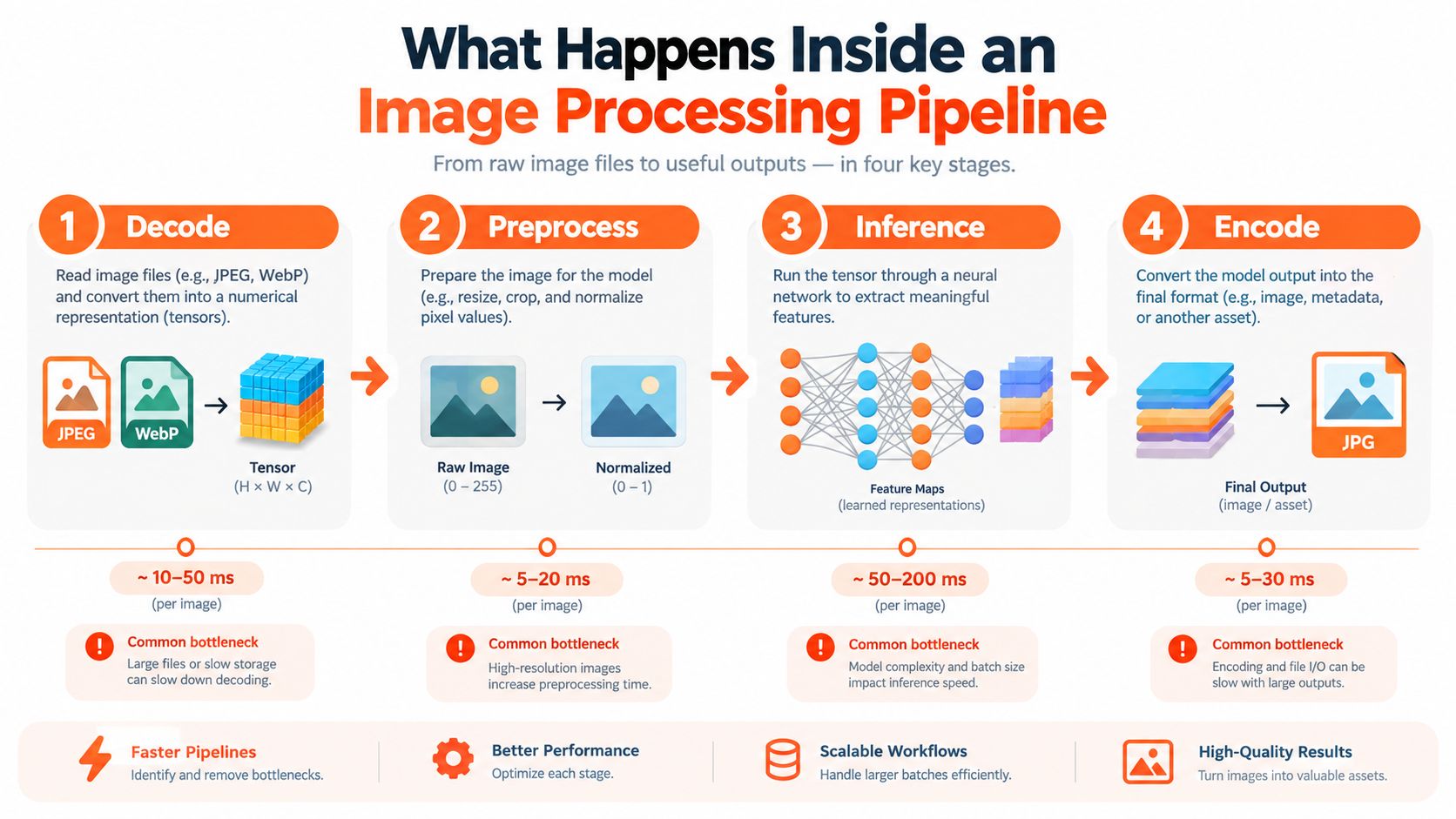
Decode and prepare
The pipeline first reads the source file and converts it into a form the next stage can use. It may need to handle formats such as JPEG, WebP, or HEIC, then apply orientation, color-space conversion, and normalization.
Doing this for a whole catalog?
MerchLoom runs background removal, upscaling and AI editing across every product photo you have — one prompt, whole batch. Try 2 batches free, no signup.
Try it freeInconsistent source files create catalogue problems. One image may contain a different orientation flag, another may use a different color profile, and a third may have dimensions far beyond the marketplace target. Normalize these inputs before applying AI instructions, or the same workflow can produce visibly different results across the collection.
Resize before expensive work
Downscaling before heavy inference can reduce memory use and processing time, but it must preserve the details that matter. A small product, thin strap, transparent edge, or fine jewelry shape can be damaged by aggressive resizing.
The order of operations matters. Don't upscale a large source and then perform a background operation that could have worked on a smaller intermediate image. Test the order on representative products, including the hardest edges in the catalogue. The workflow described in AI image enhancement for product photos focuses on this kind of staged processing rather than treating every transformation as an isolated edit.
Run inference and encode deliberately
Background removal, replacement, retouching, color correction, and scene generation may use different models and hardware. Keep each stage measurable so you can see whether the delay comes from inference, image transfer, or queueing.
Encoding then turns the processed result into the format needed by the marketplace or content system. Preserve the original and the intermediate output when review matters. A seller may need to adjust one instruction without running every earlier stage again.
As a practical visual reference for lighting and image treatment, sellers can try Department of Vibe. Use any such workflow as a controlled stage, then review the result against the actual product. AI output still needs human approval, especially for reflective surfaces, fine edges, and generated scenes.
Deliver and expose status
A real-time catalogue pipeline doesn't hide the batch behind one final progress bar. It returns completed images, records failures, and shows which stage each file has reached. That lets you inspect early outputs and stop a bad instruction before it affects the rest of the catalogue.
Platform Specific Rules That Shape a Catalog Workflow
Marketplace requirements turn image processing into validation work. A background can look white in a browser yet fail a strict color check. An image can appear large enough on screen while missing the platform's pixel target. In a catalogue, one incorrect rule applied automatically can affect hundreds of listings, so validation belongs in the processing workflow.
Amazon needs exact white and complete products
Amazon's main product image requires a pure white background with RGB values 255,255,255. The product must be fully visible, shown only once, and occupy about 85% of the image area. Amazon's current specification lists 500 pixels as the minimum and 10,000 pixels as the maximum on the longest side, as detailed in this guide to Amazon listing image size. Images with at least 1,000 pixels on the longest side enable zoom, according to Amazon's image requirements.
An Amazon export should check corner pixels, preserve the complete product, and standardize scale before upload. Do not rely on a visual approximation of white. A near-white background may pass a manual review while creating a compliance problem.
Etsy needs consistent dimensions and color handling
Etsy recommends listing photos at least 2,000 pixels in width and height, with 2,000 pixels on the shortest side identified as the recommended target in its seller guidance. Etsy supports JPG, GIF, and PNG, but animated GIFs and transparent PNGs are not supported. Etsy also advises converting images to sRGB when colors appear incorrect. The first listing image should be horizontal or square, as stated in Etsy's image guidance.
For a catalogue, set one crop and color policy rather than correcting listings individually. Keep the target side consistent, convert formats deliberately, and review the first image from each product family.
Shopify rewards controlled output sizes
Shopify specifies a maximum image size of 4,472 × 4,472 pixels, or 20 megapixels, and recommends 2,048 × 2,048 pixels. It accepts PNG, GIF, JPEG, WEBP, and HEIC, then processes uploads asynchronously and generates multiple sizes for responsive display, according to Shopify's product-media documentation.
A larger source does not automatically produce a better listing asset. Render a controlled square output when the presentation allows it, keep the result below Shopify's maximum, and track each file until its processing status is ready.
| Platform | Min Pixels | Max Pixels | Background Rule | Common Rejection |
|---|---|---|---|---|
| Amazon | 500 pixels on the longest side | 10,000 pixels on the longest side | Main image uses RGB 255,255,255 | Incomplete product, wrong background, or invalid dimensions |
| Etsy | 2,000 pixels recommended on the shortest side | Not specified here | Follow listing-image guidance | Unsupported format, inconsistent crop, or color issue |
| Shopify | Not specified here | 4,472 × 4,472 pixels | Depends on the store's presentation | Oversized media or incomplete asynchronous processing |
A platform-aware pipeline should validate dimensions, file type, orientation, color space, and background conditions before export. The check should run before upload, while a failure can still be corrected without delaying a listing.
When Real Time Is Worth the Cost and When It Is Not
Real-time processing isn't automatically the right investment. A seller with a weekly catalogue refresh may gain little from streaming results if a queued job already finishes before the next work session. The useful question is not “Can this be faster?” It's “What does a delayed or incorrect image cost me?”
Real-time architecture earns its place when the seller needs to react quickly. Examples include a product upload that should trigger an immediate listing asset, a shopper-facing preview, or a quality-control check that must stop bad images before they spread across related SKUs.
A queued batch is usually sufficient for slower workflows. Seasonal reshoots, weekly cleanup, and large archives can prioritize predictable cost and complete processing over instant delivery. In those cases, the seller can submit the collection, receive status updates, and review the finished outputs later.
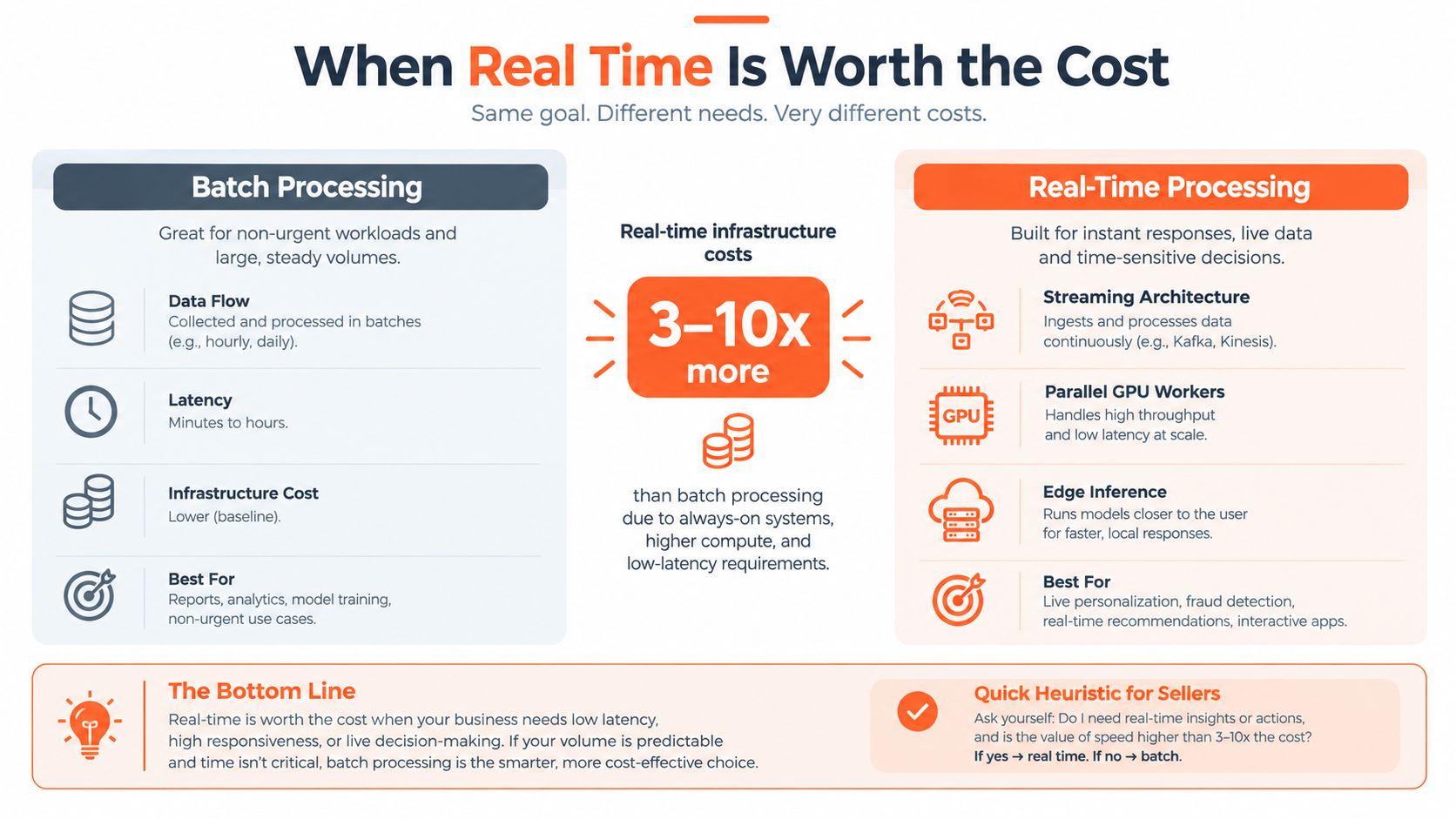
Use a simple decision test
Choose a more responsive workflow when at least one of these conditions applies:
- Stale imagery has a direct cost: A delayed image prevents a product from going live or leaves an outdated variant in a feed.
- Review must happen mid-batch: You need to inspect the first completed outputs and refine the instructions before processing everything.
- The customer is waiting: A preview or interactive transformation must return while the shopper remains engaged.
- Validation needs to stop propagation: A failed background or crop should be caught before it reaches many listings.
Otherwise, use batch processing and optimize the order of operations. Resize before expensive AI where quality allows it, limit concurrency when queues begin to build, and keep completed outputs available for reuse. The best design is often hybrid, real-time at the upload trigger and asynchronous for bulk cleanup.
Applying Real Time Image Processing to a 200 Product Catalog
A 200-product catalogue is large enough to expose inconsistent settings but small enough for a controlled pilot. Start by assigning a target platform to every listing. Don't process a shared folder without knowing whether each output must satisfy Amazon, Etsy, Shopify, or a different store template.
Set a per-image completion budget for the workflow. The exact budget should come from your launch schedule and review capacity, not from a generic claim about speed. Then run a small pilot that includes different product materials, shapes, backgrounds, and image orientations.
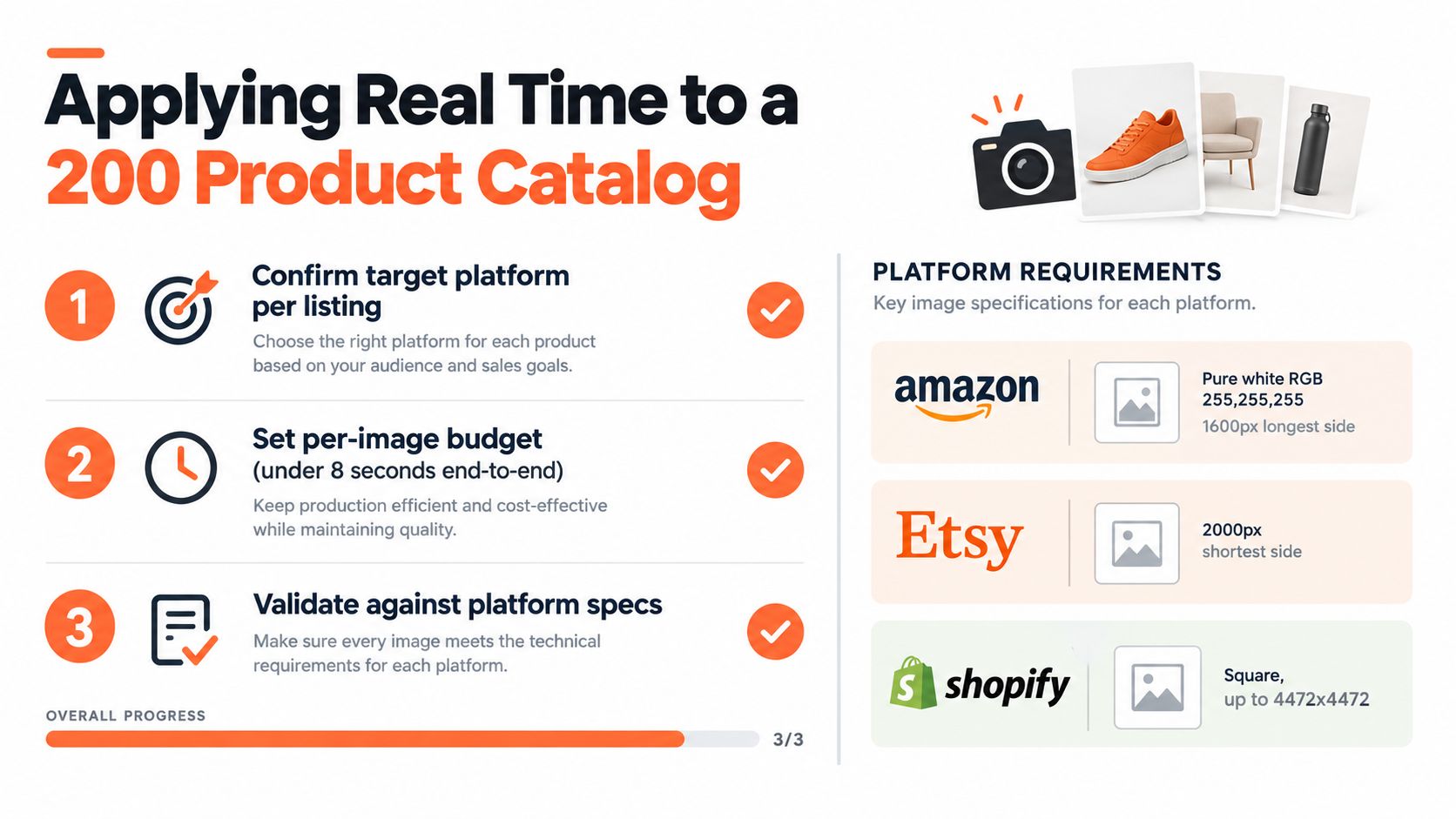
Use this checklist:
- Confirm the target platform: Assign the required output rule before transformation.
- Set the processing budget: Track time to first image, per-image latency, and completed outputs.
- Validate after each stage: Check dimensions, orientation, color space, background, and file type before final export.
- Review difficult products: Inspect transparent edges, reflective items, fine details, and generated scenes.
- Scale only after the pilot: If the first outputs are inconsistent, fix the workflow instead of processing the entire collection.
For Amazon, re-check RGB 255,255,255, full product visibility, and the required longest-side dimensions. For Etsy, verify the 2,000-pixel shortest-side recommendation and supported formats. For Shopify, verify square outputs where appropriate and keep the result within 4,472 × 4,472 pixels.
The same operational model applies to broader batch image editing. Catalog automation resources such as how Carti automates catalogs are also useful when the work extends beyond image preparation into product-data operations.
MerchLoom runs this process across a whole collection through chained AI pipelines instead of one image at a time. You can try the first images with no account, and it uses pay-per-image credits that never expire. Review the outputs before publishing, because automation reduces repetition but doesn't remove the need for human quality control.
MerchLoom lets you import product photos, chain resizing, background removal, enhancement, scene creation, and marketplace preparation, then review completed outputs while the rest of the catalogue runs. Visit MerchLoom to test the workflow on your first images without creating an account.
Stop editing product photos one at a time
Upload your catalog or connect your store. Describe the result once. MerchLoom does the rest.
Try it free — no signup