
What Is Lifestyle Product Photography Explained
What is lifestyle product photography? Learn how it shows products in use, boosts conversions, and scales across your catalog with practical tips.
Lifestyle product photography shows a product in a real or realistically styled context, helping shoppers infer scale, use, and fit. Listings with at least one lifestyle image have reported higher add-to-cart performance than studio-only listings.
You're probably not preparing one perfect image. You're moving through hundreds of SKUs, checking variants, resizing exports, and trying to keep Amazon, Etsy, Shopify, eBay, Poshmark, or Depop listings visually consistent. A clean packshot may identify the product, but it often doesn't answer the practical question behind the purchase: Where will this go, how will it fit, and what will using it look like?
Start by separating two jobs. Use a packshot to prove what the item is. Use a lifestyle image to show how the item works in a believable setting. That distinction is the foundation of a catalogue system, not just a styling choice.
Introduction to Lifestyle Product Photography
Lifestyle product photography is a commercial image format that places a product in use or in a realistic environment. A handbag rests on a shoulder, a lamp sits on a side table, or a linen dress moves on a person rather than hanging against an empty background. The product remains easy to see, while the surrounding scene supplies evidence about scale, purpose, texture, and fit.
For a busy seller, the first practical decision is simple:
- Packshot: Shows the product clearly in isolation.
- Lifestyle image: Shows the product in a situation the buyer can understand.
- Detail image: Shows material, construction, controls, or finish.
- Scale image: Shows size beside a familiar object or person.
A listing usually needs more than one of these jobs. A white-background image may satisfy a marketplace's main-image rule, while a contextual image helps a shopper understand how the product belongs in their home or wardrobe. The same product file may also need a square crop for Shopify, a mobile-friendly crop for social commerce, and a room scene for an ad.
Industry coverage places lifestyle imagery at 38.4% of product photography teams, alongside model photography at 95.6% and flat lay or ghost mannequin photography at 57.2%. The same coverage values commercial photography at about $5.1 billion globally and ecommerce product photography at around $129 million, showing that contextual product imagery is an established commercial category rather than a niche creative preference. See the broader product photography market context.
The format grew as online retail expanded. Buyers couldn't pick up a garment, walk around a chair, or hold a piece of cookware through a screen. Lifestyle imagery narrows that gap by showing a product in a setting that resembles the buyer's intended use.
If you're still deciding how lifestyle imagery fits alongside basic product photography, this guide to what product photography covers provides useful context. The key operational point is this: don't create one attractive hero shot and stop. Define a repeatable image set for each product family, then apply the same scene logic, framing, and export rules across the catalogue.
What Lifestyle Product Photography Means in Practice
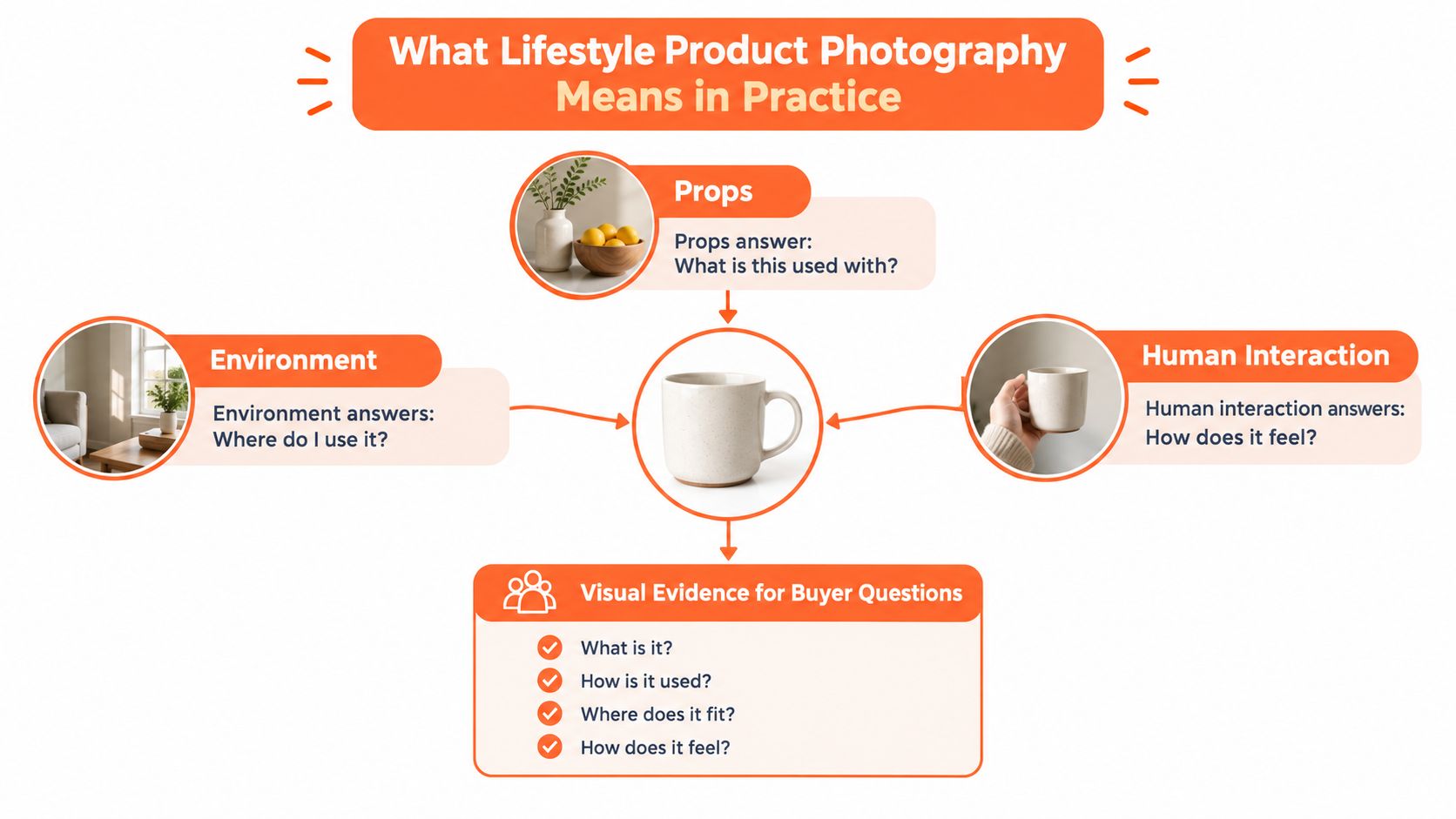
A lifestyle image answers questions that an isolated product photo can't answer on its own. A bag on a person shows how it hangs from the shoulder. A lamp in a room shows its visual scale and the kind of space it suits. A mug held in a hand gives the viewer a familiar reference for size and use.
The scene works as visual evidence. Props, environment, and human interaction all contribute, but they shouldn't compete with the item being sold.
Context must support product legibility
Think of the product as the sentence and the setting as the explanation. If a patterned cushion disappears into a patterned sofa, the scene has failed. If a skincare bottle is tiny in a crowded bathroom, the viewer may understand the mood but not the item.
A useful lifestyle frame normally has three layers:
- The product: The clearest and most visually dominant object.
- The setting: A believable place that explains use.
- The cue: A hand, prop, or nearby object that clarifies scale or function.
For a coffee mug, a hand communicates use and scale. A breakfast table suggests routine. A vase or fruit bowl can add context without turning the image into a still-life competition.
Compare the image types by buyer question
A flat lay is useful when the arrangement matters, such as a clothing bundle, stationery set, or jewellery collection. Ghost mannequin imagery shows the shape and drape of apparel without making the model the focus. A model shot adds fit, posture, and human presence. A packshot offers the cleanest view of the product itself.
Lifestyle photography combines some of these signals, but it doesn't replace every other image type. For hundreds of listings, the practical system is to assign each image a job and avoid producing several frames that communicate the same thing.
A consistent product family might use the same room, camera height, prop palette, and crop position across every colour variant. That consistency helps shoppers compare items without recalibrating the scene each time.
How Lifestyle Compares to Other Product Photography Styles
A marketplace listing works like a sales sequence. The first image identifies the item, later images answer practical questions, and lifestyle photography shows how the product fits into a real setting. Each style has a different job, so a repeatable catalog uses several image types instead of relying on one hero shot.
| Style | What It Shows Best | Best Use Case |
|---|---|---|
| Packshot on white | Product shape, colour, and included parts | Main marketplace image, search results, product-page identification |
| Lifestyle | Use, scale, setting, and aspiration | Secondary listing image, landing page, social ad, collection campaign |
| Flat lay | Arrangement, outfit pairing, or product group | Apparel sets, accessories, stationery, bundles |
| Ghost mannequin | Garment structure and volume | Fashion catalogues where the clothing shape matters |
| On-model studio | Fit, movement, and body relationship | Apparel, footwear, jewellery, and wearable accessories |
Match each style to the buyer's question
A packshot answers, “What exactly will I receive?” It should carry the cleanest view of shape, colour, and included parts. A lifestyle frame answers, “How might I use this?” It adds setting, scale, and context. Flat lay shows how items work together, ghost mannequin photography clarifies garment construction, and on-model images show fit and movement.
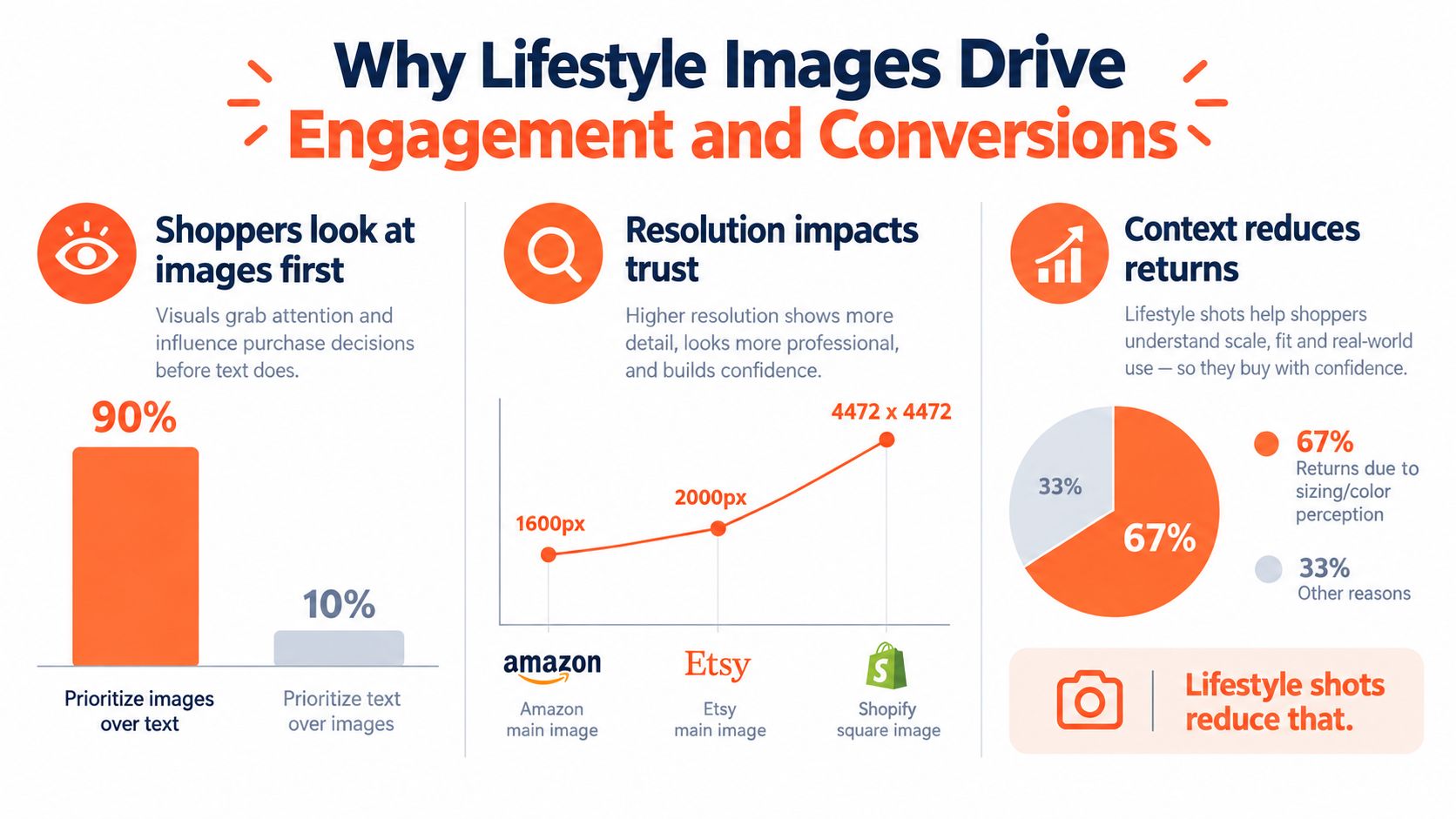
The comparison matters because shoppers often inspect images before reading the full listing. Roughly 75% of online shoppers rely on product photos when making purchase decisions, 67% say image quality is very important, and 56% say their first action on a product page is examining images before reading text. These figures are reported in PixelPanda's product image statistics guide.
Build the image set around a sequence of questions. Use the first frame for identification, a lifestyle frame for use and proportion, and detail images for finish or construction. For a fashion seller, ghost mannequin photography may show the silhouette more clearly than a busy room. For home décor, a room placement can help buyers judge scale against furniture more effectively than a flat lay.
Batch production adds another decision. Keep camera height, crop position, room, and prop palette consistent across colour variants, then change only the elements needed to show the product accurately. Use this comparison of ecommerce product photography styles to assign a clear visual task to each category. That system makes lifestyle photography part of a dependable catalog, not a one-off campaign image.
Why Lifestyle Images Drive Engagement and Conversions
A shopper cannot touch fabric, test weight, or stand beside furniture through a product page. Product images therefore carry much of the buying explanation. Clear, contextual photos reduce uncertainty before the shopper commits.
Image quality also affects expectations after delivery. Low-resolution photography makes finish, texture, and construction harder to judge, while an inaccurate scene can make the item seem different when it arrives. The benchmark collection cited earlier links image quality with conversion performance and product returns. Review the image quality and return benchmarks.
Lifestyle photography addresses uncertainty that a clean product cutout cannot. It can show how fabric falls, how a chair relates to a room, or how large a storage item looks beside familiar objects. It does not replace dimensions, materials, or colour information. It gives shoppers another visual reference for interpreting those details.
The performance case for contextual images
Doing this for a whole catalog?
MerchLoom runs background removal, upscaling and AI editing across every product photo you have — one prompt, whole batch.
Try MerchLoomPerformance comparisons support testing lifestyle imagery, but they do not guarantee the same result for every SKU. Category, price, traffic source, image accuracy, and listing quality all affect conversion and returns. Treat the evidence as a reason to test a repeatable image system, not as a promise.
A marketplace catalog needs more than one polished hero frame. Assign each image a job: identification, use context, detail, scale, mobile-friendly framing, and any required model or variant view. Ecommerce guidance also describes the move from isolated hero shots toward coordinated image sets, with Amazon recommending at least six distinct image types, including lifestyle and scale views. See Shopify's guidance on lifestyle photography for ecommerce.
Batch consistency determines whether that system remains practical. Keep the camera height, crop position, lighting direction, room, and prop palette stable across variants. Change only what shoppers need to see, such as colour, size, or use case. A consistent catalog makes comparison easier, while controlled variation prevents every SKU from looking interchangeable.
For brand teams planning a larger visual campaign, fashion campaign production Italy shows how campaign-level styling differs from routine catalog production. A seller managing hundreds of SKUs usually needs the simpler production model. Each frame should still answer a buyer question and fit the same marketplace-ready system.
Real World Examples and Use Cases That Sell
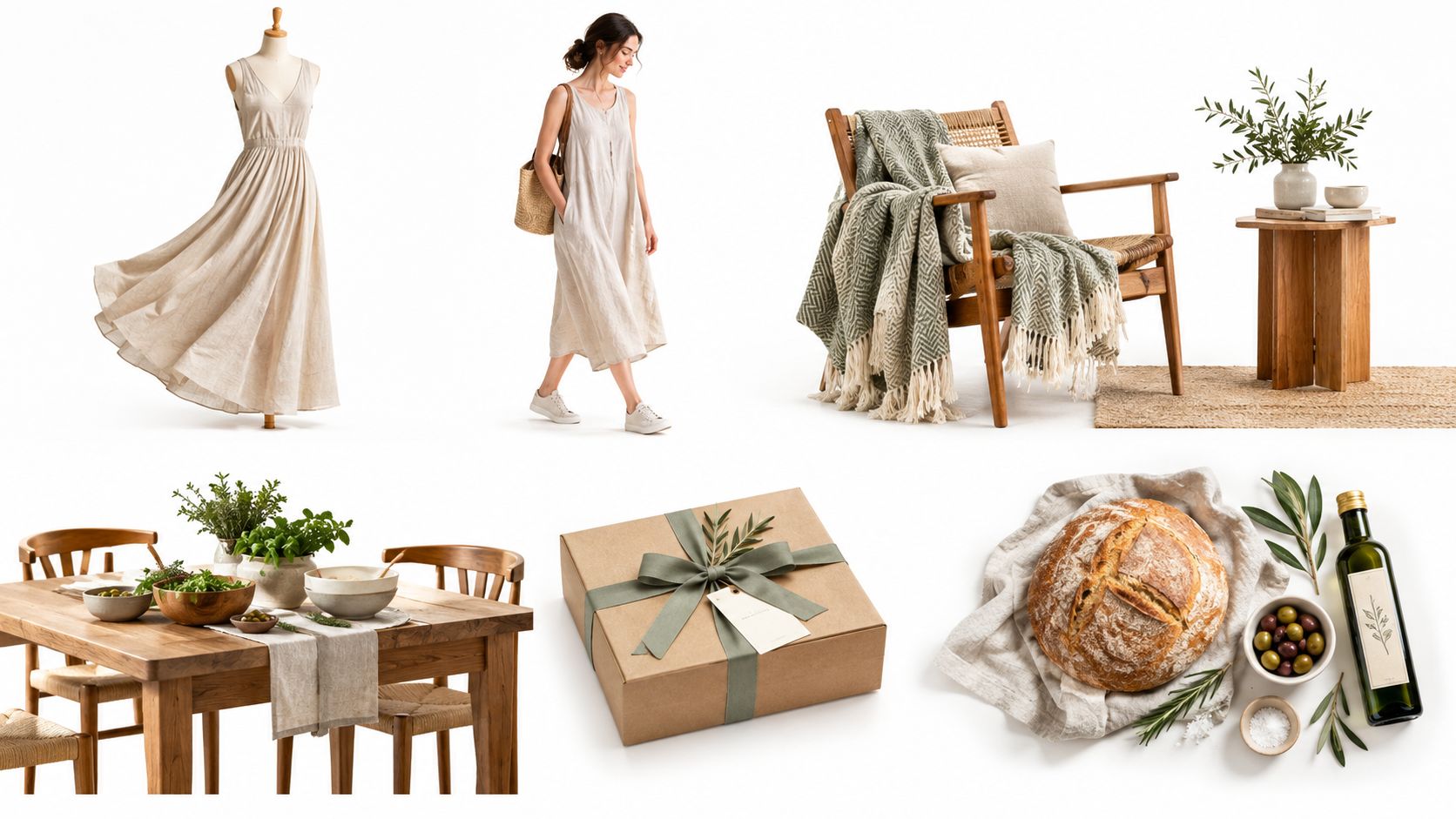
A linen dress photographed on a hanger tells shoppers what the item looks like. The same dress shown in motion helps them judge drape, length, and how the fabric behaves while worn. The scene doesn't need to be elaborate. A controlled pose, neutral background, and visible movement may answer more than a heavily decorated set.
Match the scene to the buyer's uncertainty
For accessories, show the product on a person or beside a familiar body reference. A crossbody bag should reveal strap drop and position. Earrings should appear at a useful crop that shows their relationship to the face without letting the model overpower the item.
For furniture, place the product in a room with enough surrounding structure to communicate proportion. A dining chair beside a table answers a different question from a chair isolated against white. Keep the floor, wall tone, camera height, and spacing consistent across the entire furniture family.
Home decor benefits from restrained styling. A vase on a shelf can include a plant or books, but the product must remain distinguishable at thumbnail size. Packaging and gift boxes can appear in an opening or gifting scene, while food products can use a serving context that shows portion, texture, or occasion without implying features the product doesn't have.
You can find more category examples in this collection of product photography examples. Use the examples to define scene templates, then reuse those templates across variants instead of inventing a new composition for every SKU.
The first image in a set may be a hero lifestyle frame, but the rest should answer specific questions. Add a detail view for material, a scale view for size, a back or side view where needed, and a clean product image for identification. For social selling, practical guidance on how to sell on Instagram also makes clear why a single listing image often needs to become several crop-ready creative assets.
A short visual demonstration can help you see how contextual arrangements differ from isolated product shots:
How to Shoot and Style Lifestyle Photos for a Consistent Catalog
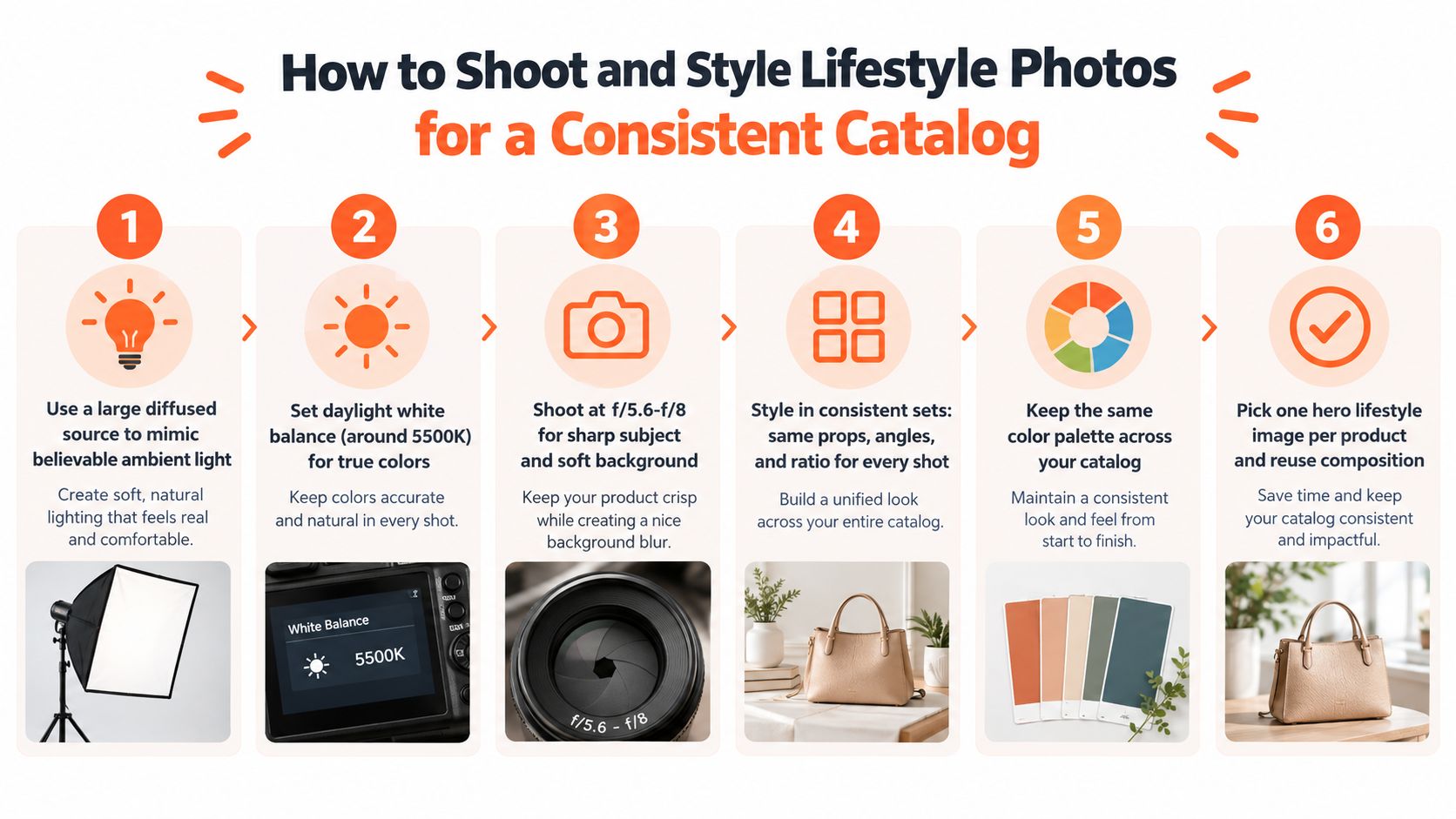
A catalogue setup should be repeatable before it is beautiful. Fix the camera position, define the light direction, record the white balance, and create a small prop library that can support several product families.
Build one controlled lighting recipe
Use a large diffused source to mimic believable ambient light. Set white balance near daylight values, around 5000–5500K, so colours stay stable across batches. A key light placed about 45 degrees off-axis and slightly above product height creates dimensional shadows without making the scene look artificially lit.
Keep the key and fill relationship near 2:1, or set fill at roughly 50–70% of key output. Too much frontal fill removes surface texture. Too little fill can hide stitching, labels, or material differences that matter to a buyer. Review the recommended lifestyle capture settings.
Typical controlled-scene settings fall around ISO 100–400, aperture f/5.6–f/11, with the shutter speed matched to the lighting method. Use a tripod where possible. Once the camera height and lens position are fixed, variant changes become a product-placement task rather than a new composition.
Create a styling sheet before the batch
Write down the room or backdrop, prop group, camera angle, product-to-frame ratio, light direction, and approved crop. Then photograph the first few products and check whether the template still works for different shapes.
- Product placement: Keep the item dominant and leave enough surrounding space for square and mobile crops.
- Prop control: Use props that explain function or scale. Remove anything that competes with the product.
- Colour control: Keep a defined palette across the product family so the catalogue doesn't shift from warm to cool or from minimal to crowded.
- Variant handling: Photograph colour and size variants in the same position, then review them together for framing and colour consistency.
For broader operational guidance, ecommerce growth operations can help connect product-media standards with the rest of the store workflow. A related guide on photography with props is useful when your scenes need context without visual clutter.
Marketplace Specs Common Mistakes and Batch Workflow Tips
A lifestyle image may be the most persuasive frame in a listing, but it isn't always the main image. Marketplace rules can require a separate clean export, and one incorrect file can create problems across a large upload.
Amazon's main product image must use a pure white background, RGB 255,255,255, and the image should be at least 1600 pixels on the longest side for usable zoom behavior. Check the Amazon product image requirements. Keep the subject isolated from props, text, borders, and watermarks in that main export.
Etsy listing photos should be at least 2000 pixels on the shortest side. Review Etsy's image size guidance. Shopify supports square images up to 4472 × 4472 pixels, so keep a high-resolution master and create platform-specific derivatives rather than repeatedly resizing the same compressed file.
Mistakes that multiply across a catalogue
- Cluttered context: Props cover labels, handles, openings, or important product edges.
- Unstable colour: Different white-balance or lighting choices make identical variants look unrelated.
- Soft exports: A small or repeatedly compressed file loses detail in thumbnails and zoom views.
- Missing scale cues: The scene looks attractive but gives no useful reference for size.
- Wrong product pairing: A file is attached to the wrong SKU or colour variant during batch processing.
- Unreviewed AI scenes: Generated environments add details, proportions, or materials that the actual product doesn't have.
AI-generated lifestyle images can help sellers create contextual scenes at catalogue scale, but trust depends on category and disclosure. A 2025 study of 199 U.S. adults found that most tested categories weren't penalized when buyers saw AI-generated product images, while apparel was an exception. Correct disclosure produced a marginal 0.499-point drop in purchase intent for apparel in that study. Read the study on AI-generated product images and purchase intent.
Review AI output manually, especially for apparel fit, product proportions, logos, closures, hardware, and colour. Use generated scenes to extend an accurate source image, not to change what the item is.
Run a mid-batch check after the first group, another check before export, and a final check after upload. MerchLoom can run chained AI pipelines across a collection instead of one image at a time. You can try the first images with no account, and its pricing is pay-per-image with credits that never expire. Human review should still happen before publishing, as explained in this guide to ecommerce image editing.
MerchLoom lets you import product images, create lifestyle scenes, reframe files for marketplace placements, and process a full collection through repeatable AI pipelines instead of editing each image separately. Try your first images with no account, use pay-per-image credits that never expire, review the outputs, and visit MerchLoom when you're ready to prepare the next catalogue batch.
Stop editing product photos one at a time
Upload your catalog or connect your store. Describe the result once. MerchLoom does the rest.
Try MerchLoom