
What Is Product Photography for E-commerce Sellers
What is product photography for e-commerce sellers? Learn the styles, settings, platform image sizes, and AI workflows that turn catalogs into sales.
You've got a pile of SKU photos on the desk, a relaunch deadline on the calendar, and half the catalog still looks like it was shot in different rooms by different people. That's the starting point for what is product photography in e-commerce. It's not a single nice image, it's the repeatable system that turns product shots into listings buyers can trust and marketplaces will accept.
Start with the output, not the camera. If a photo can't survive thumbnail view, zoom view, and batch resizing across a whole catalog, it's not doing the job. A useful reference for handling product photos at scale is to think in terms of repeatable processing, not one-off artistry.
Product Photography Defined for Catalog Scale
A relaunch is waiting, the SKU sheet is growing, and half the catalog still looks inconsistent across rooms, lighting, and crop ratios. That is where product photography starts in ecommerce. It is the catalog-wide process of capturing and processing items so shoppers, marketplaces, and internal teams all see the same product clearly.
At scale, each image has to earn attention in search results, hold up in a listing, and reduce returns by showing color, texture, shape, and proportion without confusion. It also has to fit the platform's size template, stay consistent with the rest of the catalog, and survive compression without going muddy. A single strong frame can help, but the primary job is repetition across the full assortment.
Consistency is the test that matters. If frame fill, white balance, and shadow handling drift when the same setup runs across hundreds of SKUs, the catalog starts to feel patched together. Hero-style creativity can still work for select listings, but the bulk of the catalog needs a repeatable setup that a VA or editing pipeline can reproduce without special judgment.
Clean product images also help shoppers decide faster, since buyers rely on visuals before they read much text. Industry data compiled for 2026 links high-resolution product photos and 360-degree visuals with stronger conversion (Grabon).
Practical rule: if the image set cannot be reproduced by a VA or an editing pipeline, it will not hold together across a marketplace catalog.
The useful way to run this work is as a decision-support system. File structure, crop logic, export settings, and batch editing rules matter as much as the lens choice. The same mindset applies to product photos, where the goal is a catalog process that keeps output consistent from one SKU run to the next.
Styles and Use Cases That Map to Your Catalog
A reseller with scarves, mugs, and lamp hardware runs three different production problems. Scarves need drape and color accuracy, mugs need clean shape and print visibility, and lamp hardware needs clear detail without visual clutter. The right style depends on which problem the SKU creates, how much margin the item can support, and how much setup time the listing deserves.
Match the style to the SKU, not to personal taste
Studio-on-white works best for marketplace main images, replacement parts, and any high-volume catalog row that has to stay neutral and standardized. It keeps the frame clean and the workflow simple. Lifestyle helps when context makes the item easier to understand, especially for scale, use, or gifting, but it takes more staging and is harder to repeat across a large assortment. 360-degree spins make sense when fit, finish, or scale questions come up often and the added production work is justified.
Flat-lay fits accessories, kits, and bundled items because it shows the contents in one frame without elaborate set dressing. Ghost mannequin is the practical route for apparel when you need shape and drape without hiring a model for every size run. Catalog teams usually get better results by assigning styles by category than by trying to make every product behave the same way.
| Style | Best For | Cost per Shot | Catalog Fit |
|---|---|---|---|
| Studio-on-white | Marketplace main images, parts, high-volume SKUs | Lowest | Strong for large batches |
| Lifestyle | Apparel, home goods, giftable items | Higher | Good, but harder to standardize |
| 360-degree spin | Mid to higher-priced items with fit or finish concerns | Higher | Best when the extra detail pays off |
| Flat-lay | Accessories, bundles, kits | Low to moderate | Strong for component-heavy listings |
| Ghost mannequin | Clothing and size runs | Moderate | Strong for apparel catalogs |
A simple rule helps in day-to-day production. If the buyer needs context, use lifestyle. If the buyer needs clarity, use studio-on-white. If the buyer needs a sense of construction, use ghost mannequin or a spin. If the SKU is a bundle or kit, flat-lay is usually the fastest way to show what is included.
For a wider comparison of ecommerce formats, product photoshoot styles for ecommerce is a useful reference when you are assigning visual treatments across a full store.
Technical Essentials for Repeatable Listings
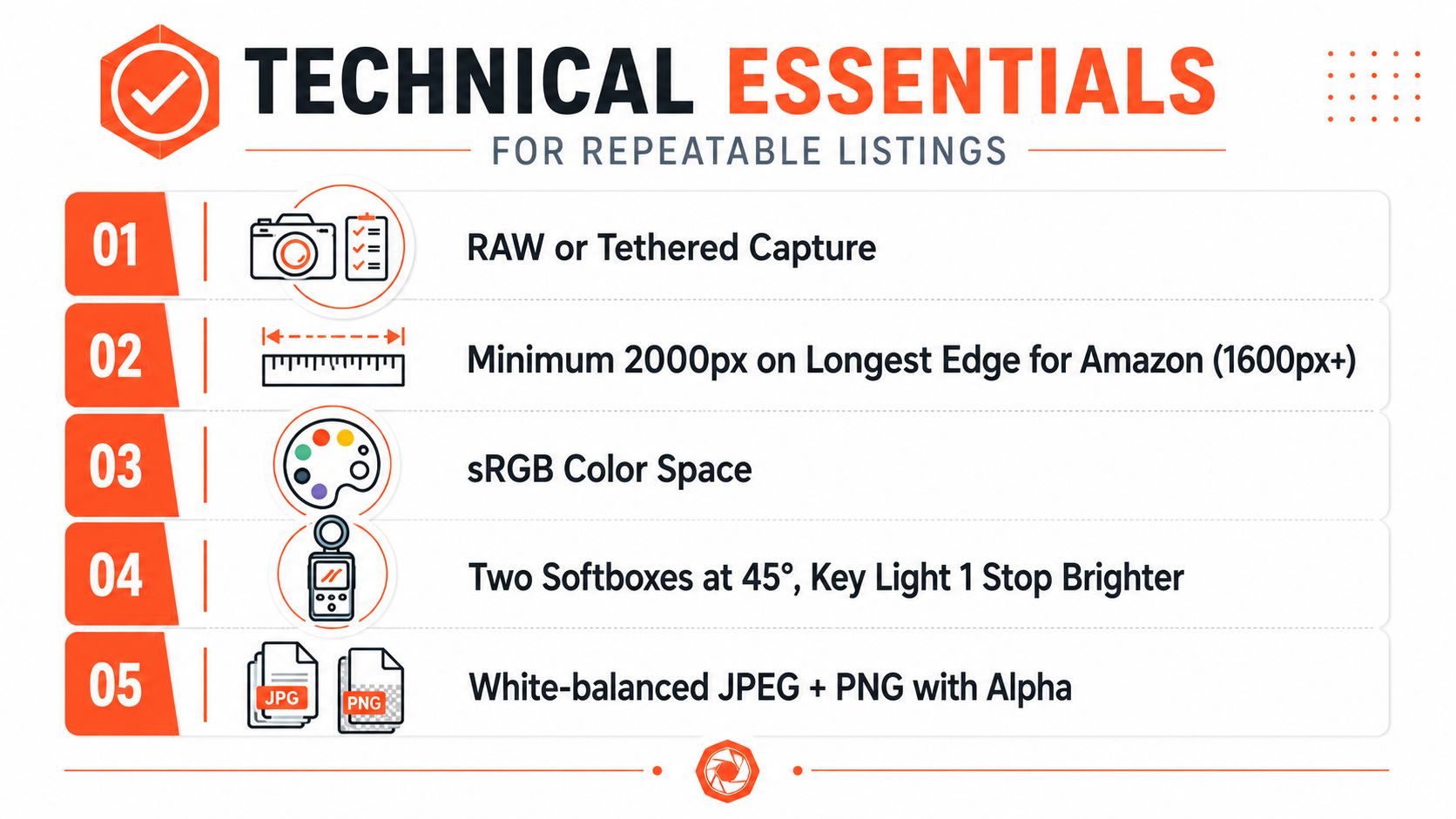
Repeatability starts with lighting, not editing. For batch work, set two softboxes at 45-degree angles, keep the key light slightly brighter than the fill, and use a diffuser overhead when glare is a problem. Lock color temperature at 5500K, and meter exposure from an 18% gray card so the same setup behaves the same way across an entire run.
Build a camera setup that survives scale
Put the camera on a tripod and keep the product centered. Frame fill should stay close to 85% so every SKU feels consistent in the grid, and position the lens at the product's vertical center to avoid distortion. A DSLR or mirrorless body in aperture priority or manual works well for this kind of work, especially with ISO 100, f/8, and a 1/125 shutter speed under continuous LED lighting.
Keep the camera still and move the product less. It sounds basic, but across 300 listings that's what keeps your crop logic and shadow direction from drifting.
Handle files like a production pipeline
Shoot RAW when you need editing latitude. If storage is tight, use the highest-quality JPEG you can justify, but don't let a platform recompress a huge original into something softer and less predictable. Export in sRGB, embed the correct color profile, and resize before upload. Backgrounds for marketplace main images should stay pure white, #FFFFFF, while transparent PNGs belong in compositing, ad variants, and layered work.
A useful way to keep the catalog clean is to save two files per SKU, a 2000px master and a platform-specific variant. That way you're never resizing from a thumbnail and never solving the same crop problem twice. The lighting side of this workflow is covered in more depth in this internal guide on product photography lighting, which helps when you're setting a room for repeatable batches.
Marketplace Image Sizes and Platform Rules
A catalog team can lose hours by exporting the same shoot three ways after the fact. A better setup is one master spec that feeds every channel, then platform variants generated from that master. That keeps crops, backgrounds, and filename logic aligned as the catalog grows into new marketplaces.
Amazon is the hardest on the main image. The main image needs a pure white background, RGB 255,255,255, and images with 1,000+ pixels on the longest side can enable zoom. Files below 500 pixels on the longest side cannot be uploaded. Amazon also allows the longest side up to 10,000 pixels (Amazon product image requirements).
Doing this for a whole catalog?
MerchLoom runs background removal, upscaling and AI editing across every product photo you have — one prompt, whole batch.
Try MerchLoomEtsy and Shopify give you more room, but crop decisions still affect how the grid reads. Etsy listing photos should be uploaded at 2000 pixels on the shortest side, and Etsy supports square 1:1 or horizontal 4:3 ratios in JPG or PNG (Etsy upload guidance for listing photos). Shopify allows product images up to 4472 × 4472 pixels, and square 1:1 files are common for keeping a catalog visually consistent, with 2048 × 2048 pixels often used as a practical upload size (Shopify product image guidance).
| Platform | Min dimensions | Max file size | Format | Background |
|---|---|---|---|---|
| Amazon | Longest side 500px minimum, 1000px+ enables zoom | Not specified here | Not specified here | Pure white RGB 255,255,255 for main image |
| Etsy | 2000px on the shortest side | Not specified here | JPG or PNG | No single rule stated here |
| Shopify | Up to 4472 × 4472 | Not specified here | Not specified here | Theme dependent |
For batch work, the cleanest setup is one master export spec, usually square 2000 × 2000, sRGB, with JPEG quality tuned for predictable compression and masked backgrounds where needed. From that master, generate channel-specific crops instead of resizing from a thumbnail or hand-fixing each listing later. That keeps the catalog stable when a marketplace rule changes or a SKU set needs a bulk update. A useful internal reference for the Amazon side is Amazon listing image size.
Batch Processing and Quality Control Workflow
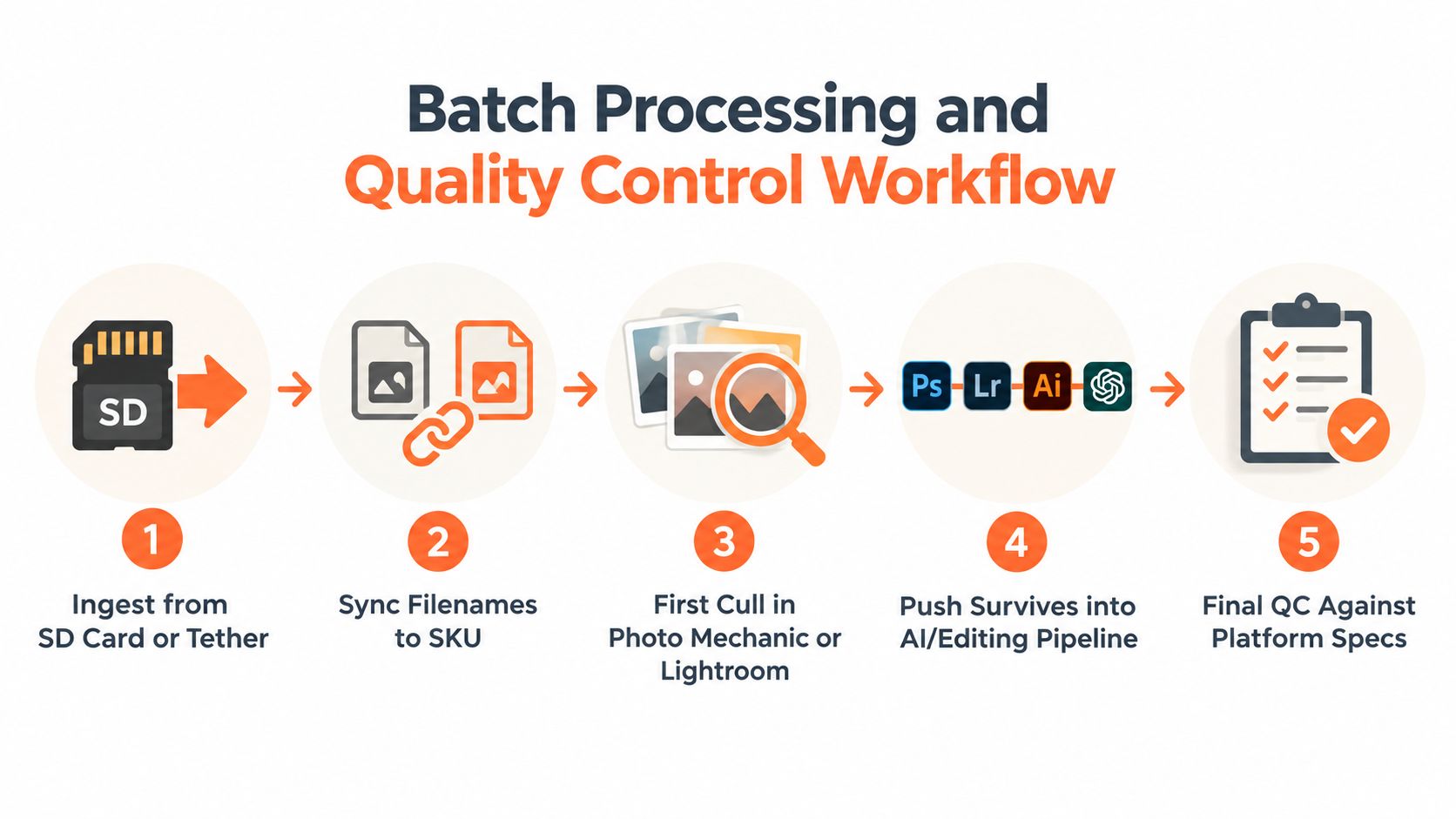
A catalog holds together when every file follows the same path. Import from SD card or tether, match filenames to SKU, do a first cull in Photo Mechanic or Lightroom, then send the keepers into one editing preset. If a file cannot be traced from capture to export without guesswork, the workflow is already costing you time.
Build checkpoints before files reach the storefront
Use a folder structure that holds up under pressure. RAW goes first, then selected, then edited, then channel exports. That order keeps source files separate from finished assets when a store needs a fast fix on a live listing.
Quality control needs clear checks, not vibes. Verify white point against #FFFFFF, check edges for clipping, compare color casts with a known reference card, and confirm SKU-to-filename parity before export. Reject any frame that is soft on the focal SKU feature. Reject exposures that drift too far from the calibrated reference.
A listing that looks fine at first glance can still fail at scale if the filename, crop, and SKU no longer agree.
The same discipline applies whether one operator or a VA handles the batch. Once the naming convention is locked, the rest of the set becomes straightforward to audit. A practical batch processing workflow helps keep that audit consistent across the catalog, so each export follows the same rules instead of depending on memory.
A second pass is still worth the time. It catches the small misses that hurt consistency, like a shadow trimmed by the frame or one product rotated slightly differently from the rest of the set. For sellers who prefer a visual walkthrough, the embedded process below shows how a batch run moves from ingestion to final QA.
AI Pipelines That Run Across a Full Catalog
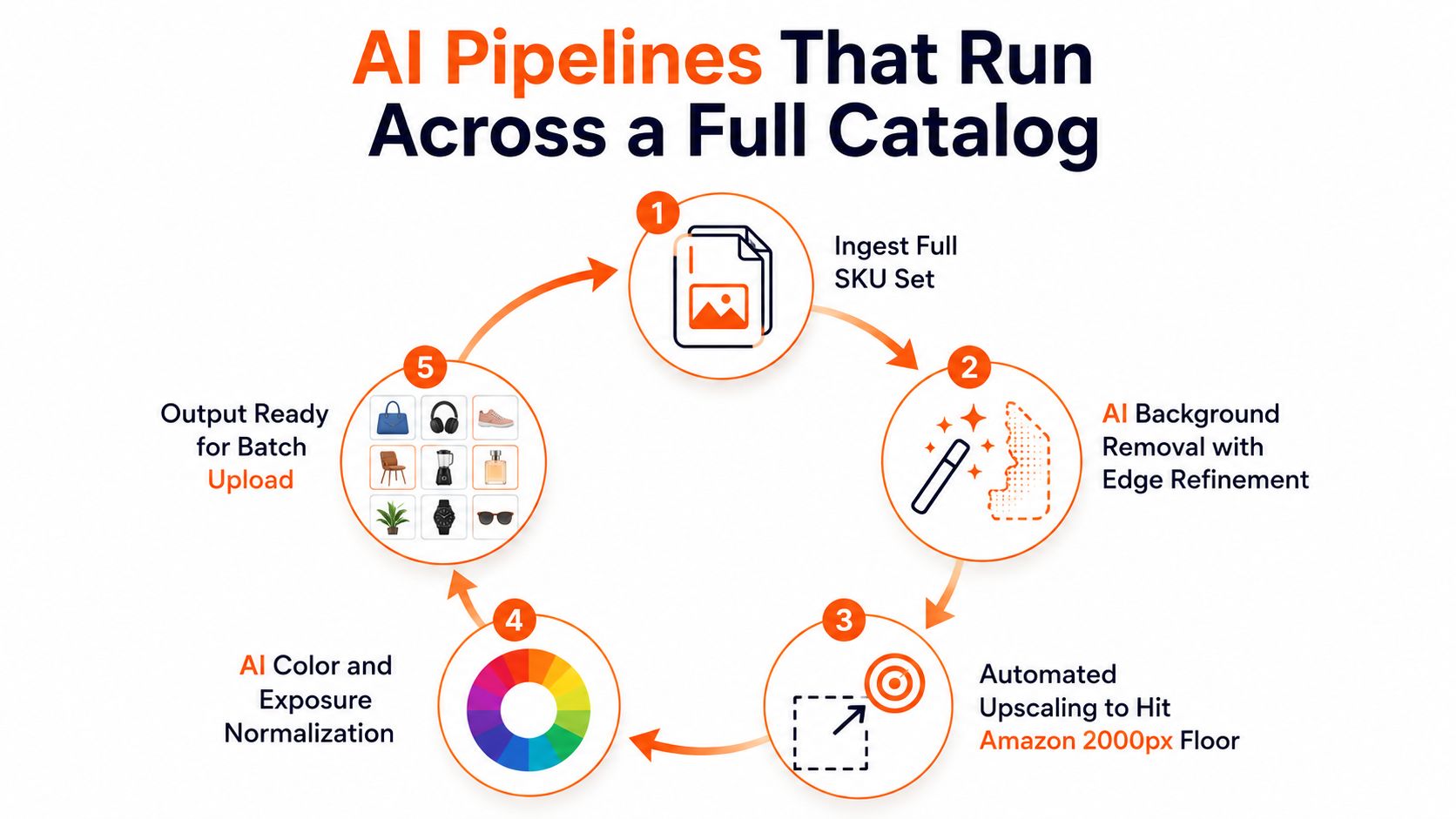
The most useful AI tools in product photography aren't the ones that make a single image look clever. They're the ones that repeat the same fix across an entire SKU set without breaking consistency. Background removal, edge refinement, upscaling, reframing, and shadow generation all become useful when they're chained in the right order.
Start with the mask. Remove the background first so you're not wasting compute on pixels that will disappear anyway. Then upscale if the capture needs to reach a platform floor, then reframe for the destination aspect ratio, then export to channel presets. That sequencing helps reduce compounding artifacts, especially when a catalog has mixed source quality.
Run the catalog once, not image by image
A workflow platform can process an entire collection in one pass, which matters more than people think. MerchLoom is built around that batch model, so a seller can run background removal, resizing, and platform-specific export rules across a full set instead of editing each image separately. It's also pay-per-image, with credits that never expire, and the first images can be tried with no account.
That matters operationally when marketplace rules change. If Amazon, Etsy, or Shopify needs a different crop or size treatment later, you can rerun the pipeline on the same source set instead of going back to the studio. The point isn't to avoid review. The point is to make review happen after the machine has done the repetitive work.
AI is most useful when it removes the work you'd repeat the same way 400 times, not when it replaces judgment.
This is also where cost control shows up. If background removal happens before upscaling, you avoid processing extra pixels that won't survive the final export. MerchLoom's batch-first workflow is designed for that order of operations, and the internal guide on AI batch image editing explains the sequencing in more detail for catalog work.
Checklist and One Way to Run It at Scale
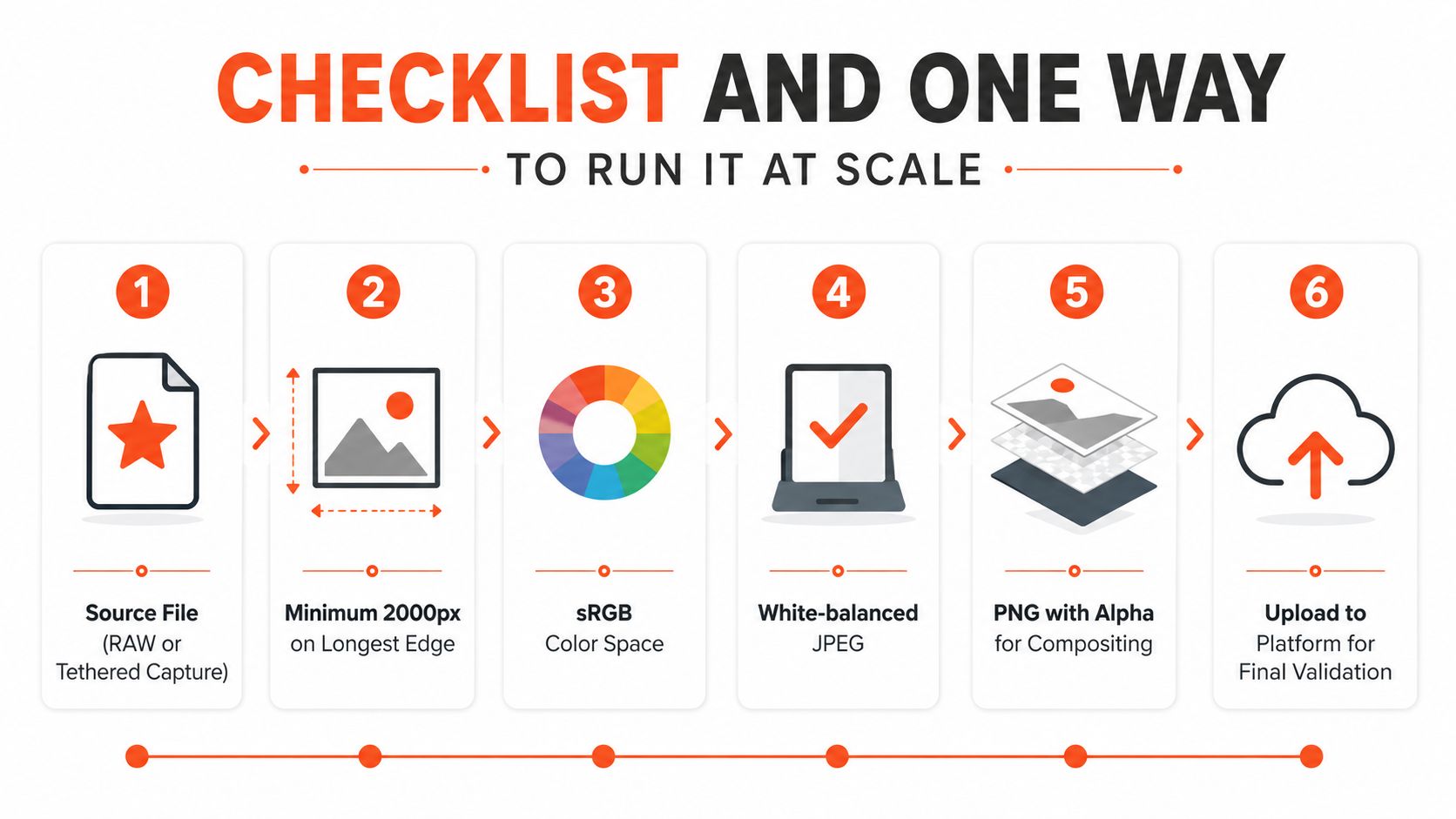
Before any image goes live, run the same six checks across the catalog:
- Source file confirmed. Start from RAW or a tethered capture so the master file stays clean.
- Resolution checked. Keep the master at 2000px on the long edge or higher where the channel asks for it.
- Color space verified. Export in sRGB so listings render the same way across platforms.
- Background validated. Use a white-balanced JPEG for the main marketplace image.
- Layered file saved. Keep a PNG with alpha for compositing and ad work.
- Filename matched. Tie each export to the correct SKU before upload.
In batch work, the checklist does the quality gate, and the pipeline carries the repeatable steps. Once the rules are fixed, one operator can run the same sequence for every SKU without treating each listing as a custom job. That matters in large catalogs, where hand-tuning every image burns time and creates inconsistency.
MerchLoom fits that kind of operation because it runs batch workflows across a full collection, applies background removal, resizing, and platform-specific export rules in one queue pass, and lets you reuse processed outputs without restarting from scratch. If you need a repeatable way to handle product photography across a large store, visit MerchLoom and test the workflow on a few images first, then scale the same process across the rest of the catalog.
Stop editing product photos one at a time
Upload your catalog or connect your store. Describe the result once. MerchLoom does the rest.
Try MerchLoom