
Virtual Try on for Products: Boost Sales & Cut Returns
Boost sales & cut returns with virtual try on for products. Learn tech, benefits, & batch implementation for e-commerce in 2026.
You can usually tell when a catalogue has outgrown manual merchandising. One product line gets polished lifestyle images. Another still has white-background shots from last season. A third has supplier photos with inconsistent lighting, odd crops, and filenames no one understands. Then returns start surfacing for reasons that all sound slightly different but point to the same problem: customers couldn't picture the product clearly enough before buying.
That's where virtual try on for products becomes useful. Not as a novelty widget, and not only for dresses or lipstick, but as an operational tool for reducing uncertainty across a large catalogue. The practical question isn't “Can we generate one impressive demo?” It's “Can we produce consistent, believable try-on assets for hundreds of SKUs, across multiple sales channels, without creating a production bottleneck?”
That's the version of virtual try-on worth caring about.
The E-commerce Challenge Virtual Try-On Actually Solves
The core issue in online retail is simple. Shoppers hesitate when they can't judge fit, scale, finish, placement, or context. A static packshot answers only part of that question. It shows the product. It doesn't show the product on the person, in the room, on the shelf, on the vehicle, or beside the other objects buyers already own.
That uncertainty hurts twice. It lowers conversion before purchase, and it increases disappointment after delivery. Both problems show up most clearly in categories where appearance, proportion, or compatibility matter.
A lot of advice about VTO focuses on the front-end demo. That's too narrow. The true value is operational. If you can turn a catalogue into context-rich visuals in a repeatable way, you reduce the amount of guessing buyers have to do.
Practical rule: If a customer has to mentally simulate the product, your images are doing too little work.
For sellers managing many listings, the problem gets worse with scale. You're not trying to improve one hero SKU. You're trying to keep accessory photos, room scenes, packaging previews, and marketplace variants aligned across Shopify, Amazon, Etsy, and paid social. That means asset consistency matters almost as much as realism.
A useful way to think about virtual try-on is as a system for closing the uncertainty gap. In some categories that means showing a watch on a wrist. In others it means placing a dining chair in a compact condo dining area, or rendering a label design on a bottle shape before print. If you want a customer-facing overview of how these experiences can boost conversions with virtual try-on, that guide is a helpful starting point. The operational layer sits underneath it.
Catalogue-scale VTO works when it answers three practical questions clearly:
- What kind of product is this
- What context should it be shown in
- What output format does each channel require
If your team can't answer those questions in batches, the project usually stays stuck at the demo stage.
Understanding Virtual Try-On Technology Beyond the Dressing Room
The phrase ‘virtual try-on' frequently brings to mind clothing on a model. That's only one branch of the field. The underlying technologies can support many product types if you match the method to the catalogue problem.
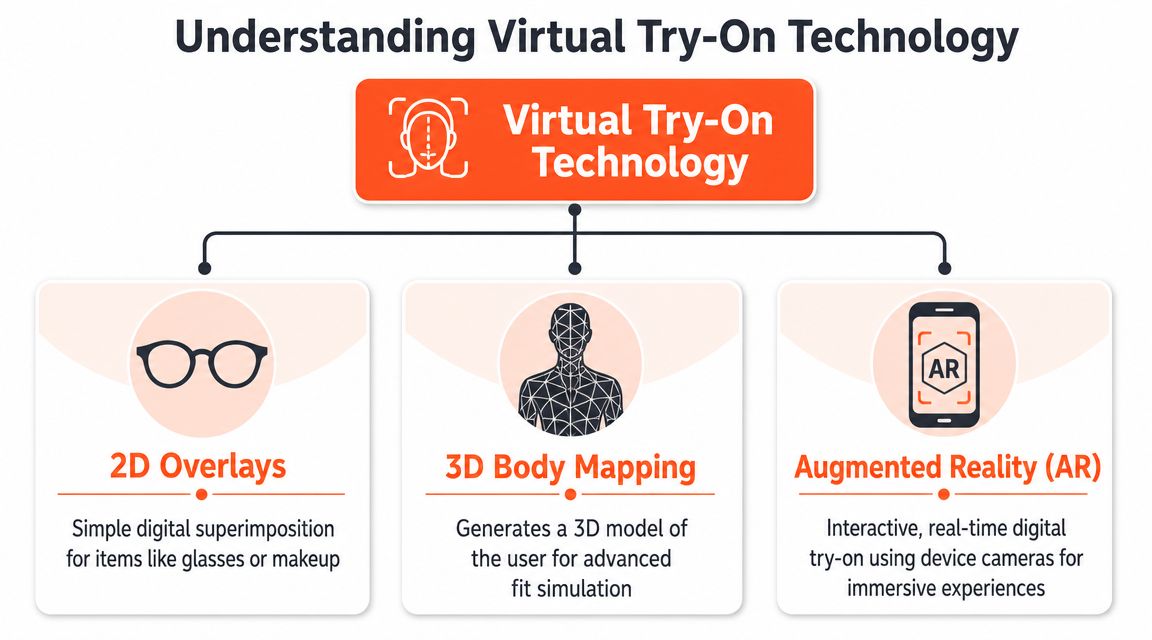
The reason this matters now is that the category is no longer experimental. The global virtual try-on market was estimated at USD 9.17 billion in 2023 and is projected to reach USD 46.42 billion by 2030, with a 26.4% CAGR, according to Grand View Research's virtual try-on market report. For operators, that signals infrastructure maturity. The tools are moving from niche campaign use into regular commerce workflows.
2D overlay tools
The lightest form of VTO is the overlay. This involves placing a precise digital sticker on a known area. Glasses on a face, lipstick on lips, earrings near the ear, or a decal on a vehicle door all fit this model.
It works well when:
- The product shape is stable: sunglasses, caps, labels, logos.
- The placement zone is predictable: wrist, face, wall, bottle front.
- The goal is speed: quick previews across many SKUs.
It works poorly when drape, volume, or material behaviour matters. A scarf, duvet cover, or loose jacket usually needs more than an overlay because the folds and edges affect believability.
3D mapping and spatial fitting
A more advanced path uses body mapping, object geometry, or room understanding. Instead of pinning an image on top of another image, the system estimates structure. That's why this method suits furniture, home décor, footwear, and products where angle and scale matter.
A simple way to explain it to non-technical teams is this:
| Method | Best mental model | Good for | Weak point |
|---|---|---|---|
| 2D overlay | Sticker | Glasses, makeup, labels | Limited realism |
| 3D mapping | Digital sculpture | Furniture, footwear, objects in space | Heavier asset prep |
| Generative fusion | Smart visual synthesis | Mixed catalogues, contextual scenes | Needs strong controls |
If your team still mixes up AR, VR, and image-based try-on, this primer on understanding AR and VR distinctions helps separate the terms. That distinction matters because many sellers don't need a full immersive environment. They need reliable product visualisation that works inside ordinary listing workflows.
Generative AI fusion
Virtual try-on for products has broadened fastest through the application of generative systems. These systems can blend a product image into a target context while preserving shadows, scene lighting, masking, and local detail. This functionality makes it useful for much more than clothes.
The practical benefit is flexibility. You can start with flat-lays, cut-outs, ghost-mannequin photos, or standard product shots and generate contextual outputs without building a full 3D pipeline for every SKU. That's especially useful for mixed catalogues.
Teams working specifically on apparel can look at virtual try-on clothing workflows for category-specific considerations, but the broader lesson applies elsewhere too. The technology choice should follow the catalogue, not the other way around.
The best VTO implementation isn't the most advanced one. It's the one your content team can repeat accurately across a live catalogue.
The Business Case for VTO Across Your Entire Catalogue
Most image initiatives get approved for the wrong reason. They're pitched as branding upgrades. In practice, VTO earns its place when it improves unit economics.
The strongest public evidence in the source set points in one direction. Brands using virtual try-on saw a 2.5x increase in sales conversion, and fashion and luxury brands offering VTO averaged 64% fewer returns, as reported by Retail Dive's coverage of Perfect Corp findings. That combination matters because conversion and returns usually pull on the same margin pool.
Why operators care more about returns than novelty
Every return creates work. Customer support handles the request. Warehouse staff receive and inspect the item. Merchandising may need to relist it. Finance reconciles the refund. If the item comes back damaged, opened, or seasonally late, the margin loss gets worse.
VTO helps when it removes avoidable uncertainty before checkout. In apparel that's fit and appearance. In furniture it's scale and style match. In beauty it's shade confidence. In packaging it's how branding will present on the finished surface.
The useful framing is not “cooler shopping experience.” It's “fewer bad purchases.”
The commercial logic across categories
A catalogue-wide VTO strategy affects more than one metric:
- Conversion quality: shoppers who can visualise the product better are more likely to commit.
- Return prevention: clearer expectations reduce mismatch between listing and reality.
- Creative reuse: one source photo can feed listing images, ads, social assets, and marketplace variants.
- Operational consistency: teams stop producing custom mockups from scratch for every campaign.
For many sellers, the business case improves further when VTO becomes part of a repeatable image pipeline rather than a one-off creative service. That's why image automation matters. A useful reference point is e-commerce image automation, especially if your bottleneck isn't generation quality but throughput and consistency.
The mistake I see most often is limiting VTO to a narrow product group because that's where the first demo happened. The better move is to identify every category where context changes buying confidence, then build a production model around those categories first.
Generating Try-On Experiences for Every Product Type
The fastest way to miss the opportunity is to define VTO as “clothes on people.” In real operations, the richer use case is contextual placement across a mixed catalogue.
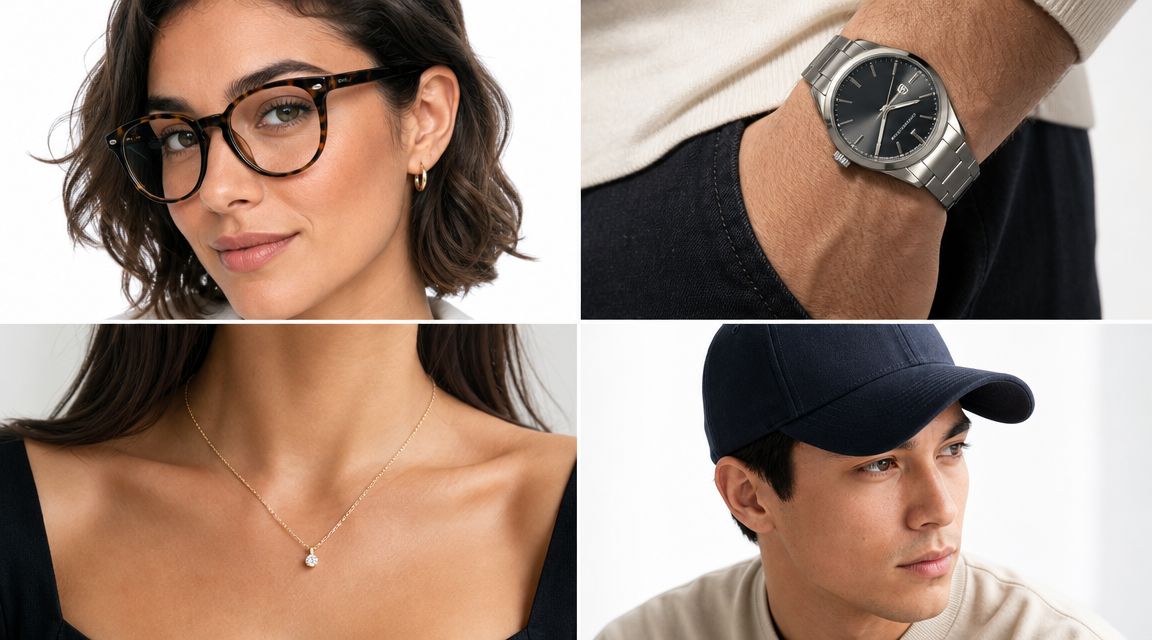
Amazon's newer direction is a good signal of where the category is heading. Its “virtual try-all” can insert any product into any personal setting with precise region masking, lighting, and shadow integration, as described by Amazon Science's explanation of virtual try-all. That's broader than on-model apparel. It points toward product visualisation as a general commerce layer.
Accessories
Accessories are usually the easiest expansion path after apparel. Watches, rings, necklaces, hats, sunglasses, scarves, and bags all benefit from body-adjacent context.
What works:
- Wrist, face, neck, and shoulder placements with controlled angles.
- Consistent source poses across a template set.
- Tight rules for scale, skin tone handling, and reflections.
What doesn't:
- Random user-generated source images with no pose constraints.
- Mixed focal lengths across the same output series.
- Generating one-off hero images without a repeatable pose library.
A watch catalogue, for example, needs more than a nice wrist render. It needs the same family of outputs for product pages, collection grids, marketplace listings, and campaign creative. If each asset is generated differently, the catalogue starts to look unreliable.
Furniture and home décor
Furniture and décor are where VTO stops looking like fashion tech and starts acting like a serious merchandising tool. Sofas, dining chairs, lamps, rugs, wall art, mirrors, shelving, and side tables all sell better when scale and room fit become visible.
A few practical rules matter here:
- Rooms must match the price point. Premium furniture dropped into a generic room weakens trust.
- Shadows must agree with the room lighting. Buyers notice this quickly.
- Proportion beats decoration. A plain but believable room scene outperforms a stylish but impossible one.
Home décor benefits from templated room sets. Art can be shown over fireplaces, above sofas, or in hallways. Lamps can be placed on bedside tables and consoles. Mirrors can be rendered in entryways or bathrooms. The key is keeping perspective believable.
Packaging and branded goods
Packaging teams often need try-on style visuals before print. Labels on bottles, logos on cartons, seasonal sleeves on boxes, and pouch variants for flavour lines all fit the model.
This is less about “trying on” in the consumer sense and more about surface simulation. Yet operationally it's the same challenge: place a designed element on a real product form, in batches, with consistent output.
Good results depend on surface-aware fusion. A flat label has to wrap correctly around a cylindrical bottle. Gloss, shadows, and edge alignment matter. So does output variation. You may need a white-background marketplace image, a Shopify square, and a campaign hero derived from the same packaging source.
Food products
Doing this for a whole catalog?
MerchLoom runs background removal, upscaling and AI editing across every product photo you have — one prompt, whole batch. Try 2 batches free, no signup.
Try it freeFood sellers often ignore VTO because the item isn't worn. That misses the point. Shoppers still need context. Sauces on a plated dish, snacks in a lunch setting, coffee on a breakfast counter, or a frozen entrée shown served can all reduce abstraction.
The trap is over-stylisation. Food visuals fail when they become obviously synthetic or when the prepared result no longer resembles the packaged product.
Keep the promise tight. If the pack shows one thing and the generated scene implies something grander, customer disappointment will catch up later.
Vehicles and vehicle graphics
Vehicle-related VTO includes more than selling the vehicle itself. It's valuable for wraps, decals, roof accessories, tyre-and-wheel combinations, and fleet branding previews.
A van graphics seller, for instance, can show the same logo treatment across multiple vehicle shapes and camera angles. A wheel seller can present fitment previews on standard side and three-quarter views. The benefit is immediate because buyers need to visualise compatibility and appearance together.
For teams creating motion assets around this kind of content, a tool for AI video clothing also hints at a broader production trend: once your product visuals are structured well enough, extending from static try-on into motion becomes much easier.
Real estate staging and home presentation
Virtual staging sits adjacent to VTO, but for operators it belongs in the same family. You're placing products into a buyer-relevant context to reduce uncertainty. Sofas, beds, tables, lighting, rugs, and décor can all be used to stage empty interiors or refresh outdated listing photos.
This is especially useful when the seller isn't only moving products but also using products to sell a space. The visual logic is the same. The room has to look lived in enough to be believable, but not so busy that the asset becomes unusable for broader listing needs.
Industrial and B2B products
Industrial products rarely get included in VTO discussions, which is a mistake. Safety equipment on workers, shelving systems in warehouses, machine parts fitted to assemblies, dispensers mounted in workspaces, and packaging lines with labelled components all benefit from contextual visualisation.
This category has a stricter tolerance for visual error. Buyers are less forgiving of impossible fit, bad scale, or decorative scenes that obscure the actual part. The best outputs are usually cleaner, more functional, and more annotation-friendly than consumer lifestyle imagery.
For broader product scene generation across these mixed categories, AI product visualization is the more useful framing than fashion-only try-on.
From Raw Product Photos to Try-On Ready Assets
Most VTO projects fail long before generation quality becomes the issue. They fail in asset preparation. The catalogue contains supplier JPGs, phone photos, flat-lays, old ghost-mannequin shots, inconsistent crops, and naming conventions that don't tell anyone what the file contains.
That's why the actual workflow starts before any try-on step.
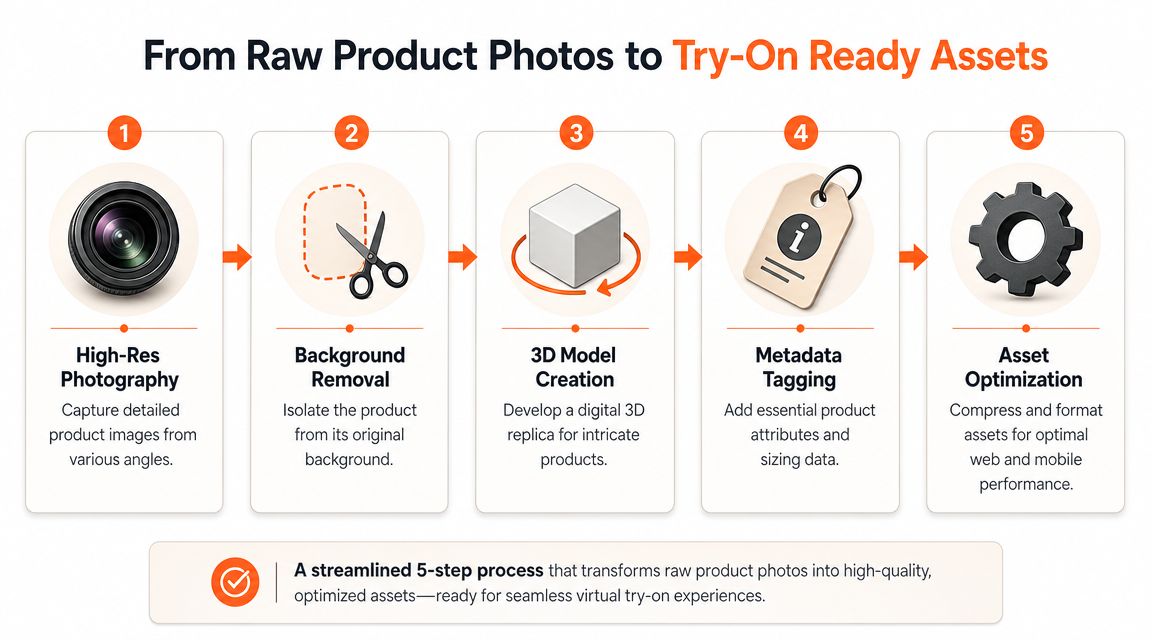
A key operational challenge is handling catalogue-scale VTO with mixed image quality. Recent coverage notes that modern systems can accept flat-lay, hanger, or ghost-mannequin photos and still produce consistent outputs, but scaling that across thousands of SKUs remains difficult without an efficient pipeline, as outlined in this analysis of virtual try-on tools and catalogue workflow issues.
What the source images need
Different categories need different source standards.
For accessories and packaging, one clean frontal or slightly angled product image may be enough. For furniture and larger objects, angle consistency matters more because perspective mismatch is obvious. For body-adjacent products, source imagery benefits from clean edges, clear silhouettes, and minimal visual clutter around the product.
You don't need perfection. You do need triage.
A practical intake process usually separates assets into buckets such as:
- Ready now: clean enough for direct try-on generation.
- Needs prep: background cleanup, crop fixes, colour correction.
- Needs re-shoot: missing angles, poor focus, unusable lighting.
The batch workflow that actually scales
The most effective production model is chained and rule-based, not manual and one image at a time. In practice, the flow looks something like this:
Import the catalogue Pull images from cloud folders, marketplaces, store platforms, or storage buckets.
Recognise what each image contains Classify the file as a chair, bottle, bracelet, wall art piece, food pouch, machine component, or room scene.
Route into try-on buckets Accessories go to body-placement workflows. Furniture goes to room-placement workflows. Packaging goes to surface-mockup workflows.
Generate structured instructions Instead of vague prompts, use repeatable instructions tied to category, angle, scene type, crop style, and output ratio.
Perform the fusion or edit Apply the appropriate compositing, placement, or generative scene step.
Upscale and export Produce final assets sized for each destination, whether that's Amazon white background, Shopify square, Etsy listing dimensions, or ad creative variants.
Bad VTO usually starts with bad routing. A bracelet pushed through a furniture scene workflow won't fail gracefully. It will just waste time.
If your team is dealing with hundreds of files at a time, AI batch image editing is the operating model to study. The point isn't just automation. It's controlled automation, where every category follows the right path.
Choosing Your Virtual Try-On Implementation Path
There isn't one correct way to implement VTO. The right choice depends on catalogue complexity, technical resources, and how much control your team needs over the image pipeline.
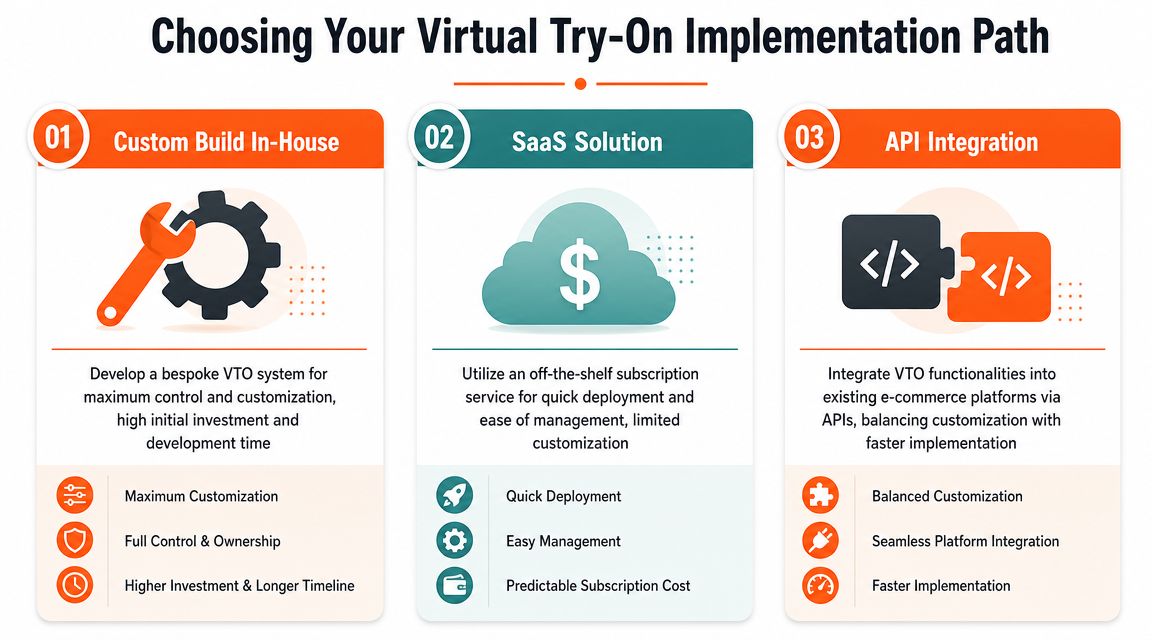
Three common paths
| Path | Best for | Strength | Trade-off |
|---|---|---|---|
| Custom build in-house | Large teams with engineering depth | Full control over workflow and output logic | Slow to build and maintain |
| SaaS product | Teams needing fast rollout | Easy deployment and simpler support | Less flexibility for odd catalogue cases |
| API integration | Teams with some technical resources | Balance of speed and control | Still requires orchestration work |
When custom makes sense
A custom build is justified when VTO is central to your product experience, not just your merchandising. If your catalogue has unusual geometry, proprietary fit logic, or complex user-state data, owning the stack may be worth it.
But custom systems create hidden operational work. Someone has to maintain ingestion logic, prompt rules, QA tooling, output templates, retries, storage, and cost controls. That overhead is easy to underestimate at the start.
When SaaS works well
SaaS VTO products are strong when the use case is narrow and well-defined. Eyewear, makeup, standard apparel categories, and simple room placement often fit well. You get faster deployment and fewer engineering dependencies.
The limitation appears when the catalogue gets messy. Mixed image quality, unusual product types, and marketplace-specific output rules often push against rigid SaaS workflows. If your team sells watches, wall art, pouches, floor lamps, and warehouse dispensers from the same back office, one-size-fits-all tools can become awkward.
The API and hybrid middle ground
API-led or hybrid approaches often suit mid-market operators best. They let you plug try-on capabilities into your existing workflow while keeping control over ingestion, QA, and export logic.
That matters because virtual try on for products is rarely a single-step feature. It sits inside a broader process that includes image cleanup, scene generation, resizing, naming, and channel delivery. The hard part often isn't the try-on model. It's the orchestration around it.
A practical selection checklist looks like this:
- Catalogue diversity: Do you sell one product type or many?
- Asset quality: Are your source images standardised or highly mixed?
- Team shape: Do you have engineers, or mostly merchandising and creative ops staff?
- Output demands: Do you need one website format, or many platform-specific variants?
- Governance needs: Who reviews realism, brand consistency, and privacy handling?
Choose the system your team can operate every week, not the one that looks best in a product demo.
Launch, Measure, and Optimize Your VTO Strategy
A VTO launch isn't finished when the feature goes live. That's when the operational work starts. The strongest implementations treat it like merchandising infrastructure, with ongoing review of speed, realism, placement quality, and downstream business impact.
Performance comes first. In Canada, retail e-commerce sales rose from C$3.1 billion in May 2024 to C$4.0 billion in December 2024, according to the source citing Statistics Canada in this review of how virtual try-on works during peak retail demand. Seasonal surges like that matter because VTO often depends on live rendering, segmentation, or camera-based interaction. If the experience lags on mobile during peak periods, shoppers won't wait.
What to monitor after launch
Don't limit measurement to click-through on the try-on button. That's too shallow. Track the operational chain around it.
Focus on signals such as:
- Interaction quality: are people completing the try-on flow or dropping halfway through?
- Asset reliability: which categories produce believable outputs consistently, and which need manual review?
- Conversion behaviour: how do product pages with VTO compare against their prior baseline?
- Return patterns: are “not as expected” reasons declining in the categories where VTO is active?
- Production throughput: how many SKUs can your team process without backlog?
Common failure points
Most launch issues are predictable.
One problem is poor source imagery. If the cut-out is rough, the colour is off, or the product angle is unsuitable, the generated result won't feel trustworthy. Another is burying the feature too deep in the page. If users can't find it quickly, the capability exists but doesn't affect behaviour.
Privacy also needs direct handling. If the workflow uses customer photos or device cameras, explain what happens to the image, how long it is retained, and what the user controls. Ambiguity here creates friction even when the visual output is strong.
Keep the workflow adaptive
A stable VTO programme usually has a review loop like this:
- Launch on the categories with the clearest context problem
- Review output quality by product type, not as one blended score
- Tighten prompts, masks, scene rules, and export specs
- Expand only after the workflow is repeatable
For teams trying to keep all of that organised, AI image workflow automation is the broader discipline worth adopting. It helps because VTO quality depends on everything around the generated image, not only the model itself.
The long-term advantage comes from treating virtual try on for products as an ongoing catalogue system. The more varied your product range becomes, the more that discipline matters.
If you're trying to operationalise this across a real catalogue, MerchLoom is built for the batch-workflow side of the problem. It lets sellers import image collections, recognise what each image contains, route assets into the right try-on buckets, generate structured AI instructions, run the fusion or edit step, and upscale final outputs for different channels. That matters when you're not editing one photo, but managing hundreds of listing images for Amazon white backgrounds, Shopify squares, Etsy-ready files, and contextual product visuals from the same source set.
Stop editing product photos one at a time
Upload your catalog or connect your store. Describe the result once. MerchLoom does the rest.
Try it free — no signup