
AI Product Visualization: E-commerce Transformation
AI product visualization transforms e-commerce. Quickly generate thousands of contextual product images in batches to enhance your catalogue & boost sales.
You've probably already got the clean cutout shots.
The white background pack is organised. The PDP images are ready. Then the diverse requests begin to pour in. Marketing wants the sofa in three room styles. Paid social wants the packaging in a kitchen scene. Your Shopify team wants square crops. Amazon still needs white background compliance. Etsy wants large, listing-friendly outputs. Sales wants the product shown in use, not floating in empty space.
That's where AI product visualization stops being a novelty and becomes an operations problem. One image is easy. A whole catalogue is where teams either build a repeatable workflow or get buried in manual design requests, reshoots, inconsistent mockups, and launch delays.
Beyond White Backgrounds The New E-commerce Challenge
A catalogue launch usually breaks down at the same point. Not at product photography, but right after it.
A brand finishes studio shots for a new range, then realises those assets only solve one part of the job. Customers still need to see the product in context before buying. Furniture needs to sit in a room. Jewellery needs to appear on a hand. Glasses need a face. Packaging needs a shelf. Food needs a lifestyle scene that feels believable enough to sell appetite, not just ingredients.
The catalogue gap
Traditional production handles a few hero images well. It struggles when every SKU needs variants across channels, audiences, and campaigns. A single seasonal collection can create dozens of downstream asset requests, and most of them arrive after the main shoot is already over.
That's why AI product visualization matters. It's already described as a faster, more cost-effective alternative to traditional photoshoots, reducing per-image cost while increasing speed to delivery in Sloyd's product visualization workflow overview. For sellers, that's the difference between producing contextual imagery for the full range and producing it only for a handful of hero products.
The operational question isn't “Can AI make a nice image?” It's “Can we produce consistent listing assets across hundreds of products without rebuilding the process every week?”
That shift is showing up across e-commerce because buyers expect more than packshots now. If you're tracking broader channel changes, the current digital marketing trends 2026 conversation points in the same direction. Brands need more visual formats, more creative variants, and faster asset turnover than manual workflows can comfortably support.
Context sells better than isolation
White background images still matter. They're mandatory for many marketplaces and still the cleanest way to present shape, colour, and packaging details. But they don't answer practical buyer questions. Will this chair suit a warm-toned room? How large does this candle look on a table? What does this bracelet look like on skin, not velvet?
That's why the move from cutouts to contextual images isn't just a design upgrade. It's a merchandising upgrade. Teams that already understand the role of white background product images usually reach the same conclusion. Isolation helps customers inspect. Context helps them decide.
For large catalogues, AI product visualization fills the gap between those two jobs.
How AI Product Visualization Actually Works
Most sellers hear “AI-generated product image” and assume the system invents everything from scratch. That's not how the useful workflows work.
The practical version behaves more like a digital photo studio with separate stations. One station preserves the product. Another builds the scene. A third handles composition so the final image doesn't look pasted together.
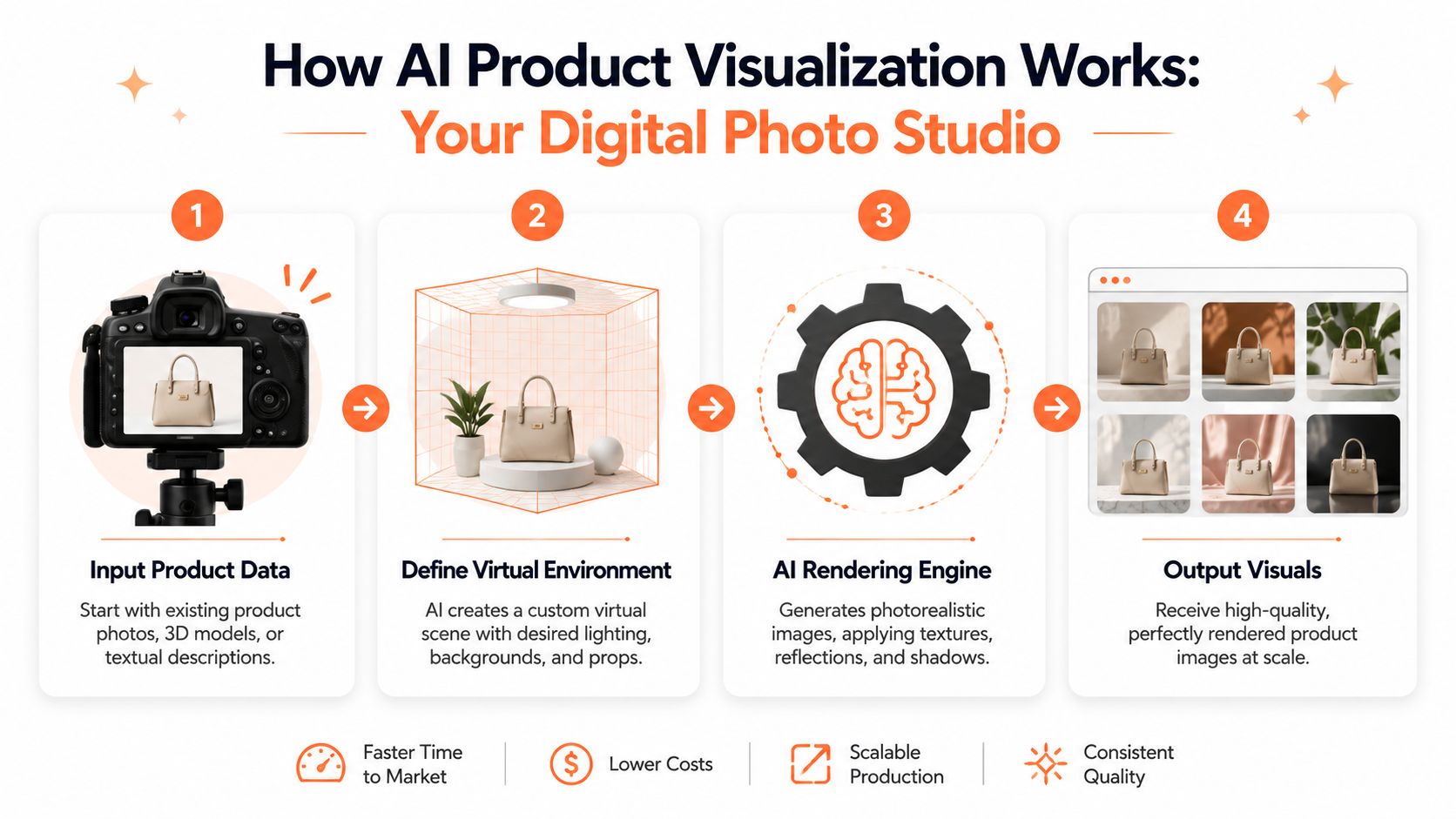
Step one keeps the product stable
The first job is to isolate or preserve the object you sell. In commerce work, this matters more than people think. A beautiful scene is useless if the handbag hardware changes, the bottle label drifts, or the ring setting softens into something that no longer matches the item.
A reliable workflow starts with a usable source image, then separates product preservation from scene creation. That usually means cutout, masking, or controlled object extraction before any generative work begins.
Step two builds the environment
Once the product is stable, the system can generate a new setting around it. That setting might be a living room, a hand, a kitchen counter, a retail shelf, a workshop, or the side of a van for branding previews. The environment is where prompts matter. Not because clever wording is magic, but because vague instructions create vague results.
Good prompts specify the scene, camera feel, lighting style, materials, and how much of the product should remain visible. If your team needs help tightening that part, a practical guide to AI image prompts for product workflows is worth keeping close to the process.
Step three fixes composition
This is the part most one-click demos skip. Grid Dynamics notes that inpainting and background replacement models such as Stable Diffusion or DALL·E are used to generate new environments while preserving the original object, and adapter networks such as ControlNet or T2I-Adapter are used to control composition, semantics, and pose in its product visualization analysis.
In plain terms, the model needs guardrails. Without them, it can make a mug float, bend the angle of a shoe, or mismatch shadows and perspective. With them, you get much stronger placement discipline.
Practical rule: treat object preservation and scene generation as two linked steps, not one prompt. That's how you reduce product drift.
Step four turns one setup into a batch workflow
The difference between hobby use and catalogue use is chaining. A seller might run one image manually. An operations team needs the same logic applied to folders, collections, and product groups.
That can include:
- Background handling first: remove or preserve the original object before expensive generative steps.
- Scene rules by category: dining products go to table scenes, jewellery goes to hand or neck compositions, eyewear goes to face-based outputs.
- Output routing last: export square for Shopify, marketplace-compliant variants for Amazon, and larger creative versions for social.
If your content team also handles motion assets, the same logic applies beyond stills. Many brands that use AI imagery at scale also streamline video production using AI so product visuals and short-form ad creative stay aligned.
Key Benefits for High-Volume Sellers
The primary gain from AI product visualization isn't that it can make an eye-catching image. The gain is that it lets a seller apply the same visual strategy across a large catalogue without turning every launch into a custom studio project.
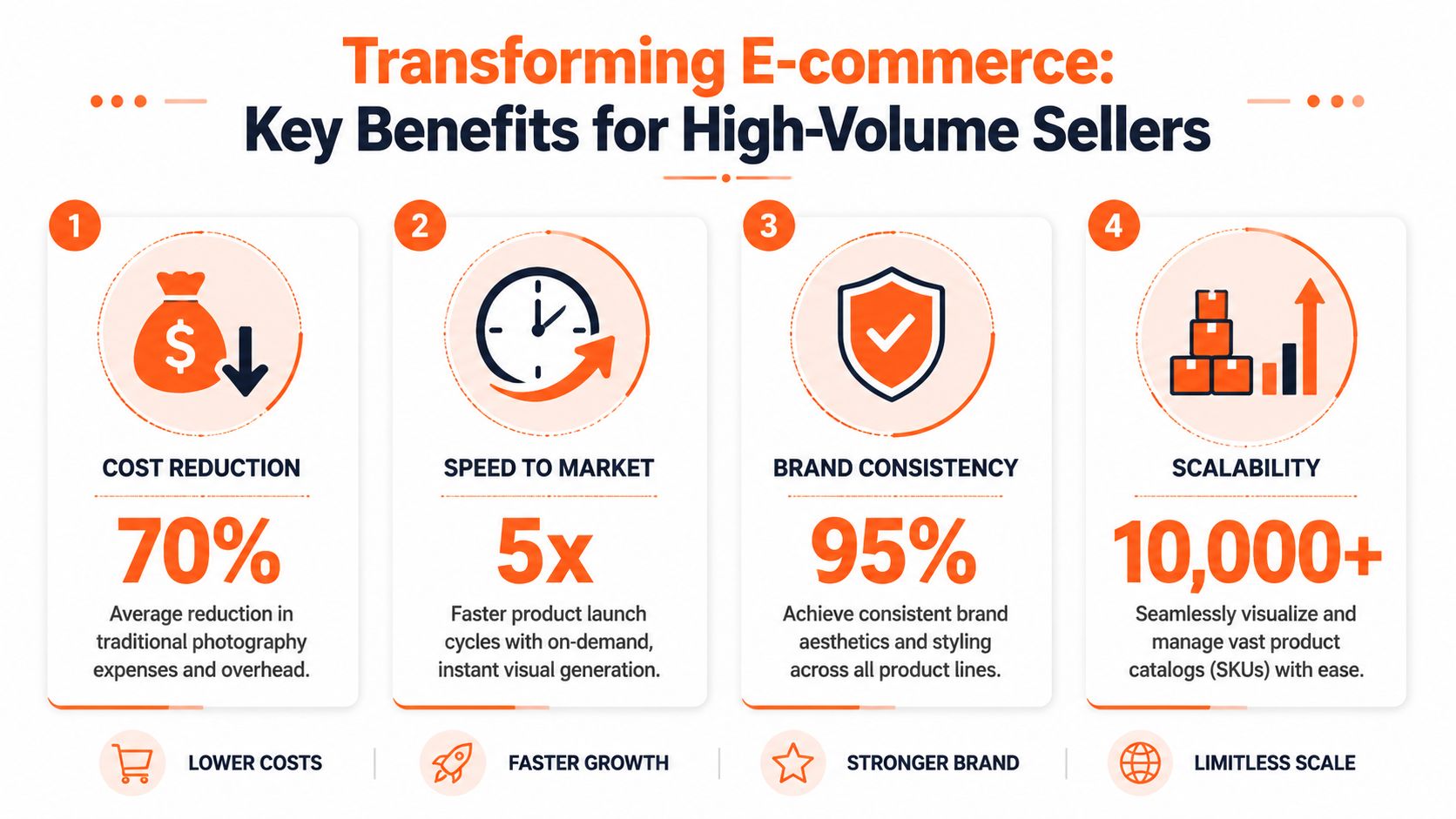
What changes when you think in batches
For a single hero SKU, almost any method can work. For hundreds of products, four advantages start to matter.
| Benefit | Why it matters in practice |
|---|---|
| Context at scale | You can create room scenes, usage scenes, shelf scenes, and branded campaign visuals for whole collections rather than a few featured items. |
| Platform fit | One source set can feed marketplace-compliant images, social creatives, and store-specific crops without rebuilding each asset manually. |
| Faster launch cycles | Teams stop waiting for reshoots every time a campaign needs a new setting or ratio. |
| Creative testing | You can compare visual directions across audiences without booking another physical production round. |
A lot of the market movement behind this is no longer speculative. The global generative AI in data visualization market is projected to grow from USD 3.6 billion in 2023 to USD 10.8 billion by 2033, at a CAGR of 11.7%, according to Market.us. That's a market projection, not a guarantee of results for any seller, but it does show that AI-assisted visual production has moved into a durable operating category.
Better compliance without duplicate effort
Multi-platform selling creates a silent asset problem. Amazon wants one thing. Shopify wants another. Etsy has its own practical expectations. Ad teams want a looser, more editorial look. If each request starts from scratch, your image stack becomes fragmented fast.
AI product visualization works best when the product asset is treated as a reusable base. From there, teams can create white background listing images, lifestyle scenes, square social crops, and banner-oriented compositions from the same controlled input set. That's also why professional-looking source files matter so much. Weak inputs create weak outputs, even with good prompting, which is why many sellers first tighten fundamentals like how to make product photos look professional.
Personalisation becomes operational
Scale reveals its true potential. A furniture retailer can run one collection through multiple styling directions. A skincare brand can place the same packaging into clean clinical scenes for one audience and softer bathroom imagery for another. A B2B supplier can show the same product in office, warehouse, and field-use contexts depending on segment.
Teams get more value when they stop asking AI for “one amazing image” and start asking for “one repeatable visual system”.
That's the commercial advantage. Not novelty. Repeatability.
Real-World Use Cases Across E-commerce
The easiest way to judge AI product visualization is to ignore the demos and look at category fit. Some products need mood. Some need scale. Some need proof of use. The best workflows reflect that difference instead of forcing every item through the same scene template.

Furniture and home decor
Furniture is one of the clearest fits because customers need spatial context before they buy. A chair on white tells you the silhouette. The same chair in a compact flat, a bright Scandinavian room, and a darker textured interior tells you where it belongs.
Doing this for a whole catalog?
MerchLoom runs background removal, upscaling and AI editing across every product photo you have — one prompt, whole batch. Try 2 batches free, no signup.
Try it freeFor home decor, the workflow usually works best when the product stays fixed and the scene changes around it. Sellers can keep one approved cutout of a lamp, mirror, cushion, or vase, then generate multiple room styles around that asset for category pages, ads, and collection launches.
Jewellery, eyewear, and try-on categories
Jewellery and glasses have a different problem. Customers want body context. They need to see scale, skin contrast, and wearability.
That means rings on hands, necklaces on necklines, bracelets on wrists, and glasses on faces. In these categories, AI product visualization overlaps with virtual try-on logic. If that's your category, examples of virtual product try-on workflows are often more useful than generic AI image inspiration because they focus on fit, placement, and consistency rather than pure atmosphere.
Packaging, shelves, and food scenes
CPG brands usually need two kinds of image. Clean listing assets and believable retail context. A box, can, pouch, or bottle on white is still essential. But buyers also need to see how the product reads on a shelf, on a kitchen counter, in a pantry, or inside a lifestyle composition.
Food is similar, except the scene has to support appetite. The common mistake is over-styling. If the background props overpower the product, the image stops selling the item and starts selling the set dressing.
One useful capability in this area is scene assembly. Advanced AI product visualization platforms can output images at up to 6K resolution and combine up to four products in a single scene while automatically handling proportionality and perspective, according to Mazing's platform overview. That matters when a seller wants coordinated family shots, bundle scenes, or printed retail materials from the same visual system.
Vehicle branding and B2B products
B2B sellers often think this space isn't for them. It is. They just use it differently.
A vehicle wrap provider can place branding concepts on vans, cars, or service fleets. An equipment seller can show a product on a warehouse floor, in a clinic, on a construction site, or inside a workshop. Industrial parts, office fixtures, hospitality products, and trade goods all benefit when customers can see the item in the environment of its intended use.
For sellers building acquisition content around those scenes, static images often pair well with motion creative. If you also run paid social, examples of high-converting dropshipping video ads can help you translate still scene concepts into short promotional formats without starting the creative process from zero.
A good use case isn't “AI made this look cool.” A good use case is “the buyer now understands the product faster.”
Implementing Your First Batch Visualization Workflow
Most guides make this sound simpler than it is. They show one uploaded image, one prompt, one polished output. That's fine for a demo. It doesn't answer the core questions sellers have when they need dependable output across a large catalogue.
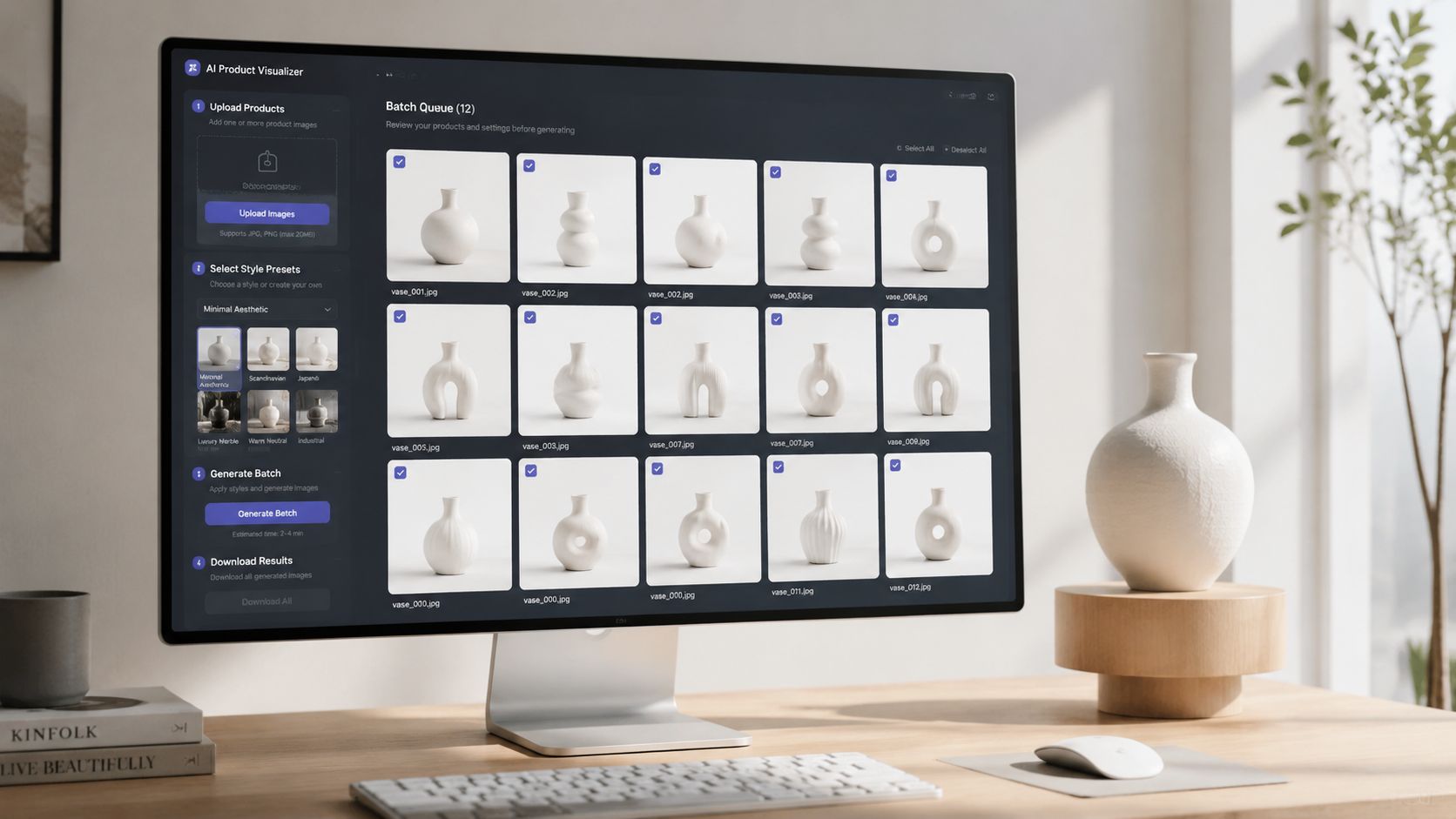
Recent vendor content still under-explains catalogue-level operations for high-SKU merchants, especially batch reliability, step ordering for cost savings, and consistency across collections, as noted in this workflow discussion on large-scale image processing. That's exactly where implementation either works or falls apart.
Start with a controlled input set
Don't begin with your messiest folder. Start with one product type, one season, or one collection that already has reasonably consistent source photography.
Your first batch should have:
- Similar framing: products photographed from comparable angles
- Clean naming: filenames or SKUs that can stay attached to outputs
- Clear category logic: all mugs, all cushions, all candles, all glasses
- One visual objective: room scenes, hand scenes, shelf scenes, not all of them at once
You're not only testing image quality. You're testing operational repeatability.
Build the pipeline in the right order
The biggest practical mistake is doing expensive steps too early. If the image needs background work, object isolation, or crop correction, handle that before upscale or scene generation when possible.
A simple batch flow often looks like this:
- Import source images from your existing storage or commerce stack.
- Clean the product layer so the item stays stable.
- Apply one scene template per category or campaign.
- Review outputs mid-batch for drift, bad shadows, or odd proportions.
- Export channel variants after the main visual is approved.
That sequencing is where a workflow platform matters more than a generator. MerchLoom is one example of a batch AI image tool built around that logic. It imports existing catalogue images, chains multiple processing steps, and runs them across collections instead of handling one image at a time. For teams managing AI batch image editing across product folders, that kind of pipeline structure is usually more useful than a prompt-only tool.
Keep prompts narrow and reusable
Your goal isn't to write the most imaginative prompt. It's to write one that can survive a batch. Prompts that are too descriptive often introduce unnecessary variation across products.
A usable prompt usually defines:
- Environment: bright kitchen counter, neutral living room, retail shelf
- Lighting: soft daylight, studio-soft, warm ambient
- Composition boundaries: centred product, front-facing, visible label, natural shadow
- Brand constraints: minimal props, muted palette, premium tone
If a prompt only works on one image, it isn't production-ready yet.
Review like an operator, not an artist
For batch work, quality control is less about taste and more about failure detection. Look for the problems that break listing trust: distorted logos, changed materials, warped packaging edges, incorrect hand placement, impossible reflections, and missing product details.
Approve the workflow only after it survives a representative batch. If it fails on edge cases, fix the workflow, not the images one by one.
Best Practices for Catalogue-Wide Consistency
Once a batch works, the next challenge is keeping it consistent across seasons, categories, and channels. That's where AI product visualization becomes part of content operations rather than a one-off creative exercise.
Create a visual system, not a prompt library
Most inconsistency starts when different people write different prompts for the same category. One person asks for “airy natural light”, another asks for “luxury editorial ambience”, and now the collection looks like it came from three different brands.
A better approach is to define a small set of approved scene families. One for neutral marketplace-safe context. One for brand lifestyle. One for seasonal campaigns. One for social-first crops. Then use those repeatedly.
A practical consistency system usually includes:
- Approved prompt templates: category-specific and tested on multiple SKUs
- Scene boundaries: fixed rules for props, camera angle, and background complexity
- Output presets: separate exports for Shopify, Amazon, Etsy, ads, and print
- Exception handling: rules for reflective, transparent, wearable, or irregular products
Separate hero standards from long-tail standards
Not every SKU needs the same treatment. Hero products deserve tighter review, stronger source images, and more refined scene control. Long-tail products need throughput and acceptable consistency.
That split keeps teams from overspending time on low-priority assets while still protecting brand quality on top sellers, launch items, and campaign anchors.
Keep a human in the loop
AI can handle volume. It still needs judgement.
Reviewers should check whether the product remains accurate, whether the scene helps rather than distracts, and whether the output matches the channel where it will appear. A useful workflow lets teams inspect outputs while the batch is still running, catch drift early, and reuse approved outputs in the next round instead of starting over.
Consistency doesn't come from generating more images. It comes from enforcing the same decisions across the whole catalogue.
When sellers get this right, the shift is substantial. Product imagery stops being a series of isolated editing tasks and becomes a repeatable production system. That's the central promise of AI product visualization for e-commerce. Not one magic image, but a reliable way to help customers see products in context before they buy.
If you're trying to turn white-background product photos into room scenes, shelf visuals, try-on imagery, or marketplace-ready variants across a full catalogue, MerchLoom is built for that batch workflow. You can bring in existing images from the systems you already use, chain the processing steps in the right order, and run the same logic across entire collections instead of editing one file at a time.
Stop editing product photos one at a time
Upload your catalog or connect your store. Describe the result once. MerchLoom does the rest.
Try it free — no signup