
Virtual Product Try On: A Scalable E-commerce Guide
Implement virtual product try on at scale. This guide covers batch AI pipelines, asset prep, and cost optimization for your entire e-commerce catalogue.
Most sellers already have the raw material for virtual product try on. It sits in folders full of white-background packshots, marketplace exports, old studio files, and a few lifestyle images that never scaled beyond the hero products. The problem isn't whether contextual visuals help. The problem is how to create them across a catalogue without turning your team into a manual compositing department.
That matters more now because virtual try on no longer means only lipstick on a face or glasses on a selfie. It includes a chair in a condo living room, a label on a bottle, a stand mixer on a kitchen counter, a tool chest in a workshop, or a branded wrap on a service van. For sellers, the primary opportunity is broader than AR. It's better product understanding at the listing level.
The operational question is simple. Can you generate believable, repeatable previews for hundreds of SKUs, review them quickly, and publish them in the formats your channels require? If the answer is no, the feature stays stuck as a demo. If the answer is yes, virtual product try on becomes part of merchandising.
From Static Shots to Dynamic Shopping Experiences
A clean white-background image still does an important job. It shows the product clearly, keeps marketplaces happy, and gives buyers a neutral reference point. But it doesn't answer the question that drives hesitation: what does this look like in use, in scale, on a person, or in a real environment?
That gap is where virtual product try on has become practical. By 2026, generative-AI virtual try-on is projected to be commercially mature, with photorealistic results, typical latency of 8 to 15 seconds, and no per-SKU production overhead according to this virtual try-ons market report. For catalogue operators, the important part isn't the novelty. It's the removal of one-by-one production bottlenecks.
What changed operationally
Older workflows broke down at scale. Teams could build a handful of polished composites for ads, but not maintain a full collection across new arrivals, colour variants, and seasonal updates.
Now the workflow can be treated more like image processing than studio production:
- Source once: Start with your existing product shots instead of planning fresh photoshoots for every context.
- Process in batches: Apply the same logic across dozens or hundreds of SKUs.
- Export for channels: Keep your Amazon main image clean, then generate secondary images for Shopify, Etsy, paid social, and email.
If you're also evaluating the shopper-facing side of AR, Wonderment Apps has a useful overview of implementing AR in online stores that helps clarify where interactive storefront experiences fit versus static generated previews.
Static packshots sell the object. Contextual previews sell the decision.
The shift from feature to workflow
The biggest mistake is treating virtual try on as a special effect reserved for a few flagship products. That approach creates visual inconsistency, piles work onto designers, and usually dies after the first launch cycle.
A better view is this: virtual try on is a catalogue-scale merchandising layer. You still need compliance images, clean crops, and platform-specific formatting. But alongside them, you generate dynamic use-case visuals that answer real buyer questions. In practice, that means not only apparel on people, but lamps in rooms, cosmetics in bathrooms, packages on shelves, and equipment in work settings.
Once you look at it that way, the problem stops being "Can AI make a cool image?" and becomes "Can our team run this reliably across the whole catalogue?"
Visualizing Products Beyond the Human Body
The term "try on" often brings clothes to mind. Retail operations teams usually think in a wider frame. Buyers want to see products in context, even when the product isn't wearable.
Amazon Science describes this as "virtual-try-all", the ability to insert "any product" into "any personal setting" in its write-up on virtual-try-all product visualization. That broader framing fits Canadian commerce well because in 2024 91.3% of Canadian households had internet access and 96.4% owned a smartphone, which makes mobile-first visual browsing relevant across categories, not only fashion.
Where virtual product try on actually shows up
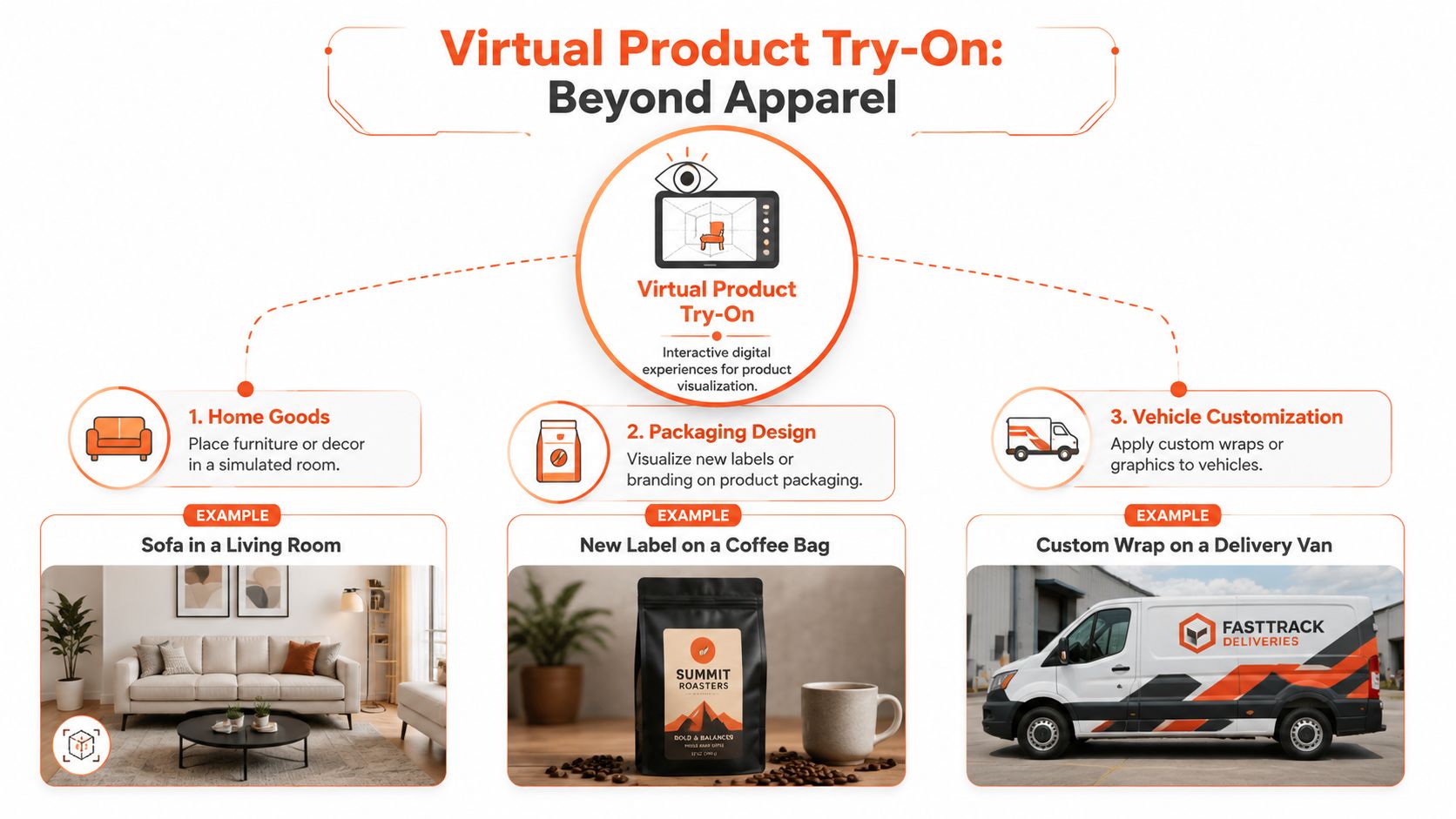
A furniture seller needs more than a cutout on white. Buyers want to judge scale, colour balance, and whether a piece works in a bright condo, a darker family room, or a minimalist office. One sofa can need several believable room contexts before shoppers stop guessing.
A packaging team has a different problem. They may already have label artwork, dielines, and product renders, but still need to show how the final design looks on a pouch, bottle, canister, or carton in a retail-like setting. The same applies to seasonal packaging refreshes, limited editions, and private-label variants.
Then there are categories that almost never get included in virtual try on discussions:
- Vehicle branding: A service business wants to preview wraps on vans or fleet vehicles before production.
- B2B tools and equipment: A seller needs to show shelving, carts, bins, or machinery in workshops, warehouses, clinics, or trade environments.
- Shelf and scene placement: Food, household goods, and accessories often benefit from showing the product in a realistic shelf, kitchen, desk, or bathroom context.
Why manual production fails here
These use cases all sound manageable until you count SKUs. A catalogue with multiple colours, sizes, labels, or bundles turns one "simple mockup" into a backlog.
That's why many teams end up looking for batch-friendly composition workflows such as AI image combiner tools. The principle is straightforward. Instead of designing one scene at a time, you define reusable contexts and map products into them systematically.
The practical value of virtual product try on isn't that it creates one impressive preview. It's that it lets a seller create a whole family of consistent previews without rebuilding the process for every SKU.
Context beats spectacle
The best outputs don't always look cinematic. They look believable enough to reduce uncertainty. A basic dining chair in a plain room often does more sales work than an over-styled editorial scene. A bottle with the correct label curvature and realistic reflections matters more than a dramatic background.
That is especially true outside fashion. For furniture, packaging, tools, and branded surfaces, customers aren't asking for entertainment. They're asking for orientation. They want to know if the thing fits, matches, reads clearly, and feels plausible in the environment where it will be used.
Preparing Your Assets for Batch Processing
Bad source files don't become reliable try-on assets just because the model is good. At scale, the quality of your inputs controls both the output quality and the number of files your team has to reject later.
The most efficient teams clean the source set before they generate anything. That usually means choosing one approved product image per SKU, fixing obvious metadata issues, and separating images meant for generation from images meant only for marketplace compliance.
What a batch-ready source set looks like
Use this checklist before you run a large job:
- Clean product isolation: A straightforward packshot usually works better than a busy lifestyle image because the system can identify edges and shape more reliably.
- Consistent angles: If half your mugs are front-facing and the rest are shot from above, your generated scenes will feel uneven even when each image looks acceptable by itself.
- Stable lighting and colour: Drastic differences in exposure create drift across a collection.
- Correct SKU mapping: Every source image should tie cleanly to the right product, variant, and export target.
- Useful attributes: Material, category, colour family, form factor, and use case help you assign the right scenes later.
Prompting starts before generation
A lot of operators focus on the final prompt and ignore the source folder. That's backwards. If your naming, product groups, and visual standards are messy, prompts become a patch for poor preparation.
A practical way to tighten the process is to define reusable prompt logic by category. A guide to AI image prompts for product workflows can assist here, especially when you're trying to keep dozens of generated outputs aligned to one visual standard.
Practical rule: Standardize the inputs before you try to optimize the prompts.
Source image triage
Not every product belongs in the first batch. Start by sorting products into three groups:
| Product group | Good early candidates | Use caution |
|---|---|---|
| Simple shapes | basics, plain packaging, furniture with clean silhouettes | items with reflective surfaces |
| Pattern complexity | solid colours, low-detail finishes | dense prints, logos, small text |
| Placement sensitivity | products with obvious orientation | products that deform, drape, or wrap irregularly |
This triage reduces disappointment. It also protects your QA time. If your first rollout includes the hardest products in the catalogue, your team will spend most of its time fixing edge cases instead of learning what the workflow does well.
For sellers with Amazon, Shopify, and Etsy requirements, asset prep also needs to account for final output ratios and sizes. Even if one source file can feed all channels, the crops and framing rules won't be identical. Build that into the folder structure early, not after generation.
Building Your Automated AI Image Pipeline
A scalable virtual product try on system isn't one tool doing one trick. It's a chained process. Each stage sets up the next one, and the order matters.
The teams that struggle usually treat generation as the first step. It isn't. Generation sits in the middle of a broader image pipeline that has to ingest, clean, place, review, and export.

The pipeline logic that holds up in production
A workable sequence usually looks like this:
Ingestion
Pull approved source images from storage, product feeds, or platform exports. At this stage, you want one trusted file per SKU or variant, not a messy folder of alternates.
Background removal and cleanup
Isolate the product. Remove distractions. Correct obvious crop issues. This gives the placement stage a cleaner object to work with.
Segmentation and product understanding
The model needs to understand what the object is, where its edges are, and how it should sit in a scene. This is straightforward for some products and fragile for others, especially when materials, folds, or transparent areas are involved.
Virtual placement
Here the product gets mapped onto a person, room, shelf, container, or vehicle surface. This is where category-specific logic matters most.
After those transformations, many teams rely on AI batch image editing workflows to apply the same processing logic across a whole collection rather than rebuilding each output manually.
Rendering is where realism gets won or lost
The next stage often gets oversimplified. Placement alone doesn't make the image believable. Rendering has to account for light direction, shadows, surface interaction, and texture retention.
Industry reporting summarised by Mocky notes that effective virtual try-on can increase time on product pages by 180% and session duration by 65% when the workflow is sound, and it recommends standardizing photos, restricting early deployment to reliable categories, and validating gains with testing in its piece on virtual try-on workflow performance.
For a broader view of the app ecosystem around store automation, Grumspot's overview of AI apps for Shopify stores is a useful companion read because it shows how image generation fits into a larger merchandising stack rather than living in isolation.
A quick walkthrough helps make the pipeline concrete:
Review loops matter more than perfect prompts
Doing this for a whole catalog?
MerchLoom runs background removal, upscaling and AI editing across every product photo you have — one prompt, whole batch. Try 2 batches free, no signup.
Try it freeMost batch pipelines fail at QA, not generation. The operator sees one good image, assumes the batch is safe, and publishes too quickly.
Use a review loop that checks:
- Product fidelity: Did logos, seams, edges, and proportions hold up?
- Scene fit: Does the item sit naturally in the environment?
- Collection consistency: Do outputs feel like part of one merchandising system?
- Channel readiness: Are crops, aspect ratios, and file variants ready for each destination?
One of the biggest advantages of an automated pipeline is repeatability. Once a chain works for dining chairs, serum bottles, or branded boxes, you can reuse that logic with adjustments instead of starting over from scratch.
Integrating and Testing Previews on Your Storefront
Generating assets is only half the job. The rest is placement, measurement, and restraint. A strong preview can help a product page. A cluttered one can bury the buying path.

Where previews belong
Not every virtual product try on asset needs the same storefront treatment.
For many catalogues, the best deployment pattern is simple:
- Marketplace-safe primary image: Keep the hero image compliant and neutral.
- Secondary gallery images: Add contextual try-on or in-scene visuals here.
- Variant-specific previews: Use these where colour, scale, or finish changes matter.
- Landing pages and collections: Show grouped lifestyle consistency, not just one-off experiments.
For some categories, a static generated preview is enough. For others, you may want an interactive "see it in context" element. The choice depends on the complexity of the purchase and the friction of implementation.
Test by category, not by belief
Mature virtual try-on implementations have documented an 18 to 28% conversion lift and a 25 to 30% reduction in returns according to The Interline's review of AI virtual try-on benchmarks. Those numbers are encouraging, but they shouldn't tempt you into blanket rollout.
Use A/B testing at the category level. Apparel basics may respond well. Printed garments or reflective accessories may not. Home décor may benefit from room scenes, while commodity consumables may see limited lift.
Track more than conversion. Look at:
| Metric | Why it matters |
|---|---|
| Add-to-cart behaviour | Shows whether the preview improves purchase confidence early |
| Product-page engagement | Helps identify whether shoppers actually use the visual asset |
| Return reasons | More useful than overall return totals when diagnosing fit or expectation issues |
| Variant interaction | Reveals whether contextual images help buyers choose correctly |
A believable preview that reduces wrong expectations is more valuable than a dramatic preview that wins clicks but causes returns.
QA after publishing
Storefront QA doesn't end when the files upload. Review the live experience across devices. Check crop behaviour, load order, thumbnail clarity, and whether generated images feel consistent with the rest of the brand.
This is also where the generated assets can branch into marketing. If a preview performs well on the PDP, it often has reuse value in paid social and retention campaigns. Teams building broader creative systems may also look at adjacent workflows like an automated social media ad creation platform to turn product visuals into ad variations without rebuilding the asset stack.
For social-first merchandising, mockup workflows matter too. A practical example is using Instagram post mockups for product presentation so the same contextual assets can be adapted for store, campaign, and social channels with minimal redesign.
Optimizing for Cost and Performance at Scale
Virtual product try on gets expensive when teams process everything the hard way. The savings don't come from AI alone. They come from the order of operations, the categories you choose first, and the amount of waste you prevent.
If your pipeline runs on every product, at full size, with no triage, you'll pay to generate assets that never go live. That's not a model problem. It's an operations problem.
Start with the products most likely to work
For Canadian merchants, virtual try-on works best as a returns optimization workflow, and industry data cited by Wearfits shows 20 to 30% return-rate reductions for apparel when execution is strong. The same guidance recommends segmenting catalogues and starting with high-confidence basics before moving into more complex items, as explained in this article on gen-AI virtual try-on trust.
That operating principle matters beyond apparel. Plain dining chairs are easier than patterned bean bags. A standard bottle is easier than a reflective foil pouch. A plain van side is easier than a highly curved vehicle panel.
Order of operations affects cost
Efficient teams don't run the most expensive transformation first. They trim the workload before the heavier steps.
A sensible pattern looks like this:
- Remove backgrounds early: Cleaner objects are easier to place and cheaper to process than large untrimmed source files.
- Normalize before upscale: Fix composition, category mapping, and scene assignment first. Save larger output sizes for approved variations.
- Generate a review batch first: Test a representative subset before launching the whole catalogue.
- Export only needed variants: Don't create every ratio for every platform unless the product has earned that investment.
If you're evaluating model and workflow options more broadly, it's useful to understand how different AI systems handle structured image tasks. A technical primer like Gemini AI workflow guidance can help frame where generation models fit versus editing pipelines and QA-heavy commerce use cases.
Front-end performance still matters
Rich imagery doesn't get a free pass on page speed. A strong contextual preview that slows the PDP can undermine the gain.
Keep the storefront side disciplined:
- Use modern formats where supported.
- Compress secondary images aggressively enough to protect speed without making the product look soft.
- Load compliant main images first and let richer lifestyle previews support, not block, the purchase path.
- Review mobile rendering because many buyers will encounter these assets on phones, not desktops.
The best virtual product try on programmes don't just produce more images. They produce the right images, in the right order, at a cost the catalogue can sustain.
Common Pitfalls and How to Avoid Them
Most virtual product try on disappointments are predictable. The technology isn't usually the main issue. The setup is.
Expecting every SKU to work equally well
Some products are easy. Some are brittle. Teams get into trouble when they assume one workflow should handle plain tees, glossy puffer jackets, printed dresses, transparent bottles, and metallic packaging with equal accuracy.
The fix is operational discipline. Segment the catalogue. Put easier products through first. Create a separate review threshold for categories with drape, reflections, tiny text, or complex branding.
Using weak inputs and blaming the output
Low-resolution photos, inconsistent angles, badly cropped sources, and muddled SKU names create avoidable errors. Operators then spend hours trying to prompt their way out of problems that started before generation.
Use a small intake checklist and enforce it. If a source file fails it, don't send it into the batch.
Don't ask the model to recover information that isn't present in the source image.
Chasing realism while ignoring trust
A preview can look impressive and still mislead the buyer. This is especially common when shadows, scale, or fit cues feel slightly off. In some categories, that small mismatch is enough to create returns.
Statistics Canada reports that retail e-commerce accounted for 6.7% of total retail trade in Canada in 2024, which makes trust at the product-page level commercially meaningful, as noted in this discussion of AI virtual try-on and retail trust. Treat realism as a trust problem, not only a design problem.
Publishing without human review
Automation should reduce manual work, not eliminate judgment. If nobody reviews the output, strange hand placements, warped labels, floating products, and mismatched reflections will reach the live store.
Use a simple QA pass with clear reject reasons:
- Scale errors: product appears too large or too small in context
- Fidelity issues: logos, patterns, labels, or seams shift unnaturally
- Placement problems: object floats, clips, or ignores surface geometry
- Brand inconsistency: scene style doesn't match the catalogue standard
Ignoring diversity in scenes and users
A narrow set of contexts can weaken the whole programme. Apparel needs a thoughtful range of body representation. Home goods need more than one room aesthetic. B2B products need real work environments, not generic stock-like backdrops.
Variety should be structured, not random. Define a scene library by category and use it consistently.
Forgetting channel constraints
A generated preview that works beautifully on a Shopify PDP might not belong on Amazon as the main image. A square social crop may cut off the key context from a wide room scene. Teams often discover this after asset production, when the expensive part is already done.
Build destination rules into the workflow from the start. Every generated asset should know where it's going before it's created.
If you're trying to turn virtual product try on into a repeatable catalogue workflow instead of a one-off experiment, MerchLoom is built for that batch reality. You can bring in full image collections from the systems you already use, run chained AI workflows across hundreds of products, and generate listing-ready visuals, contextual scenes, and try-on style previews without editing one file at a time.
Stop editing product photos one at a time
Upload your catalog or connect your store. Describe the result once. MerchLoom does the rest.
Try it free — no signup