
AI Image Workflow Automation: The E-commerce Guide
Learn how AI image workflow automation moves beyond single edits to transform your e-commerce catalogue. A practical guide for sellers on batch processing.
You finish a product shoot and dump a few hundred images into a folder. Then the repetitive work starts. One version needs a white background for Amazon. Another needs a square crop for Shopify. Another needs higher resolution for Etsy zoom. A few need cleaner edges, better colour consistency, and a lifestyle version for ads. None of those tasks are difficult on their own. Together, across a catalogue, they become the part of the job that slows everything down.
That's why AI image workflow automation matters. It isn't just another editing feature. It's an operational layer for online retail. In Canada, retail e-commerce sales reached $4.5 billion in May 2024 and represented 6.0% of total retail sales, which makes visual throughput a retail operations issue, not a creative side task. In the same period, AI adoption among Canadian businesses rose to 12.2% in late 2023, signalling that more teams are moving from testing AI to using it in day-to-day work, as noted in this Canadian AI workflow automation overview.
Your E-commerce Reality and the Automation Solution
Most sellers don't have an image problem. They have a batch operations problem.
A single product image can be edited manually in Photoshop, Canva, or a basic background remover. A catalogue can't. Once you're managing collections, seasonal drops, variants, bundles, and marketplace rules, single-image editing stops being a workflow and starts becoming a queue.
That queue usually looks like this:
- Raw intake lands in one folder and nobody has tagged what belongs to which listing.
- Background cleanup happens first, often by hand, even when only some images need isolation.
- Each channel gets a separate export pass, so the same image is reopened for Amazon, Shopify, Etsy, and paid social.
- Final QC happens too late, after the team has already spent time on edits that should have been rejected earlier.
If you need a solid refresher on the fundamentals before automating them, this e-commerce photo editing guide is useful because it frames the baseline requirements sellers still have to meet regardless of tooling.
The operational answer is to stop thinking in edits and start thinking in repeatable image pipelines. Instead of asking, "How do I remove the background on this photo?" the better question is, "How do I process this whole collection into listing-ready outputs with as little rework as possible?"
That's where tools built for catalogue volume change the equation. A seller using a bulk product photo editor isn't just speeding up one task. They're reducing the number of times the team touches the same asset across the whole production cycle.
Practical rule: If your team opens the same product photo more than once for different marketplace requirements, the workflow is already costing too much.
AI image workflow automation turns a pile of images into a production system. It gives sellers a way to intake, classify, transform, review, and publish image batches without rebuilding the process for every collection.
From Single Edits to Intelligent Pipelines
The old model is familiar. You use one tool for background removal, another for resizing, another for upscaling, and maybe one more for scene generation. It works for five images. It becomes messy at fifty. At catalogue scale, it breaks.
That's the difference between tool-chaining and a real workflow.
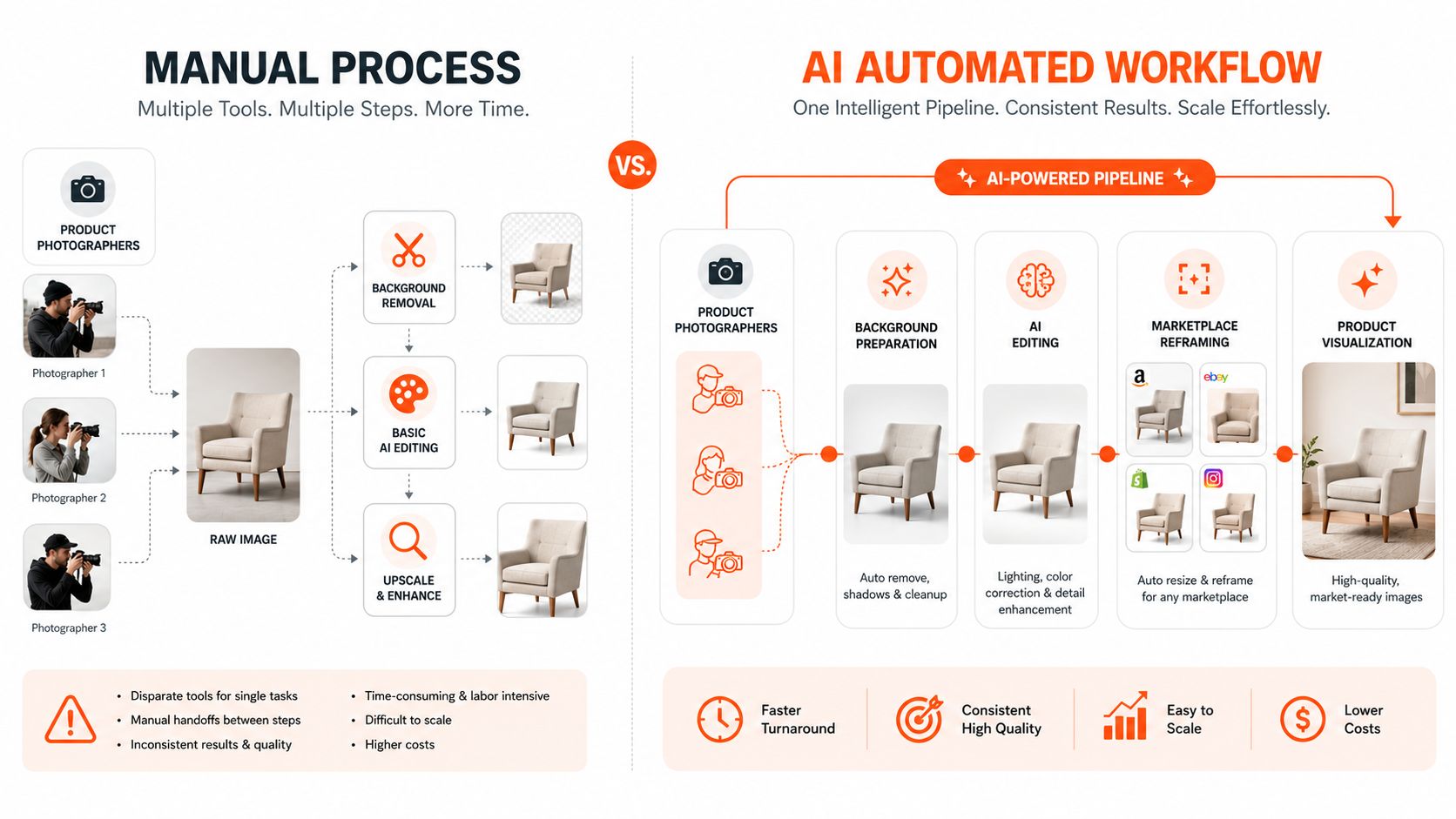
Why separate tools stop working
When each step lives in a separate app, three things usually go wrong.
First, the team loses context. The crop used for Shopify may not match the framing used for Amazon. The upscale may happen before the background is cleaned, which wastes processing. The lifestyle composite may use the wrong reference image.
Second, the process gets fragile. One missed step means a listing goes live with the wrong aspect ratio, a grey background, or an image that doesn't match the rest of the collection.
Third, quality control becomes reactive. Someone notices a problem after exports are already done, then the team starts over.
Canada is a good example of why this shift matters operationally. 79.2% of Canadian businesses used at least one digital technology in 2023, and 21.1% used cloud computing, while only 12.2% had adopted AI, which shows many businesses already have the infrastructure but still handle image work manually, as discussed in this analysis of AI workflow automation and digital readiness.
What makes a pipeline intelligent
An intelligent pipeline doesn't just chain steps together. It understands what kind of image it's looking at and what the output needs to be.
A product on a plain backdrop should be treated differently from a model shot, a room scene, a packaging image, or a reference background. The system should recognise that difference and route the image through the right sequence. That might mean isolation first, then marketplace reframing, then final clarity polish. Or it might mean skipping background removal entirely because the goal is a lifestyle composite.
A workflow-oriented tool, unlike a feature-oriented tool, offers a distinct advantage: a platform built for AI batch image editing can take a plain-English instruction, map it to a sequence of actions, and apply it consistently across a collection instead of forcing the user to rebuild the same process image by image.
The real upgrade isn't faster clicking. It's fewer decisions repeated across the same catalogue.
The assembly line analogy fits. A manual process treats each image as a separate craft project. AI image workflow automation treats the catalogue as a structured production run.
The Core Components of an Automated Workflow
A useful workflow has four parts. If one is missing, the system usually turns into a fancier editor rather than a real operations layer.
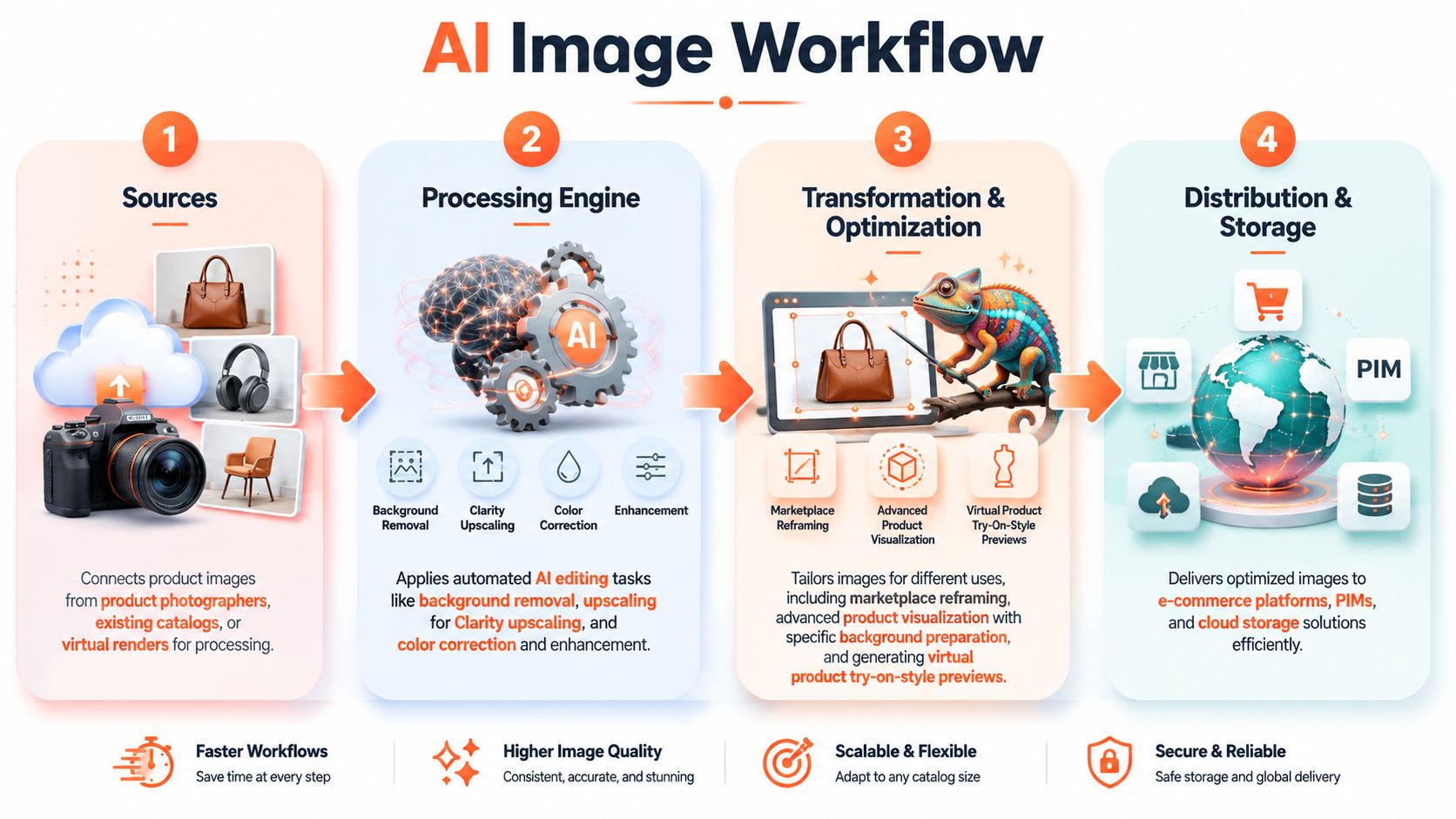
Sources and intake
The first requirement is simple. The system needs to pull images from where your team already works.
That might be Google Drive for a photographer handoff, Dropbox for a studio folder, Shopify media for existing listings, or object storage for a larger catalogue. Good intake isn't glamorous, but it decides whether the workflow gets used. If uploads are clumsy or assets lose their naming structure, the team falls back to manual handling.
For e-commerce, intake also needs some practical discipline:
- Keep collection structure intact so variants, angles, and detail shots stay grouped.
- Separate source types early so product cutouts, model images, packaging shots, and reference scenes don't get mixed.
- Preserve originals because sellers often need to rerun the same batch for a new marketplace or campaign.
Processing and orchestration
This is the brain of the system. It decides what happens, in what order, and on which images.
A useful orchestration layer doesn't assume every file needs the same treatment. It can detect that one image is a hero shot, another is a detail crop, another is a room image, and another is packaging. Then it builds the right instruction set for each use case.
That's where a workflow tool such as an AI image combiner for e-commerce becomes more than a compositing utility. It can treat source images as structured inputs for product scenes, bundles, mockups, or merchandising outputs rather than isolated files.
A practical review of workflow thinking in adjacent marketing operations is Scheduler.social's AI marketing platform, which is useful because it shows the same operational principle. The value comes from coordinating repetitive production steps, not just adding an AI feature to one task.
A quick visual walkthrough helps if you want to see how this kind of batch process is typically assembled:
Optimisation before expensive steps
Most sellers focus on output quality. Experienced operators focus on processing order.
A key cost-saving tactic is to reduce pixel volume before expensive AI stages. On a 4000×4000 image, background removal or cropping before upscaling can reduce the amount of image area pushed through the most expensive step by an order of magnitude, which lowers both cost and latency, as described in this workflow automation explanation focused on image processing order.
That principle matters in everyday catalogue work:
| Workflow choice | What usually happens |
|---|---|
| Crop or isolate first | Less image area moves into later steps |
| Upscale first | You pay to enhance pixels you may discard |
| Reframe by marketplace early | Final exports stay organised |
| Reframe manually at the end | Teams repeat work and create inconsistencies |
Background removal fits here as an optional preparation step, not the headline feature. If the product needs isolation for a compliant listing or cleaner composite, do it early. If the image is already a strong in-context scene, skip it.
Review and refinement
Production systems need checkpoints.
The best workflows let the team review outputs as they stream in, spot errors mid-batch, and adjust without restarting the whole run. That matters when the AI has misunderstood the product edge, over-smoothed packaging detail, or framed a listing too tightly for one marketplace.
Operational advice: Don't wait until export is finished to do quality control. Review the first outputs while the batch is still running.
Clarity upscaling belongs near the end. It's the polish pass that prepares images for listing use after composition, reframing, and cleanup decisions are already locked.
Real-World E-commerce Workflow Examples
The quickest way to understand AI image workflow automation is to look at jobs sellers run.
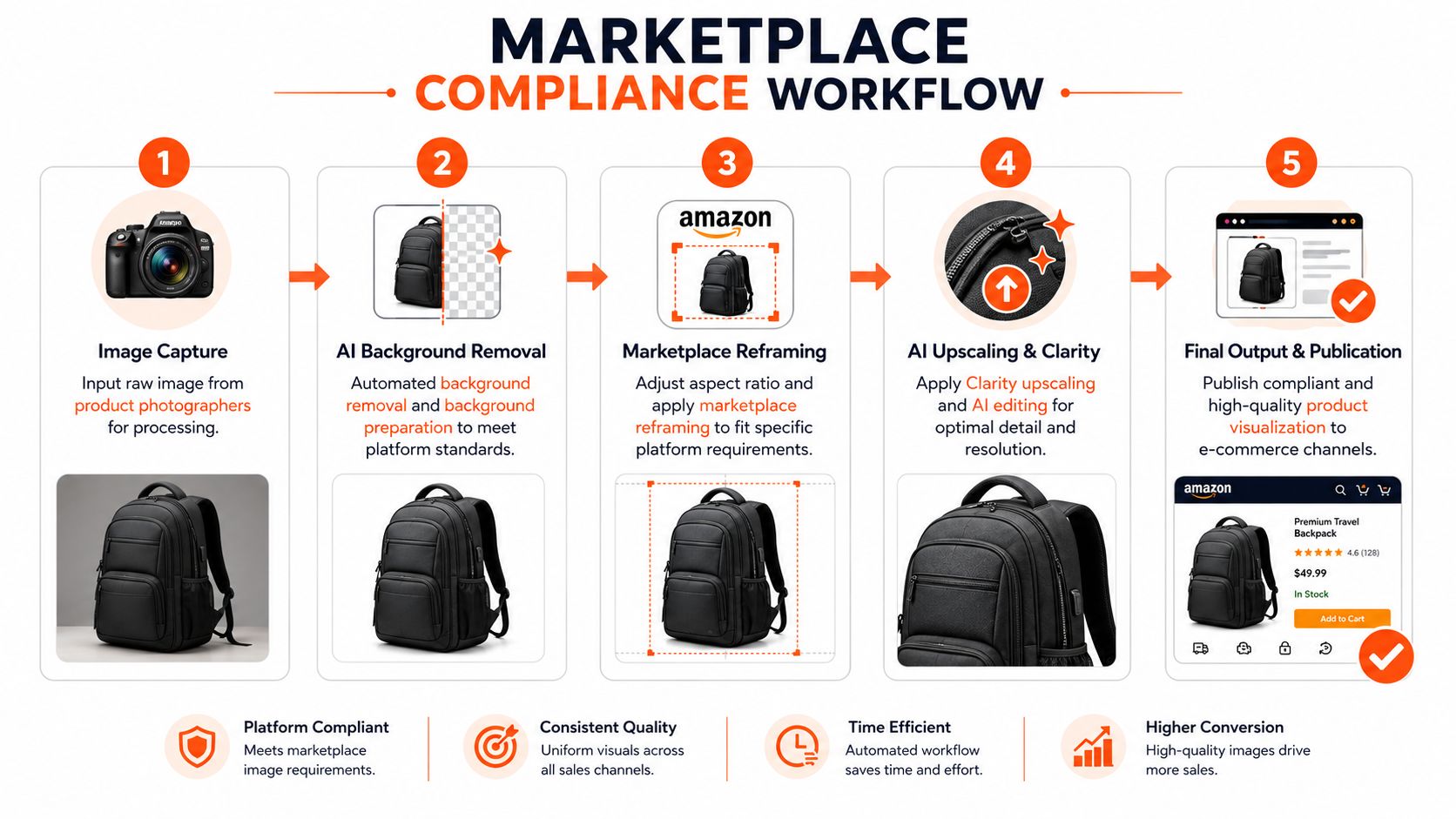
Marketplace compliance workflow
Doing this for a whole catalog?
MerchLoom runs background removal, upscaling and AI editing across every product photo you have — one prompt, whole batch. Try 2 batches free, no signup.
Try it freeStart with one raw product photo from a studio session. The seller needs the image to work across multiple channels.
A sensible workflow runs like this:
- Intake the original file with its product or SKU grouping intact.
- Isolate the product if needed so the asset can be cleanly placed on a compliant white background.
- Create marketplace-specific framing for each destination instead of forcing one crop everywhere.
- Apply final clarity and resolution polish after framing is settled.
- Export separate outputs for each channel with naming that keeps them easy to publish.
The important point isn't the exact order alone. It's that the order becomes reusable. Once the pipeline works for one handbag, candle, shoe, or supplement bottle, the same logic can run across the rest of the collection with only minor adjustments.
For sellers managing Amazon, Shopify, and Etsy together, this avoids one of the most common catalogue problems. The image looks fine on one storefront but cropped, padded, or inconsistent on another.
Product visualisation workflow
The second workflow is where AI starts doing more than compliance work.
Take an isolated sofa, lamp, sneaker, or cosmetics product. Instead of editing one hero image, the team uses the source asset to generate multiple in-context outputs: a styled room, a seasonal backdrop, an ad-ready composition, or a try-on-style preview for a fashion or accessories item.
This only works reliably when the workflow understands the role of each source image. A product cutout is not the same as a room scene. A model image is not the same as a packaging reference. A good system uses those roles to decide how to place, scale, and blend elements.
That's the practical appeal of a workflow-based tool such as MerchLoom. It can import existing product images, interpret plain-English output requests, recognise whether the participating images are products, models, rooms, packaging, reference scenes, or backgrounds, and generate structured edit instructions for the batch. In a catalogue setting, that matters more than having one impressive generation feature.
For apparel and accessories, this often overlaps with the use cases covered in virtual product try-on workflows. The same logic applies even when the final output isn't a strict try-on. The system still needs to place products consistently across many images.
If one source photo can produce listing images, ad variations, and contextual merchandising scenes, the value isn't just creative output. It's fewer reshoots.
The shift is subtle but important. Sellers stop asking AI to make an image. They ask it to run a repeatable visual production process.
Integrating Workflows into Your Business Operations
The workflow shouldn't live in a separate corner of the business. If it does, the team ends up exporting files by hand, renaming assets twice, and pushing finished images back into the catalogue manually.
The better approach is to treat AI image workflow automation as an operational hub between image sources and publishing channels. It pulls from the places your assets already sit, processes them, and returns finished outputs to the systems the business already uses.
Where integration matters most
For most retail teams, the important connection points are straightforward:
- Cloud storage such as Google Drive, Dropbox, Box, or object storage buckets.
- Commerce platforms such as Shopify, WooCommerce, or BigCommerce.
- Media infrastructure such as Cloudinary or a CDN-backed asset library.
- Internal catalogue systems where filenames, SKUs, and collection groupings already carry business context.
When these connections work properly, the image pipeline becomes part of normal listing operations. A photographer uploads the source set. The merchandiser reviews the processed outputs. The marketplace team publishes channel-specific versions. Nobody has to rebuild folders on a desktop halfway through.
Why this changes team behaviour
Teams adopt automation when it fits the way they already work. They resist it when it requires a brand-new asset management process.
That's why the practical win isn't “AI can edit photos”. It's “the team can keep using its current stack while adding a layer that standardises image handling”. A guide on how to make product photos look professional is useful at this point because it reminds sellers that quality standards still start with strong source images. Automation works best when it extends a good process rather than compensating for a chaotic one.
A production-grade image workflow should feel like plumbing. Quiet, connected, and hard to justify removing once it's in place.
Measuring Success with KPIs and Governance
If you only judge an image workflow by whether the pictures look good, you'll miss whether the operation is improving.
The better test is whether the catalogue moves faster, with fewer manual interventions and fewer avoidable mistakes.
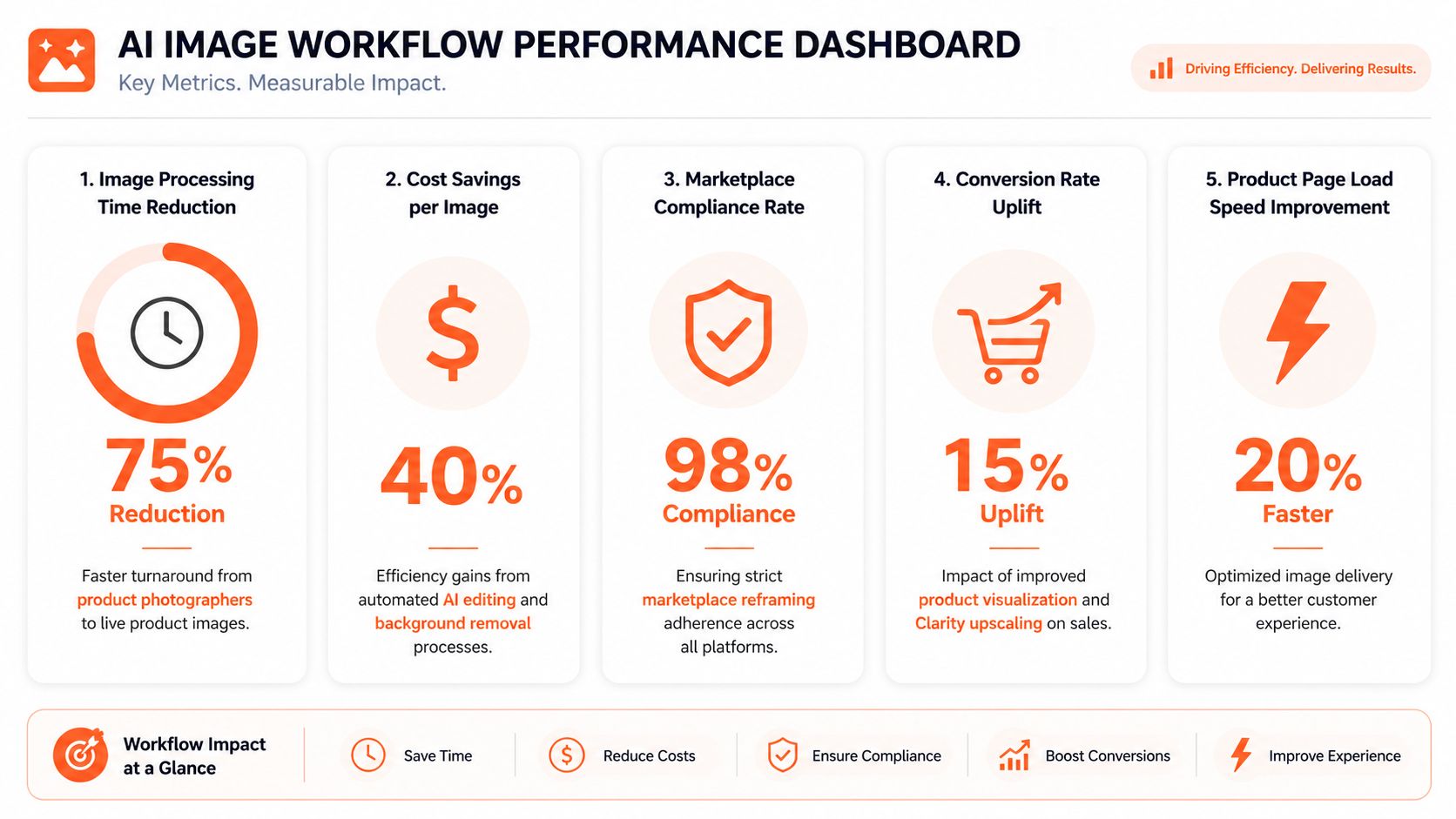
The KPIs that matter in practice
For e-commerce image operations, the most useful KPIs are usually operational rather than artistic.
- Time to listing readiness tracks how long it takes to move from source images to publishable assets.
- Cost per processed image helps compare manual handling against automated batch runs.
- Rework rate shows how often outputs need to be reopened, corrected, or rerun.
- Catalogue consistency reveals whether product collections look like one coherent storefront rather than a mix of editing styles.
- Queue visibility helps teams spot where delays happen, whether that's intake, masking, reframing, or review.
These metrics are more useful than asking whether the AI is “good”. They tell you whether the process is stable.
A strong workflow also measures checkpoints inside the pipeline, not just final output. If edge cleanup keeps failing on reflective packaging, or reframing keeps producing weak mobile crops, the team should see that pattern early.
Governance isn't optional
This becomes more important when source images include people, homes, number plates, addresses, or customer-submitted content.
Privacy frameworks such as CCPA/CPRA give consumers rights over personal information, which means image automation needs governance around source assets, retention, and downstream reuse. That's especially relevant when teams repurpose user-generated content or lifestyle shoots for ads and listings, as outlined in this discussion of privacy governance in AI-enabled workflows.
A few governance rules make a big difference:
| Governance area | Why it matters |
|---|---|
| Source permissions | Teams need to know whether an image can be reused commercially |
| Retention policies | Not every source asset should stay in the system indefinitely |
| Human review gates | Low-confidence or sensitive outputs should be checked before publication |
| Reuse controls | A listing image may be approved for one channel but not for paid social or UGC campaigns |
Good governance doesn't slow automation down. It prevents expensive mistakes from scaling with the batch.
For product-only studio shots, governance may feel light. For lifestyle imagery and customer-submitted assets, it becomes part of normal operations.
Your Practical Next Steps for Adoption
Teams generally shouldn't automate everything at once. That usually creates a messy pilot with too many exceptions and not enough learning.
A better rollout starts with one repetitive, high-volume task.
Start where repetition is highest
Look for the work your team repeats every week with almost no creative variation.
That could be:
- Marketplace reframing for the same collection across Amazon, Shopify, and Etsy.
- Background cleanup on a backlog of catalogue images.
- Listing-resolution exports that always happen at the end of a shoot.
- Lifestyle scene generation for a product line that uses the same visual structure repeatedly.
The ROI question is broader than speed. The tradeoff is between manual editing, iterative QA, and batch orchestration. Even AI-edited assets often still need human review, which is why the most effective starting point is the most repetitive part of the pipeline, as explained in this discussion of automation ROI and review tradeoffs.
Run a small pilot with real catalogue conditions
Don't test on your easiest image. Test on a small collection that reflects reality.
Use mixed angles. Include at least one difficult edge case. Compare the outputs not just on visual quality, but on whether the team would publish them without extra handwork.
A practical adoption path looks like this:
- Audit your current flow and note where the same image gets reopened.
- Pick one product collection with enough volume to expose inefficiencies.
- Automate one repeated sequence rather than the whole catalogue operation.
- Review outputs mid-batch so the team learns where controls are needed.
- Save and reuse the workflow once the logic is stable.
Start with the boring work. That's where automation usually pays off first.
Once that first workflow is reliable, expanding is straightforward. Add more channels. Add visualisation outputs. Add stricter review rules. Then the image pipeline stops being a project and becomes part of normal catalogue operations.
MerchLoom fits this adoption model well for sellers who want to test AI image workflow automation on real catalogue batches without rebuilding their stack. You can bring in existing product images from current sources, describe the output you need in plain English, and run chained processing across a collection instead of editing one file at a time. See how it works at MerchLoom.
Stop editing product photos one at a time
Upload your catalog or connect your store. Describe the result once. MerchLoom does the rest.
Try it free — no signup