
Virtual Try on API for E-Commerce Catalogs
Integrate a virtual try on API to process hundreds of product photos. Learn batch workflows, payload structures, and platform specs for e-commerce scale.
You've got a seasonal collection waiting in a folder, hundreds of flat-lay garment photos, and marketplace listings that still need better on-model visuals. Editing one image is manageable. Repeating the same work across every SKU, colour, size, and channel is where the process breaks.
Start by separating the workflow into inputs, generation, validation, and delivery. A virtual try on API should receive a consistent person image and product image, return a generated result, and pass that result through platform formatting and human review before publication. Treat it as a catalog-processing system, not as a faster selfie editor.
Moving From Single Edits to Catalog Scale
A seller with two hundred products doesn't have an image problem. They have a repeatability problem. One jacket may need a model image, a clean marketplace image, a square Shopify crop, and a resized Etsy version. Multiply that by every product and the manual Photoshop workflow becomes a queue that never clears.
Basic background removers solve only one part of the job. They can isolate a shirt, but they won't place it naturally on a model, preserve the garment's proportions, or create the same visual treatment across an entire collection. Manual editing has the opposite weakness. It can produce a carefully controlled result, but each image depends on someone repeating the same decisions.
Practical rule: define the visual recipe before processing the catalog. Choose the model, pose, crop, background, output format, and review rules first.
A batch-oriented API pipeline should look more like this:
- Import: Match each product image to a SKU, category, colour, and source location.
- Prepare: Normalize orientation, remove distracting backgrounds, and check that the garment is visible.
- Generate: Send the product image and a fixed model reference to the virtual try-on service.
- Format: Crop, pad, resize, and export versions for each sales channel.
- Review: Reject warped hands, incorrect garment details, bad shadows, and inconsistent model placement.
- Publish: Deliver approved files back to the listing or the storage location used by the store.
This is the difference between processing an image and operating an image pipeline. The useful output isn't one attractive preview. It's a collection in which a shopper can move from one product to the next without seeing a different lighting style, crop, or model treatment on every listing.
A practical overview of AI image workflow automation for e-commerce is useful when mapping those stages. The same principle applies whether your source catalog lives in Shopify, WooCommerce, Amazon S3, Google Drive, or a photographer's shared folder. Store the original, generated file, validation status, and final destination separately. Never overwrite the source image during an automated run.
The Shift to Generative Try-On Models
Virtual try-on began with limited retail experiments in the early 1990s. Early systems used a camera, a mirror-shaped display, and rule-based graphics to place simplified clothing silhouettes over live video. IBM and European retail groups ran limited pilot installations in department stores and mall kiosks between 1994 and 1999, according to this documented history of virtual try-on technology.
Those overlays were useful for demonstrating the idea, but they weren't rendering a garment as part of a photograph. Static texture mapping could not reliably handle folds, body position, hands, changing light, or the relationship between a garment and the background. The technology later moved through early generative approaches, then toward latent diffusion models. The release of latent diffusion models in 2022 became a major milestone because person-and-garment synthesis could look photographic rather than like a paper cutout.
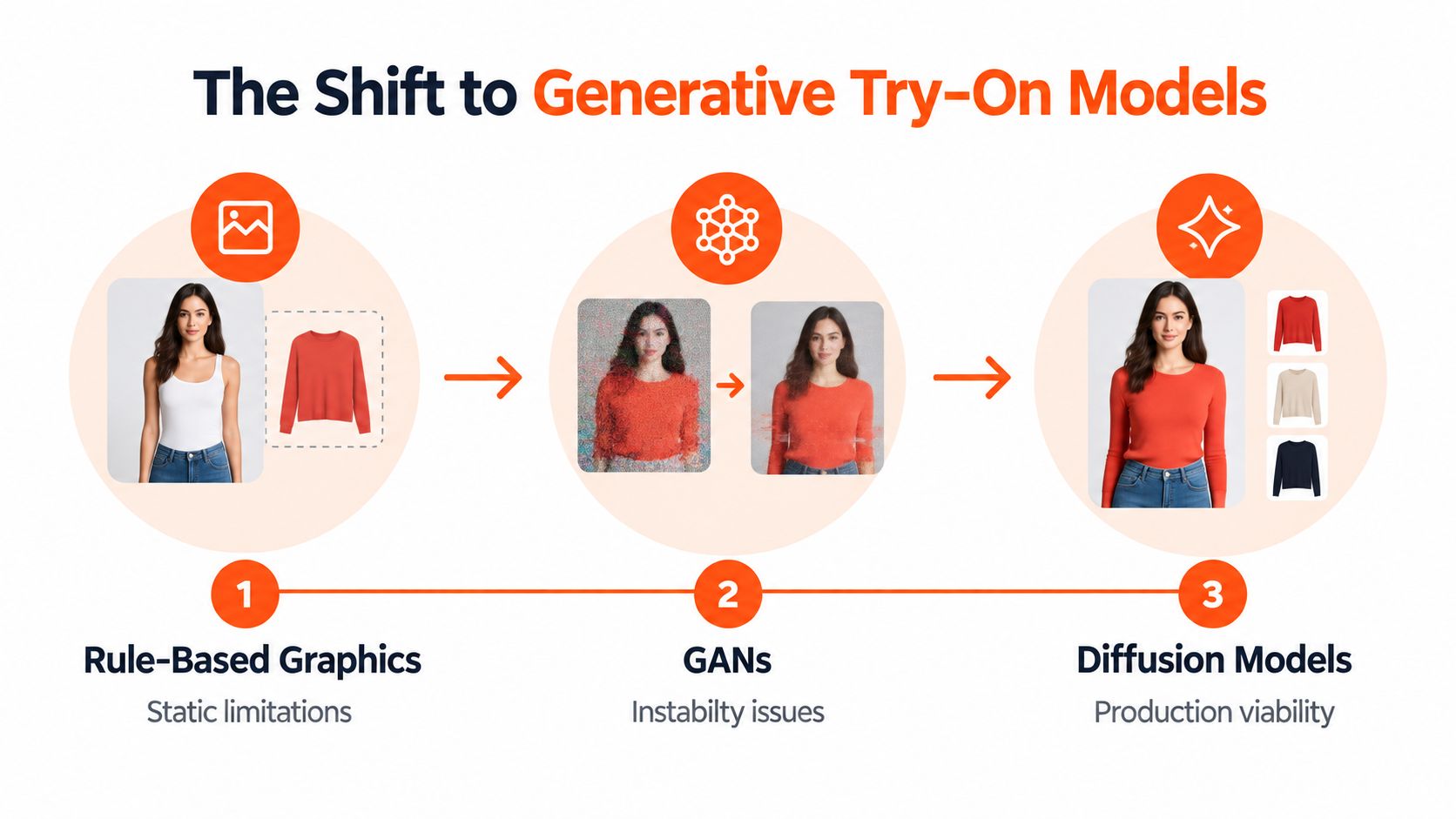
The commercial implication is important for catalog operators. By 2018–2020, apparel-focused e-commerce virtual try-on products had emerged. By 2026, generative AI-based virtual try-on was described as a mature commercial product for apparel and jewelry in the cited industry history. That doesn't mean every result is publication-ready. It means the technology can now be evaluated as infrastructure, with queues, quality checks, storage, and fallbacks.
The category has also expanded beyond a novelty feature. One market report valued virtual try-on at USD 15.18 billion in 2025 and projected USD 48.10 billion by 2030, a 25.95% CAGR. The same report says software represented 61.43% of market share in 2024, apparel represented 47.64% of the application mix, and physical stores held 63.19% of end-user share. Virtual stores and e-commerce channels were projected to grow at a 27.94% CAGR through 2030, while smart mirrors and kiosks held 43.86% of technology-segment revenue in 2024, according to the virtual try-on market analysis.
For sellers, the lesson isn't to expect a perfect image from every call. Generative models make scalable visual merchandising possible, but they also make QA mandatory. A modern API creates a candidate image. Your pipeline decides whether that image belongs in a listing.
A detailed guide to virtual try-on clothing workflows helps explain the difference between an interactive consumer feature and a repeatable catalog process.
API Payloads and Asynchronous Processing
A virtual try-on request normally needs two core assets:
- A person image, usually a fixed model reference for catalog consistency.
- A clothing product image, showing the item to be placed on that person.
Keep those assets addressable by stable identifiers. A product record might contain a SKU, source image path, garment category, model reference, requested output count, and current job status. The generated file should receive its own identifier instead of replacing the source.
Google Cloud exposes its virtual try-on capability as an image-generation endpoint under Vertex AI. Its publisher model is named virtual-try-on-preview-08-04, and the REST predict request follows this structure:
POST https://REGION-aiplatform.googleapis.com/v1/projects/PROJECT_ID/locations/REGION/publishers/google/models/virtual-try-on-preview-08-04:predict
The Google Cloud Virtual Try-On API reference shows why deployment details matter. You need a regional choice, authenticated access, and client-side handling for generated outputs. Don't build a catalog script that assumes one synchronous request will finish immediately and return a permanent public file.
Queue the work instead of looping blindly
A workable batch controller should:
- Read eligible SKU records.
- Create a job for each product and model combination.
- Place jobs into a queue with a controlled concurrency level.
- Submit requests while respecting provider throttling.
- Record pending, processing, completed, and failed states.
- Poll or receive completion events.
- Store the result and its metadata.
- Send failed jobs to a retry or review queue.
The accepted IMAGE_COUNT range for the Google Cloud workflow is 1 to 4, as described in this virtual try-on API documentation. That range is suited to producing a small set of variations per request. It isn't a mechanism for sending a whole catalog in one call. Your application still needs an outer batch loop, a queue, and a way to avoid duplicate work.
Use idempotency at the job level. If a network timeout occurs after submission, don't automatically create a second generation unless you can confirm the first job failed. Save the request parameters and input hashes, then let the worker decide whether the same job can be resumed.
For storage, keep the input person image, product image, API response, generated asset, and QA result linked to the same SKU. A practical image-processing workflow using Amazon S3 illustrates why object storage and metadata belong in the design from the beginning, even if your store uses a different platform.
Marketplace Dimension and Background Rules
A convincing generated image can still fail a marketplace listing. Apply channel formatting after generation and before human approval. For catalog processing, create a marketplace-specific derivative for each SKU instead of making one file serve every channel.
| Channel | Requirement to enforce |
|---|---|
| Amazon main image | Pure white background at RGB 255,255,255, with the longest side at 1600 pixels or more |
| Etsy | 2000 pixels on the shortest side |
| Shopify | Square product images, up to 4472 × 4472 |
The e-commerce product image requirements guide summarizes these channel rules. For Amazon, also review the Amazon main image white background requirements for exact RGB and dimension validation. Store source dimensions, output dimensions, channel, crop, and background checks in metadata so later resizing remains traceable.
Build formatting into the job
For Amazon, measure the background colour numerically. Near-white grey can look acceptable on a monitor and still fail validation. If the generated scene is lifestyle-oriented, route it to a separate lifestyle derivative and reserve the pure-white version for the main image.
For Etsy, measure the shortest side after the final crop. Cropping a square or portrait source can change the dimension that controls eligibility. For Shopify, preserve a square canvas and add padding when the product proportions would otherwise create an awkward crop.
Use a deterministic naming pattern:
SKU_channel_view_version.format
This naming scheme lets a worker regenerate only the Amazon derivative without changing the Shopify or Etsy asset. It also keeps seasonal refreshes from mixing old and new files in the same folder.
A marketplace image is an export target, not just a generated picture. Validate the canvas, colour, file type, and crop as separate fields.
Run these checks across the entire batch. A pipeline can pass its first group of images and fail when a later category produces portrait outputs. Automated validation should flag the exception with the failed field and SKU. A person then decides whether the image still represents the product accurately.
Multi-Dimensional Quality Assurance
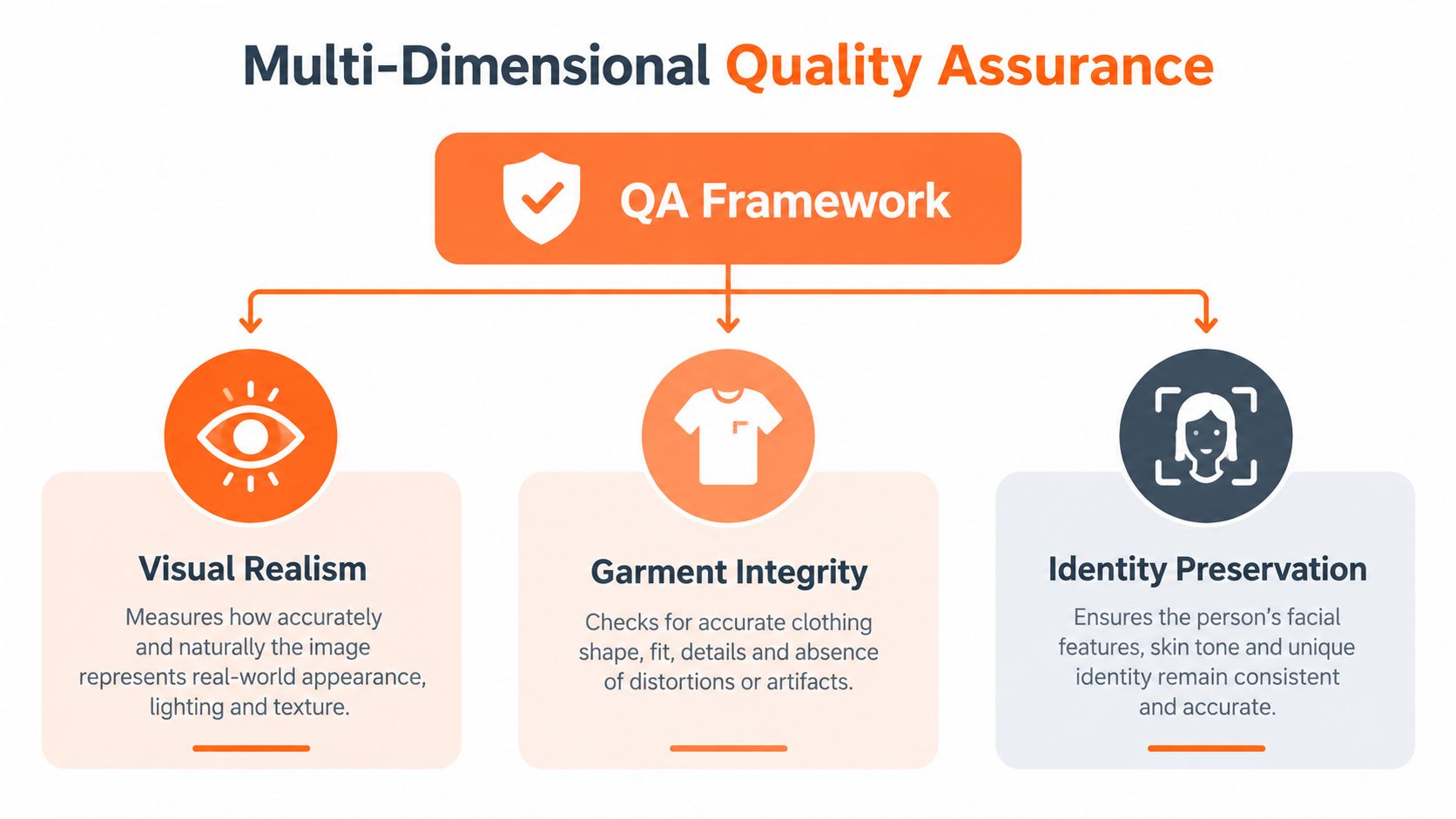
Visual realism is only one part of virtual try-on quality. An image can look polished at thumbnail size and fail when a shopper examines the sleeve, hand, hem, logo, or background. Independent benchmark literature, including VTBench, separates evaluation into five dimensions: overall image quality, texture preservation, complex background consistency, cross-category size adaptability, and hand-occlusion handling. See the VTBench research paper for the benchmark framing.
Doing this for a whole catalog?
MerchLoom runs background removal, upscaling and AI editing across every product photo you have — one prompt, whole batch. Try 2 batches free, no signup.
Try it freeThat framework changes how you test a batch. Don't approve a model because it produces attractive images for one T-shirt. Test categories and poses that expose different weaknesses.
Test the failure points deliberately
Overall image quality covers composition, sharpness, lighting, and whether the result reads as a product photograph. It shouldn't hide defects in the other dimensions.
Texture preservation checks stripes, knit patterns, seams, buttons, logos, prints, and material appearance. A smooth fabric may survive generation while a detailed pattern becomes distorted.
Background consistency matters when the model reference includes furniture, walls, shelves, or outdoor elements. Look for shadows that don't match the light source and objects that warp around the garment.
Cross-category size adaptability tests how the system handles shirts, trousers, dresses, outerwear, footwear, and accessories. A model that works for upper-body garments may not place a bag or shoe correctly.
Hand occlusion handling deserves its own review. Fingers may merge with sleeves, hands may disappear behind fabric, or the garment may cover an area that should remain visible. These faults often appear only when the pose includes crossed arms or hands near the torso.
Create a small approval set for each category and pose before launching the full run. Compare outputs against the original product image, not only against a generic standard of realism. If a logo changes, a pocket disappears, or a hemline moves, the image may misrepresent the item even if the model looks natural.
A useful image editing framework for e-commerce can sit alongside these checks, but no automated score replaces human review for catalog accuracy. Mark each failed output with a reason code. That lets you identify whether the issue comes from the source photo, model pose, category, prompt, or generation service.
Production Architecture and Error Handling
A successful test call proves very little about a production catalog. At scale, the system must handle authentication, queue depth, retries, storage, privacy, provider errors, and partial completion without losing track of the SKU.
Start with a job record. It should include the product identifier, person-image identifier, input locations, model settings, output count, current status, retry count, error message, and timestamps. Keep the status machine small and explicit:
queued → submitted → processing → completed
A separate failed state should include whether the error is retryable. Authentication errors, invalid image inputs, and unsupported categories usually need correction. Temporary service errors, timeouts, and throttling responses may be retried with backoff.
Protect the worker
Use a queue between the catalog importer and the API worker. The importer can continue registering products while workers process requests at a controlled rate. Throttling protects your account and prevents a burst from causing a long chain of failures.
Useful controls include:
- Retry limits: Stop retrying a permanently invalid source image.
- Backoff: Wait progressively longer after temporary failures.
- Dead-letter handling: Send jobs that exhaust retries to a review list.
- Timeout recovery: Reconcile uncertain jobs before submitting duplicates.
- Cost tracking: Record requested variations and completed outputs by SKU.
- Observability: Log latency, error type, provider response, and final file location.
Privacy needs its own path. If the workflow uses customer-uploaded photographs rather than a fixed catalog model, define retention, deletion, access, and consent rules before launch. Don't leave personal images in a shared bucket because the prototype did. Restrict access, separate customer assets from public product assets, and avoid exposing permanent public URLs where a controlled delivery URL will work.
Storefront fallbacks are equally practical. If generation or image delivery fails, show the standard product photograph. A broken try-on image shouldn't replace the only usable listing image. Publish the generated preview as an additional asset only after it passes validation, and retain the original listing image as the default fallback.
Consumer Adoption and Privacy Friction
A seller may assume that shoppers will upload a body scan or personal photo as soon as a try-on widget appears. That assumption ignores the trust decision at the centre of the experience. EuroShop reports that 42% of shoppers hesitate to upload body scans because of data-breach fears, while its coverage also highlights bias, lighting, and fabric-rendering problems as ongoing obstacles. Read the EuroShop coverage of virtual try-on in retail for that adoption context.
The practical response isn't to force every shopper into an upload flow. Use generated on-model catalog images when the goal is merchandising, and offer interactive try-on only where the shopper understands what will happen to their image. A static preview has lower participation friction because it doesn't require a body scan. It also avoids presenting a generated image as a guarantee of fit.
Explain the boundaries clearly
Product pages should state:
- What image the shopper needs to provide.
- Whether the image is stored or deleted after processing.
- Whether the result is an approximation rather than a fit guarantee.
- How shoppers can avoid uploading identifying details.
- Where they can find sizing information and return terms.
AR can remain useful when latency and deployment simplicity matter. Market coverage says AR held the largest share in 2025 because it is lower-latency and easier to deploy, while the category is also moving toward generative try-on and AI sizing recommendations. Choose the mode based on the job. AR may suit an interactive storefront feature. Generated previews may suit a seller preparing a large catalog without asking every shopper to upload an image.
For teams handling personal references across several automated services, guidance on managing sensitive data across automations provides a useful privacy checklist. Your image pipeline should apply the same discipline to access permissions, retention, logging, and deletion as it does to product files.
Chaining AI Pipelines for Cost Efficiency
Don't send an oversized, unprepared source image into the most expensive generation step by default. A better sequence is to prepare the image, generate a working-resolution try-on result, inspect it, and upscale only the approved output. This keeps expensive processing away from files that will later be rejected for bad framing or garment defects.
A catalogue pipeline can use this order:
- Normalize the source: Correct orientation, remove irrelevant borders, and standardize the model and product framing.
- Prepare the garment: Isolate the product when needed and preserve details that the try-on model must read.
- Generate at a working resolution: Produce the try-on candidate and reject obvious failures before enlargement.
- Upscale approved results: Increase resolution only after the garment, pose, and composition pass review.
- Create channel derivatives: Apply the Amazon, Etsy, and Shopify canvas rules separately.
This is also where MerchLoom fits as an operational option. It runs chained AI pipelines across a whole collection rather than requiring you to edit one image at a time. You can try the first images with no account. Its model is pay-per-image, and credits never expire.
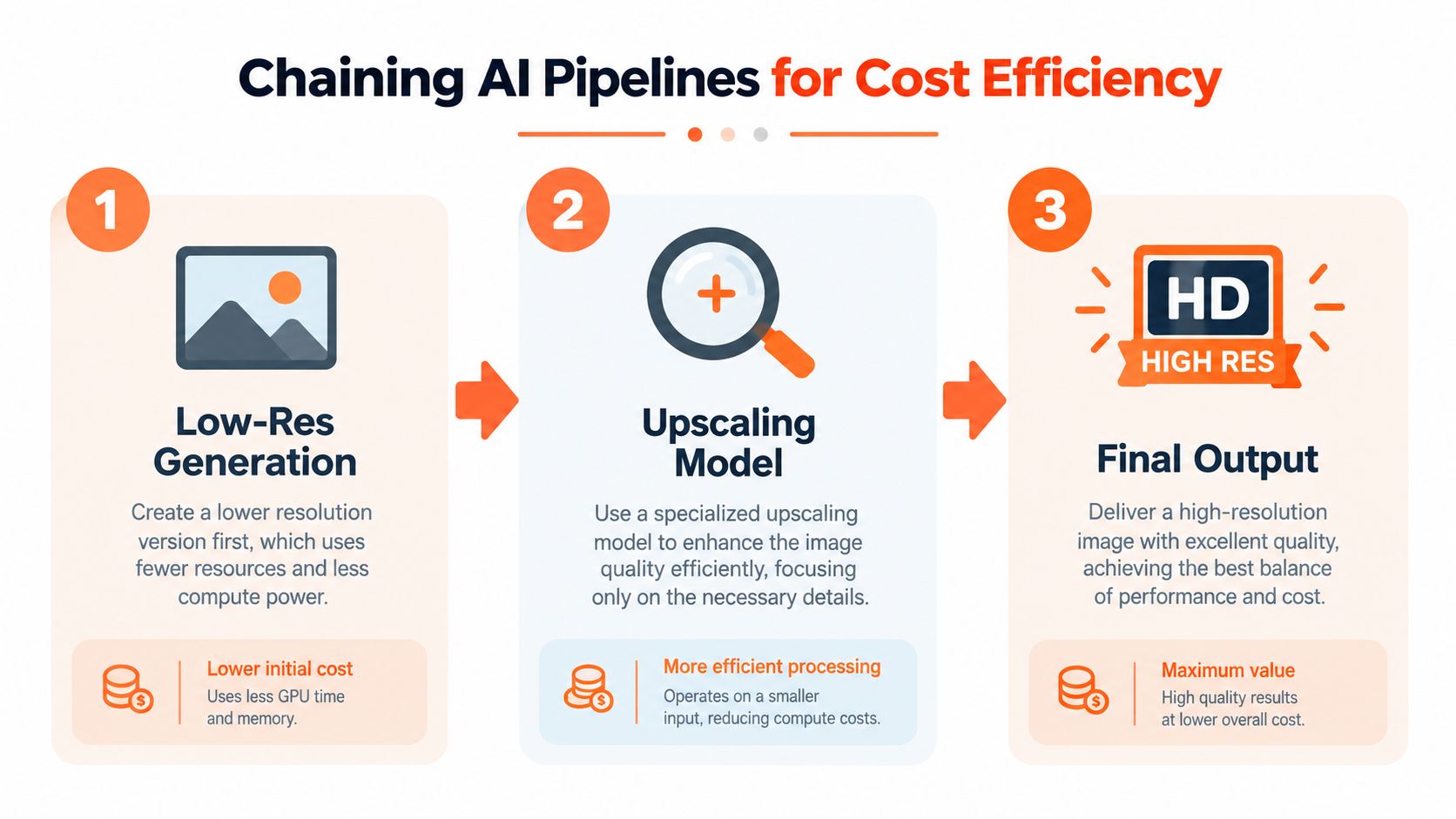
The order matters for consistency as much as cost. If one SKU gets background removal before try-on and another receives it afterward, edges and shadows may differ across the collection. Save the pipeline version with every output so you can reproduce a seasonal batch or change one stage without redoing unrelated work.
Don't treat chaining as permission to remove review. A low-resolution candidate can conceal a small logo defect, and an upscaler can make a warped hand more visible rather than correcting it. Use the cheaper early stages for filtering, then reserve human attention for the final images that have passed technical and visual checks.
Pre-Launch Pipeline Audit Checklist
Run a controlled sample before processing the full collection. Include different garment categories, model poses, source backgrounds, and the output formats your stores need. The point isn't to make the sample look impressive. It is to expose the conditions that could invalidate hundreds of files.
Use this checklist:
- Confirm source mapping: Every product image points to the correct SKU, colour, and category.
- Check model consistency: The selected person reference has the intended pose, crop, lighting, and background.
- Validate the API job: Authentication works, requests enter the queue, output counts stay within the provider's accepted range, and failures receive a status.
- Set throttling and retries: Workers respect provider limits, retry only temporary failures, and route unresolved jobs to review.
- Check Amazon formatting: The main-image derivative uses pure RGB 255,255,255 and has a longest side of 1600 pixels or more.
- Verify Etsy sizing: The shortest side reaches 2000 pixels after the final crop.
- Confirm Shopify framing: The product image is square and stays within 4472 × 4472.
- Review garment integrity: Compare logos, patterns, seams, hems, sleeves, and accessories with the source.
- Review hands and backgrounds: Inspect occlusion, shadows, lighting, and objects near the model.
- Preserve a fallback: Keep the original product image available if the generated asset fails or is rejected.
MerchLoom can execute this type of batch workflow without requiring you to manage custom server infrastructure, but its outputs still need human review. It isn't a full Photoshop replacement, and no virtual try-on API should be treated as one.
MerchLoom lets you import product images, chain preparation, virtual try-on, upscaling, and marketplace formatting steps across a collection, then review the results before publishing. Try the first images without an account and visit MerchLoom when you're ready to process your catalog as a batch instead of one file at a time.
Stop editing product photos one at a time
Upload your catalog or connect your store. Describe the result once. MerchLoom does the rest.
Try it free — no signup