
Product Photo Automation: Boost E-commerce Visuals 2026
Transform e-commerce with product photo automation. Discover batch processing, AI pipelines, and cost optimization to scale your brand's visuals.
A new collection lands, the photographer drops a folder of raw images, and the product team wants listings live before the next promo starts. That's where most sellers feel the bottleneck. The products are ready, but the catalogue isn't, because hundreds of files still need background cleanup, framing, resizing, and channel-specific exports.
Manual editing breaks down fast at that point. One image is manageable. Ten images are annoying. A few hundred images turn into an operations problem that pulls time from merchandising, launches, and marketplace upkeep. Product photo automation matters because it turns that pile of raw files into usable commercial assets without asking someone to touch every image by hand.
Beyond Single Edits The New Reality of Product Photos
The old workflow usually looks the same. A team member opens files one by one, removes backgrounds, nudges alignment, exports one size for Shopify, another for Amazon, and then realises Etsy needs a different crop. By the time that batch is done, the next set of products has already arrived.

That approach worked when catalogues were small and refresh cycles were slower. It doesn't hold up when you're managing variants, seasonal drops, marketplace feeds, and paid creative from the same source images. In Canada alone, e-commerce sales reached C$52.8 billion in 2023, and the broader automated product photography studios market was valued at USD 0.54 billion in 2026 and is projected to reach USD 1.39 billion by 2035 at an 11% CAGR, according to Business Research Insights on automated product photography studios.
Manual editing fails at catalogue scale
The pain isn't just time. It's inconsistency.
When different people edit different batches, lighting shifts, white backgrounds don't match, crop ratios drift, and product positioning changes from listing to listing. Shoppers may not know why a catalogue feels uneven, but they notice it.
Practical rule: If your team edits product photos file by file, the real problem isn't editing skill. It's workflow design.
What changes when automation becomes operational
Product photo automation replaces one-off edits with repeatable processing. Instead of asking, “How do we fix this image?”, the better question is, “What should happen to every image in this collection?”
That shift matters because it treats visual production like inventory operations. You define the standard once, then run it across the batch. The result is less rework, fewer formatting mistakes, and faster launches.
For busy sellers, that's the difference between image editing as cleanup work and image processing as part of the listing pipeline.
What Is Product Photo Automation Exactly
Product photo automation is the process of turning raw product images into listing-ready assets through a repeatable workflow, without manual editing on every file. That's broader than a single AI feature.
A background remover on its own isn't full automation. Neither is a filter pack, a Photoshop action, or a one-click mobile edit. Those can help with individual tasks, but they still leave someone managing the sequence, checking each export, and rebuilding the same steps every time a new batch comes in.
It's a workflow, not a trick
A real automation setup handles a chain of tasks such as:
- Background cleanup: Remove or replace backgrounds so listings meet channel requirements.
- Framing rules: Centre products consistently, keep margins even, and avoid one image looking cramped while the next feels empty.
- Channel outputs: Create a white-background marketplace version, a square storefront version, and a larger lifestyle-ready version from the same source file.
- Resolution handling: Prepare sharper outputs when the source image needs more detail for zoom or larger display placements.
That sequence is what matters. A seller doesn't just need “AI editing”. They need a recipe that can be reused across an entire collection.
According to Autophoto's roundup of AI product photography statistics, a 2025 industry statistic cited by Squareshot says 67% of online shoppers name image quality as the top factor in buying decisions, and modern AI photo editing platforms can process 5,000+ images in a single batch. That combination is the real point. Quality matters, and scale matters at the same time.
What automation does better than manual actions
Manual actions tend to break when products vary. A handbag, a lamp, and a framed print don't crop the same way. A workflow system can apply category-aware logic instead of forcing every image into the same rigid template.
Good product photo automation doesn't just make images look cleaner. It makes outputs more predictable across mixed catalogues.
For sellers comparing tools, AdCrafty's guide on AI visuals is useful because it helps separate simple AI image generation from practical e-commerce image workflows. That distinction matters. One is about making a nice image. The other is about getting a whole catalogue ready for sale.
The AI-Powered Workflow From Intake to Output
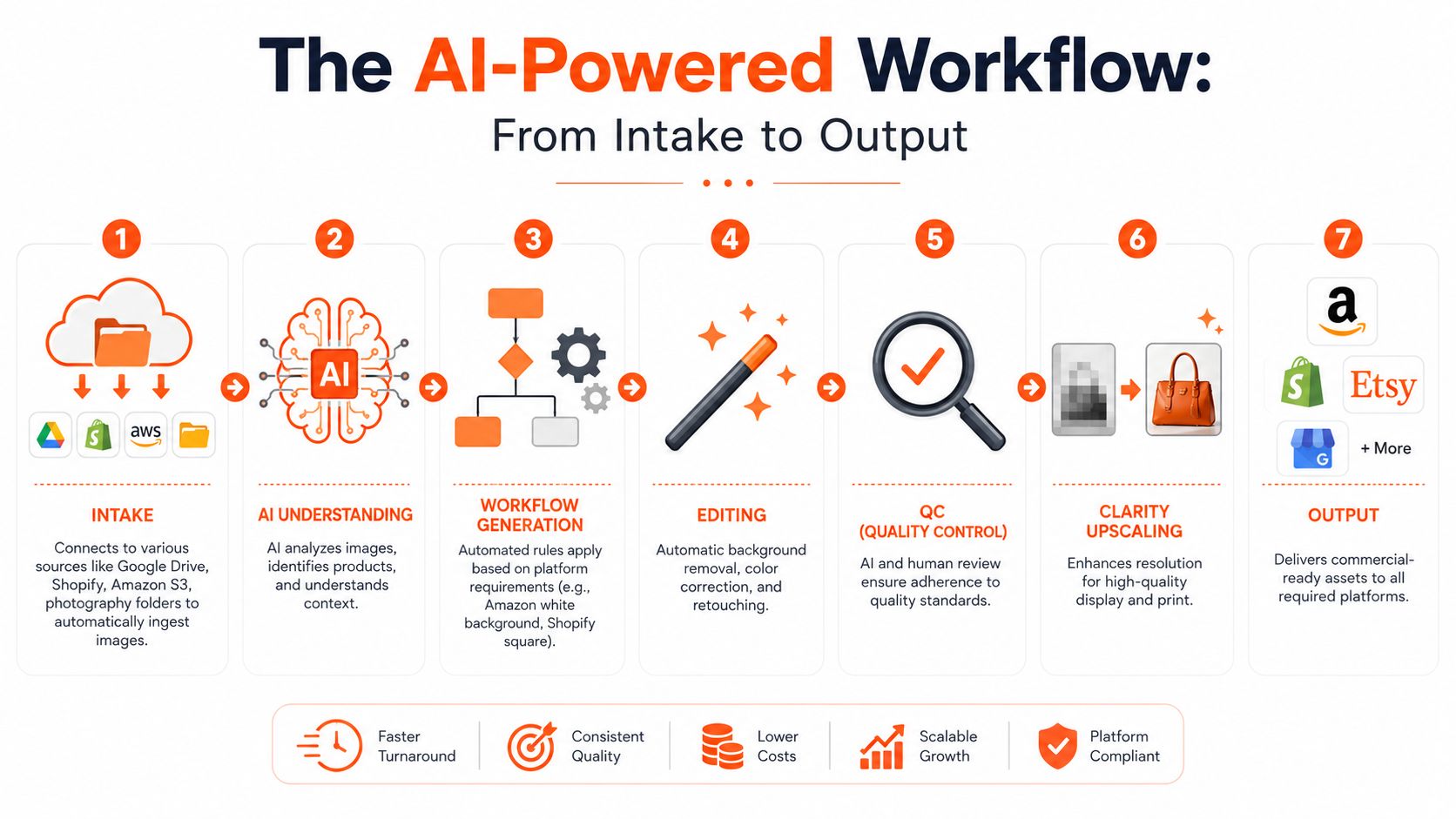
Significant time is often lost before editing even begins. Files are scattered across shared drives, cloud folders, marketplace exports, photographer handoff folders, and old archive storage. If the workflow starts with downloading everything and re-uploading it somewhere else, the process is already slower than it should be.
Intake starts where your files already live
A practical system should connect to existing storage and commerce tools. That includes Google Drive, Dropbox, Box, Shopify, WooCommerce, BigCommerce, Amazon S3, Cloudinary, Google Cloud, DigitalOcean Spaces, Cloudflare R2, Backblaze B2, and ordinary photography folders.
That matters because image automation should reduce movement, not create more of it. If your team already organises raw photos by shoot date, SKU, season, or supplier, the workflow should respect that structure.
One option in this category is MerchLoom's AI image workflow automation approach, which supports a bring-your-own-data model and runs chained image pipelines across connected collections rather than requiring a fresh upload cycle for every job.
AI understanding comes before editing
Once files are ingested, the system needs to identify what it's looking at. Not in an abstract “AI” sense, but in ways that affect output:
- Product boundaries: Where the item ends and the background begins
- Orientation: Whether the product is front-facing, flat lay, overhead, or angled
- Category context: Whether the image should be treated like apparel, packaging, furniture, or accessories
- Output intent: Whether this batch is for marketplace compliance, storefront merchandising, or campaign creative
In Canada, Statistics Canada's 2023 Survey of Household Spending found that 51.7% of consumers made at least one online purchase in the prior 12 months, as cited in Ailee's guide to automated product photography. That's why image processing is a catalogue systems issue, not just a design task. More than half the market is already buying online.
Workflow generation, QC, and final delivery
The useful part comes next. A seller should be able to describe the desired outcome in plain English. For example: remove background, keep true product colour, export white background for Amazon, square crop for Shopify, and larger listing image for Etsy. The platform then turns that request into an ordered pipeline.
Editing only works well if the order is right. Background removal often comes early. Colour correction should preserve the actual product. Reframing needs to fit channel rules. Upscaling comes later when needed, including Clarity upscaling for sharper outputs from weaker source files.
For teams that also need to convert product images into ad-ready assets, AdStellar AI's workflow for generating image ads from a product URL is a useful adjacent reference because it shows what happens after the catalogue image is standardised.
QC should happen mid-batch, not only at the end. If shadows, crops, or colour handling are off, you want to catch that before the whole collection finishes processing.
The Strategic Advantage of Batch Processing
Batch processing sounds like an efficiency feature, but the bigger impact is strategic. It changes how quickly a team can launch, how reliably a catalogue stays on-brand, and how easily one master image set can feed multiple channels without rework.
Consistency is what customers actually see
A catalogue rarely fails because one image looks bad. It fails because fifty images look slightly different.
That's where batch processing earns its place. Every product can follow the same rules for margins, lighting treatment, background style, and output dimensions. A customer browsing a category page should feel that the products belong to the same store, not that they came from different shoots and different editors.
For teams handling ongoing refreshes, batch product photo editing workflows are useful because they standardise the treatment across collections instead of relying on memory and manual checking.
Speed matters when launches move fast
Speed to market isn't only about being first. It's also about avoiding backlog.
If your visual team takes too long to process a new collection, products sit in a limbo state. They exist in inventory systems and planning sheets but not in revenue channels. Batch processing removes that choke point by letting teams run grouped edits across the whole drop rather than waiting for one-by-one handwork.
A delayed image workflow delays merchandising, marketplace updates, ad creative, and often the first week of sales on a new collection.
Doing this for a whole catalog?
MerchLoom runs background removal, upscaling and AI editing across every product photo you have — one prompt, whole batch.
Try MerchLoomOne source set can serve every channel
The strongest catalogue workflows treat the original product image as a master asset, then produce channel-specific variants from it.
A practical output mix often includes:
- Marketplace compliance versions: White background, tighter framing, no distracting props
- Storefront versions: Square crops for collection grids and cleaner consistency across Shopify themes
- Lifestyle or campaign derivatives: Wider framing for banners, email modules, or paid social placements
- Archive-safe masters: A higher-quality processed source that can be reused later without rebuilding the work
What doesn't work is exporting manually for each destination every time. That creates version sprawl and makes it harder to know which file is current. Batch processing is valuable because it turns one approved workflow into many reliable outputs.
Unlocking ROI Through Smart Cost Optimization
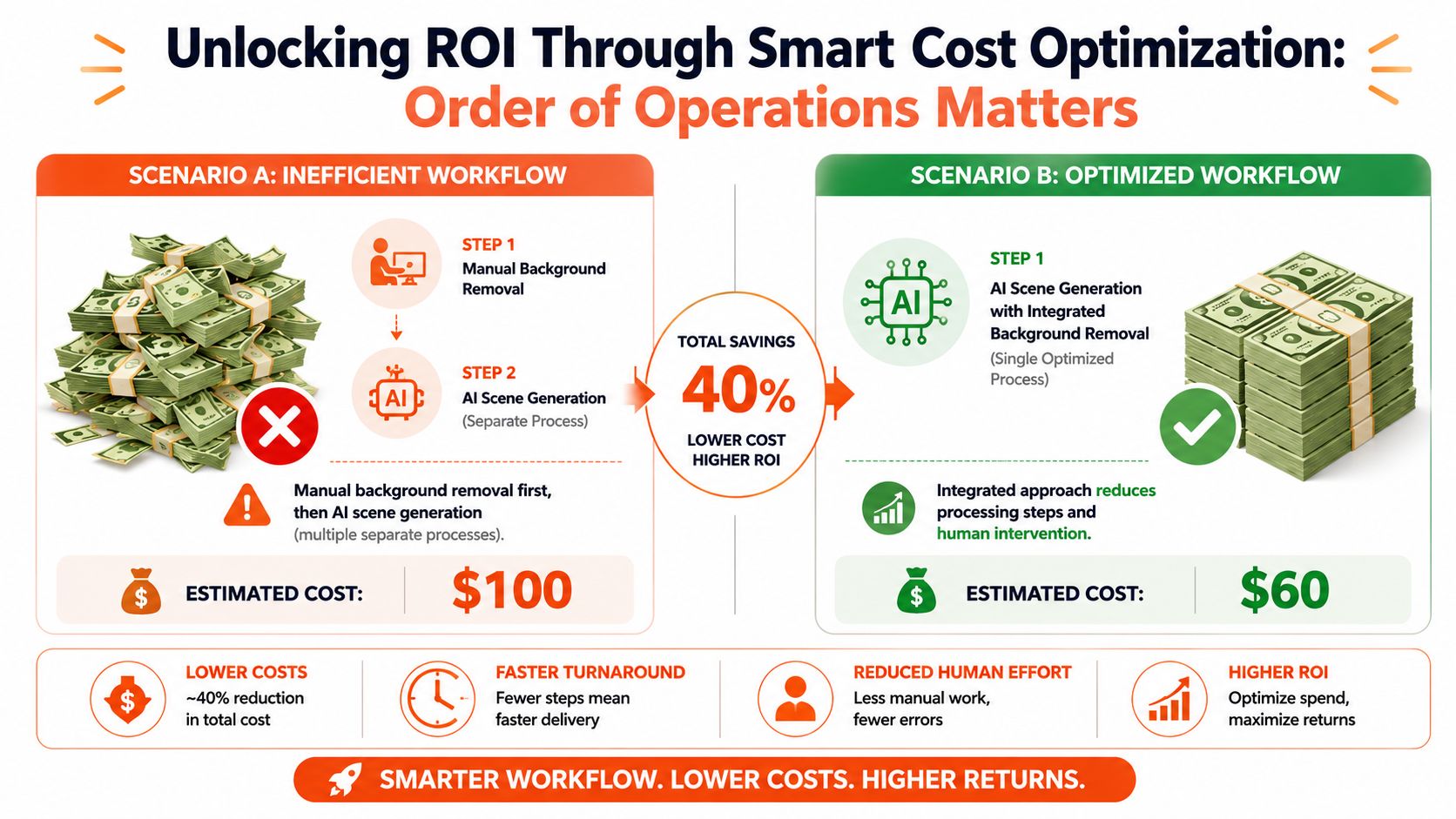
Many sellers evaluate automation tools by plan price and stop there. That misses the actual cost driver. In AI image workflows, the order of operations changes what you pay.
Why per-image pricing can be misleading
A 2025 report indicates 68% of mid-market sellers underestimate their per-image automation costs by over 40%. The same report notes that removing backgrounds before upscaling can save up to 87% on compute costs. Those are the kinds of details most tutorials skip.
The operational lesson is simple. If a workflow enlarges an image before doing heavy processing, the expensive step runs on more pixels than necessary. If the system trims complexity earlier, later steps become cheaper.
The expensive way and the efficient way
Here's the trade-off in plain terms:
| Workflow order | What happens | Likely outcome |
|---|---|---|
| Upscale first | The system processes a larger file through later editing steps | More compute used than needed |
| Background removal first | The file is cleaned before the heavier enhancement stage | Lower processing cost and cleaner pipeline |
That doesn't mean every workflow should follow the exact same order. It does mean sellers should ask how the tool sequences steps, whether costs are visible before processing, and whether the pipeline can be tuned for catalogue work rather than demo images.
Cost control should be designed into the workflow
This is one reason upscaling shouldn't be treated like a cosmetic extra. It's a production step, and it belongs at the right point in the chain. If you're comparing output quality and sequencing, MerchLoom's guide to HD photo conversion is relevant because it highlights the relationship between sharper output and workflow structure.
Cheap-looking automation often comes from a bad sequence, not bad AI. Teams pay more, wait longer, and still get weaker outputs when steps are in the wrong order.
The sellers who get the best ROI from product photo automation usually do three things well: they standardise inputs, limit unnecessary transformations, and insist on clear pricing before the batch runs.
Maintaining Brand Consistency with AI Scenes
Lifestyle scenes are where many teams get excited and then run into trouble. A single generated image can look polished. A batch of them can feel disconnected fast.

The issue usually isn't that AI scenes look artificial. It's that they don't look related. One image has cool daylight, the next has amber evening tones, the next shifts perspective, and the whole collection stops feeling like a brand system.
A 2025 study found that 74% of DTC brands report a 30% drop in customer trust due to inconsistent visual tones in AI-generated lifestyle image batches. That is the primary risk. Not novelty. Drift.
What consistency actually requires
The fix isn't “use less AI”. The fix is to lock style variables before batch generation.
That means setting rules such as:
- Lighting direction and warmth: soft daylight, warm afternoon light, studio-neutral, high contrast
- Camera perspective: eye level, top-down, 45-degree angle, straight-on shelf view
- Room or environment language: minimalist kitchen, textured stone surface, bright nursery, dark moody vanity
- Colour discipline: restrained neutrals, muted earth tones, clean white set, brand-accent backdrop
Most failed AI lifestyle batches come from prompts that are too loose. “Put this product in a beautiful room” sounds creative, but it produces visual drift across the catalogue.
Batch prompts need to act like brand guidelines
The better way is to write instructions that behave like a style manual. If you're generating hundreds of product scenes, every prompt should reinforce the same camera feel and the same environment logic.
For teams exploring this use case, AI product scene generator workflows are useful because they focus on repeatable scene structure rather than one-off novelty outputs.
A short demo helps show how this kind of scene control works in practice.
If one scene looks great and the next forty don't match it, you don't have a creative win. You have catalogue fragmentation.
The teams that succeed with AI scenes treat them like production assets. They define the visual system first, then let the model create within that system.
Your Implementation Checklist for Automation
Most sellers don't need a big transformation project. They need a sane starting point. The cleanest way to adopt product photo automation is to test it as an operations workflow, not as a creative experiment.
Start with the current process
Write down how images move today. Where they come from, who edits them, how many handoffs happen, and where delays show up. If you don't map the existing process, you won't know whether the automation improved anything.
Then gather the sources you'll need. That usually includes photographer folders, marketplace exports, Shopify product images, and whatever cloud storage the team already uses.
Run a small but realistic pilot
Don't start with your hardest category. Start with a batch that reflects real catalogue work but won't create major risk if you need to refine the workflow.
A useful pilot checklist looks like this:
- Audit your baseline: Track current editing effort, revisions, and handoff friction.
- List image sources: Note whether files live in Google Drive, Dropbox, Shopify, Amazon S3, or local photography folders.
- Define channel rules: Decide what counts as done for Amazon, Shopify, Etsy, and any social placements.
- Pick a test batch: Choose a small collection with enough variation to expose workflow issues.
- Review output for consistency: Check edges, colour accuracy, framing, and whether every file meets listing needs.
- Decide how it scales: Document the workflow so future collections use the same rules.
For teams preparing that first test, a bulk product photo editor rollout is usually easier to evaluate when you compare one full batch against your current manual process instead of judging single-image demos.
Measure what matters
Don't over-focus on whether one image looks impressive. Judge the workflow on repeatability.
Ask practical questions. Did the batch stay consistent? Were exports ready for each platform? Could someone else on the team run the same process without rebuilding it from scratch? If the answer is yes, the workflow is working.
If your team is tired of pushing product photos through manual editing queues, MerchLoom is one option built for batch catalogue workflows. It connects to the image sources sellers already use, builds chained AI pipelines from plain-English instructions, and processes whole collections into marketplace-ready outputs without requiring one-by-one editing.
Stop editing product photos one at a time
Upload your catalog or connect your store. Describe the result once. MerchLoom does the rest.
Try MerchLoom