
Batch Product Photo Editing for E-commerce Success
Learn how to design and run efficient batch product photo editing workflows for your e-commerce store. Turn raw photos into marketplace-ready images at scale.
You finish a shoot, open the folder, and realise the hard part hasn't started yet. There are clean angles, alternate colourways, a few problem shots with glare, and a long list of destinations waiting for finished assets. Amazon wants a strict main image. Shopify needs orderly collection pages. Etsy rewards stronger context. Paid social needs crops that feel native, not recycled.
Many still treat that as a retouching queue. That's the mistake. At catalogue scale, batch product photo editing isn't a design chore. It's an operations system.
The shift matters because online retail runs on repetition. California alone has more than 1.1 million logistics and warehouse jobs tied to digital retail fulfilment, and Adobe documents Photoshop batch processing as a standard way to apply identical edits across many files to create “visual consistency” at scale, using recorded actions and File > Automate > Batch across folders of images in its guide to batch processing in Photoshop. If you're handling frequent launches, listing updates, or seasonal refreshes, that volume shows up in image work long before it shows up in reporting.
Beyond One-Off Edits The Case for Image Pipelines
A seller with ten hero images can get away with opening files one by one and making judgment calls. A seller with hundreds of SKUs can't. The problem isn't just time. It's drift.
One product gets a warmer white balance. Another sits lower in frame. A third has a slightly different crop because someone eyeballed it late in the day. None of these look serious in isolation. Together, they make a catalogue feel disorganised.
The operational view changes everything
An image pipeline fixes that by turning editing into a repeatable system. Raw files go in. Defined outputs come out. The decisions are made once in the workflow, not improvised on every image.
That changes how teams work after a photoshoot or product upload:
- Intake becomes structured instead of a loose folder dump
- Edits become rule-based instead of mood-based
- Exports become channel-specific instead of manually recreated
- QA becomes visual and fast instead of scattered across tabs
Practical rule: If two editors can produce noticeably different outputs from the same raw set, you don't have a workflow yet. You have preferences.
This is why batch processing has outgrown its old reputation as a simple Photoshop shortcut. In practice, it sits closer to fulfilment logic than to one-off retouching. You need naming, routing, output specs, exceptions, and review checkpoints.
Why sellers feel the pain after every shoot
The post-shoot backlog usually contains the same hidden costs:
- Repeated corrections on exposure, white balance, and framing
- Rework for each marketplace because the first export wasn't planned for downstream use
- Inconsistent lifestyle assets when context images are generated ad hoc
- Slow launch cycles because image prep becomes the bottleneck
Teams that want cleaner assets often start by learning how to shoot better. That helps. But shooting discipline only pays off fully when the back end is organised. A good reference point is this guide on how to make product photos look professional, because the “professional” look isn't just lighting or styling. It's also consistency across the full set.
A reliable image pipeline gives you that consistency without turning every launch into a manual editing marathon.
Designing Your E-commerce Image Workflow
The right workflow starts before you touch exposure, masking, or backgrounds. First define what the finished files need to do. If you skip that step, you'll edit the same product set multiple times because every downstream channel will expose a missing requirement.
Start with output rules, not editing tools
For most sellers, the core brief isn't “make these photos look good.” It's closer to this:
- Amazon main image needs a white background and strong product occupancy in frame
- Shopify collection image needs a crop that stays tidy in grid layouts
- Etsy listing image often benefits from a more contextual presentation
- Social ad creative needs vertical and square variants with room for text or motion overlays
- Product-in-context scenes need to look related to the catalogue, not like they came from a different brand
- Virtual try-on-style previews need clean source assets and consistent garment or accessory boundaries
If those outputs aren't defined up front, the batch won't hold together.
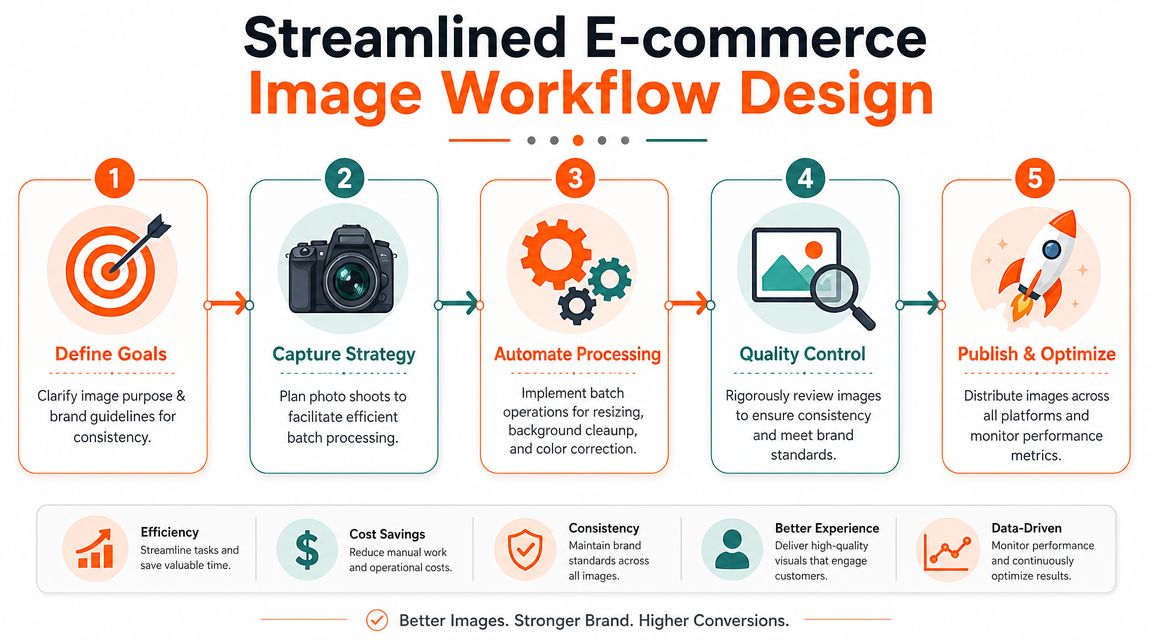
Build one style guide for the whole catalogue
A practical workflow standardises every image against a single style guide, then processes in a fixed order: cull and select, apply global exposure and white-balance normalisation, perform background removal and crop or alignment, then do final batch retouching and QA in grid view. LenFlash also stresses that catalogue consistency depends on synchronised exposure and white balance, while still reviewing each file for local corrections, and notes that Amazon requires the product to occupy at least 85% of the frame on a white background in its discussion of common product retouching mistakes.
A workable style guide doesn't need to be long. It needs to be specific. Keep it to a single page if possible:
Colour handling
Define your neutral white, acceptable warmth, and how metallics, fabrics, or skin-adjacent materials should render.Framing rules
Decide where products sit in frame, how much breathing room is allowed, and whether all primaries centre or align by base.Background policy
List where pure white is required, where transparent PNGs are useful, and where contextual scenes are allowed.Retouching limits
Specify what gets cleaned globally and what still requires manual review, such as reflections, wrinkles, dust, or edge fringing.
Grid review catches problems you won't notice image by image. A set can look fine in isolation and still fall apart as a collection.
Organise files so the batch doesn't collapse later
Folders matter more than often acknowledged. Separate raw selects, approved masters, channel variants, and exceptions. If multiple people touch the catalogue, use a naming scheme that reflects product ID, angle, colourway, and output type.
For teams that juggle approvals and large handoffs, a dedicated system for file structure and review helps. This overview of software for organizing client photos is useful because the bottleneck often starts in file chaos, not in editing itself.
When the workflow includes fit visuals or model-based previews, define those outputs alongside the standard listing set. Otherwise, your try-on assets become a separate side project. That's usually when consistency breaks. A useful reference point is this explanation of virtual product try-on workflows, especially for apparel and accessories that need both clean PDP images and more contextual previews.
Core Editing Operations in a Batch Pipeline
Most post-shoot image work falls apart because teams treat every operation as separate. They remove backgrounds in one tool, resize in another, create lifestyle scenes somewhere else, then manually rename exports. That's not a pipeline. It's a chain of interruptions.
Modern batch systems are moving in the opposite direction. Industry reporting on AI product photography notes that some platforms can process 5,000+ images in a single batch, and that the AI photo editors market reached $2.1 billion in 2024 and is projected to hit $8.9 billion by 2034, a 15.7% CAGR, in its review of AI product photography and photo editing stats. The important operational takeaway isn't the market size. It's that batch product photo editing now covers far more than resizing and basic corrections.
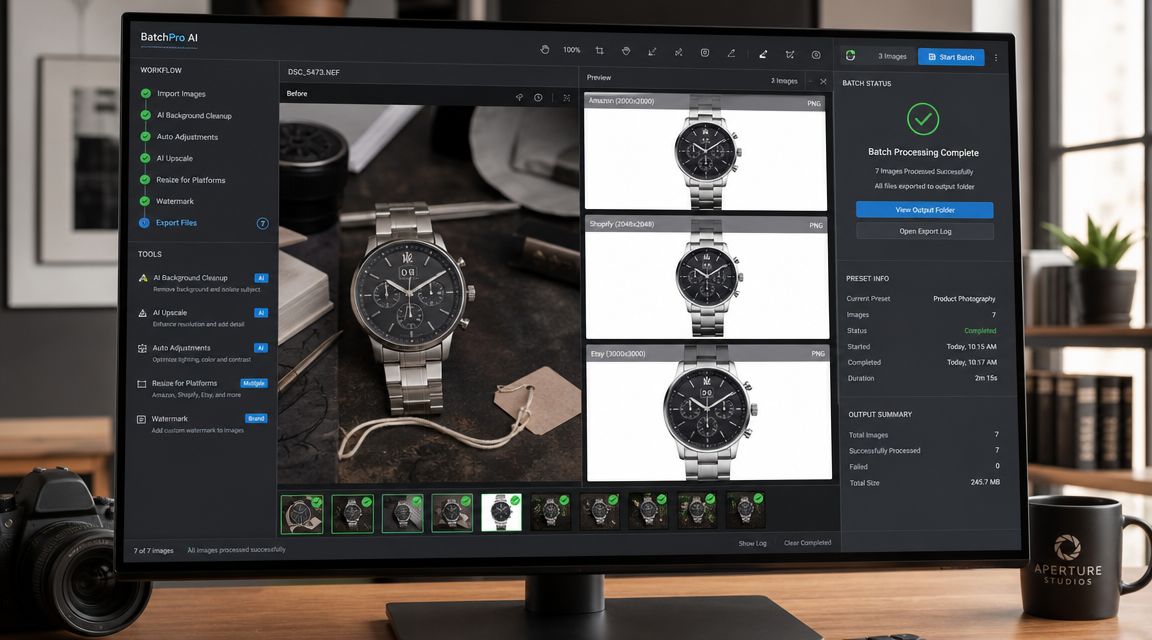
Preparation comes first
Background removal gets too much attention because it's visible. In practice, it's a preparation step.
A clean source image gives you options. Once the subject is isolated properly, you can send the same master into multiple downstream outputs:
- white-background marketplace images
- transparent cutouts for design teams
- collection thumbnails with standard crops
- product-in-context scenes
- ad creative variants
- virtual try-on-style previews
The order matters. If the image still has exposure inconsistency or a colour cast, every later output inherits that flaw.
Normalise before you stylise
The best-performing pipelines handle the plain corrections first. That usually means:
- cull unusable shots
- sync white balance and exposure across the set
- align crop and product position
- remove or replace backgrounds
- retouch edge cases
- export variants by channel
That sequence keeps the catalogue stable. It also stops teams wasting time on images that should've been rejected during culling.
Don't generate fancy scene work from a weak base file. Fix the catalogue master first, then branch outward.
Use one clean source for many outputs
Once you have a stable master, the pipeline becomes much more flexible. The same product can support multiple business needs without separate manual rebuilds.
A practical example looks like this:
Doing this for a whole catalog?
MerchLoom runs background removal, upscaling and AI editing across every product photo you have — one prompt, whole batch. Try 2 batches free, no signup.
Try it free| Output type | What the pipeline changes | Why it exists |
|---|---|---|
| Main listing image | white background, centred crop, compliance framing | marketplace approval and clean PDP presentation |
| Secondary listing image | alternate angle, mild shadow, same colour profile | product detail and browsing confidence |
| Lifestyle scene | context background, realistic placement, matched lighting | merchandising and storytelling |
| Try-on-style preview | body or accessory placement, fit-oriented framing | category exploration for fashion and accessories |
| Ad creative | space for copy, platform crop, stronger contrast | campaign use across paid social and display |
| Upscaled asset | larger export, preserved detail, sharpened edges | zoom, marketplace standards, and creative reuse |
Later in the workflow, advanced edits become useful, with tools for scene generation, reframing, and object-aware cleanup saving meaningful time. If you still need targeted fixes after a batch run, techniques such as content-aware fill in Photoshop remain useful for small defects the automated pass didn't solve cleanly.
A newer operating model is to describe the workflow in plain English and let the system chain the steps. That's where MerchLoom fits naturally for e-commerce teams. It takes a request like “clean this collection, remove backgrounds, make Amazon and Shopify crops, generate a set of lifestyle scenes, create try-on previews, and upscale final exports” and turns it into a multi-step batch pipeline across the whole collection.
Here's a visual walkthrough of that broader AI-assisted editing approach:
Where automation still needs supervision
Automation is strong at repeatable transformations. It's weaker at ambiguity.
Keep a manual check for:
- Reflective surfaces that confuse edge detection
- Transparent materials where masking can look brittle
- Mixed lighting that creates uneven colour correction
- Complex overlaps like straps, fringe, glassware, or translucent packaging
- Generated scenes that feel polished individually but inconsistent as a collection
That's the difference between an efficient pipeline and a careless one. The batch should do the heavy lifting. A human still needs to approve the catalogue.
Creating Rule-Based Variants for Multi-Channel Retail
A single “finished image” doesn't really exist anymore. What exists is a master asset plus a set of channel variants.
That matters because shoppers move across platforms. Adobe's 2024 Holiday Shopping Survey found that 57% of Canadian shoppers used more than one channel on the path to purchase, which is why inconsistent crops, backgrounds, and export formats create friction across touchpoints, as noted in this discussion of multi-channel batch product photo editing. The operational question isn't how to edit one image well. It's how to derive multiple compliant versions without visual drift.
One source image, several controlled outputs
The weak approach is to duplicate the file and re-edit it for every platform. That creates tiny differences in colour, framing, and cleanup. The better approach is to define rules once, then generate variants from the same approved source.
Think of it as branching logic:
- one master for colour and tonal consistency
- one set of crop rules by platform
- one background rule by use case
- one export spec by channel
- one QA pass to compare all variants against the same baseline
Marketplace Image Requirements At-a-Glance 2026
| Platform | Primary Background Rule | Minimum Resolution (Longest Side) | Recommended Aspect Ratio |
|---|---|---|---|
| Amazon | White background for main image, product should dominate frame | Listing-ready high resolution | Square or near-square for core catalogue use |
| Shopify | Flexible, but consistency across collection grids matters most | Listing-ready high resolution | Square works well for collection layouts |
| Etsy | Flexible, often benefits from contextual supporting images | Listing-ready high resolution | Square or vertical depending on category presentation |
| Social ads | Flexible, based on campaign creative | Platform-ready high resolution | Square and vertical variants are usually most useful |
Rule-based variants prove their worth. You can tell the system to produce:
- Amazon set with white background and strict occupancy framing
- Shopify set with uniform square crops
- Etsy set with cleaner contextual alternates
- Paid social set with vertical and square ad-ready versions
The goal isn't one universal image set. The goal is one controlled source that can produce different outputs without changing the brand's visual language.
That's especially important for products that need more than static catalogue treatment. Furniture may need room scenes. Beauty may need shelf and hand-held variants. Fashion may need fit previews. Those outputs should still inherit the same colour logic, cleanliness standard, and product scale.
For teams building those richer variants in a structured way, AI product visualisation workflows are useful because they treat contextual imagery as an extension of the catalogue, not a separate creative universe.
Optimizing for Cost Speed and Quality
A batch pipeline should save time, but speed alone isn't enough. If it creates expensive reruns or pushes flawed assets into listings, it's not efficient. It's just fast at making problems.
The best operational gains come from process design. Imagen AI says batch photo-editing software can cut post-production time by up to 96%, and ties that gain to reusable profiles, presets, and non-destructive synchronisation across RAW files in its guide to batch photo editing software. The same guidance also warns against treating automation as “set and forget”, especially when mixed lighting or unusual surfaces are involved.
Reorder steps to avoid wasted processing
Cost control often starts with sequencing. Don't run expensive transformations on files that still contain unnecessary image area or obvious rejects.
A practical order looks like this:
- Cull early so bad frames never enter the expensive stages
- Normalise globally before detailed local corrections
- Remove or simplify backgrounds before downstream scene work
- Upscale late once you know the image is approved and correctly framed
- Export channel variants last from the approved master
That order keeps compute and labour focused on images worth finishing.

Quality control has to be visual, not theoretical
A contact sheet or grid pass is where weak batches reveal themselves. You'll catch the image that runs too warm, the product that sits too low, the mask that clipped a handle, or the scene variant that looks off-brand.
Use a final review checklist:
Compare in grid view
Single-image review hides inconsistency. Collections expose it immediately.Inspect edge cases manually
Glass, chrome, clear packaging, and textured fabrics often need a closer look.Keep edits non-destructive
If the pipeline bakes in every choice too early, small fixes become full reruns.Check each output family separately
Main listings, contextual scenes, ad crops, and upscaled files fail in different ways.
Automation works best when the rules are stable. It struggles when products break the assumptions built into the batch.
What actually saves money
Not every shortcut is efficient. Some create hidden rework. The durable savings usually come from three places:
| Decision | What works | What doesn't |
|---|---|---|
| Presets and sync | apply reusable global corrections to similar sets | force one preset onto mixed lighting without review |
| Batch exports | generate all approved variants from one master | export manually from scattered working files |
| Final checks | review in contact sheet and inspect difficult materials | trust the batch blindly because the first few images looked fine |
Resolution planning matters here too. Sellers often upscale too early, then discover they need a different crop or channel version. If you're sorting out print sharpness, listing clarity, or marketplace resolution requirements, this guide to an image DPI converter is a practical reference for deciding what truly needs to be enlarged and what merely needs cleaner source preparation.
From Editing Tasks to Scalable Image Operations
The core shift is mental. Teams stop asking, “Who's editing these photos?” and start asking, “What system turns this raw set into approved assets for every channel?”
That system includes a style guide, a fixed order of operations, rule-based variants, and a QA pass that catches drift before customers do. Once those pieces are in place, batch product photo editing stops being a cleanup burden and starts functioning like production infrastructure.
The payoff shows up everywhere. Launches move faster. Collections look more coherent. Marketplace compliance becomes easier to maintain. Ad teams get usable assets without rebuilding from scratch. New channels become manageable because the workflow already knows how to branch from a master image into different outputs.
The same operational thinking is spreading into adjacent content functions too. Teams that standardise image workflows often do the same for motion assets, which is why resources on how to streamline video production with AI are relevant. The pattern is the same. Build repeatable systems first, then scale content production without multiplying manual work.
If you sell online, image work won't get simpler as the catalogue grows. It only gets more repetitive, more channel-specific, and more expensive to manage casually. The answer isn't more heroic editing sessions. It's a better pipeline.
If you want to turn plain product uploads into a repeatable batch workflow, MerchLoom is built for that operational job. It lets you describe the output you need in plain English, then runs the image pipeline across full collections for marketplace-ready listings, contextual scenes, ad variants, try-on previews, and other catalogue assets without forcing you to process one file at a time.
Stop editing product photos one at a time
Upload your catalog or connect your store. Describe the result once. MerchLoom does the rest.
Try it free — no signup