
AI Product Scene Generator: Transform Your E-commerce In
Discover how an AI product scene generator transforms e-commerce. Master batch processing, workflows, & create stunning lifestyle images for 2026.
You've already done the hard part. The products are shot, the files are organised, and the main listing images are clean enough to publish. Then the actual workload starts. Shopify needs square lifestyle images. Amazon wants the main image clean but still benefits from supporting context in secondary slots. Etsy likes imagery that feels handmade and lived-in. Paid social needs fresh creative every few weeks, not the same white-background packshot you uploaded months ago.
For a seller with a few SKUs, that's annoying. For a seller with hundreds, it turns into an operations problem.
That's where an AI product scene generator becomes useful. Not as a toy for making one dramatic hero image, but as a way to turn a folder of real product photos into structured, repeatable scene variations across a catalogue. The practical question isn't “can AI make something pretty?” It's “can this fit into the way product imagery gets produced, reviewed, resized, and published?”
The E-commerce Seller's Image Dilemma
A familiar setup looks like this. You have a directory full of products on white backgrounds. Maybe mugs, candles, skincare bottles, desk accessories, or packaged food. The images are good enough for listings, but they aren't enough for collection pages, ad creative, seasonal campaigns, or marketplace secondary images.
Traditional photography solves that, but only if you can afford repeated shoots, props, retouching, and coordination. It also creates a consistency problem. One campaign gets warm kitchen lighting, another gets cool studio light, a third uses a different lens and crop. By the time you merge all of that back into your catalogue, the brand grid starts to feel stitched together instead of planned.
Sellers in adjacent categories have been dealing with the same issue for a while. If you've seen how property teams use Roomstage AI photo editing solutions, the pattern is familiar: take a real image, preserve what matters, and generate contextual presentation around it. Product teams are now applying that same operational logic to commerce imagery.
One product photo is never enough
A single source image often has to become many deliverables:
- A compliant listing image for the marketplace
- A lifestyle crop for Shopify collection pages
- A seasonal variant for email or paid social
- A vertical ad creative for mobile placements
- A contextual image that shows scale or use
That's why image production breaks down when teams treat each output like a separate creative project.
Practical rule: if the same product needs to appear in multiple contexts, the workflow has to preserve the product once and vary the scene around it.
Why sellers are shifting from editing to systems
Random manual edits don't hold up at catalogue scale. Teams need naming conventions, reusable templates, approval checkpoints, and predictable exports. They also need product accuracy, especially when colours, labels, and proportions affect returns or support tickets.
A useful starting point is to tighten the quality of the original source images before you generate anything else. This guide on how to make product photos look professional is worth reviewing because scene generation only works well when the base photography is consistent.
The operational shift is simple. Stop thinking in terms of “make me one nice image.” Start thinking in terms of “turn this product library into multiple usable scene sets without rebuilding the process every time.”
How AI Scene Generation Actually Works
A standard text-to-image model invents the whole frame. It guesses the product, the materials, the label, the lighting, and the proportions from your prompt. That's fine for concept art. It's risky for commerce.
A real AI product scene generator works differently. It starts with your actual product image, isolates the item, and then builds the environment around that reference so the product remains recognisable.
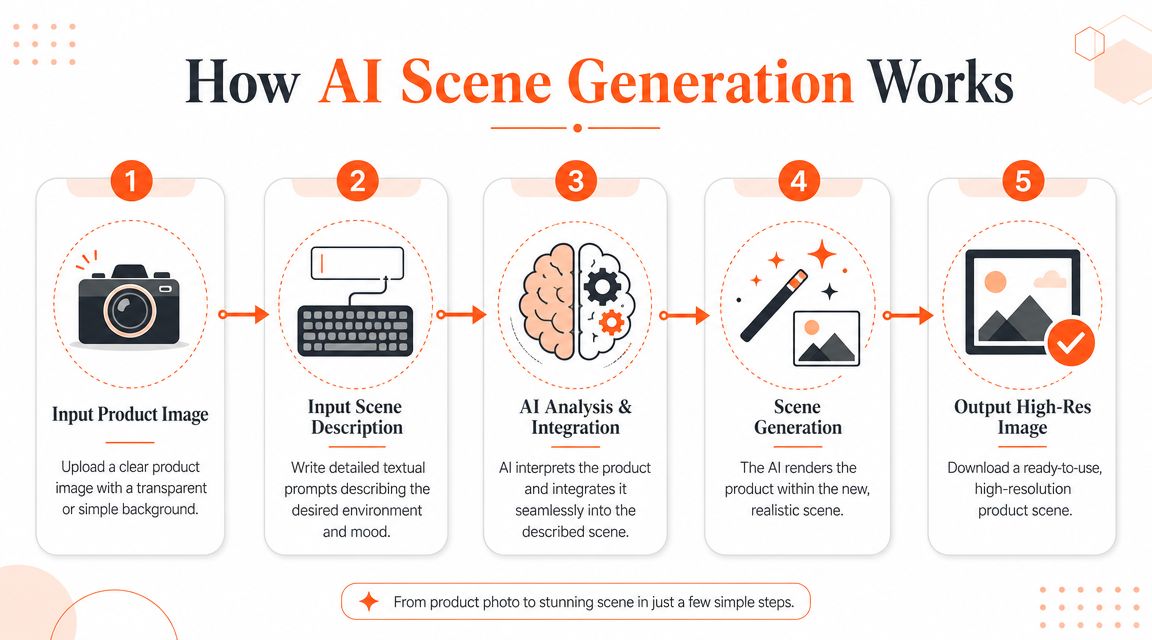
The difference between invented images and product-based scenes
It's like a digital diorama.
With random image generation, the model is making both the product and the room. If you prompt “amber skincare bottle on a marble bathroom shelf,” it may create something attractive, but it can easily alter the cap shape, soften the label text, or change the bottle proportions.
With product scene generation, the workflow keeps the bottle as the fixed object and changes the shelf, lighting, props, and background context around it. That's the difference that matters for e-commerce.
According to LTX Studio's explanation of AI product photography, high-fidelity results depend on a two-stage pipeline: first the product is isolated using segmentation, then the scene synthesis is conditioned on product attributes such as material, colour, and scale. That's also why the strongest tools use an upload-and-describe workflow rather than pure text prompts.
What the system is really doing
Under the hood, the workflow is usually closer to compositing than to pure image invention. In practical terms, it works like this:
Product isolation
The system removes or masks the background so it knows exactly which pixels belong to the product.Reference understanding
It reads visual cues from the item itself, including shape, reflective surfaces, colour, texture, and likely scale.Scene conditioning
Your instructions define the environment. Product on shelf. Product in kitchen. Product in office. Product in room. Product inside an ad layout. Seasonal campaign with winter props. The better the constraints, the fewer strange results you get.Integration
The model generates lighting, surfaces, shadows, and surrounding elements so the product looks placed rather than pasted.Output adaptation
The final image can then be reframed or exported for channel-specific use.
A lot of confusion comes from teams using broad prompts when they need structured instructions. If you want realistic results, “product in a kitchen” is too loose. You need something closer to surface type, viewing angle, lighting direction, and scene mood. A prompt discipline borrowed from work on the future of influencer marketing becomes relevant in this context. The winning systems aren't the most imaginative. They're the most controllable.
Why upload and describe beats pure prompting
For commerce, product truth matters more than artistic novelty.
Use pure text-to-image when you're brainstorming concepts. Use a reference-based generator when you need to show the actual item you ship. If your team needs help tightening those instructions, this breakdown of AI image prompts is useful because it forces the prompt to describe the environment without rewriting the product itself.
The more freedom you give the model, the more likely it is to improvise the part you needed it to preserve.
That's why the strongest scene generation setups behave less like image toys and more like controlled production systems.
Unlocking Catalogue-Scale Creative Production
The value of scene generation changes completely once you stop judging it one image at a time.
At single-image scale, it looks like a shortcut for making prettier content. At catalogue scale, it becomes a production method. One approved packshot can feed an entire family of outputs: shelf scenes for a home collection, office desk scenes for accessories, countertop scenes for kitchen goods, and seasonal campaign variants for paid media.

Where this helps in the real catalogue
The most common use cases aren't exotic. They're the repetitive ones that always clog the queue.
| Scene type | Typical use | Operational concern |
|---|---|---|
| Product on shelf | Collection pages, home décor, beauty, pantry goods | Keep shelf height and camera angle consistent across SKUs |
| Product in room | Furniture, lighting, home accessories | Preserve scale so the item doesn't feel oversized |
| Product in kitchen | Food, drinkware, appliances, storage | Avoid props that imply included items or unsupported use |
| Product in office | Desk accessories, tech, stationery | Keep surfaces and background styling uniform across a line |
| Product in ad | Paid social, display, email hero panels | Leave room for copy and safe crop zones |
| Seasonal campaign scenes | Holiday, back-to-school, summer launches | Reuse the same scene logic across many products |
These aren't six separate creative disciplines. They're six repeatable scene families.
Why consistency matters more than novelty
A lot of sellers make the same mistake early. They generate ten radically different backgrounds for ten similar products, then realise the category page looks chaotic. Customers don't scroll a product grid as a series of isolated artworks. They read it as one brand system.
That's one reason the market has moved so quickly. As noted in Photoroom's AI image statistics roundup, 71% of consumers believe AI-generated images are common on social media, and the AI image generator market is projected to grow from USD 8.7 billion in 2024 to USD 60.8 billion by 2030. For sellers, that means synthetic visuals are no longer judged as unusual by default. They're judged on whether they're credible, consistent, and useful.
Why workflow systems beat one-off editors
This is also where a workflow platform matters more than a clever generator. MerchLoom fits into this part of the process as a system that imports product images from existing sources, understands each participating image, and generates structured instructions for realistic placement across batches. In practice, that matters when you're not making one candle in one café scene, but an entire candle collection in the same autumn shelf treatment with different crops for Shopify, Amazon, and Etsy. If you're already thinking at collection level, a bulk product photo editor is the more relevant frame than a single-image design app.
Catalogue rule: approve a style once, then apply it many times. Don't art-direct every SKU from scratch.
The crucial aspect isn't that AI can make scenes. It's that a team can create scene logic once, then run it across a product library without losing control.
A Practical Workflow for Batch Scene Generation
The workflow that works in production is rarely the most glamorous one. It's the one that reduces rework.
If you're handling a real catalogue, the best approach is to split scene generation into stages. Prepare assets first. Define scene templates second. Run a small sample batch third. Scale only after the test images pass review.
Start with groups, not with prompts
Batch work breaks when every image is treated as unique. Group products by visual logic before you generate anything.
Useful groupings include:
- Same category such as mugs, candles, shampoos, notebooks
- Same camera angle such as front-facing, three-quarter, top-down
- Same surface behaviour such as matte packaging, reflective metal, glass
- Same campaign intent such as evergreen lifestyle, holiday, office, kitchen
This is what keeps a batch coherent. If one set contains clear glass bottles and another contains soft fabric pouches, they usually shouldn't share the same exact scene recipe.
Build a scene recipe, not a loose idea
A good prompt for e-commerce is closer to a template than a sentence fragment.
Doing this for a whole catalog?
MerchLoom runs background removal, upscaling and AI editing across every product photo you have — one prompt, whole batch. Try 2 batches free, no signup.
Try it freeInstead of “put this in a kitchen”, define constraints like these:
- Environment class. Modern home kitchen, bright studio shelf, warm office desk
- Surface. Oak table, white quartz, matte stone, painted shelf
- Lighting direction. Soft window light from the left, diffused overhead, warm side light
- Camera framing. Eye level, slight top-down, centred product focus
- Prop policy. Minimal props, no extra packaged items, no hands, no food unless included
- Negative instructions. Don't alter logo, don't change cap shape, don't add text, don't duplicate product
When teams struggle, the problem is usually not “bad AI.” It's underspecified instructions.
For anyone writing more technical prompt templates, this article on crafting prompts for Stable Diffusion is useful background because it reinforces the same habit: constrain the output before you ask for style.
Optimise the processing order
Processing order affects cost and throughput more than many sellers realise.
According to Bandy's explanation of AI product image generation, doing background removal before upscaling or scene generation can save up to 87% in compute costs because the more expensive generative step runs on a smaller image payload. That principle matters most when you're processing large catalogues, but it also matters for smaller shops that don't want to waste time rerunning files.
A practical order often looks like this:
- Clean the source image
- Remove or mask the background
- Check the cut-out edges at zoom
- Generate a small scene batch
- Review consistency and product accuracy
- Only then upscale or export channel variants
That sequencing protects both budget and QA time.
A lot of teams now use workflow automation instead of manually moving files between tools. If you're trying to organise that side of the operation, this guide to AI image workflow automation is worth a look because it frames each image step as part of a chain rather than a standalone edit.
Here's a useful walkthrough for thinking about the production rhythm in motion:
Run a sample before you unlock the full batch
Never send the whole catalogue through the generator first.
Use a test set that includes:
- one easy product
- one reflective product
- one darker product
- one item with fine label detail
- one product that's easy to scale incorrectly
If the batch survives those edge cases, the rest usually goes more smoothly.
Review at full zoom before you review for style. A scene can look attractive in thumbnail view and still fail because the label edge melted, the shadow floats, or the cap changed shape.
This is also where channel planning matters. Amazon may need one output style, Shopify another, and Etsy another. The generator should support those exports after the scene is approved, not force you to rebuild the scene for each platform.
Common Pitfalls and How to Fix Them
The scepticism around AI scene generation is usually earned. Sellers have seen the bad outputs. Floating products. Gloss that looks like plastic. Shadows going in the wrong direction. Labels that blur just enough to look wrong.
Those failures are real. They're also usually traceable.
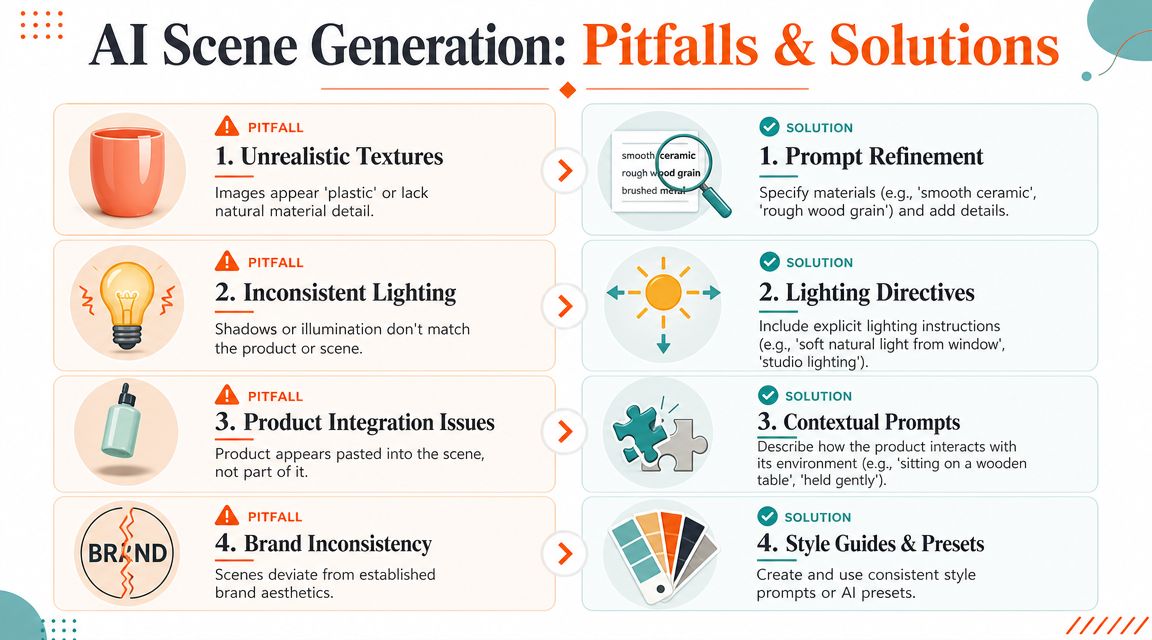
The most common failure modes
The product looks pasted in
This usually happens when the prompt describes a background but not the interaction between product and surface. Ask for contact shadows, defined placement, and a specific surface.Textures turn waxy or plastic
Generic prompts flatten material detail. Specify ceramic, brushed metal, matte cardboard, clear glass, fabric weave, or wood grain.Lighting feels wrong
If the source image has highlights on one side and the generated scene lights from another, the mismatch becomes obvious. Add explicit light direction and softness.Brand details degrade
Logos, labels, and package edges often fail when the system is given too much freedom. Use a stronger product reference, a tighter crop, and negative instructions against altering text or geometry.
Fixes that work better than rerolling endlessly
A lot of teams waste time hitting regenerate. That can occasionally help, but it doesn't solve the underlying cause.
A better troubleshooting sequence is:
| Problem | Likely cause | Better fix |
|---|---|---|
| Floating object | Missing placement instructions | Specify the product is resting on a named surface with a visible contact shadow |
| Unnatural shine | Material not defined | Add exact material terms and reduce stylisation |
| Odd crop | No framing constraints | Specify centred composition, margin space, and camera angle |
| Blurred branding | Too much scene freedom | Strengthen reference image and add negative prompt restrictions |
Don't confuse variety with quality
The easiest trap is chasing visual novelty. Sellers often assume more dramatic prompts will produce stronger images. In practice, realism improves when the instructions get narrower, not broader.
If your source file is already slightly soft, scene generation can make the weakness more obvious. In those cases, fix the base image first instead of blaming the scene model. This guide on how to fix blurry photos is relevant because no scene tool can fully rescue weak input detail.
A believable scene starts with an honest product image. If the source is compromised, the output usually compounds the problem instead of hiding it.
The most reliable teams don't treat quality issues as mysterious. They treat them like production errors, then tighten the inputs until the outputs behave.
Beyond Realism: Navigating Canadian Compliance
Image quality isn't the only risk. The more serious issue is what a scene implies.
A generated spa shelf, café counter, hiking setup, or office desk can communicate more than mood. It can suggest ingredients, product compatibility, durability, included accessories, or a use case that hasn't been substantiated. That matters for sellers operating in Canada, where visual merchandising can drift into claim territory faster than many teams realise.
The legal risk is often in the implication
According to Nightjar's discussion of AI product placement in scenes, the Competition Bureau can enforce deceptive marketing rules under the Competition Act, and an AI-generated scene that implies an unsupported product use case or performance level can create legal risk.
That shifts the professional standard. The job isn't only to make the image look real. The job is to make sure the image doesn't communicate something the business can't support.
A few examples make the distinction clear:
- Product in kitchen can imply food-safe use, heat resistance, or appliance compatibility
- Product in office can imply device fit, workspace function, or included accessories
- Outdoor scene can imply weather resistance or travel suitability
- Spa or wellness styling can imply ingredient, benefit, or treatment claims
A safer review process for Canadian sellers
A practical approval layer should include more than visual QA.
Use a checklist that asks:
- Does the scene imply a feature the listing doesn't claim?
- Does any prop suggest the product includes something it doesn't?
- Would a buyer infer a performance benefit from the context alone?
- Does packaging, on-image text, or localisation need a separate Quebec version?
This last point gets missed often. Canadian commerce workflows frequently need English and French versions while keeping the scene itself consistent. The simplest way to manage that is to treat the base scene and the localized overlay as separate assets. Generate the visual once, then swap compliant copy, labels, or campaign text without rebuilding the environment.
Localisation is part of the image workflow
For bilingual catalogues, the risk isn't only mistranslation. It's visual inconsistency introduced by making each language version manually from scratch. Teams get better results when they lock the product placement, lighting, and crop first, then localise the text layer afterwards.
That method also helps with marketplace operations. You avoid one of the most common batch problems, which is having English and French assets that look like two different campaigns because they were generated separately.
The professional use of an AI product scene generator in Canada is partly technical, partly operational, and partly legal. If any one of those is ignored, the output may still look polished while creating unnecessary risk.
From Photo Studio to Workflow Engine
Product scene generation is most useful when it stops being treated like a design trick.
For e-commerce teams, it's a workflow decision. Use a real product reference instead of random generation. Group products before prompting. Lock scene logic before scaling. Review implications, not just aesthetics. Export to channel requirements after the core image passes QA.
That's the shift. The image team is no longer only producing photos. It's operating a repeatable engine for catalogue visuals.
Sellers who adopt that mindset can move faster on seasonal launches, keep visual consistency across marketplaces, and reduce the drag of rebuilding creative assets every time a campaign changes. By 2026 and beyond, that kind of structured image production won't feel experimental. It will feel like normal e-commerce operations.
If you're managing a growing product library and need scene generation to work across batches instead of one image at a time, MerchLoom is built for that workflow. It connects to existing image sources, chains processing steps like background removal and scene placement, and runs those instructions across full collections so you can review, refine, and publish without rebuilding the process for every SKU.
Stop editing product photos one at a time
Upload your catalog or connect your store. Describe the result once. MerchLoom does the rest.
Try it free — no signup