
Color Correction AI for Product Catalogs at Scale
Learn how color correction AI keeps product photos consistent across hundreds of SKUs on Amazon, Etsy, Shopify, and more, with practical batch workflow tips.
You're uploading another batch of product photos, and the same shirt looks cream in one listing and blue-white in another. Fixing the latest image won't solve it. You need the next import, the alternate angles, and the marketplace exports to agree too.
Before running color correction AI, separate images by lighting setup and choose an approved reference for each group. Keep the originals untouched. That gives you a repeatable starting point instead of another folder of individually attractive but inconsistent edits.
Why Color Correction Breaks at Catalog Scale
A seller can correct a shirt until it looks right on screen. The trouble starts when the next photograph needs a different adjustment, and nobody records why. By the time the collection is uploaded, identical fabric appears to belong to different colorways.
Single-image tutorials usually stop at a pleasing result. Catalog operations need something stricter: a correction that can be repeated, checked, reversed, and exported without changing the product's identity.
Your goal isn't to make every photograph equally warm or equally saturated. It's to make buyers recognize the same physical product across the collection, regardless of when you photographed it.
Group by capture conditions, not upload order
Don't run the entire camera roll through the same adjustment. A studio shoot, a supplier photograph, and a phone image beside a window need separate starting assumptions.
- Capture group: Keep images made under the same lighting and camera settings together.
- Product reference: Select a photograph that matches the physical item, not the most flattering image.
- Exception group: Separate reflective packaging, translucent products, and unusual finishes before processing.
- Destination: Record whether each output is intended for Amazon, Etsy, Shopify, or another storefront.
A useful white-balance workflow for product photography starts before batch editing. If the capture conditions keep changing, a shared correction can spread the wrong adjustment across otherwise usable photographs.
Practical rule: Standardize the decision process, not necessarily the adjustment applied to every file.
Marketplace preparation adds another layer. Amazon's main-image background, Etsy's export settings, and Shopify's presentation conventions need separate output recipes. Keep those recipes downstream from product-color approval so changing a crop or background doesn't become permission to reinterpret the merchandise.
How AI Color Correction Actually Works
Think of a catalog containing navy cotton shirts and glossy navy packaging. Both may look blue, but the correction shouldn't treat their shadows, texture, and reflections identically. A useful pipeline combines color management with object-aware processing.
The processing stages should remain distinct, even when a tool runs them together.
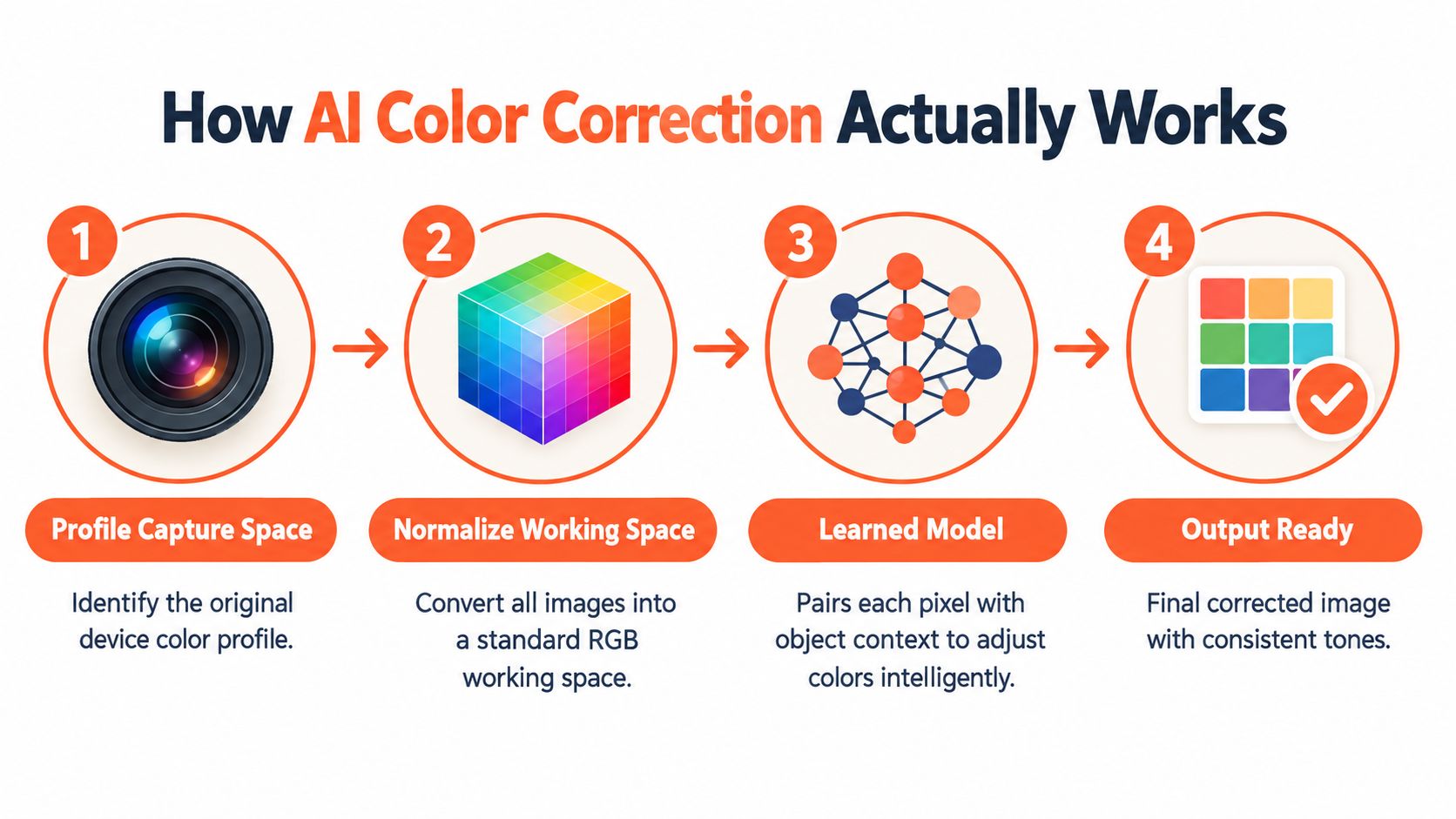
From capture data to a controlled working image
Identify the capture space first. The International Color Consortium's color-management guidance explains that profiles describe device-dependent color and support conversions between capture, display, and output devices. Preserve that information in the master files, then convert inputs deliberately into a defined working space.
Next, run the model against those normalized inputs. Otherwise, you're asking it to judge photographs whose color values may have different meanings.
Modern systems aren't saturation sliders. A review of automatic image colorization describes the shift toward deep learning during the 2010s, including Zhang and colleagues' 2016 approach that predicted color distributions in CIE Lab. Later segmentation, generative, instance-aware, and transformer approaches expanded how systems use visual context.
Colorization isn't the same task as correcting an existing product photograph. Its relevance is the ambiguity: image content alone doesn't establish the physical item's true color.
Context helps, but references decide
For an operator evaluating object-aware processing, Applied's AI image recognition deployment guide is a useful companion resource. Keep recognition and color approval as separate checks: identifying fabric doesn't establish its exact dye shade.
- Model instruction: Remove the lighting cast while preserving product hue, texture, and finish.
- Reference check: Compare the output with an approved capture or measured target.
- Release condition: Accept the correction only after checking the exported result.
Treat broader AI image enhancement as a separate operation. Sharpening, contrast changes, and generative cleanup should not alter the reference color you just approved.
The Real Cost of Inconsistent Color Across a Catalog
An unwanted cast creates more than an unattractive thumbnail. A buyer comparing alternate angles may reasonably wonder whether they're seeing different variants. You then have to resolve the ambiguity through messages, replacement images, or listing maintenance.
Calibration research shows why leaving everything to camera automation isn't a dependable catalog policy. In a Microsoft Research camera-array study, automatic gain and white balance produced channel RMS errors of 7.98, 7.98, and 8.30; sRGB matching reduced them to 3.40, 2.44, and 4.23, while iterative configuration achieved 2.45, 1.43, and 1.90 before post-processing.
Calibration Methods and Their Residual Color Error
| Method | RMS Error Range | Best For |
|---|---|---|
| Automatic gain and white balance | Highest residual error among these compared approaches | Establishing an uncontrolled baseline |
| sRGB matching | Lower than automatic camera controls | Aligning capture outputs to a common standard |
| Iterative configuration | Lowest of these pre-processing comparisons | Repeatable capture environments |
These are results from that camera-array experiment, not promised outcomes for your store. Don't turn them into a universal AI performance claim or a pass threshold for product photography.
Measure the difference buyers can perceive
RGB error alone isn't enough for product-color approval. CIEDE2000, written as ΔE00, evaluates differences in a perceptual color space and is more useful when comparing corrected output with a measured reference.
A raw-to-rendered-image study reported average ΔE00 changing from 3.10 before training to 2.49 after training with physically informed initialization. That's evidence for reference-based evaluation, not a guarantee that any catalog tool will achieve the same result.
A smaller error matters only when you're comparing against the right reference.
For batch operations, record the reference, processing recipe, and acceptance result together. If a supplier reshoots a product or you change your lighting, you can identify which images need revalidation instead of reopening the entire catalog.
Marketplace Color and Format Rules You Cannot Skip
Approve product color in the master, then generate destination-specific files. Don't repeatedly edit the Amazon export to create the Etsy version. That makes it harder to trace whether a mismatch came from correction, resizing, or export.
Use separate validation presets for each channel.
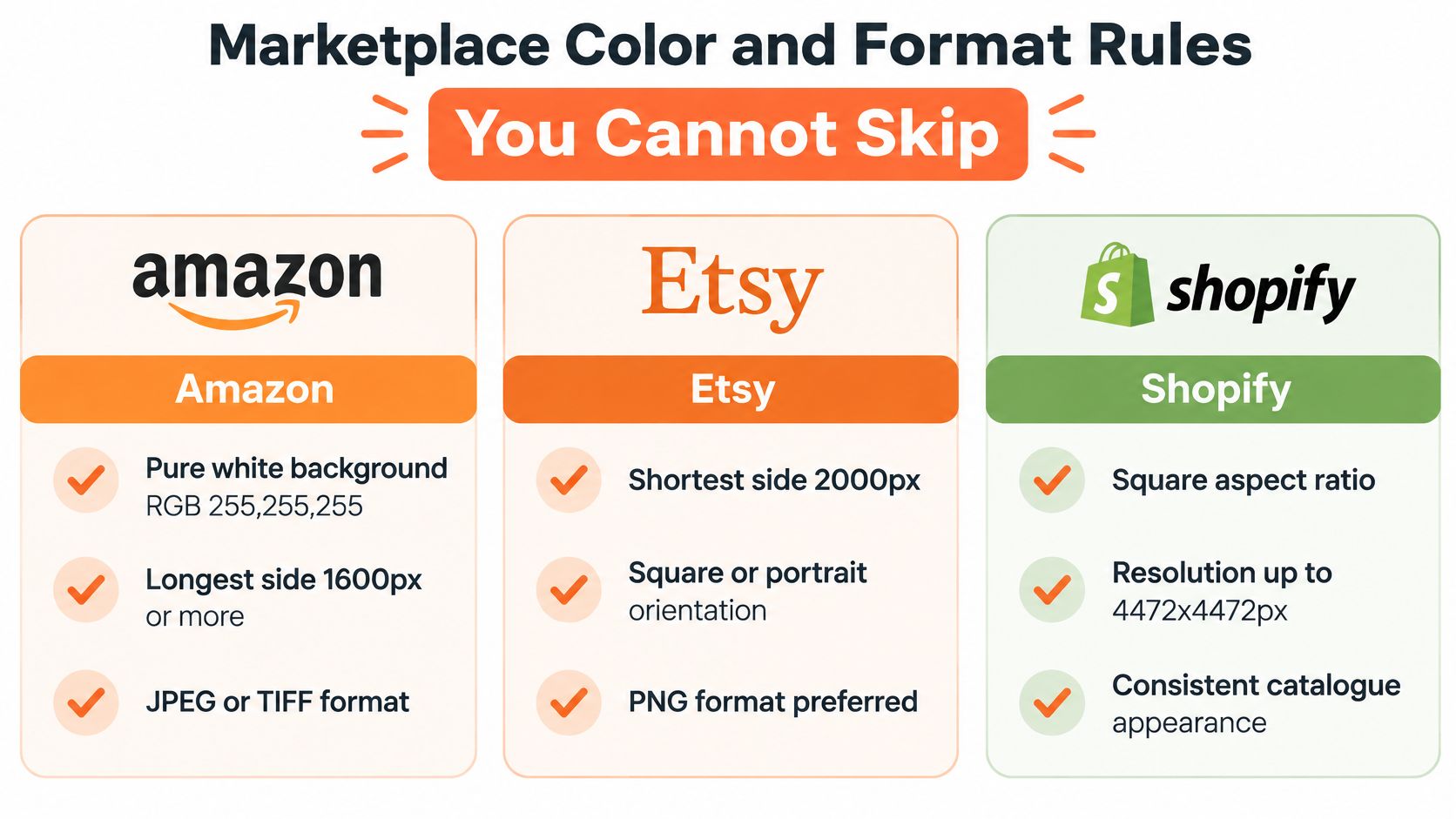
Amazon main images
Amazon's published image requirements specify a pure white background, RGB 255, 255, 255, an actual product photograph, and no unrelated props, text, logos, watermarks, or inset images. JPEG is preferred; the published zoom guidance requires at least 1,000 pixels on one dimension, with a 10,000-pixel maximum.
Check the final background pixels rather than judging white by eye. Keep product highlights separate from background whitening so pale fabric, glass edges, and white packaging don't disappear.
Use the Amazon product image requirements checklist to keep compliance review separate from color approval.
Etsy and Shopify exports
Etsy's image guidance recommends at least 2,000 pixels for both width and height, supports JPG, GIF, and PNG, and excludes animated GIFs and transparent PNGs. Etsy also advises conversion to sRGB when displayed colors look wrong.
Shopify's product-media guidance permits images up to 5,000 × 5,000 pixels, with files smaller than 20 MB, and says square product images commonly display best at 2,048 × 2,048 pixels. Shopify may remove displayed image profiles, so convert deliberately to sRGB before upload.
The infographic is a quick production overview, not the authority for platform limits or format preferences. Use the published specifications above when configuring validators.
- Dimensions: Check the exported file, not the source photograph.
- Framing: Keep comparable product scale and aspect ratio within each listing grid.
- Color conversion: Convert to the delivery space; don't merely delete the source profile.
- Upload verification: Inspect the storefront rendition after the platform processes it.
Batch Workflow That Keeps Color Consistent
Consider an apparel batch arriving alongside cosmetics and furniture photographs. Putting everything into the same correction job is convenient at import and expensive at review. Build separate processing groups, then reuse the approved workflow within each group.
A contact-sheet view makes drift easier to spot than opening files individually.
Doing this for a whole catalog?
MerchLoom runs background removal, upscaling and AI editing across every product photo you have — one prompt, whole batch.
Try MerchLoom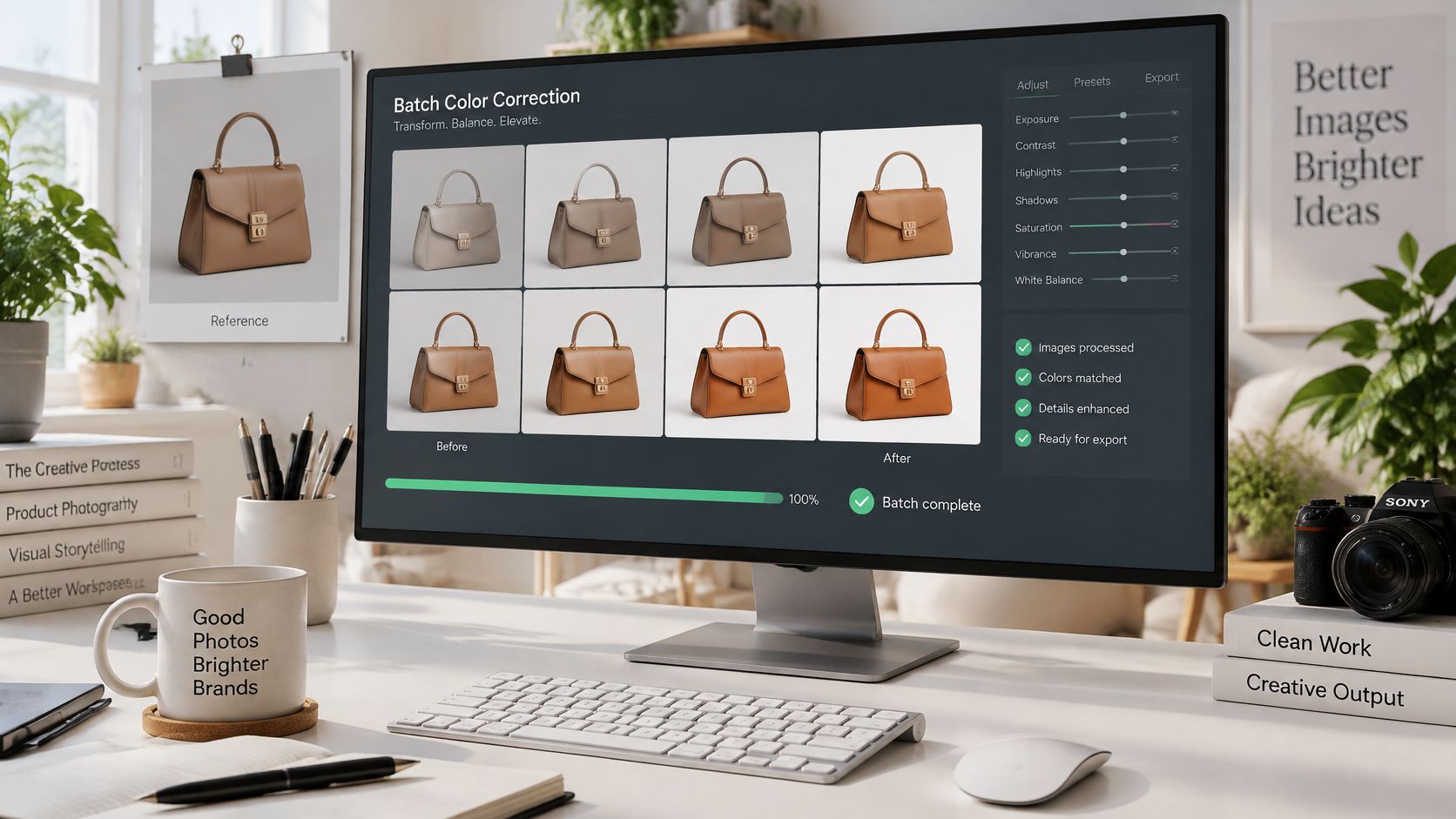
Build a reusable chain
Import from your existing storage or store platform while retaining SKU and variant identifiers. Assign each group a reference, correction instructions, and an export destination before starting the job.
MerchLoom is one option for running these steps as chained AI pipelines across a collection, rather than editing each image separately. Keep the color acceptance checks explicit; automated processing doesn't replace approval of sensitive shades or materials.
- Prepare: Normalize inputs and identify missing or questionable reference information.
- Correct: Resolve exposure and unwanted casts without changing intended product characteristics.
- Isolate: Remove or replace backgrounds without contaminating product edges.
- Finish: Upscale where needed, resize, export, and validate the destination file.
Sequence affects cost as well as appearance. Background removal before upscaling can reduce the area sent through later processing, but only if the intermediate step produces a smaller working image. Don't assume a background mask alone changes processing cost.
Use a reusable batch image editing workflow and keep the approved recipe attached to the resulting files. Re-anchor the group when lighting, supplier imagery, or capture conditions change, not when another folder starts.
The video can be reviewed alongside a test batch.
Keep portability in the workflow
Store approved masters separately from marketplace exports. If you change storefronts, you should regenerate delivery files rather than reconstruct product-color decisions.
For that handoff, PlatformDTC's ecommerce platform switch tips provide relevant migration context. Keep image identifiers, variant relationships, and approval records portable alongside the assets.
Before and After Scenarios Across Product Categories
A brighter “after” image isn't automatically a better listing image. These are operating scenarios, not claimed customer results. Each needs a different acceptance test because product materials communicate color differently.
Apparel and cosmetics
Apparel: White shirts photographed under different light sources can look like separate products. Correct the unwanted cast against a neutral reference, then compare collars, seams, and folds across alternate views.
The acceptance test isn't “make every light area white.” Preserve the actual fabric tone, including intentional cream shades and garment-specific variation.
Cosmetics: A foundation swatch can look more polished after smoothing and warming, while becoming less useful for shade selection. Lock the reference to the physical shade and compare the corrected swatch without treating neighboring shades as interchangeable.
For approval, check the measured reference difference and inspect the sequence of adjacent shades. If the correction makes distinct products appear alike, reject it even when each image looks attractive alone.
Don't use consistency as an excuse to erase real differences between products.
Furniture and merchandising groups
Furniture: Walnut photographed beside a window may have warm wood tones and cooler shadows. A global neutralizing adjustment can remove the cast while also stripping the finish's character.
Check the broad surface against the reference, then inspect grain, shaded edges, and reflective areas separately. Accept a result that preserves the material, not one that makes every part of the object the same brown.
Use these category distinctions when organizing commercial review. Product Metrics' product segmentation for Google Shopping is a relevant resource for thinking about product groups, but your color-risk groups should also reflect material and shade sensitivity.
Don't assume more saturation improves conversion. Treat that as an unproven hypothesis until your own listing and return records support it, and never trade away physical accuracy to create a more vivid grid.
Product Truth Beats Visual Appeal Every Time
The commercial reason to protect product truth is straightforward. Coverage citing Salsify research reports that 71% of consumers had returned a product because it didn't match the online listing, while 22% returned an item because it looked different in real life. Those figures concern listing mismatch, not color alone, so they shouldn't be presented as a measured return reduction from AI correction.
They do support treating visual accuracy as an operational concern alongside fit, sizing, and product information. An attractive photograph that establishes the wrong expectation isn't a successful catalog asset.
Define approval around the physical item
Make the acceptance standard explicit before anyone compares before-and-after images.
- Reference evidence: Require an approved physical-target capture or trustworthy product reference.
- Adjustment boundaries: Flag unexpected hue or chroma changes instead of judging only the final appearance.
- Commercial feedback: Track complaints and returns tagged “color different than shown” by SKU and processing version.
- Ownership: Give a named reviewer authority to reject an attractive but inaccurate result.
Set category-specific acceptance caps from your approved samples. Don't borrow a universal ΔE00 threshold without checking how it behaves on your products, measurement setup, and delivery files.
Separate correction from changing the merchandise
A correction removes a capture problem. Recoloring changes the depicted product and needs a different approval process.
If you need to recolor an image, keep those outputs separate from documentary product photographs until the actual variant has been verified. A generated shade preview shouldn't become evidence that a manufactured colorway matches.
Judge performance across the catalog using both image quality and customer feedback. Click-through alone can't tell you whether buyers received what they expected, and an increase in engagement wouldn't excuse a rise in mismatch complaints.
When AI Should Stop and Ask a Human
The most useful automation rule is sometimes “leave this unchanged.” A model that always produces an edit can turn uncertainty into a plausible-looking error, especially when there's no reliable evidence for the original color.
Guidance on ecommerce color accuracy emphasizes that AI correction depends on the supplied reference and identifies metallics, iridescent fabrics, and subtle gradients as difficult cases that may need human review. Route those materials differently from ordinary matte products.
Use a visible routing policy rather than burying exceptions in editing instructions.
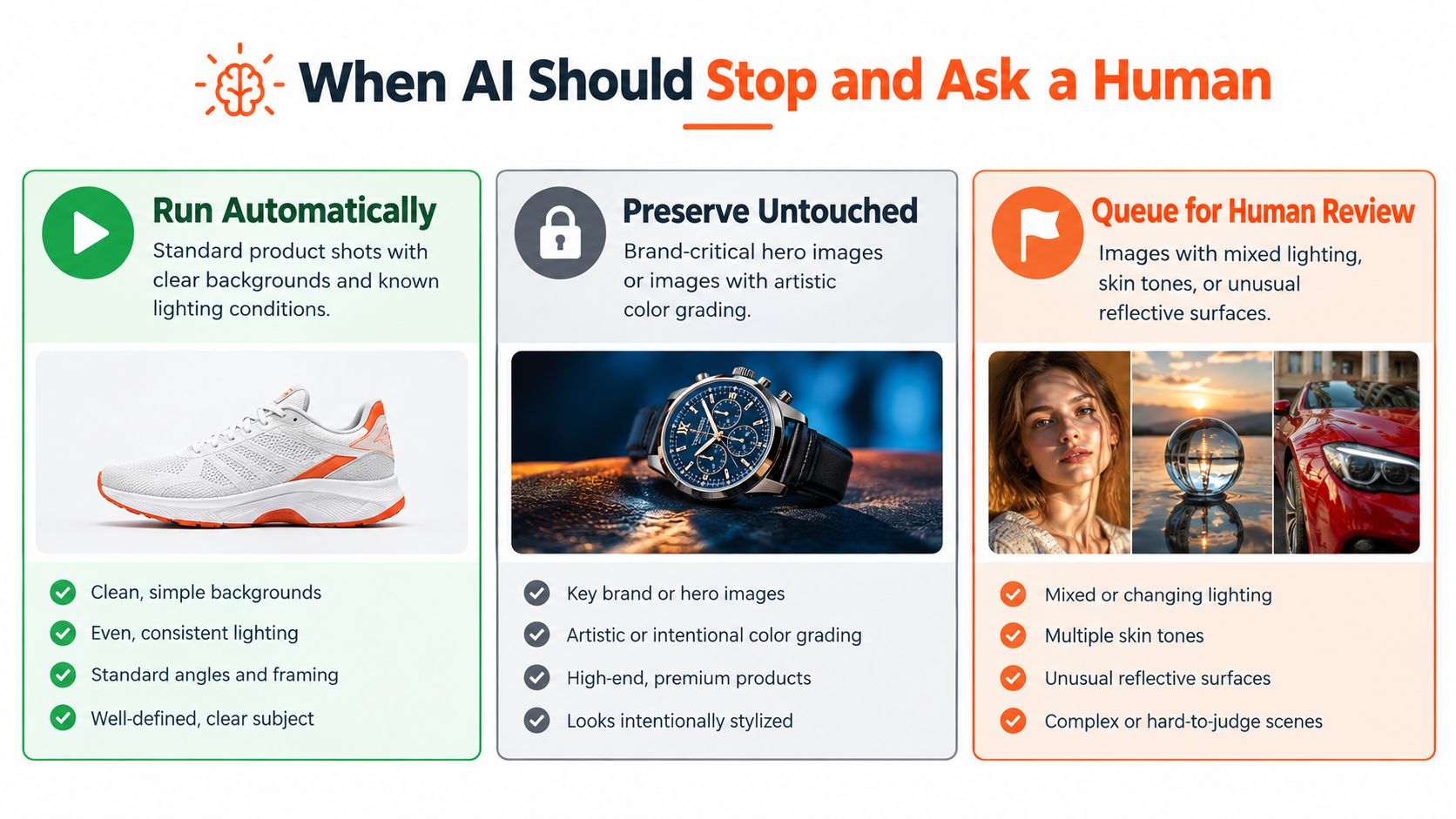
Decide whether to run, preserve, or escalate
Run automatically when capture conditions are known, the reference is approved, and the proposed correction stays within your tested category limits. Release those images through the same export validation used for reviewed files.
Preserve untouched when the source is already approved or the workflow lacks enough evidence to justify changing it. Preserve doesn't mean publish blindly. It means retain the original rather than replacing uncertainty with a guess.
Queue for review when an image contains mixed lighting, clipped channels, transparent materials, reflective surfaces, deep-shadow hue changes, or an unusually large proposed adjustment. Also escalate when the reference itself is questionable.
- Shade-critical SKUs: Give foundation, branded packaging, paint-like finishes, and closely related apparel colorways stricter approval.
- Lower-sensitivity products: Allow tested routine corrections where small differences don't change the purchasing decision.
- Batch sampling: Review the first corrected image and a defined share of each colorway before releasing the rest. Increase sampling when a group shows drift.
- Confidence handling: Treat model confidence as a routing signal, not proof of accuracy.
A white storage bin and a foundation shade shouldn't share the same commercial tolerance. Set that distinction in the workflow before processing, not after a customer complains.
Run this checklist this week
- Capture with a reference target. Keep a usable target image for each lighting setup and preserve its connection to the product group.
- Retain ICC information. Archive the originals and their profiles before creating normalized working copies.
- Normalize the working space. Use a documented conversion recipe across the batch.
- Run constrained correction. Specify preservation of product hue, material texture, and intentional variation.
- Validate against the reference. Record ΔE00 where measurement is available and inspect difference previews.
- Escalate by SKU risk. Apply category caps and send failed or uncertain outputs to a single review gate.
- Export for the destination. Check dimensions, background, format, and displayed color after upload.
Keep a small approved test set containing ordinary products and known exceptions. Run it whenever you change the model, instructions, capture setup, or export recipe. That gives you a practical regression check without inspecting the entire archive again.
Run your next collection through chained color-correction, background, and export steps with MerchLoom, then review flagged outputs before publishing. You can try the first images without an account; processing is pay-per-image with no subscription, credits never expire, and you see the exact cost before processing starts.
Stop editing product photos one at a time
Upload your catalog or connect your store. Describe the result once. MerchLoom does the rest.
Try MerchLoom