
AI Product Staging: Professional E-commerce Listings
Transform raw photos into professional e-commerce listings using AI product staging. Scale your product catalog with efficient batch workflows.
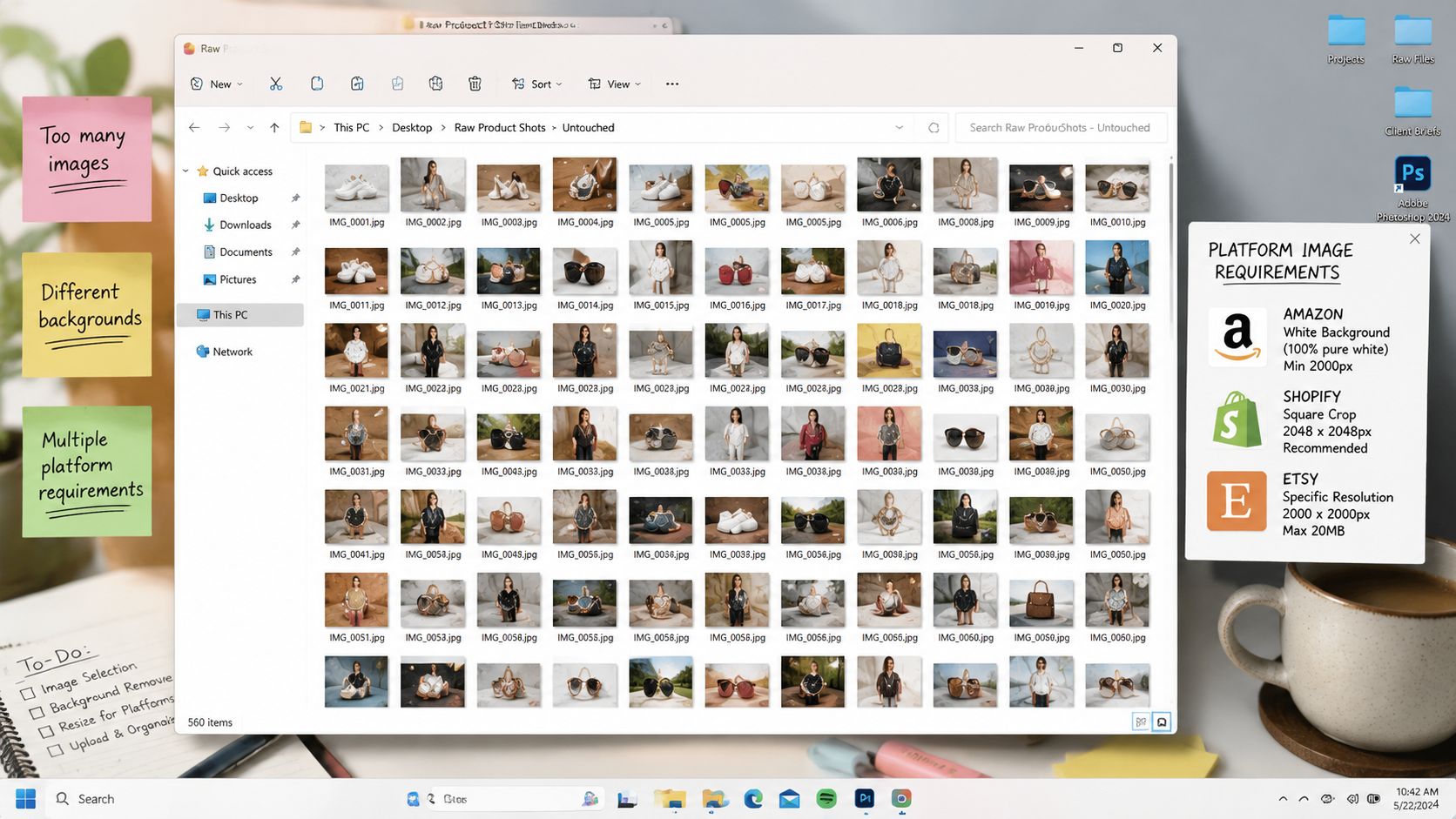
You've got a folder full of product photos. Some are clean enough for a marketplace main image. Some need a white background. Some would sell better in a room, on a shelf, on a person, or beside complementary objects. And none of them only need one version.
That's the context for AI product staging. It isn't a novelty effect for one hero image. It's the e-commerce equivalent of staging a home before a sale. You're helping the buyer understand scale, use, mood, and fit. A sofa in a styled living room reads differently from the same sofa on a blank sweep. A necklace on a model tells a different story than a flat lay. A packaged food item on a kitchen counter can answer questions about occasion and use before the shopper reads a single bullet point.
The reason this matters now is practical, not abstract. Generative AI attracted $25.2 billion in private investment in 2023, nearly nine times the amount in 2022, and 55% of organisations were using AI in 2023, according to Stanford HAI's AI Index summary. For sellers, that doesn't mean every image problem is solved. It means the tooling has matured enough that turning raw product photos into listing-ready assets is no longer limited to large studios or in-house retouching teams.
From Raw Photos to Ready Listings
A typical catalogue problem looks like this. You've got a seasonal drop or a backlog of SKUs. The furniture pieces need room scenes. The jewellery needs clean cut-outs and lifestyle versions. The food packaging needs both compliant marketplace images and campaign creatives. The tools need context without looking fake. The B2B products need clarity, not drama.
What sellers usually get wrong
This is often still treated as an editing queue. They think in single images, not batches. So they open files one by one, remove backgrounds manually, export different crops, send a few products for lifestyle compositing, then realise the whole set looks inconsistent across Amazon, Shopify, Etsy, ads, and email.
That approach breaks down fast when listings multiply.
Practical rule: If your visual process depends on someone making the same decision hundreds of times by hand, it won't stay fast or consistent.
AI product staging works when you treat it as a repeatable production workflow. One input photo can become a marketplace main image, a square store image, a contextual scene, and a campaign asset, but only if those outputs follow a defined sequence. That's why batch operations matter more than flashy one-offs. If you're dealing with volume, batch product photo editing workflows are more relevant to the underlying challenge than image generation demos.
Context sells when the context is useful
Home staging is a useful analogy because it isn't about decoration for its own sake. It's about reducing buyer friction. A staged product image helps a customer answer practical questions.
- Furniture and home décor need scale, placement, and style cues.
- Jewellery needs skin context, material realism, and detail retention.
- Food and packaging need believable surfaces, serving context, and colour accuracy.
- Tools and hardware need use-case clarity, not overly polished scenes.
- B2B products need clean presentation in believable commercial settings.
For teams that also need motion assets, a complementary next step is Zebracat's solution for AI product videos, especially when stills and short product clips have to stay visually aligned across the same campaign.
Understanding AI Product Staging
AI product staging is the process of placing a real product image into a believable, purpose-built visual context so the final asset works for merchandising, listings, or advertising. That sounds simple, but it's different from both a traditional photoshoot and a quick background swap.
A plain background replacement changes where the product appears. Staging changes how the product is understood.
What it replaces
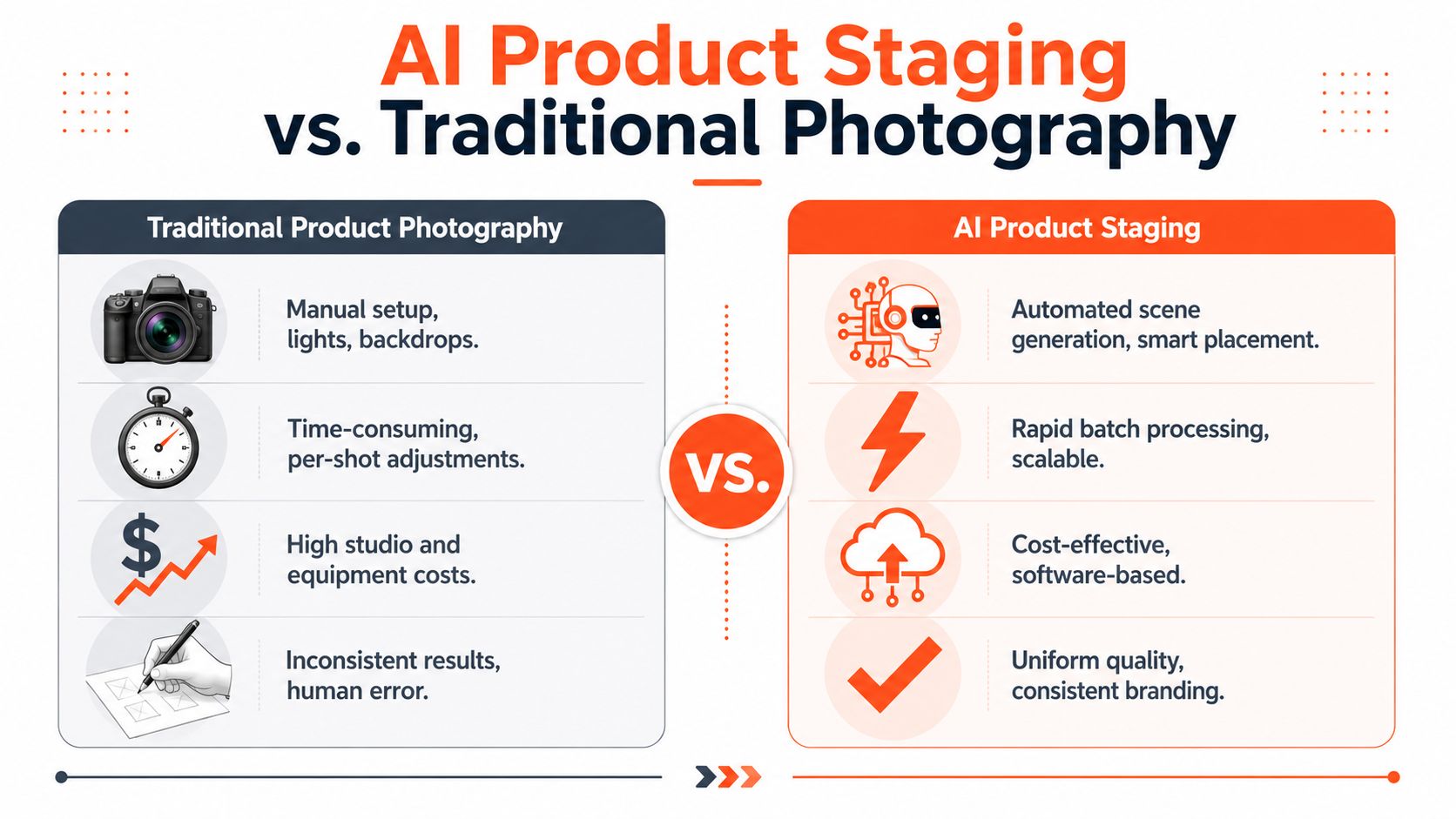
Traditional product photography usually solves context with physical production. You book a studio, source props, arrange a set, light each shot, and reshoot when the angle or styling is off. Manual digital staging shifts some of that work into retouching and compositing. AI staging moves more of it into a software pipeline.
That matters because each method fails in a different way:
| Factor | Traditional Photoshoot | Manual Digital Staging | AI Product Staging |
|---|---|---|---|
| Setup | Physical set, lights, props, crew | Product cut-out plus hand compositing | Input product plus defined scene workflow |
| Speed | Slow to change concepts | Faster than reshooting, still labour-heavy | Fast when run in batches |
| Consistency | Depends on shoot control and reshoots | Depends on editor skill and templates | Depends on workflow rules and QC |
| Creative flexibility | Strong, but costly to expand | Flexible, but manual | Broad variation without rebuilding sets |
| Catalogue scale | Harder to maintain across many SKUs | Possible, but operationally heavy | Built for repeated outputs |
What useful staging looks like
The easiest way to judge whether staging is doing its job is to ask what the buyer learns from the image that they couldn't learn from a cut-out.
A few examples:
- A dining chair in a rendered room shows seat height, style fit, and spatial proportion.
- A candle on a shelf with other décor tells the buyer whether it reads minimal, rustic, or premium.
- A necklace on a model helps with scale and drape.
- A jarred sauce on a kitchen counter gives occasion and flavour cues.
- A power drill in a workshop scene can suggest intended environment without showing unsafe use.
- A B2B label printer in an office or warehouse setting helps explain its role faster than a white background alone.
Good staging adds buying context. Bad staging adds visual noise.
This is why AI product staging is often more useful than generic “AI product photography” as a category. If you want a wider look at how marketers use generated product visuals, AI product photography for digital marketers gives a broader perspective, while AI product visualisation workflows are closer to catalogue operations.
What doesn't work
Three things usually fail.
First, forcing every product into the same aesthetic. Jewellery, packaged food, and industrial tools shouldn't share the same scene logic.
Second, trying to generate the whole product from scratch when you already have a real photo. That often loses logos, shape accuracy, and material truth.
Third, treating one beautiful result as proof of a usable system. The true test is whether the method holds up across a collection, not whether it wins on one hero SKU.
The Business Case for AI Staging at Scale
The business case isn't “AI makes prettier images”. It's that staging can turn image production from a stop-start manual task into a repeatable merchandising operation.
In Canada, that shift matters because many organisations are still experimenting rather than operationalising. A recent industry analysis noted that 62% of organisations were in the AI pilot phase, while only about 7% had reached full enterprise deployment, and retail usage was around 10% in daily work, according to this Canadian AI deployment analysis. For sellers, that gap is familiar. Teams test tools, generate a few samples, then stop because the process doesn't fit the day-to-day work of listing, reviewing, exporting, and publishing.
Where the value actually shows up
The strongest use case for AI product staging is operational. One clean product photo can support multiple outputs without scheduling separate shoots for each channel or campaign concept. That reduces handoffs between photographers, designers, marketplace managers, and paid media teams.
The payoff usually appears in three places:
- Lower cost per listing because one source image can feed several channel-ready assets
- Faster time to publish because sellers don't wait on separate shoots or manual composites
- Better catalogue depth because more SKUs get contextual imagery instead of only top sellers
This is also where a lot of AI projects fail. Teams buy into generation quality but ignore process design. They can produce attractive examples, yet they can't move a full collection through review and into channel-specific exports. That's why product photo automation is the more relevant frame for operators than “creative AI” on its own.
Why staging scales better than ad hoc editing
When a seller launches a new range, they rarely need just one lifestyle image. They need a compliant marketplace image, a store image, a social crop, often a square version, and sometimes a contextual scene specific to a category. AI staging makes sense when those outputs come from a managed pipeline instead of a loose chain of edits.
Doing this for a whole catalog?
MerchLoom runs background removal, upscaling and AI editing across every product photo you have — one prompt, whole batch.
Try MerchLoomThe winning workflow isn't the one that produces the most dramatic image. It's the one that produces the most usable images with the least rework.
That's the practical bridge between pilot and deployment. A repeatable image workflow is easier to keep than a creative experiment, because it attaches directly to listing operations.
Building a Scalable AI Staging Workflow
If you're processing a handful of images, almost any tool can look capable. The stress test starts when you need to move a whole catalogue through the same logic without babysitting every file.
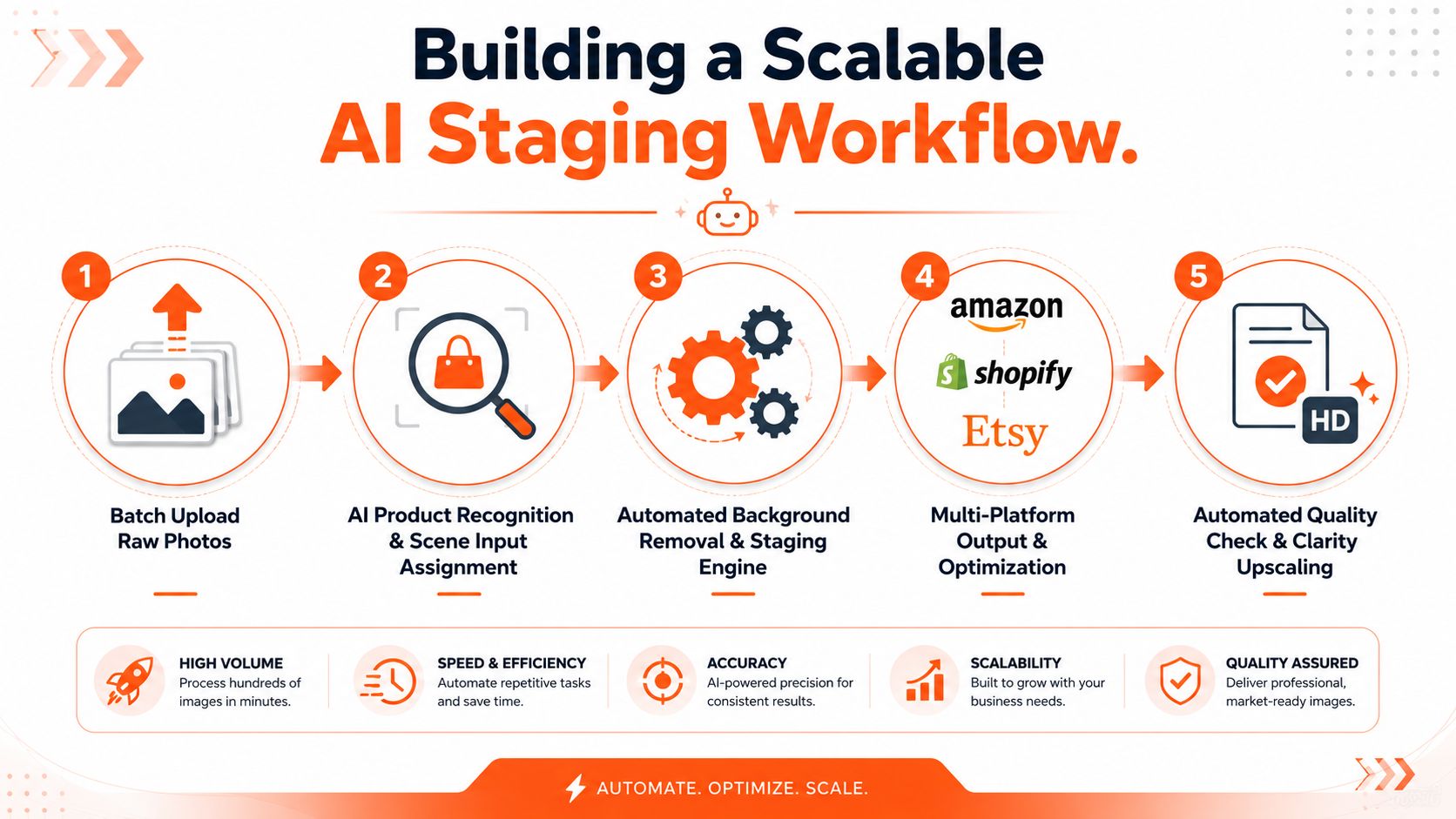
A workable staging pipeline has to decide what kind of product it's looking at, whether the image already has usable isolation, what scene type fits the category, which output sizes are required, and how sharpening or upscaling should be handled at the end.
The five-part workflow
Ingest the batch
Pull images from wherever the catalogue already lives. That could be cloud storage, a commerce platform, or a photo handoff folder. The important part is keeping file groups intact so variants, SKUs, and collection-level processing rules don't get scrambled.Recognise the product and assign the right route A chair shouldn't go through the same scene recipe as a ring, making category-aware routing important. Furniture may need room scenes. Packaging may need shelf or countertop scenes. B2B products may need cleaner commercial contexts with less styling.
Use background removal only when the image needs isolation
Many teams overprocess here. If the product is already shot cleanly against a workable backdrop, forcing a fresh cut-out can create edge problems you didn't start with. But if isolation is needed, do it before heavier rendering steps.Generate the stage, then produce channel outputs
Build the contextual image first, then export the required ratios and formats for Amazon, Shopify, Etsy, social, or ads. This keeps the source of truth consistent.Finish with clarity work and review
Final enhancement should happen after the visual composition is stable. That's the point to sharpen details, upscale where needed, and reject any outputs that don't meet QC.
A short walkthrough helps make the process concrete:
Order matters more than most teams expect
The cheapest workflow isn't always the lowest-quality one. It's the one that avoids paying for expensive processing on files that didn't need it.
The clearest example is step order. Performing background removal before upscaling can shrink image data before the most compute-intensive stage, a choice that can reduce total processing costs by up to 87% for large catalogues, as explained in this product staging workflow guide. That doesn't mean every image should follow the exact same sequence. It means every sequence should have a reason.
How this looks in practice
For catalogue-scale work, tools need to chain these decisions together. MerchLoom fits that operational model because it can process image collections through chained AI pipelines, recognise product and scene inputs, route files into the right workflow, apply background removal only where isolation is needed, and finish with Clarity upscaling. That's useful when you're handling furniture, décor, jewellery, food packaging, tools, and B2B products in the same system, because each category can follow a different route without becoming a separate manual project. The broader logic behind that kind of setup is covered well in AI image workflow automation.
Ensuring Quality and Consistency
Generating a large batch is the easy part. Deciding whether the batch is usable is where teams often either become disciplined or start wasting time.
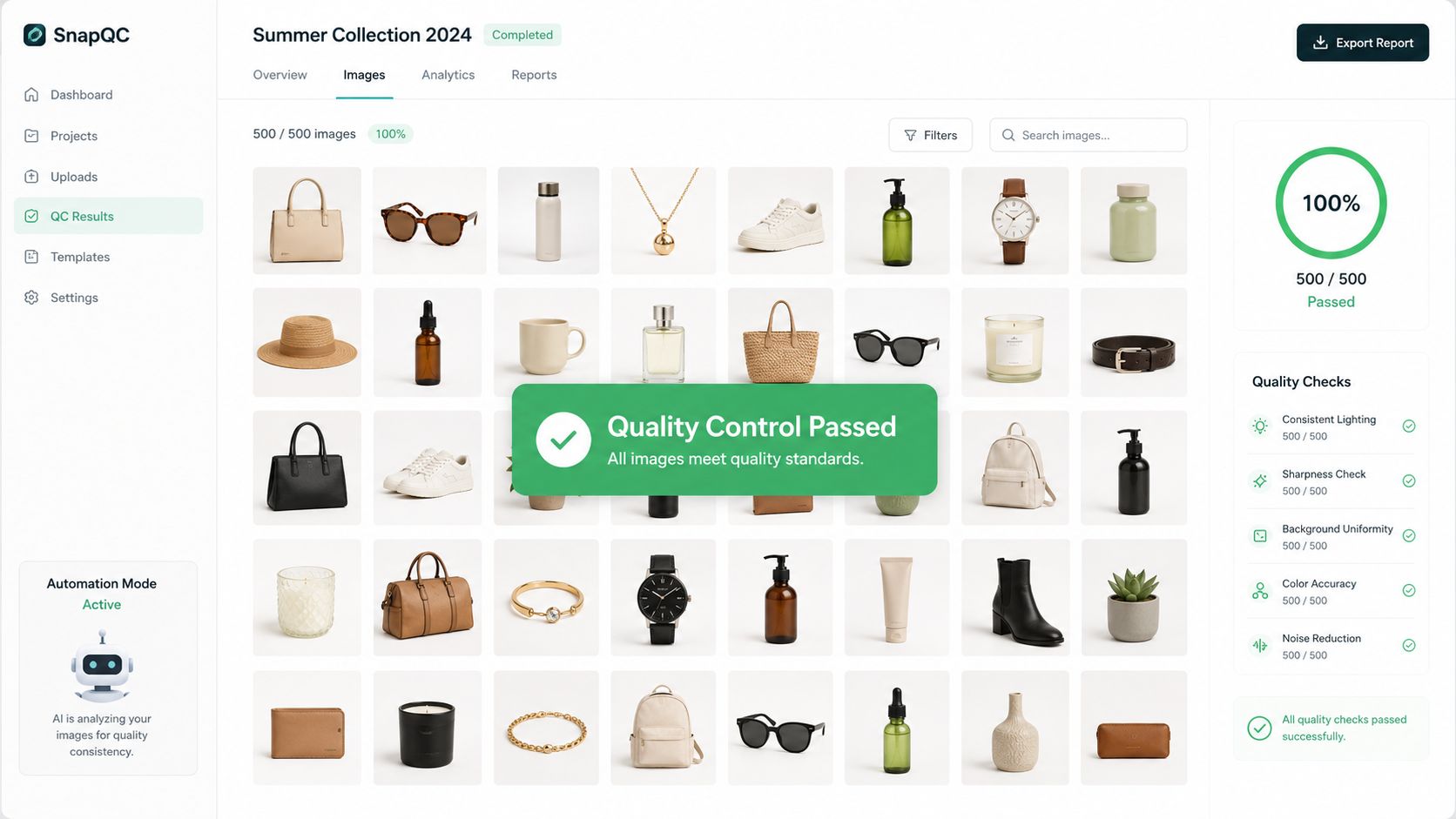
A good staged image doesn't just “look nice”. It survives scrutiny. The most reliable check is physical consistency. A technical QC rubric should verify that the product's shadow matches the light source, colour temperature is coherent, perspective aligns with the camera angle, and fine details such as logos and textures remain sharp at 200% zoom, based on this AI product placement quality guide.
The QC checklist that actually catches problems
Most failed staged images break in obvious ways once you know where to look.
Shadow logic
If the room light falls left to right, the product shadow can't drift in another direction. Buyers might not describe the issue, but they'll feel the image is off.Colour coherence
Warm product tones dropped into a cool background often look pasted in. Metal finishes, food packaging, and home décor are especially sensitive to this.Perspective match
The product camera angle has to agree with the scene. A top-down product dropped into an eye-level room is one of the fastest ways to ruin realism.Detail retention
Check logos, stone settings, labels, stitching, knurling, and printed copy. Zoom in. If these details soften or mutate, the image isn't listing-safe.
Consistency is a brand issue, not just a design issue
Catalogue quality problems rarely come from one terrible image. They come from minor drift across many acceptable ones. One candle scene is too warm. Another is too bright. One necklace render is editorial. Another is flat. By the time a collection is live, the shop looks unorganised.
That's why prompt style and workflow parameters need to be locked down by category. Home décor can have one scene family. Tools can have another. Packaging can have a tighter set of surface and lighting rules. The point isn't to make everything identical. It's to make the differences intentional.
Review at collection level, not just image level. A single file can pass on its own and still break the visual logic of the catalogue.
If your team is already cleaning up standard packshots, how to make product photos look professional is a useful companion mindset. The same discipline applies to staged imagery. Realism, edge quality, and detail preservation aren't optional because the background is more interesting.
A practical approval method
Use a two-pass review:
| Review pass | What to check |
|---|---|
| First pass | Obvious failures, category mismatch, wrong scene style, edge issues |
| Second pass | Shadow direction, colour temperature, perspective, logo and texture detail at zoom |
This keeps reviewers from wasting time on fine detail before eliminating clear rejects.
Getting Started with AI Product Staging
The easiest way to make AI product staging expensive is to start with your whole catalogue. The smarter move is to start with a representative slice and test the workflow, not just the visuals.
Choose a small batch that reflects your real mix. Include something easy, something reflective, something textured, and something that needs context to sell well. For many shops that means a mix such as packaging, décor, jewellery, and one awkward product that has always been difficult to shoot or edit.
A sensible first rollout
Run the trial like an operations project.
Audit the current process
Note where time goes now. Background cleanup, resizing, reformatting, manual composites, review loops, and export work are usually the bottlenecks.Define output types before you generate anything
List the assets you need. Main listing image, square storefront image, contextual scene, ad creative, or marketplace-specific format.Set category rules early
Decide what “good” looks like for furniture versus food versus tools. That prevents random scene choices later.Review cost and rework together
Cheap generation that creates lots of manual fixes isn't cheap. Expensive generation that clears review with minimal intervention may be the better workflow.
What to aim for first
The first win isn't a dramatic campaign image. It's a stable workflow that can take raw product photos and turn them into usable listing assets with fewer hand edits and fewer approval delays.
If that works on a small set, then expand by collection, season, or channel. Keep the scene families tight. Reuse what passes. Tighten the review rubric. That's how AI product staging becomes part of catalogue operations instead of another tool your team tried once and abandoned.
The sellers who get the most value from this don't treat it like a design trick. They treat it like a production system for visual merchandising.
If you want to test that production-system approach, MerchLoom is built for running AI image workflows across full product batches instead of editing one file at a time. You can bring in existing catalogue images, route them through staged processing steps, and produce channel-ready outputs without rebuilding the process for every SKU.
Stop editing product photos one at a time
Upload your catalog or connect your store. Describe the result once. MerchLoom does the rest.
Try MerchLoom