
AI Product Photo Generator: Transform E-commerce Photos
Transform existing product photos into a stunning e-commerce catalog with an AI product photo generator. Get practical tips for batch processing and
A lot of sellers search for an AI product photo generator when what they need is a production system.
You already have the hard part. Real product photos, supplier images, sample shots from a phone, or a folder from a photographer. The problem starts after that. Amazon needs a clean white background. Shopify wants a polished square image. Etsy benefits from styled visuals that still look believable. Paid social needs cropped variants that don't look like they came from three different teams.
Editing one image is easy. Managing a catalogue is where the work multiplies.
Beyond Single Edits Introduction to AI Photo Generation
An AI product photo generator is most useful when it transforms existing photos into commercial variations, not when it tries to invent your catalogue from scratch.
That distinction matters. If you sell apparel, home goods, beauty, or accessories, you usually can't afford visual drift. A generated image that changes the label, softens the fabric texture, or reshapes the product might look impressive in isolation and still be unusable for a listing.
What sellers actually need
Most operations teams need a repeatable way to turn one source image into several outputs:
- Marketplace main images that meet listing rules
- Lifestyle scenes for supporting gallery slots
- Social crops for ads and organic posts
- Room or in-use previews that help shoppers understand scale and context
- Refreshed catalogue assets without rebooking a shoot
That's why the most practical view of AI image tooling is workflow automation, not image magic. If you're processing hundreds of SKUs, the task isn't “make one nice image.” It's “produce a reliable set of assets from every approved source photo.”
Consumers already move through a visual environment where AI imagery is normal. A 2026 roundup noted that 20% of Americans used AI to generate images or videos as of 2024, and 71% of consumers believed AI-generated images are common on social media in the broader North American market, which is relevant for Canadian sellers operating in the same ecosystem (Photoroom AI image statistics).
The practical shift is simple. Buyers no longer treat AI visuals as unusual. They judge them by whether they look accurate, consistent, and useful.
Why single-image thinking breaks down
A casual user can open one editor, remove one background, and call it done.
A seller with a growing catalogue can't. They need naming conventions, platform-specific outputs, style consistency, and a way to process batches without manually redoing every step. If you're dealing with that transition, it helps to think in terms of AI image workflow automation rather than isolated edits.
The strongest use case for an AI product photo generator is straightforward. Start with real photos. Keep the product faithful to the original. Generate many usable assets from the same approved source.
The Core Capabilities of an AI Photo Generator
The phrase AI product photo generator sounds broad because it bundles several different functions into one label. In practice, these tools are collections of image operations that solve specific retail problems.
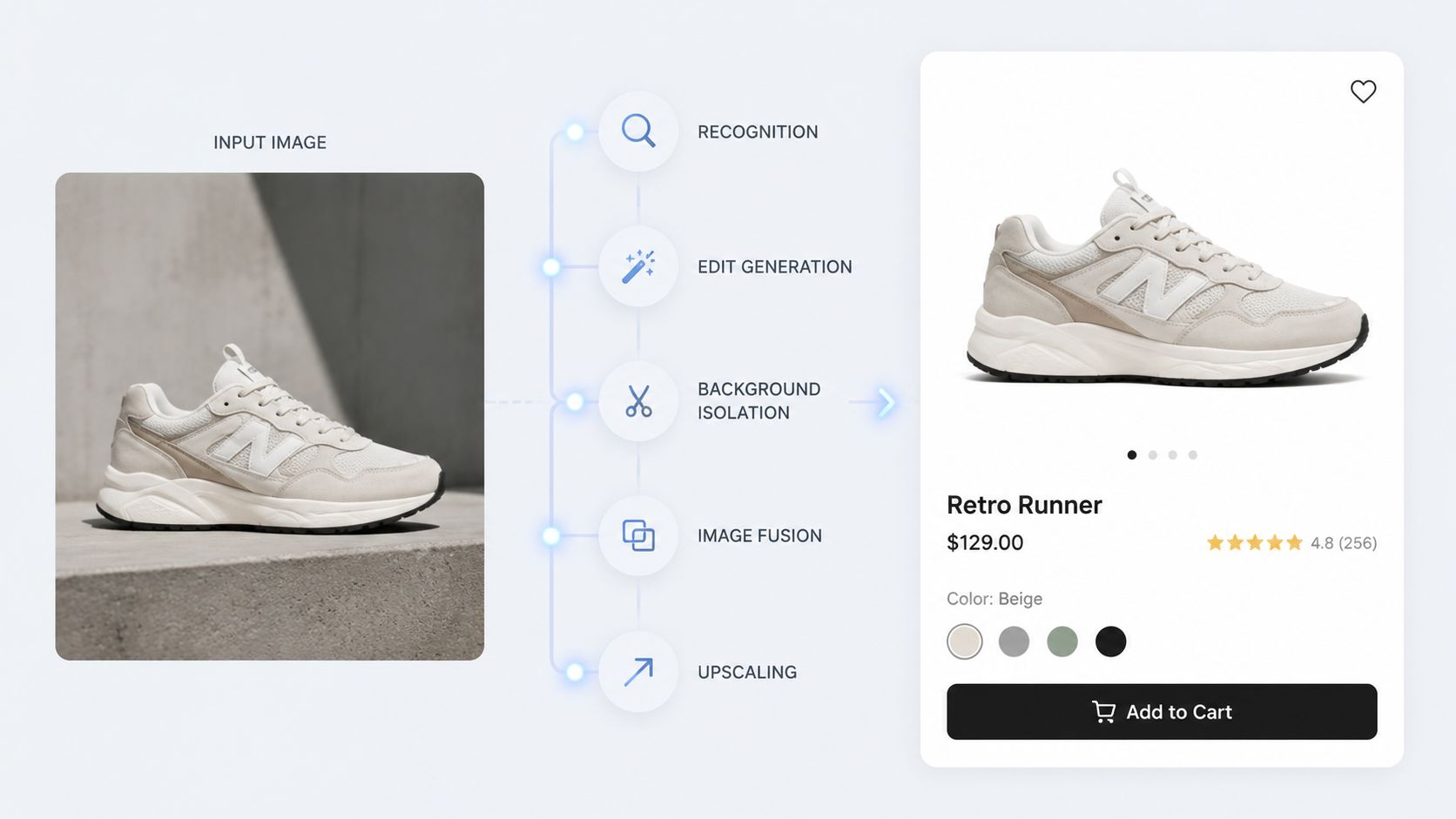
Background work and format control
The most common capability is background removal or replacement. Sellers use it for different reasons depending on channel.
Amazon-style listing images often need a clean product isolation. Shopify stores often benefit from a cleaner presentation for collection pages. Etsy usually gives you more room for context, but the first image still needs to read clearly at a glance.
A strong tool should let you produce several variations from the same source:
- Pure product cut-out for listing compliance
- Soft studio backdrop for branded collections
- Contextual scene placement for secondary gallery images
- Square or vertical reframing for ads and social
Smart scene generation and image fusion
The next capability is scene placement, which fuses a source product image into a new environment such as a living room, vanity, kitchen, gym, or outdoor setting.
This works best when the tool preserves the product itself and edits around it. For a sofa, that means placing the existing sofa into a believable room. For a skincare bottle, it means adding a clean bathroom counter or natural light setting without changing the packaging.
That distinction is more valuable than full synthetic generation because it keeps the asset commercially usable. If you work with paid social, this also overlaps with creative production for campaigns. Teams exploring ad production may find this practical context in Koast's piece on AI for Meta ad images.
Practical rule: Use AI to expand the use of approved product photography. Don't let it become a substitute for product accuracy.
Upscaling, clean-up, and controlled edits
A useful AI product photo generator also handles the less glamorous jobs:
| Capability | Best use in e-commerce |
|---|---|
| Upscaling | Bringing source images up to listing-ready resolution |
| Colour correction | Normalising a batch shot under mixed lighting |
| Reframing | Creating square, vertical, or wide variants from one image |
| Shadow and edge clean-up | Fixing cut-out errors that make listings look cheap |
| Variation generation | Producing several compositions from the same original |
Some tools also support apparel previews, product-on-person concepts, or in-room placement. Those are useful, but only when they stay disciplined. The goal isn't novelty. It's producing assets that match how the product will be sold.
For sellers comparing these functions through a commerce lens, this guide to AI product visualization is a useful companion.
The Catalogue Consistency Challenge
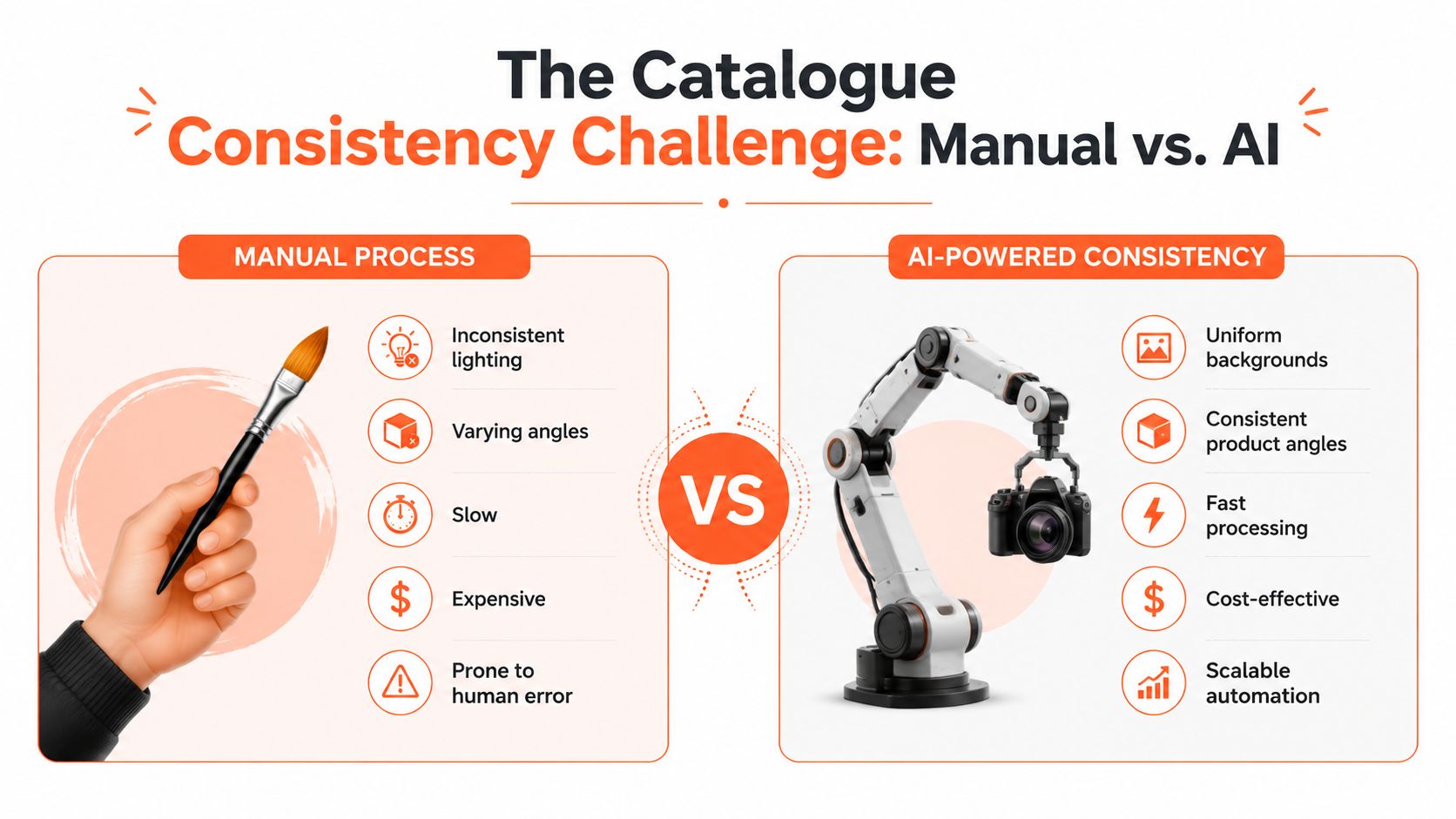
The biggest failure point isn't image quality on a single file. It's consistency across the full catalogue.
A product page can survive one slightly awkward image. A storefront with hundreds of mismatched images looks disorganised. Different lighting temperatures, inconsistent crops, varying background tones, and shifting shadow styles make the brand feel less reliable.
Why one-off editing creates catalogue drift
A lot of AI image tools are built for the satisfaction of a single result. Upload one image. Type one prompt. Generate one scene. That workflow is fine for experimentation, but it breaks when you need to process a collection.
The usual problems show up quickly:
- Lighting drift from one image to the next
- Inconsistent framing across variants
- Different scene styles that don't belong together
- Texture loss on fabrics, labels, and packaging
- Manual correction loops that eat up the time AI was supposed to save
If your catalogue spans seasons, product families, or multiple channels, those small inconsistencies stack up. Buyers may not articulate the issue, but they notice when the brand presentation feels uneven.
The trust problem is operational, not cosmetic
Most surface-level guides fail to address a key issue. They talk about prompts and backgrounds, but they skip the operational question. How do you get a whole catalogue to look like it came from one system?
A 2025 Digital Commerce Institute study found that 72% of Canadian DTC brands report catalogue inconsistency as their primary reason for low customer trust in AI-generated visuals. The same finding also notes that few guides address automated consistency across full collections.
If the same mug looks warm beige in one listing image and cool grey in the next, the issue isn't creativity. It's process control.
What consistency actually means
Catalogue consistency doesn't mean every image has to look identical. It means the rules are stable.
A practical consistency framework usually includes:
- Source standards such as angle, lighting, and file naming
- Approved edit recipes for each channel
- Scene families tied to product categories
- Crop rules by use case
- Review checkpoints before a batch is published
For many teams, the key upgrade isn't a better prompt. It's adopting a batch-oriented mindset similar to the thinking behind professional-looking, repeatable catalogue production discussed in this guide on how to make product photos look professional.
When sellers say an AI product photo generator “didn't work,” they often mean it couldn't maintain coherence beyond a few examples.
Building an Automated Image Pipeline
Once you stop treating image work as isolated edits, the right structure becomes a pipeline.
That matters because each stage affects the next one. If the product isn't recognised correctly, the edit instructions drift. If the background isn't isolated cleanly, the scene fusion looks fake. If upscaling happens at the wrong time, you waste money and processing time.
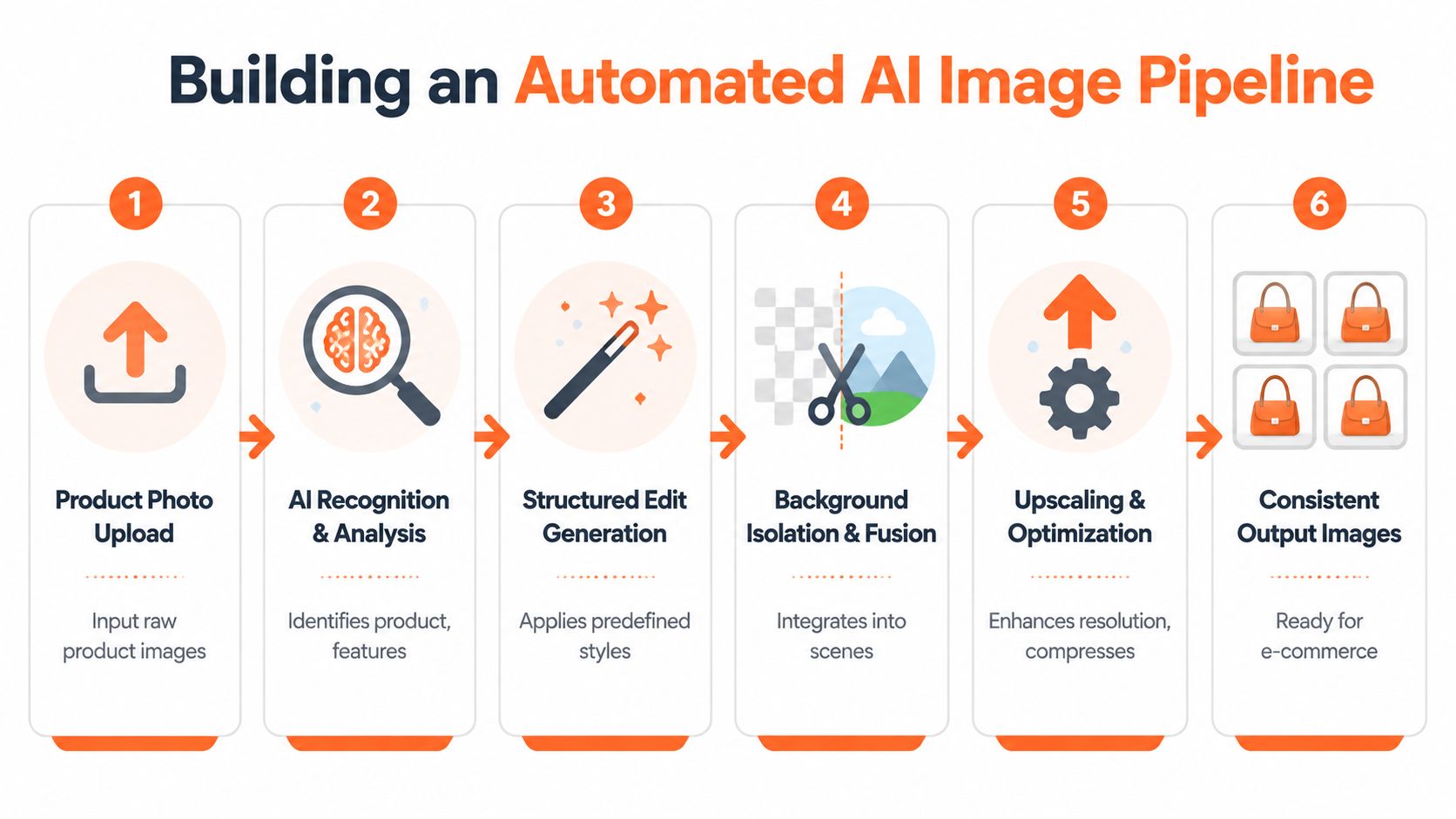
The five working stages
A practical catalogue workflow usually follows this sequence.
Doing this for a whole catalog?
MerchLoom runs background removal, upscaling and AI editing across every product photo you have — one prompt, whole batch.
Try MerchLoomRecognition
The system identifies what the product is, how it sits in frame, and which visual details must be preserved. That includes edges, labels, textures, and proportions.Structured edit generation
In this step, the plain-English goal becomes a controlled instruction set. Not “make it nicer,” but “generate white-background main image, square lifestyle version, and platform-safe crop from the same source.”Optional background isolation
If the asset needs cut-out handling or scene replacement, this happens before further transformations.Image fusion or editing
The product is placed into the required context, or the source image is cleaned, relit, reframed, and adapted for channel use.Upscaling and final optimisation
Resolution, compression, and output formatting are handled at the end so the image is ready for publishing.
A lot of teams researching product content automation on Shopify will recognise similar workflow concerns in this guide on Shopify AI catalogs.
A short demo helps make the pipeline idea easier to visualise.
Why chaining beats tool-hopping
Sellers often try to piece together separate tools. One for cut-outs. One for scenes. One for resizing. One for upscaling. One for final compression.
That approach works for a few images. It becomes fragile at scale.
Here's the trade-off in plain terms:
| Approach | What usually happens |
|---|---|
| Separate tools for each task | More control, more file handoffs, more manual checks |
| Single chained workflow | Less friction, easier repeatability, cleaner batch output |
A good pipeline reduces decisions. You define the rules once, then apply them across the collection.
If your operation is already feeling the pain of repeated edits, batch logic matters more than one impressive demo result. That's the core argument behind AI batch image editing as an operating model rather than a convenience feature.
Best Practices for Cost and Quality
Most conversations about AI product images focus on output quality. For sellers running batches, processing order matters just as much.
If you do the expensive step too early, you pay to transform data you were going to discard anyway. That mistake shows up constantly in catalogue work.

Fix the order before you chase better outputs
One of the clearest examples is background handling. Verified workflow data shows that removing backgrounds before upscaling can save up to 87% in operational costs per image because the expensive upscaling step processes a smaller image footprint.
That's not a cosmetic trick. It's a cost control rule.
For large catalogues, the order should usually be:
- Recognise the product
- Isolate or remove background if needed
- Apply scene or edit logic
- Upscale at the end
- Export to channel-specific outputs
When teams upscale first and isolate later, they spend compute on pixels that don't add selling value.
Protect realism over style
The second mistake is relying on enhancement settings that make the image look artistic instead of accurate.
Verified benchmark data in AI product photography workflows indicates that models such as Flux Development or Nano Banana 2, with autoenhance disabled, can yield up to 20x lower production costs and 10x faster processing times than traditional studio photography, while achieving a 33% higher conversion rate on marketplaces like Amazon and Shopify. The same benchmark ties the performance to preserving details like fabric texture, label typography, and material reflectivity.
The practical takeaway is narrower than the headline. If your image tool applies heavy stylisation, it may damage the exact details buyers use to judge the product.
Clean realism usually beats dramatic enhancement for listings. Texture, edges, and typography sell the item. Filters don't.
A simple quality-control checklist
Use this before you approve a workflow for a full batch:
- Check texture fidelity against the original photo, especially for fabric, packaging, or finishes.
- Review edge quality at zoom level, not only in thumbnail view.
- Compare colour stability across several products from the same collection.
- Test one lifestyle scene family before expanding it to a whole range.
- Watch for accidental redesign of labels, fasteners, seams, and shapes.
If your team also manages the visibility side of content production, it's worth pairing image workflow discipline with a distribution framework such as this AI content visibility framework.
A strong AI product photo generator saves money when it's configured with restraint. Most quality failures come from asking it to be too creative.
Your Implementation and Integration Strategy
The safest way to adopt an AI product photo generator is to treat it like a production rollout, not a design experiment.
Start with your existing image library. That might live in Shopify, a cloud drive, a shared folder from a photographer, or object storage used by your operations team. The point is to work from approved product imagery, not rebuild the catalogue from scratch.
Start with one product family
Don't begin with everything. Pick one manageable segment such as drinkware, skincare, footwear, or a single apparel line.
Define the outputs you need from each source photo:
- Marketplace version with a clean listing-safe background
- Storefront square image for collections and PDPs
- Lifestyle support image for the gallery
- Paid social crop for campaigns
- Optional contextual variation such as in-room or on-person preview
This gives you a repeatable specification instead of a vague request for “better images.”
Build rules by destination
The smartest implementations map outputs to channels rather than editing styles.
A useful operating pattern looks like this:
| Destination | Output rule |
|---|---|
| Amazon | Main image built for clean product presentation |
| Shopify | Square product image plus supporting lifestyle asset |
| Etsy | Styled lead image plus clear product-focused alternates |
| Social ads | Cropped, attention-ready variants from the same source |
That setup matters because the business case is already strong. A 2026 industry roundup estimated AI product images at about $0.02 to $2.00 per image versus $200 to $5,000 for a traditional product shoot, and for a 500-product catalogue the same source estimated roughly $100 to $1,000 with AI workflows compared with about $10,000 to $50,000 with conventional photography (Morphed industry roundup).
Connect systems and define review points
Once the rules are clear, connect the places where your images already live and decide who approves what.
In practice, that means:
- Input location is fixed, so no one is re-uploading the same files repeatedly
- Output naming follows a standard for channel and variant
- Review happens early on sample outputs before the full batch runs
- Approved workflows are reused instead of rebuilt each time
If you're replacing manual edits on a large collection, a bulk product photo editor mindset is more useful than thinking in terms of individual touch-ups. The operational gain comes from repeatability.
A mature implementation doesn't ask a designer to touch every image. It asks the team to define the rules once, test them, then run them confidently.
Conclusion From Editor to Workflow Manager
The most useful mindset shift is this. Stop thinking like an editor trying to perfect one image. Start thinking like a workflow manager responsible for turning approved source photos into a full asset system.
That's where an AI product photo generator earns its place. Not by inventing fantasy product shots, but by helping a seller transform real photos into listing images, lifestyle scenes, ad creatives, and channel-specific variants without losing control of accuracy.
The strongest results come from a few disciplined choices:
- start with real product photography
- build for catalogue consistency, not isolated wins
- sequence the pipeline carefully
- protect realism over flashy enhancement
- define output rules by channel
Teams that get this right don't just save editing time. They make image production easier to scale, easier to review, and easier to keep consistent across the whole business.
Used that way, AI image tooling isn't a shortcut. It's infrastructure.
If you already have product photos and need a practical way to turn them into white-background listings, lifestyle scenes, ad variants, and catalogue assets at batch scale, MerchLoom is built for that workflow. It connects to the image sources you already use, chains the processing steps automatically, and helps online sellers run repeatable AI image pipelines across full collections instead of editing one file at a time.
Stop editing product photos one at a time
Upload your catalog or connect your store. Describe the result once. MerchLoom does the rest.
Try MerchLoom