
AI Jewelry Try On
AI jewelry try on - Scale your brand with AI jewelry try-on. This guide helps e-commerce sellers implement virtual try-on for entire catalogs, from image prep
A new jewellery drop rarely arrives as a tidy creative brief. It arrives as a folder full of ring shots, bracelet angles, necklace packshots, earring close-ups, and a deadline that doesn't care how many SKUs you've added this season. If you sell online, you already know the tension. Clean catalogue images are mandatory, but buyers also want to see scale, fit, and how a piece sits on a real person.
That's where AI jewellery try on becomes useful. Not as a gimmick on one product page, but as an operational tool for turning hundreds of product images into consistent try-on previews, lifestyle scenes, and marketplace-ready listings without rebuilding your entire content process around custom shoots.
Beyond Static Photos The Case for Virtual Try-On
Static product photography still does one job very well. It shows detail. For pavé settings, clasp construction, metal finish, and gemstone cut, a clean front-on image remains essential. But jewellery has a second sales problem that still photos often fail to solve. Buyers want to know how a ring sits on a hand, whether a bracelet feels delicate or chunky on a wrist, how a necklace falls at the collarbone, and whether earrings read as subtle or statement.
That gap matters commercially. Marketing tests for virtual try‑on features in online retail indicate that enabling customers to virtually try on products can increase purchase rates by approximately 65%. For a seller managing Amazon listings, Shopify product pages, and Etsy imagery at the same time, that's a strong argument for building try-on previews into the image pipeline rather than treating them as an optional extra.
Why jewellery needs more than packshots
Jewellery is one of the hardest categories to sell from a single white-background photo. A pendant can look oversized in one crop and tiny in another. A ring can sparkle beautifully in isolation and still leave the customer unsure whether it will look refined or bulky on the hand.
The practical fix isn't replacing catalogue imagery. It's pairing clean product views with try-on-style previews.
- Rings on hands: Buyers judge scale, finger coverage, and stone presence faster on-hand than from dimensions alone.
- Bracelets on wrists: Shape, drape, and stackability are easier to understand in context.
- Necklaces on models: Length and neckline interaction often decide whether a shopper keeps scrolling or adds to cart.
- Earrings on ears: Drop length and visual weight become clearer immediately.
- Luxury lifestyle scenes: These aren't substitutes for product pages, but they help social ads and collection banners feel aspirational without losing the product.
Practical rule: If a shopper has to imagine fit, you're adding friction.
For sellers working at catalogue scale, the challenge is consistency. One handcrafted try-on visual is easy. Producing the same quality across a collection is where workflows break. Different crops, inconsistent model angles, mixed backgrounds, and platform requirements quickly turn “creative variation” into listing chaos.
A useful primer on augmented reality for ecommerce helps frame the broader commercial logic, especially around sales and returns. For a more product-image-specific angle, this guide to virtual try-on for products is useful because it treats try-on as part of a content system, not a standalone widget.
Batch scale changes the economics
The shift happens when you stop thinking about one hero image and start thinking in batches. If you've got hundreds of images, AI jewellery try on can turn a catalogue into a set of coordinated assets. You can create clean packshots for Amazon's white background rules, square crops for Shopify, larger presentation-ready images for Etsy, plus on-model previews for ads and collection pages.
That's the business case. Better visual context doesn't just make pages look nicer. It makes jewellery easier to buy.
Understanding Virtual Try-On Models and Methods
Not all virtual try-on systems do the same job. Some are basically smart overlays. Others use body tracking and 3D positioning. Others lean on generative AI to create new on-model visuals. If you're a jewellery seller or product photographer, the right question isn't “Which is most advanced?” It's “Which method fits my products, source files, and batch workload?”
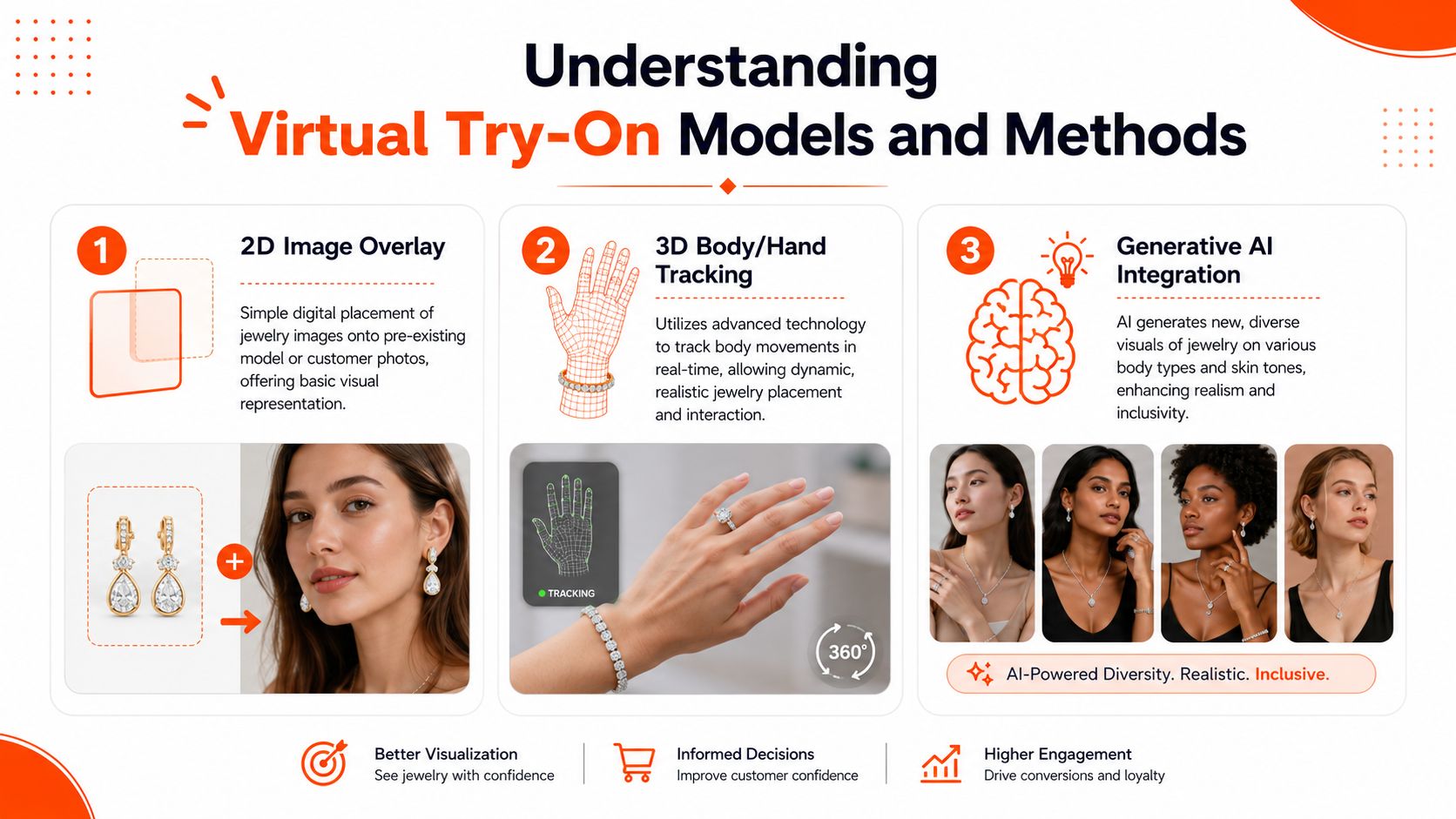
Three common approaches
Here's the practical breakdown:
| Method | Best suited to | Strength | Main limitation |
|---|---|---|---|
| 2D image overlay | Earrings, pendants, simple necklace previews | Fast and easier to batch | Can look flat or sticker-like |
| 3D body or hand tracking | Rings on hands, bracelets on wrists, live AR previews | Better fit and movement realism | Needs stronger assets and tighter alignment |
| Generative AI integration | Lifestyle scenes, model variation, campaign visuals | Flexible and efficient for catalogue expansion | Needs careful quality control to protect product accuracy |
A lot of confusion comes from sellers expecting one method to cover every use case. It usually won't. A clean earring preview for an Etsy listing may work perfectly as a 2D placement. A ring on a moving hand usually needs better registration and rendering logic. A luxury campaign image with a necklace at golden hour is often closer to image generation than traditional AR.
The technical pipeline in plain English
Most AI jewellery try on systems follow four stages: image acquisition, segmentation, registration, and rendering. Photta's overview of the process notes that, when properly tuned, these steps can yield 85–90% acceptance in side-by-side A/B tests versus studio photos, while poor lighting or low camera resolution can drop perceived realism to roughly 40–50%, especially for rings and bracelets.
That sounds technical, but the workflow is straightforward in practice:
- Image acquisition means capturing the jewellery and the person or model image cleanly enough for the system to work.
- Segmentation removes or refines the background around the item so edges don't glow or fray.
- Registration positions the jewellery onto the hand, neck, ear, or wrist.
- Rendering adjusts light, scale, and overlap so the result feels believable.
The biggest mistake I see is assuming the AI will rescue weak input files. It won't. It will usually preserve the problem and make it more obvious.
Matching method to product type
Different jewellery categories break in different ways.
Rings and bracelets
These are the hardest. Hands rotate, wrists bend, and even slight placement errors make jewellery look like it's floating. If realism matters, especially for premium pieces, better source imagery and stronger alignment tools prove their worth.
Necklaces
Necklaces are more forgiving if the model angle is controlled. Symmetry helps. Product photographers can often get reliable results by standardising neckline crops and chain position before batch generation. For broader context on synthetic listing imagery, AI product visualization is worth reviewing.
Earrings
Studs and small drops often work well with simpler methods because the anchor point is relatively stable. Hair, however, creates problems fast. If the ear is obscured, no technology choice will fully compensate.
Lifestyle scenes
These are valuable for luxury branding, but they carry the highest risk of product drift. If the exact silhouette, stone arrangement, or clasp shape matters, keep one eye on editorial mood and the other on product fidelity.
The right model isn't always the most advanced one. It's the one that stays believable across the entire catalogue.
Preparing Your Image Catalogue for AI
Most failed AI jewellery try on projects don't fail at the generation stage. They fail earlier, when the source images are inconsistent. One bracelet is shot warm, another cool. One ring is tightly cropped, another has extra negative space. Necklace chains vary in angle and scale from image to image. Once those files enter a batch workflow, the inconsistencies multiply.
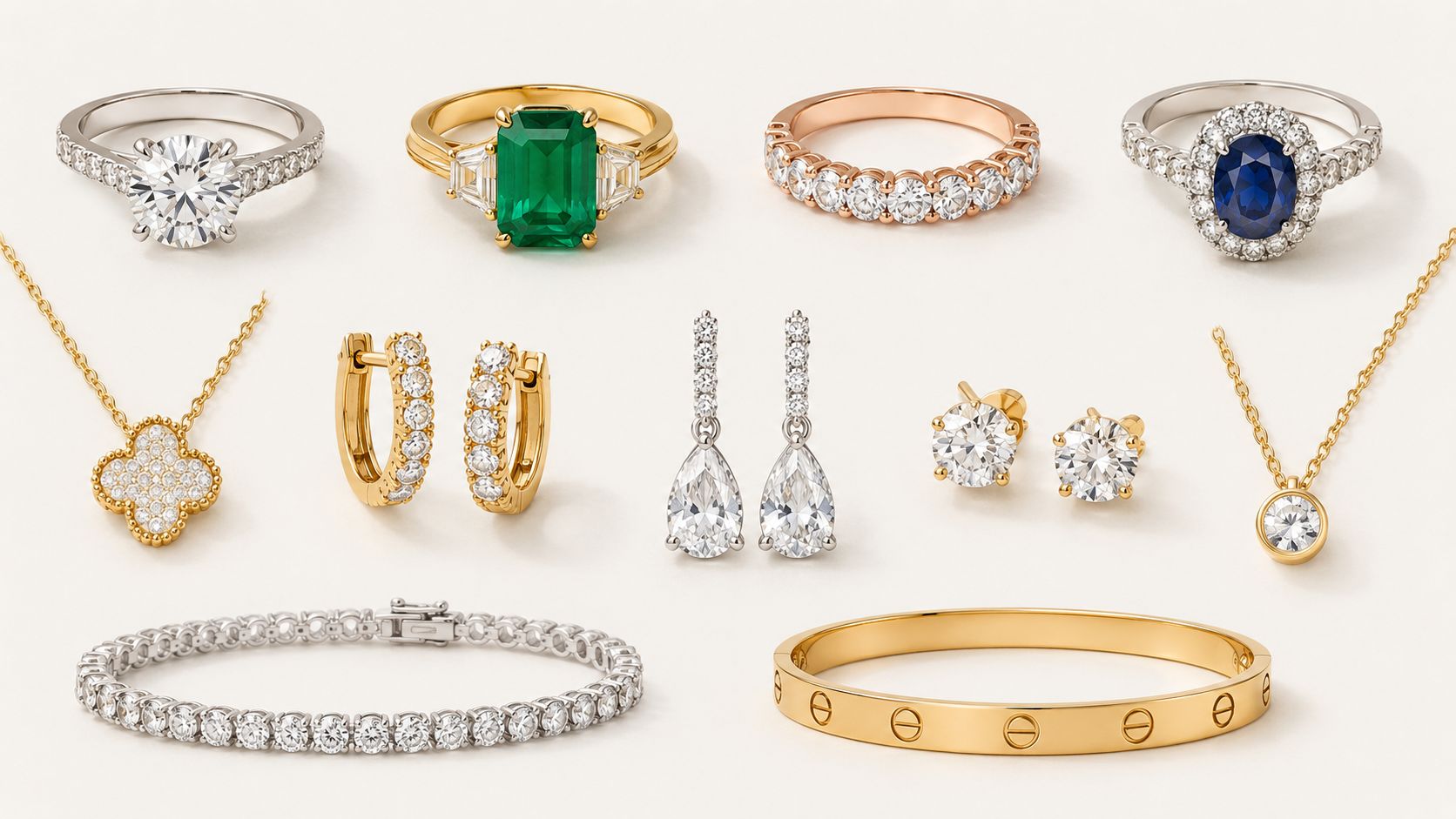
Build two asset sets, not one
Jewellery sellers usually need two parallel image systems.
The first is the clean catalogue set. These are your isolated products, standard angles, white or transparent backgrounds, and marketplace-safe exports. The second is the context set. These are model images, hand crops, neck crops, ear views, and lifestyle backgrounds that support try-on previews.
If you try to force one set of files to do both jobs, the results tend to look compromised.
- Catalogue files should prioritise accurate metal colour, edge clarity, and consistency across the collection.
- Try-on source files should prioritise natural anatomy, stable pose, even skin lighting, and repeatable composition.
- Lifestyle backgrounds should be used selectively, mainly for campaign assets, social media, and collection storytelling.
What consistency actually means
Consistency isn't about making every image identical. It's about removing variables the AI doesn't need to solve.
For photographers and in-house teams, that translates into a disciplined prep checklist:
- Lighting: Keep it soft and neutral. Metal tone shifts are hard to fix later.
- Angles: Standardise hero angles per category. Rings, bracelets, and necklaces each need their own baseline.
- Resolution: Use source files that hold up when cropped tighter for hands, ears, or neckline detail.
- Spacing: Leave predictable room around each product so batch crops don't cut into the piece.
- Naming: Organise by SKU, category, metal, and variant. Good file structure saves more time than people expect.
Jewellery AI works best when the inputs are boring. Controlled files produce believable outputs.
A solid guide to photographing small items for e-commerce can help if your current product photos are sharp enough for a packshot but inconsistent for reuse in try-on previews.
Separate prep by product type
Rings and bracelets need extra discipline because hands and wrists magnify alignment issues. Necklaces benefit from consistent chain presentation and predictable neck crops. Earrings need unobstructed ear visibility, especially if hair or shadows are involved.
Later in the workflow, video and live try-on can introduce another layer of complexity. This short clip gives a useful visual reference for how these systems are presented in practice:
Prepare for platform outputs early
A busy seller shouldn't wait until export day to think about format requirements. Amazon may need white-background catalogue views. Shopify often benefits from square framing. Etsy sellers often want larger, detail-friendly presentation images. If your asset library is organised around those outcomes from the start, AI jewellery try on becomes much easier to scale.
Doing this for a whole catalog?
MerchLoom runs background removal, upscaling and AI editing across every product photo you have — one prompt, whole batch.
Try MerchLoomThe boring preparation work is what makes the polished output possible.
Designing a Scalable Batch Workflow
A single mock-up proves that virtual try-on can work. A workflow proves that your team can keep using it next month when another collection lands. That distinction matters. Jewellery teams don't need more one-off experiments. They need a production line that handles hundreds of images without introducing visual drift.
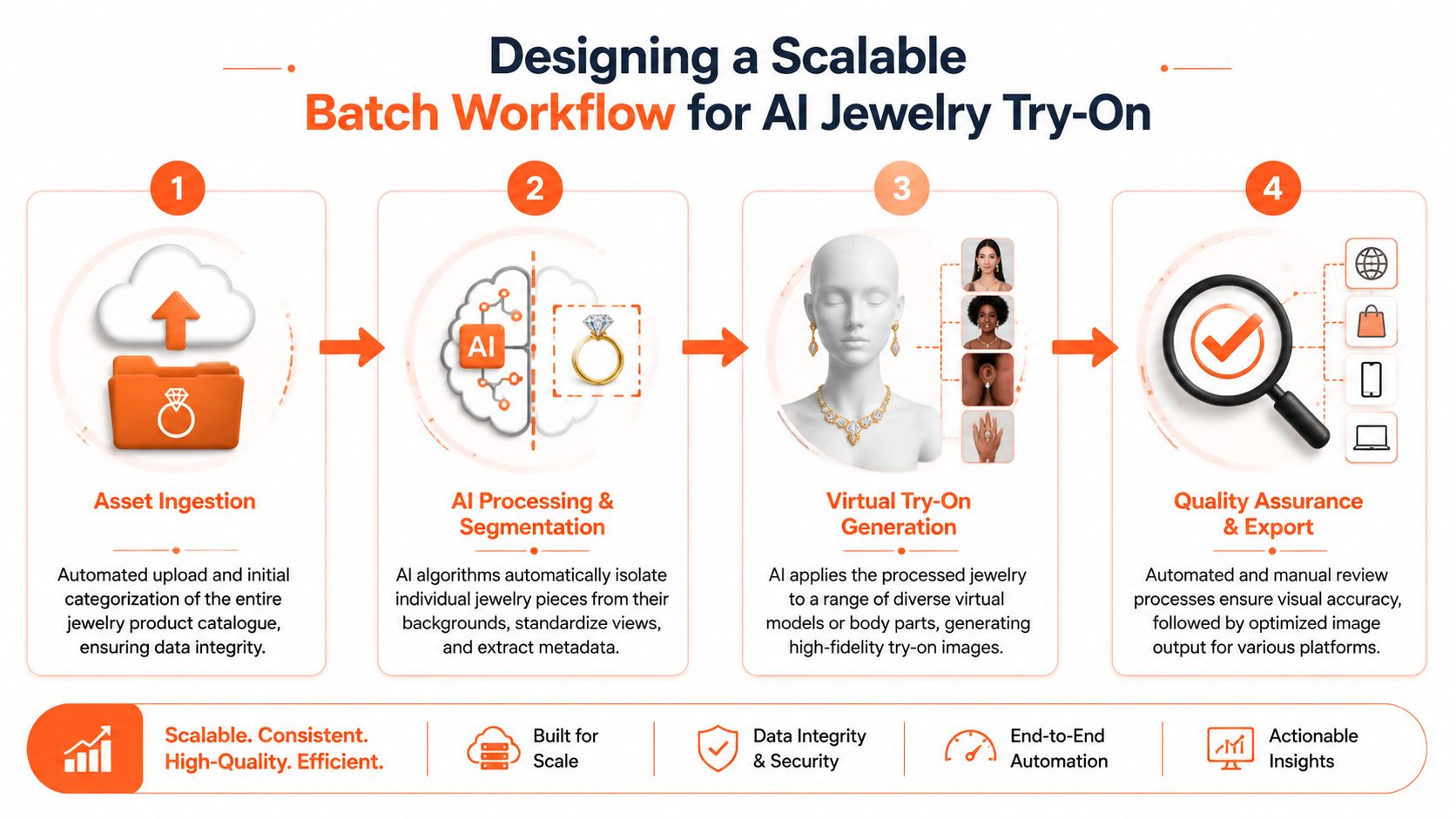
Think in chained operations
The most reliable setup is a chained batch process. Each stage solves one problem cleanly, then hands off to the next.
A typical jewellery workflow looks like this:
Ingest the raw collection
Import product photos by SKU, category, and variant. Keep rings, bracelets, necklaces, and earrings separated because they often need different treatment.Clean and isolate products Remove backgrounds where needed, refine edges, and standardise base crops to produce clean catalogue views.
Generate try-on previews
Apply products to hands, wrists, necks, ears, or selected model templates. Keep category-specific rules in place so a ring workflow doesn't behave like a necklace workflow.Create context assets
Produce luxury lifestyle scenes, campaign visuals, or secondary imagery for social and email. These should support the product, not obscure it.Export by channel
Reframe and deliver outputs for Amazon white background listings, Shopify squares, Etsy-ready presentation images, and ad placements.
Standardisation is the hidden advantage
One reason browser-based try-on tools matter operationally is that they encourage standardised outputs. Perfect Corp's AI-powered virtual try-on for 3D necklaces is designed to run on both mobile and desktop browsers and supports high-precision real-time rendering, enabling brands to create standardised on-model necklace previews that can be adapted for Amazon white-background requirements or Shopify squares.
That standardisation matters more than the novelty factor. If one necklace preview is elegant and the next feels mis-scaled or over-processed, the catalogue starts to look disorganised even if each image is technically “good”.
Where batch workflows usually break
The pressure points aren't mysterious. They tend to be operational.
| Failure point | What it looks like | Better approach |
|---|---|---|
| Mixed source quality | Some items look premium, others look synthetic | Enforce category-based input standards |
| No workflow branching | Earrings, rings, and necklaces all run through one generic process | Split pipelines by jewellery type |
| Late formatting decisions | Teams re-edit finished assets for each channel | Build export rules into the pipeline |
| Too much manual correction | Editors keep fixing the same issue image by image | Solve recurring problems upstream |
If you're evaluating the broader operational side, this article on implementing AI workflow automation is a helpful companion read because it treats automation as a process design problem, not just a tool choice.
For teams dealing with volume, AI batch image editing is the relevant lens. The value isn't in making one image faster. It's in defining the process once, then applying it across the entire collection with predictable output.
Don't optimise for the prettiest single image. Optimise for the strongest average result across the full catalogue.
That's how AI jewellery try on becomes sustainable.
Optimizing Cost Quality and User Experience
Most sellers don't need the most advanced try-on system. They need one that balances visual credibility, processing cost, and a buying experience that doesn't slow the customer down. That balance shifts by category. A luxury necklace collection can justify more rendering effort than a fast-turn fashion earring range. A ring page often needs more realism than a secondary lifestyle banner.
Start with the commercial threshold
There's a clear payoff when the implementation is good. Studies of AR-enabled jewellery try-on in North America and Europe indicate that consumers using AR virtual try-on features are approximately 2.7 times more likely to complete a purchase and report roughly 41% higher satisfaction scores with their online jewellery purchases.
That doesn't mean every SKU deserves the same production effort. It means the feature has to be good enough to support trust.
Choose quality where it matters most
A practical way to manage cost is to tier your catalogue.
Premium pieces
Use stronger source images, tighter QA, and more realistic try-on treatment for hero rings, statement necklaces, and high-margin bracelets. These are the products where a floating fit or bad metal tone can damage perceived value.
Bread-and-butter catalogue lines
Use faster, more standardised outputs where the buying decision depends on variety and quick comparison. Earrings, simple pendants, and repeatable styles often work well here.
Campaign and social assets
These can be more expressive, but they still need product discipline. If the mood image is beautiful but the jewellery shape reads inaccurately, the creative has done the brand no favour.
Lower cost by changing process order
A lot of budget gets wasted by processing images in the wrong sequence. If a file is going to be isolated, reframed, and then enlarged, it's often smarter to clean and simplify the image before pushing it through heavier steps. That matters most when you're working across full collections, not isolated edits.
This is also where automation becomes practical rather than abstract. A system for product photo automation is useful when it reduces repetitive handling and preserves consistency across exports.
Better UX usually comes from restraint. One reliable try-on option beats a flashy interface that loads slowly or misplaces the product.
Keep the user flow simple
The customer experience on the product page matters as much as the image generation behind it. Good implementation usually follows a few basic rules:
- Place try-on near the main gallery: Don't hide it in tabs or lower-page modules.
- Use it to answer fit questions: Ring-on-hand, necklace-on-neck, bracelet-on-wrist, and earrings-on-ear should solve uncertainty quickly.
- Support mobile first: A jewellery customer often shops from a phone, so cramped controls or heavy previews create friction.
- Avoid loading theatrics: Slow transitions and excessive options can make the feature feel ornamental rather than useful.
The best AI jewellery try on experience feels boring in the right way. It loads quickly, looks believable, and helps the buyer decide.
Common Jewelry Try-On Pitfalls to Avoid
Most jewellery teams assume the main risk is technical failure. In practice, the larger risk is strategic sloppiness. The try-on works, but the catalogue becomes visually inconsistent, the product loses accuracy, or the customer gets a confusing mix of clean packshots and overly stylised previews.
Floating jewellery and bad fit cues
Rings and bracelets expose weak registration immediately. If the piece doesn't sit flush to the hand or wrist, the result looks fake even when the rendering itself is sharp. The fix isn't more effects. It's tighter source control, stronger anatomy matching, and category-specific placement rules.
Necklaces can fail in a quieter way. A chain may look centred in one image and drift in another. Buyers may not articulate the problem, but they'll feel the inconsistency.
Metal colour drift
Gold is unforgiving. Silver is too. If your source images vary in warmth, AI outputs can make premium jewellery look cheap. That's especially dangerous when you're processing large batches from mixed shoots or supplier-provided files.
The solution is disciplined colour management before try-on generation, not after.
- Standardise the base product files before applying context.
- Keep model lighting neutral so the jewellery doesn't inherit odd colour casts.
- Review by metal type rather than approving mixed batches all at once.
A realistic preview that misrepresents the metal is still a bad product image.
Overusing lifestyle scenes
Luxury lifestyle imagery can enhance a brand, but too much of it muddies the selling job. Buyers still need clean catalog views and straightforward try-on-style previews. If every asset becomes cinematic, shoppers lose the ability to compare pieces cleanly.
A better mix is simple:
- Use catalogue images for clarity.
- Use try-on previews for fit and scale.
- Use lifestyle scenes for mood, ads, and collection storytelling.
Treating all jewellery categories the same
A final mistake is using one generic workflow for everything. Earrings, rings, bracelets, and necklaces don't share the same visual constraints. The teams that get reliable results are the ones that split the process by category and review outputs according to how each product is judged by shoppers.
AI jewellery try on works best when it stays grounded in retail reality. Buyers want accuracy first, confidence second, and polish third.
MerchLoom helps sellers handle that reality at catalogue scale. If you need to clean product images, isolate jewellery, generate try-on previews, correct visual context, and upscale final outputs across entire collections, MerchLoom is built for chained batch workflows rather than one-image-at-a-time editing. It's a practical fit for jewellery teams juggling Amazon white backgrounds, Shopify squares, Etsy-ready images, and a constant stream of new SKUs.
Stop editing product photos one at a time
Upload your catalog or connect your store. Describe the result once. MerchLoom does the rest.
Try MerchLoom