
Price for Product Photography Costs and Models in 2026
Price for product photography explained — per-image, hourly and package rates, cost drivers and sample budgets to plan your catalog spend.
Basic white-background product photos commonly cost $12–$75 per image, styled images $50–$150, and high-end commercial work $300–$500+, while photographer day rates can range from $500–$3,000. Bulk batches usually reduce the effective price per image, but the number that matters is your cost per approved, usable catalog asset.
You've got a Shopify or Amazon catalog waiting for attention. Two hundred SKUs need clean main images, alternate angles, detail shots, and perhaps lifestyle versions. A quote that looks reasonable for one image can become a large production bill once styling, retouching, revisions, licensing, shipping, and file preparation are included.
Introduction What Price for Product Photography Really Means at Catalog Scale
A seller with 200 SKUs might need one white-background image per SKU, or several views for each product. The total workload changes completely depending on whether the photographer is delivering one edited image, a complete set of angles, or a mixture of listing and campaign assets. That's why the phrase price for product photography needs a defined unit before it can help you budget.
Independent 2026 pricing guides place simple white-background ecommerce work at about $12–$75 per image, styled shots at $50–$150, and high-end commercial or luxury images at $300–$500+. Some commercial day rates reach $10,000, while Shopify's 2026 planning guidance places product photographers at about $500–$3,000 per day and finished images around $50–$350 per image. These are different scopes, not contradictions. The quote depends on styling, retouching, production support, volume, and rights. See this product photography overview for the basic distinction between catalog images and more creative visual assets.
Practical rule: Budget by approved asset, not by the cheapest number on a rate card.
A 10-image white-background batch may cost roughly $250–$750, while a 50-image catalog batch may land around $1,000–$3,500, according to an independent 2026 pricing guide. The larger batch can have a lower effective per-image price because setup, lighting, product handling, and retouching workflows are spread across more deliverables.
For a large catalog, consistency often matters more than one impressive hero image. Product scale, camera height, crop, shadow treatment, background color, and color correction need to remain stable from the first SKU to the last. A lower quote that produces mismatched files can create extra internal work and force reshoots.
Start your budget with this formula:
Total catalog cost ÷ approved images you can publish = cost per usable asset
Then add the requirements for Amazon, Etsy, Shopify, and any other channel before accepting a quote. The correct question isn't, “What's the price per photo?” It's, “What will each publishable asset cost after every required production step?”
How Pricing Models Work and When Each One Saves You Money
Photographers and production services usually structure catalog work in five ways. The right model depends on your quantity, how predictable the products are, how much creative direction you need, and whether the work repeats throughout the year.
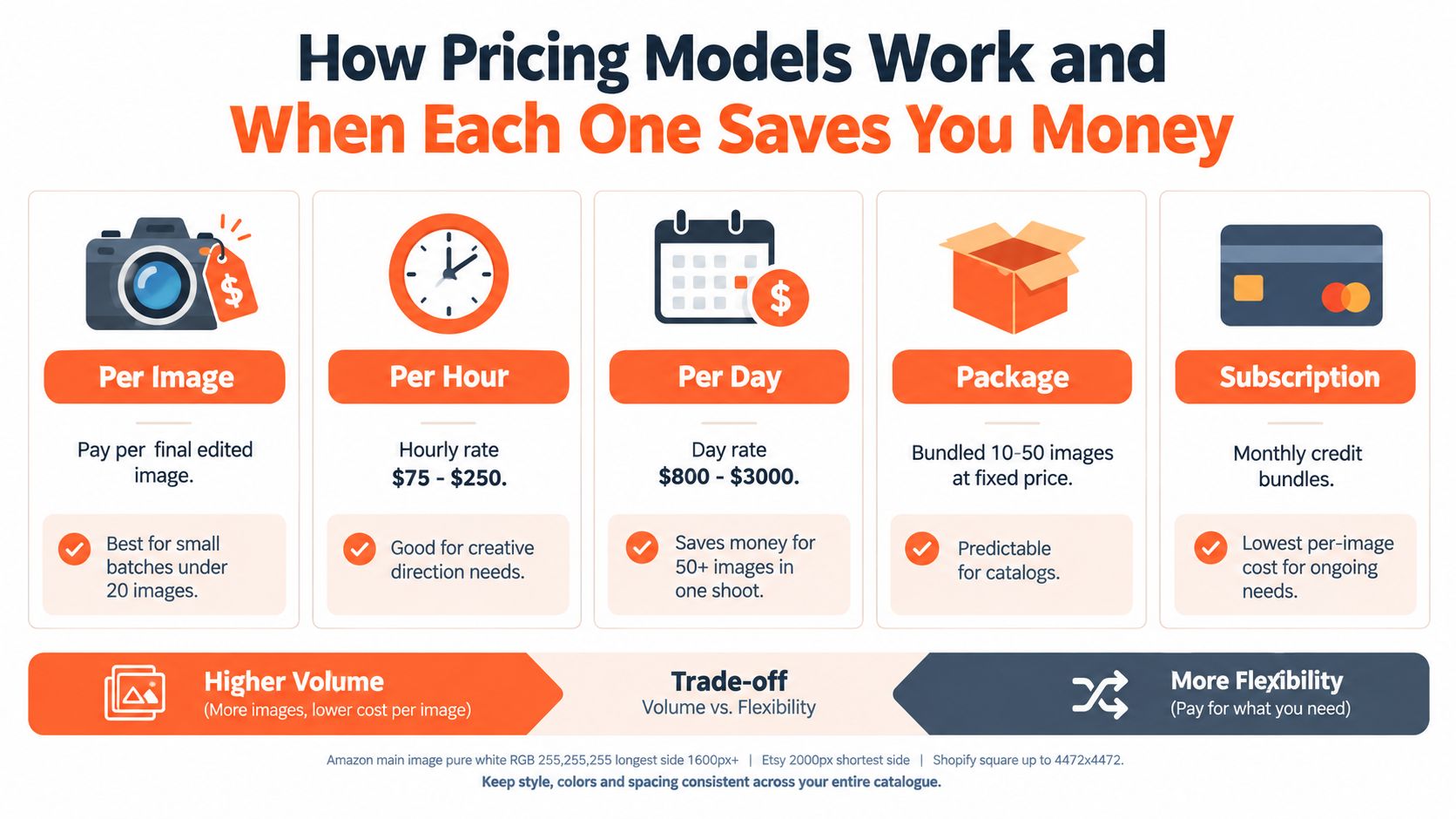
Compare the charging structures
Per image is easy to understand. You pay for each final edited file. It suits a small batch, a few replacement images, or a controlled test set. At catalog scale, check whether setup, minimum orders, advanced retouching, and licensing sit outside the image rate.
Per hour works when the product needs experimentation. You may need creative direction, unusual lighting, or repeated adjustments for reflective materials. Hourly billing gives flexibility, but your final image count isn't guaranteed unless the quote defines expected deliverables.
Per day can make sense when similar products are prepared together. Shopify's 2026 guidance lists approximately $500–$3,000 per day for product photographers and about $50–$350 per finished image, with the effective result depending on output and production scope. A day rate becomes easier to evaluate when the photographer states how many finished images the day is expected to produce.
Packages bundle a defined quantity, such as 10 to 50 images, at a fixed project price. This helps catalog sellers forecast spending and compare vendors. Confirm whether the package includes product prep, a set number of angles, retouching, revisions, and exports.
Subscriptions or credit bundles fit recurring launches. They can lower the effective image price for ongoing work, but ask about credit expiration, unused balances, resolution, failed outputs, review time, and export rules. A low recurring fee isn't useful if your seasonal catalog can't consume the included work.
Pricing model comparison for catalog sellers
| Pricing Model | Typical Range | Best For | Watch Out At Scale |
|---|---|---|---|
| Per image | $12–$75 for basic white-background images, with higher tiers for styled and commercial work | Small, standardized batches | Separate setup, rights, revisions, or retouching fees |
| Per hour | Varies by market and experience | Creative direction and difficult products | Time can grow without a guaranteed asset count |
| Per day | $500–$3,000 in Shopify's 2026 guidance | Large, coordinated shoots | A day rate doesn't guarantee enough approved images |
| Package | Fixed bundle price | Planned catalog batches | Define exactly what counts as a finished image |
| Subscription or credits | Depends on included credits and usage | Repeated catalog drops | Check expiration, review labor, and output limits |
For marketplace editing and file preparation, you can also review this ecommerce photo editing app guide. Treat editing as a separate production decision if your photographer delivers consistent source files but not every marketplace version.
Amazon's main image needs a pure white background at RGB 255,255,255, and the longest side should be at least 1,000 pixels for zoom, while Amazon's help text says images shouldn't exceed 10,000 pixels or fall below 500 pixels on the longest side. Etsy recommends uploading listing photos at 2,000 pixels on the shortest side or larger. Shopify supports uploads up to 4,472 × 4,472 pixels, with square images around 2,048 × 2,048 pixels commonly recommended for product photos. Keep these output needs in the brief, not as an afterthought.
What Drives the Price Up or Down Across Your Catalog
The same product can receive a basic catalog treatment or a commercial production treatment. The difference isn't just the camera. It's the labor required to prepare, capture, edit, approve, license, and deliver every usable file.
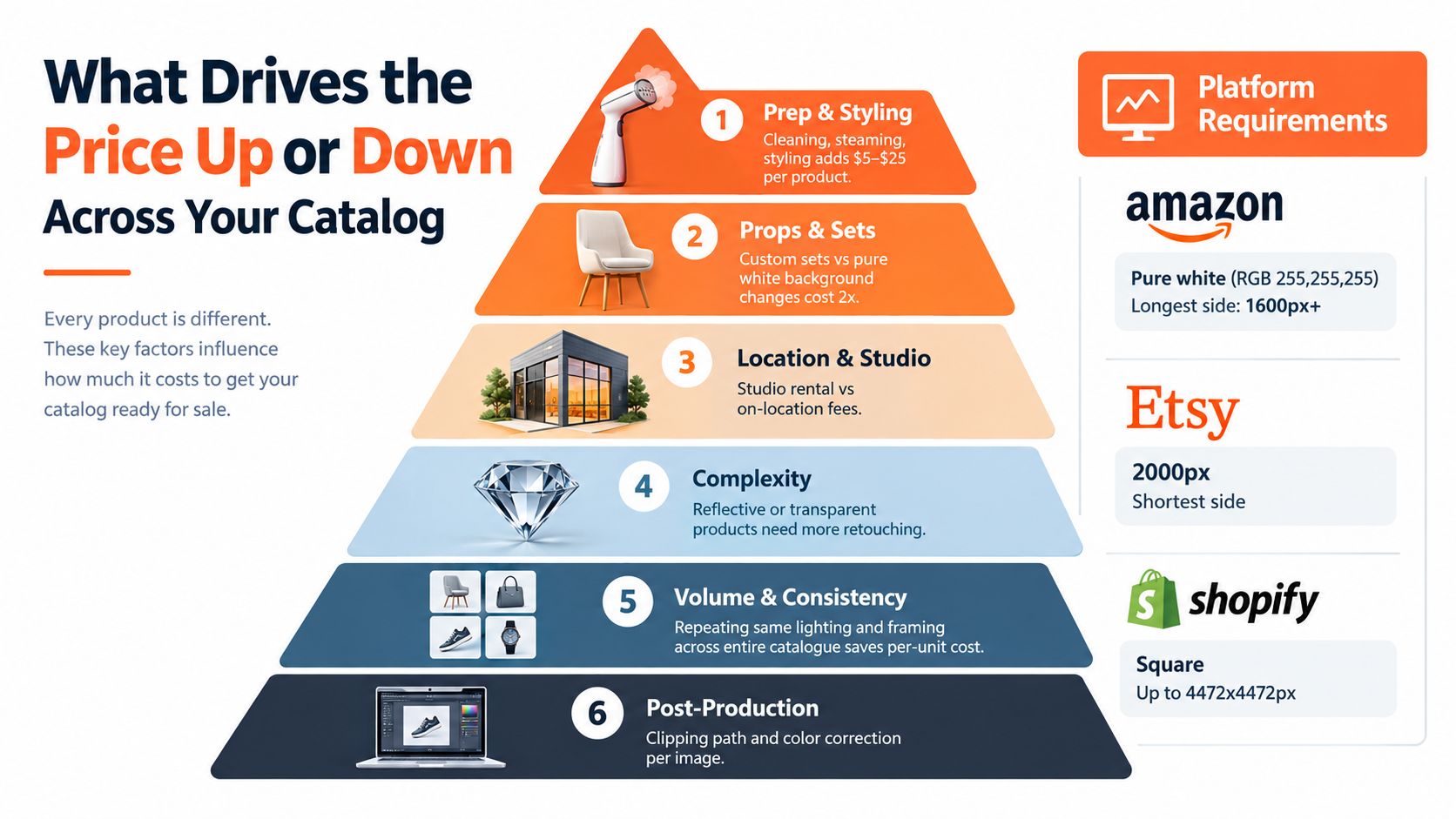
Seven quote lines to inspect
Product preparation and styling includes cleaning, steaming, assembling, and arranging the item. Apparel, footwear, and soft goods often need more hands-on preparation than a boxed hard good. If every SKU needs attention, a small per-product preparation charge can become a substantial catalog line.
Props and sets change the production from a controlled listing image to a styled scene. A white sweep uses a repeatable setup. A custom set needs surfaces, props, color decisions, assembly, and often additional approvals. Ask whether props are supplied, purchased, returned, or billed separately.
Studio or location affects both the direct fee and the logistics around the shoot. A studio can provide controlled light and repeatable framing. An on-location setup may better suit a campaign but introduces travel, access, setup, and weather considerations.
Lighting complexity rises with products that are glossy, metallic, transparent, translucent, or heavily textured. These items show reflections and dust more clearly, so the photographer may need flags, diffusion, multiple light positions, and more retouching.
Retouching depth separates a basic edit from a commercial finish. Ask whether the quote includes background cleanup, clipping paths, dust removal, color correction, shadow creation, wrinkle removal, compositing, and variant matching.
Usage rights and licensing determine where you may publish the images. Product pages, marketplaces, organic social, paid advertising, packaging, print, territory, duration, and exclusivity can all change the commercial value of the files. A web-only license isn't the same as national advertising rights. Some pricing guides place simple commercial web and social use around $350–$600, while national advertising rights can reach $1,500–$3,000 for the same photo, depending on the scope described in the guide.
Revisions, turnaround, and reshoots affect the final approved count. A rush request, changed styling direction, missing product detail, or rejected color can add work. Get the revision count and reshoot policy in writing before the first product ships.
Quote test: Ask the supplier to label every line as included, optional, or billed separately.
The technical brief also affects cost. Tell the photographer whether the final files must support Amazon's pure white RGB 255,255,255 background, Etsy's 2,000-pixel shortest side, or Shopify's square format up to 4,472 × 4,472 pixels. Standardizing these requirements across the catalog reduces rework and prevents separate exports from being treated as new creative work.
For lighting decisions that affect consistency, use this product photography lighting guide. The key is to lock the setup before the catalog grows, then record camera position, background treatment, and shadow direction for future batches.
Typical Price Ranges by Product Type and Complexity
Product type gives you a better starting point than a generic average. A plain box on white usually needs less preparation than a reflective bottle, a fitted garment, or a staged room scene.
| Product Type | Complexity Level | Typical Per-Image Range |
|---|---|---|
| Simple hard goods on white | Basic catalog | $12–$75 |
| Apparel on white or ghost mannequin | Mid-range catalog | $50–$150 |
| Styled apparel or fashion scene | Mid-range to commercial | $50–$150 and above, depending on talent and set |
| Jewelry, glass, and reflective products | High retouching complexity | $150–$350+ |
| Lifestyle or brand campaign image | High-end commercial | $300–$500+ |
These ranges reflect the 2026 tiered structure described by independent pricing guides. They're planning bands, not promises. A simple product can move upward when it needs extensive cleanup, multiple variants, special props, or broader usage rights.
Geography changes the baseline
India-focused 2026 pricing guidance places professional studio apparel work at about ₹500–₹2,000 per image, while freelance fashion photographers may charge ₹300–₹800 per image, particularly for bulk shoots. An Australian 2026 guide places agency services around $1,500–$6,000+ per shoot day, with retouched per-image rates around $50–$200. It gives an all-in fashion-shoot planning range of $2,000–$5,000 for 40–80 finished images.
US pricing varies by photographer experience. A 2026 US guide lists entry-level photographers at about $50–$150 per hour, experienced specialists at $150–$500 per hour, and top commercial photographers at $500+ per hour. These differences reflect labor markets, production expectations, local overhead, and the type of retailer each market commonly serves.
Apply the ranges to batch sizes
Doing this for a whole catalog?
MerchLoom runs background removal, upscaling and AI editing across every product photo you have — one prompt, whole batch.
Try MerchLoomFor 10 simple white-background images, the published batch example is roughly $250–$750, or about $25–$75 per image. A 50-image catalog batch may cost approximately $1,000–$3,500, or about $20–$70 per image, because setup and workflow costs spread across more files.
For 200 SKUs, don't multiply a small-order quote without asking for a catalog rate. Request a price for the full batch, specify whether each SKU means one image or several, and ask how the supplier will maintain framing and color across the entire run. Volume can reduce the unit rate, but complex categories still need more labor per approved asset.
Sample Budgets and a Simple Calculator You Can Reuse
Start with the smallest useful denominator, the approved image you can publish. If you commission 50 files but reject or replace several because the background, color, crop, or product detail is wrong, the invoice should be divided by the approved count when you evaluate the workflow.
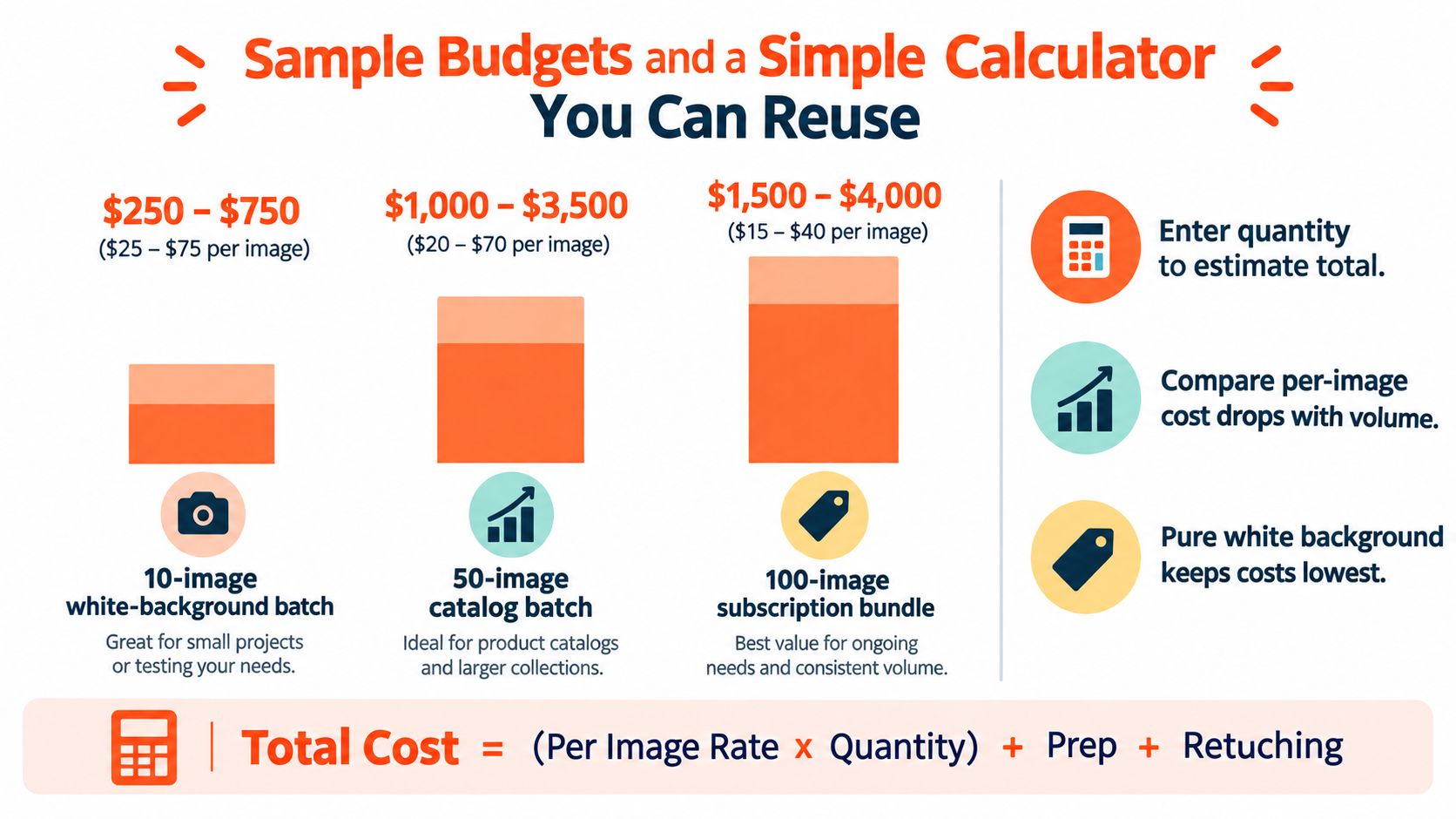
Three starting budgets
10-image white-background batch: Budget roughly $250–$750, which works out to $25–$75 per image. This suits a test batch, a small collection, or replacement assets. Ask whether the quote includes setup, basic retouching, file delivery, and one revision round.
50-image catalog batch: Budget roughly $1,000–$3,500, or about $20–$70 per image. This is large enough for a photographer to repeat a controlled setup, but the range still changes with product handling, angles, and retouching.
200-SKU seasonal drop: Build this from the actual shot list rather than assuming one image per SKU. If you need one approved white-background image per SKU, start with the 50-image batch economics and request a custom quote for four comparable batches. If you need several views, detail shots, and lifestyle variants, separate those categories because they belong to different production tiers.
Use the all-in formula
Write the estimate as:
Total cost = (per-image rate × quantity) + prep + retouching + rights + revisions + logistics
Then calculate:
Cost per usable asset = total cost ÷ approved publishable files
For example, a quote may show a low per-image rate but exclude product steaming, color correction, licensing, or extra revisions. Add those lines before comparing it with a higher quote that includes them.
The cheapest quote is often the one with the clearest scope, not the lowest headline rate.
Batching can reduce cost because the photographer reuses the same lighting and camera arrangement. Group products by shape, material, size, and background requirement. Send complete product information together, and avoid adding late-arriving SKUs to a finished setup unless the supplier confirms the effect on schedule and price.
AI-assisted production changes the break-even calculation. One independent 2026 benchmark reports traditional studio photography at $48–$215 per SKU, with a category-blended median of $92, while AI-native production at a comparable consistency bar runs $19–$64 per SKU, with a median of $31. Another 2026 report places traditional work around $85–$250 per SKU and AI tools around $3–$12 per image, while reporting cost reductions of 60%–70% in its dataset. Treat these as benchmark figures, not guaranteed quotes.
The break-even question is:
Traditional setup and capture cost + retouching + rights + revisions compared with AI credits or software + source preparation + review + corrections + publishing labor.
There isn't one universal SKU threshold. A small, exacting set may favor photography. A large catalog with good source images and repeatable scenes may favor a hybrid workflow.
For current pay-per-image workflow information, review the MerchLoom pricing page and compare its cost against the human review time your catalog requires.
How to Reduce Costs Without Hurting Conversion
Cost reduction starts with fewer exceptions. Every product that needs a different background, camera angle, crop, shadow, or retouching rule makes the catalog harder to process consistently.
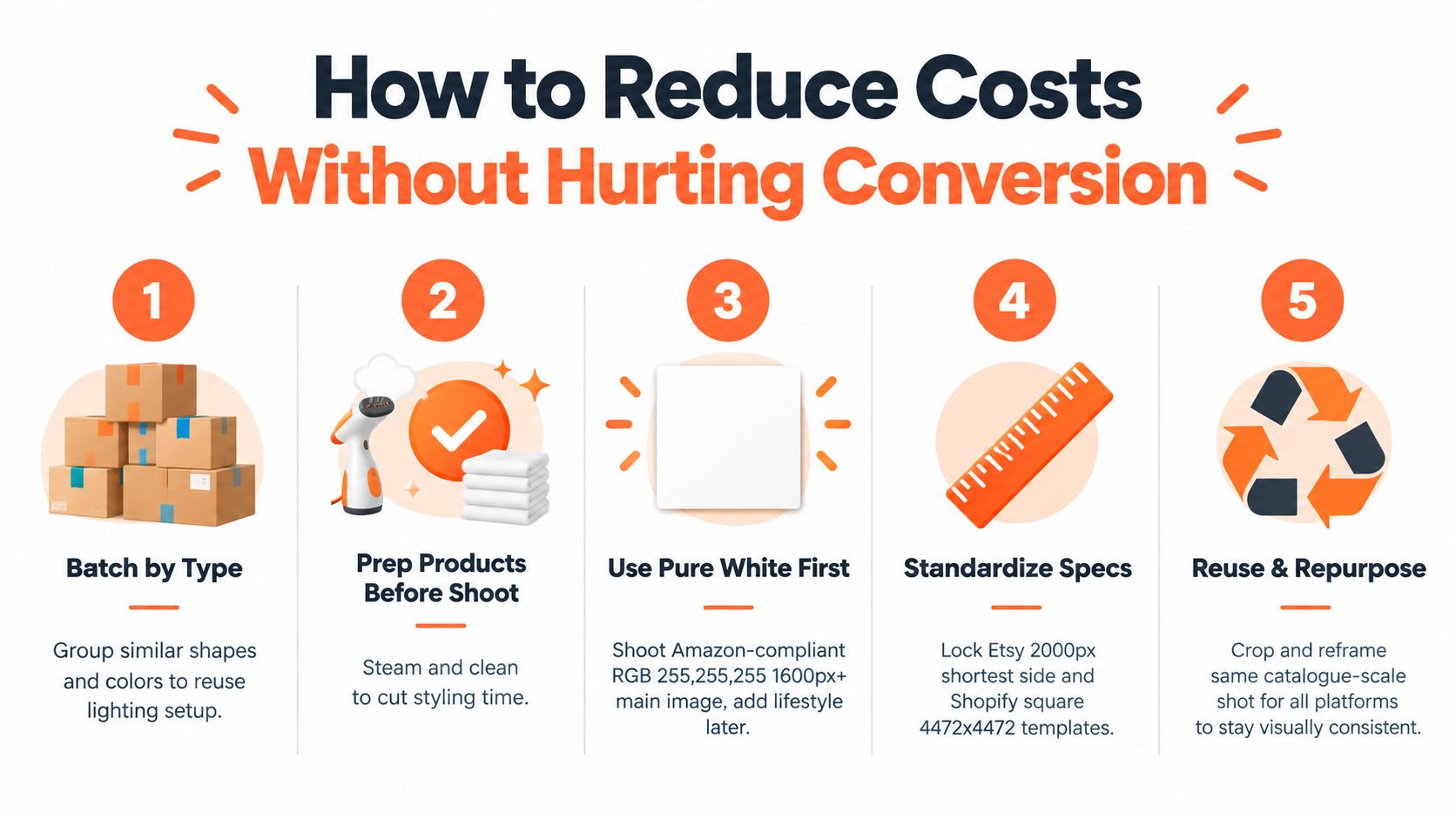
Build a repeatable catalog workflow
Batch similar products. Group products with similar shapes, finishes, and colors. A photographer can preserve one lighting arrangement instead of rebuilding it for every SKU.
Prepare products before shipping. Clean, steam, assemble, and label every item. Include a SKU sheet that identifies variants and the required views. Preparation done before the shoot reduces interruptions and makes the output easier to review.
Create the marketplace main image first. For Amazon, specify a pure white RGB 255,255,255 background and a longest side of at least 1,000 pixels for zoom. Amazon's help text also gives 500 pixels as the minimum longest side and 10,000 pixels as the maximum. Add lifestyle assets only after the compliant main image is approved.
Lock channel templates. Etsy listing photos should use at least 2,000 pixels on the shortest side. Shopify accepts images up to 4,472 × 4,472 pixels, and square images around 2,048 × 2,048 pixels are commonly recommended for product photos. Keep one master crop and define channel exports from it.
Reuse approved source material. Crop and reframe a consistent catalog image for different storefronts rather than commissioning a separate shoot for every channel. Check that the resulting image still meets each marketplace's rules and doesn't remove important product information.
Use AI for repeatable post-processing
AI editing can handle background cleanup, reframing, color correction, upscaling, and scene variations, but it still needs human review. Compare generated files with the actual product, especially labels, stitching, materials, dimensions, packaging, and safety details. Don't use a generated scene as evidence of a product feature that wasn't present in the source.
MerchLoom is one option for running these steps across a whole collection through chained AI pipelines instead of processing one image at a time. The first images can be tried with no account, and its model is pay-per-image with credits that never expire. It isn't a full Photoshop replacement, so keep a manual editing path for exact compositing and difficult corrections. You can read about its AI product photo editor before deciding which stages belong in an automated batch.
Copy-paste photographer brief
Use this text when requesting quotes:
- Catalog size: [number] SKUs and [number] final images
- Views per SKU: [front, back, side, detail, lifestyle]
- Amazon main image: pure white RGB 255,255,255, longest side at least 1,000 pixels for zoom
- Etsy output: at least 2,000 pixels on the shortest side
- Shopify output: square master, up to 4,472 × 4,472 pixels
- File format: [JPEG, PNG, or both]
- Product preparation: [cleaning, steaming, assembly, styling]
- Retouching: [background, clipping path, color correction, dust removal, shadow]
- Usage rights: [product pages, marketplaces, social, paid ads, packaging, territory, duration]
- Revisions: [number of included rounds]
- Turnaround: [delivery date]
- Reshoots: state when a reshoot is included and when it becomes an extra charge
- Quote format: show capture, prep, retouching, rights, revisions, logistics, and tax separately
Brief Template Negotiation Tips and Red Flags Before You Book
A low quote can become expensive after approval delays, reshoots, missing files, and limited usage rights. Compare suppliers using the same scope, then examine how each one handles the work behind the camera and after delivery.
Negotiate the batch, not just the unit rate
Ask for a volume price when one lighting setup, styling approach, or background can serve many SKUs. Request the quote in stages, such as a pilot batch followed by the remaining catalog. This lets you test the photographer's process before paying for every product.
Define the break point for the discount. A supplier may reduce capture costs while charging full rates for preparation, retouching, or exports. Ask whether the same reduction applies to variants, bundles, and reshoots. Broader usage rights may also cost less when agreed at the start than when added for paid ads or packaging later.
Approve a small representative batch before the full booking. Include a simple product, a reflective item, a difficult garment, and a typical variant. Review color, edge quality, shadows, cropping, naming, and delivery speed. A polished first sample does not prove that the workflow will hold up across a large collection.
Red flags in the agreement
Watch for “unlimited revisions” without a definition of the project boundary. It can turn a fixed quote into an open-ended discussion. Ask how many rounds are included, what qualifies as a correction, and what happens when the brief changes.
A vague license can restrict paid advertising, packaging, territory, or future use. A quote that combines every fee into one total can also hide charges for product preparation, file exports, storage, or logistics. The agreement should identify those costs and state who pays when an item arrives damaged, a label is wrong, or a required detail was missed.
Check the file-management process before booking. Ask for the naming convention, folder structure, variant handling, master-file policy, backup period, and delivery method. Confirm whether channel-specific exports are included or supplied as an extra. With hundreds or thousands of assets, finding the right file becomes operational labor, not a minor admin task.
Choose the lowest credible all-in cost per approved asset, including capture, preparation, retouching, rights, revisions, reshoots, and delivery. Keep a manual correction path for difficult images, even if post-shoot cleanup uses an automated workflow. MerchLoom can process imported product images through chained AI pipelines, with pay-per-image credits that never expire, but review remains part of the budget.
MerchLoom lets you import product images from existing ecommerce, storage, CDN, and photography workflows, then run repeatable AI pipelines for background cleaning, reframing, color correction, upscaling, and catalog scene creation. Try the first images without an account, pay per image with credits that never expire, and review the workflow for your collection at MerchLoom.
Stop editing product photos one at a time
Upload your catalog or connect your store. Describe the result once. MerchLoom does the rest.
Try MerchLoom