
How Does eBay Work for Sellers: A Complete Guide
Learn how does eBay work for sellers with this practical guide covering listings, fees, shipping, returns, seller metrics, and image workflows at catalog scale.
You can get an eBay store live in an afternoon, then lose the next week fixing the same mistakes across 200 photos, 80 titles, and three shipping policies. That's the question behind how does ebay work for sellers, because the platform is less about posting one item and more about running a repeatable catalog system that buyers can search, filter, and trust.
If you're already juggling Shopify, Amazon, Etsy, or WooCommerce, the fastest way to think about eBay is simple. It rewards sellers who standardize listings, keep shipping clean, and protect performance metrics, because eBay's seller system directly affects account standing, visibility, and selling limits through monthly reviews and rolling recent-sales windows. eBay's seller performance standards are built for consistency, not improvisation.
Why eBay Mechanics Matter More Than Tips
The first time a seller gets one listing to move, it feels easy. Then the next 499 SKUs sit in folders while the title, photo set, shipping policy, and return terms all need to be rebuilt by hand. That's where eBay stops being a side channel and starts acting like an operating system.
One good listing doesn't scale
A one-off auction can survive on instinct. A catalog can't. Once you're listing across multiple channels, eBay's mechanics matter more than generic selling advice because every listing has to be reproducible, searchable, and tied to performance rules that can affect how often buyers see it.
eBay's own structure pushes you toward standardized inventory records with titles, photos, item specifics, price, shipping policy, and return policy. It also says item specifics matter for search visibility because buyers filter inventory through indexed attributes, not just free-text titles. That's the part many sellers miss when they copy-paste a marketplace description and hope the platform does the rest. eBay selling guidance makes the same point in practical terms.
For a catalog seller, that means the bottleneck isn't listing an item. It's building a workflow that can survive repetition. If you edit each product image manually, rewrite each description from scratch, and choose shipping settings one by one, eBay becomes a time sink instead of a sales channel.
Practical rule: if a task can't be repeated cleanly across 100 SKUs, it will eventually slow the entire catalog.
Batch thinking beats one-off effort
At scale, the losing move is treating every SKU like a custom project. The better move is to decide once what a title format looks like, what photo order looks like, what return policy applies to a category, and what fields are always required before publish. That way, the work becomes a batch process instead of a daily scramble.
This is also where the image workload becomes the main focus. If the catalog needs consistent main images, alternate angles, and marketplace-ready crops, the seller who edits one photo at a time will always lag behind the seller who can process a whole folder at once. Merchants managing large image sets usually feel that pain before they notice any fee issue.
Setting Up a Seller Account and Hub
The setup work is straightforward, but new sellers usually skip the boring parts and pay for it later. Create the account, verify identity, link the bank account for payouts, and get into Seller Hub before listing anything in bulk. That order matters because payout access and policy setup shape every listing after that.
Build the account once, then reuse the settings
eBay's seller page says sellers can choose daily or weekly payouts deposited directly into a bank account, and payouts go through that linked account rather than sitting in a marketplace wallet. It also says eBay generally charges 10% to 15% of the final value when an item sells, and the first 250 listings per month are free before a $0.35 insertion fee applies per listing. eBay's sell page is worth reading before you list a single SKU.
The actual setup flow should look like this:
- Create the account with the right seller identity. Use the account type that matches how you operate, since business sellers usually need cleaner records and more structured policies than hobby sellers.
- Verify identity and connect the bank account. Payouts depend on a verified destination account, and delays here can stall cash access even when sales are coming in.
- Enter Seller Hub first. You keep the operational view of the store here, not just the listing view.
- Set business policies once. Payment, shipping, and returns can be saved and reused, which matters a lot more when you're moving hundreds of listings.
- Check the Performance tab regularly. That's where you watch sales, traffic, selling costs, and seller level in one place.
Seller Hub is where the work becomes manageable. It gives you the bulk-edit flow and the performance view, while the legacy path is more useful for one-off listing edits than for a growing catalog. If you're using a repeatable SKU structure, the time savings start there.
For sellers who work across regions, an external walkthrough like the AUSFF eBay seller guide can be useful for comparing setup details and operational gotchas. The point isn't to memorize every rule up front. It's to get the account, bank, and policy structure right once so you don't rebuild it later.
A clean setup saves more time than any listing hack because every future item inherits the same policy layer.
One practical note from catalog work, not consumer selling. A SKU is just the internal ID that lets you track one exact item across photos, inventory, and orders, which is why a structured SKU system keeps eBay ops sane. MerchLoom's SKU definition guide is useful if your catalog tags still live in spreadsheets or folder names.

Auction Versus Buy It Now Formats
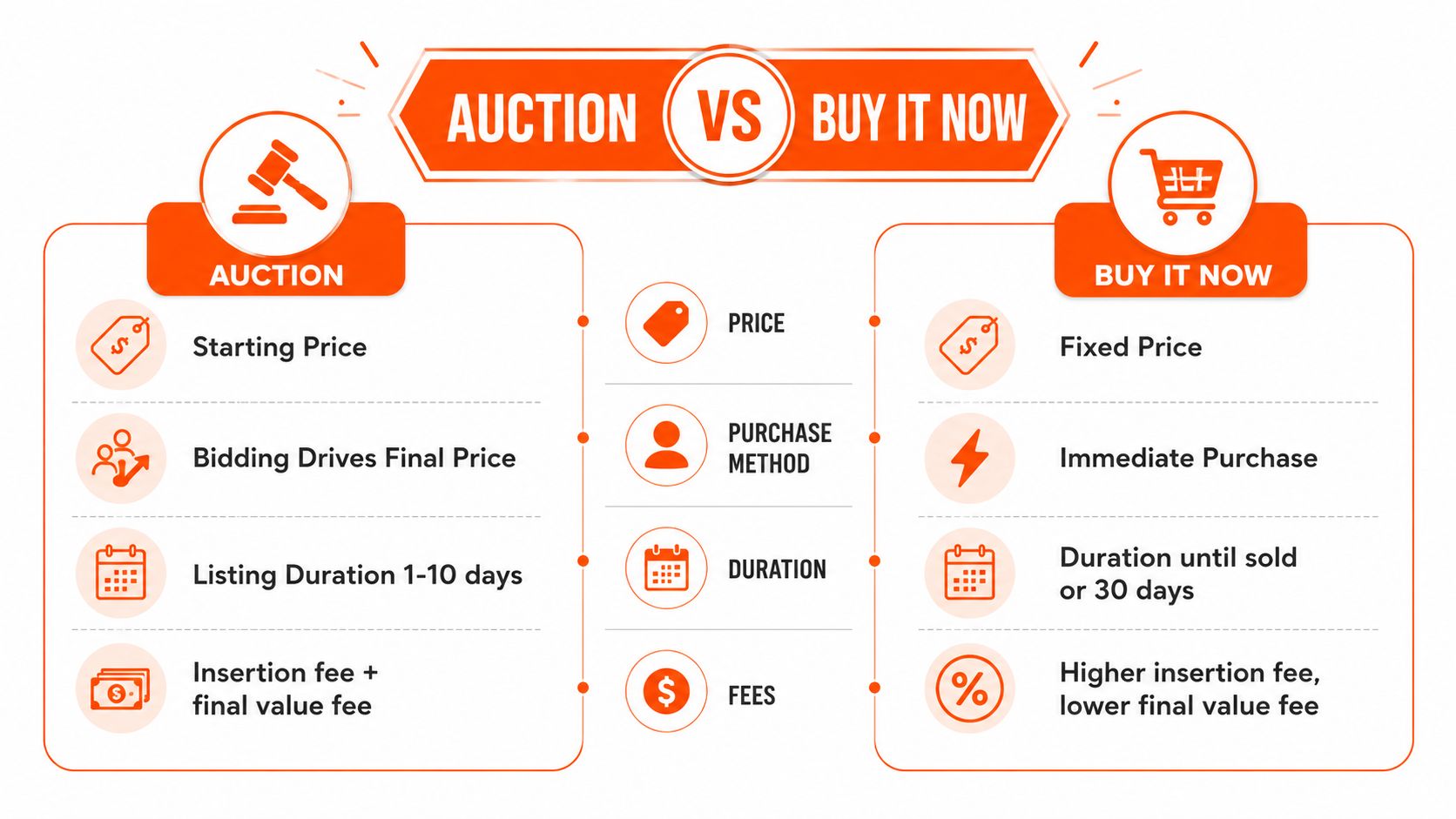
Auction and Buy It Now are not just two buttons. They create different inventory behavior, different cash flow, and different buyer expectations. If you run a catalog, the wrong format for a category can make your listings look inconsistent and your operations harder than they need to be.
When auctions make sense
eBay's help article on bidding says that in an auction-style listing, the seller names a starting price and buyers bid against each other. eBay's bidding guide is clear on that point. Auctions fit best when the item is used, collectible, rare, or part of odd-lot liquidation where price discovery matters more than predictability.
That format can work well for inventory you'd rather move than hold. It's also useful when you don't want to spend time perfecting a price ceiling for every single piece of one-off stock. If the category has uneven condition or highly variable demand, bidding can surface the market faster than a fixed price.
When fixed price is cleaner
Buy It Now is the better default for repeatable SKUs, brand new inventory, and anything where margin planning matters. eBay also confirms that sellers can use Buy It Now, and listings may run as auctions or fixed-price listings. For catalog-scale stock, fixed price usually keeps your store easier to manage because the same SKU can be replenished with the same logic.
That matters when you're cross-listing from Shopify or Amazon. A fixed-price rule keeps pricing aligned across channels, while auctions can create odd inventory gaps and make reconciliation messy. If you're using auctions at all, use them sparingly for aging stock or items you already want to clear.
Practical rule: choose one default format per category, then only deviate when the inventory itself justifies it.
Best Offer and catalog discipline
Best Offer sits in the middle. It gives buyers room to negotiate without turning the listing into a full auction. For sellers with a lot of similar items, it can help clear stubborn stock, but it also adds another decision point if your team is already handling pricing in bulk.
The mistake is mixing formats randomly inside the same category. One SKU as an auction, the next as fixed price, the third with a different duration, all from the same intake batch. That kind of inconsistency breaks catalog discipline and makes it harder to know what is working. Keep the format decision tied to product type, not mood.
Building a Repeatable Listing Schema
A marketplace-ready listing is a structure, not a paragraph. If you treat it like a writing exercise, you'll keep rewriting the same fields. If you treat it like a schema, you can move a 500-SKU drop through the system without each item becoming a custom job.
The fields that matter every time
Every eBay listing should be built from the same core parts, title, photos, item specifics, price, shipping policy, and return policy. The more consistent those fields are, the easier it is to reuse your process across a whole catalog. eBay's own seller guidance emphasizes that completeness matters because buyers discover inventory through indexed attributes as much as through the title. eBay seller guidance points directly at that behavior.
The photo limit is also part of the schema. A standard listing can include up to 24 photos, and listings can go live within minutes after publication, according to a 2026 seller guide. That guide is useful as a practical reference if your workflow depends on fast indexing and repeatable imagery. For a seller managing hundreds of SKUs, that means the photo set has to be designed in advance, not improvised item by item.
What a reusable listing template looks like
Use the same skeleton for every SKU in a category:
Doing this for a whole catalog?
MerchLoom runs background removal, upscaling and AI editing across every product photo you have — one prompt, whole batch. Try 2 batches free, no signup.
Try it free- Title pattern: keep brand, model, size, and condition in a fixed order so bulk edits stay readable.
- Item specifics: fill every relevant attribute the category supports, because filters do a lot of the discovery work.
- Photo sequence: decide what goes first, what shows defects, and what gets saved for secondary angles.
- Description blocks: use reusable text for condition notes, shipping terms, and return language.
- Policy links: assign the same shipping and return policy where the category allows it.
That structure cuts decision fatigue. It also makes it easier to spot the items that need custom handling. A rare camera body, a single vintage garment, or an awkward bundle should stand out because it breaks the template, not because every listing already looks different.
For photo prep, category-scale sellers often use tooling that can process batches instead of one image at a time. MerchLoom's product photo automation guide fits that workflow because it focuses on repeatable image operations, not manual retouching.
Fees, Payouts, and Real Cost Examples
The fee stack is easy to underestimate because each line looks small on its own. In practice, insertion fees, final value fees, and payout timing all hit the same thing, your cash flow. That matters more when inventory is funded out of pocket and the catalog has to keep moving.
What the published fee structure means
eBay's sell page says the first 250 listings per month are free before a $0.35 insertion fee applies per listing. It also says eBay generally charges 10% to 15% of the final value when an item sells. eBay's sell page is the source sellers should use for the published baseline.
The bigger operational point is payout cadence. eBay says payouts go directly to a linked bank account on a daily or weekly schedule and are sent within two business days after buyer payment is confirmed, while the user-facing reality can still include holds, weekends, and verification delays. eBay's payments and earnings page covers the timing, and that timing can matter more than headline fee percentages for inventory-funded sellers.
Two simple fee examples
If you sell a $25 item, the fee band published by eBay means you're giving up a meaningful slice before shipping cost and packaging are even considered. If the item also carries a $0.35 insertion fee, that fixed charge bites harder on lower-priced stock than it does on premium items. The lesson is not the exact leftover amount, it's that low-ticket SKUs need tighter sourcing and better shipping discipline.
If you sell a $150 item, the same published fee band still applies, but the fixed insertion fee is much less painful relative to order value. The cash-flow question shifts from margin survival to payout timing, because one delayed payout can slow your next replenishment order. That's why higher-ticket inventory usually gives you more room to absorb marketplace friction.
Practical rule: model fees per SKU before you list in volume, not after the order starts coming in.
For sellers who build and test ad creatives alongside marketplace listings, a pricing reference like ProdSnap's ad creative platform pricing can be useful when you're comparing how much it costs to prepare creative assets versus how much margin the item can carry. The point is to keep every support cost visible before the SKU goes live.
If your store already routes product photos through MerchLoom's product photo automation workflow, the benefit is less about cutting one edit and more about making the per-SKU cost visible before you start a bulk upload. That's the kind of cost awareness catalog sellers need.
Shipping, Returns, and Seller Performance
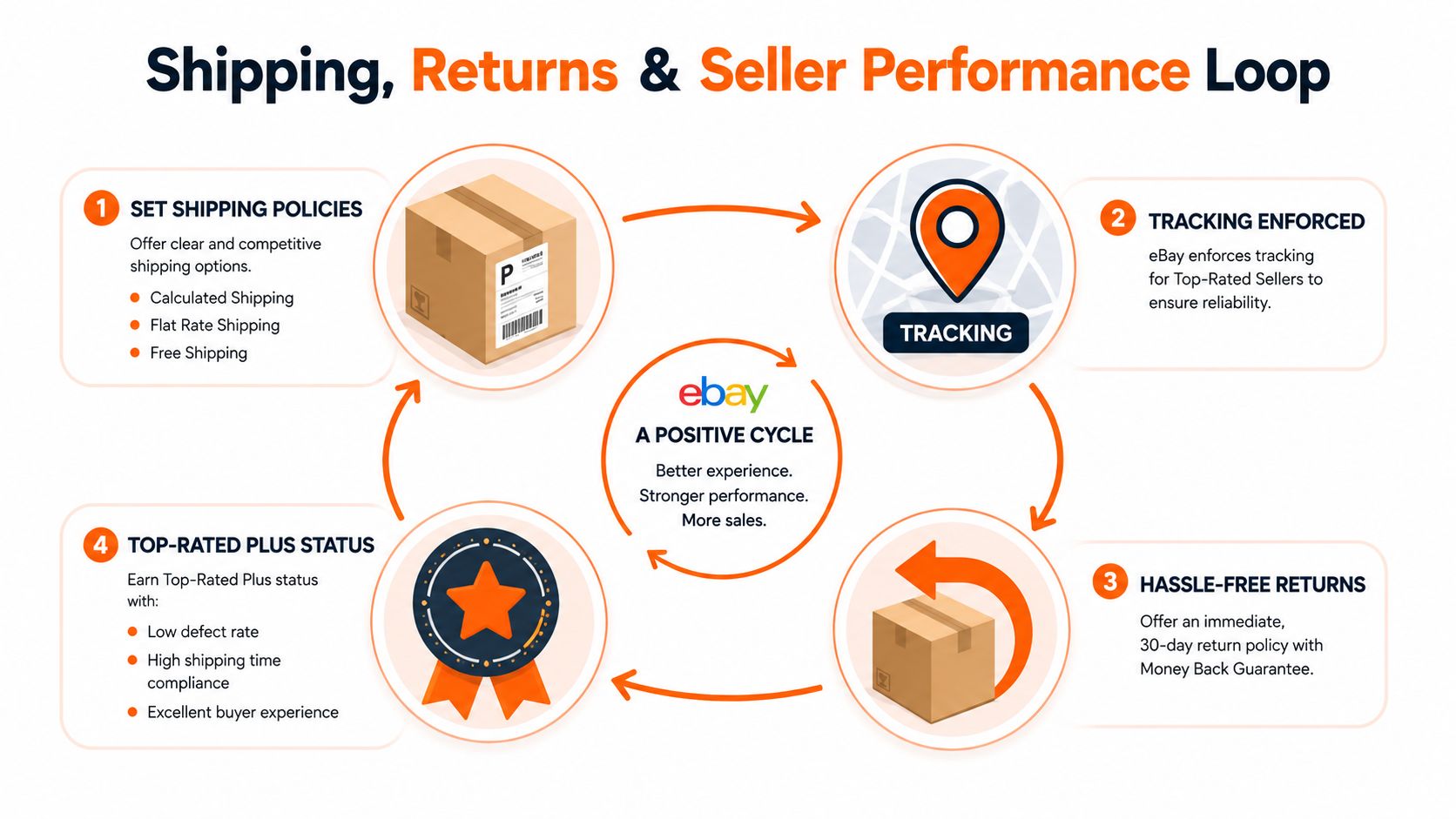
Shipping and returns are not separate admin tasks on eBay. They feed the same performance system, and that system shapes standing, visibility, and selling limits. If those settings are sloppy, the store pays for it later.
Set shipping like an operator
eBay sellers can set shipping as calculated, flat, or free. The right choice depends on the category and how predictable your packaging is. Calculated shipping works when weight and destination matter, flat shipping works when the item is stable enough to standardize, and free shipping only works when the margin already includes the cost.
Tracking matters just as much. eBay's performance framework measures factors within the seller's control, including late shipment rate, transaction defect rate, and cases closed without seller resolution. It reviews recent sales monthly, and third-party guidance summarizing the published rules says the review uses a rolling 90-day window. eBay's seller standards page is where those rules live.
The thresholds that actually matter
For higher performance tiers, eBay says sellers need defect rates below 0.5% for Top Rated and below 2% for Above Standard. The late shipment rate thresholds are below 3% for Top Rated and below 10% for Above Standard, while cases closed without seller resolution must stay below 0.3% for higher tiers. Those thresholds are not just account trivia. They can influence search visibility and fee discounts.
Returns should be handled as part of the same loop. A buyer-friendly policy reduces friction, but it also has to be something your operation can support. If your return language is generous but your intake process is messy, the policy becomes a liability instead of a trust signal.
A clean return policy is only useful if the warehouse, spreadsheet, or photo archive behind it is just as organized.
The Seller Hub Performance tab is where you catch drift early. Watch the traffic and seller level alongside the sales chart, because a quiet slide often starts there before it becomes a formal performance problem. eBay's own analytics tools, including the Performance tab and Analytics API, are meant to help sellers study listing performance over time. eBay's product research and analytics tools support that kind of monitoring.
Here's a practical video walkthrough that can help you think through the flow from listing to delivery.
If you're comparing returns policies across channels, MerchLoom's try-before-you-buy workflow article is useful as a reference point for how catalog presentation and buyer confidence connect.
Scaling With Promoted Listings, International Reach, and Batch Image Workflows
The first 50 SKUs are usually a listing problem. After that, scaling becomes a workflow problem. Promotion, international reach, analytics, and image production all start to matter at the same time, and the sellers who win are the ones who turn each step into a repeatable system.
Use the tools that help you validate demand
eBay gives sellers a data-heavy environment. Its Product Research tool provides the last 3 years of sales data for millions of items, including sales trends, average selling price, sold price range, average shipping costs, the number of listings offering free shipping, sell-through rate, and the total number of sellers who sold the item. eBay's product research tool is built for benchmarking, not guesswork.
Seller Hub also shows a 31-day sales chart with selling costs, traffic, and seller level, while the Analytics API can return customer service metrics and traffic reports. That's enough structure to decide whether a category deserves more inventory, a different price, or a cleaner listing template.
Promoted Listings and international shipping are the usual next levers. They're useful because they widen visibility without forcing you to rebuild the whole catalog. For international orders, a guide on international money transfer and transfer fees can help you think through the payment side of cross-border selling, especially if your operations stretch beyond the domestic bank account and into multiple currencies.
The real scaling bottleneck is image prep
At catalog scale, the slowest part is often not eBay itself. It's producing marketplace-ready photos across hundreds of SKUs. You need consistent main images, alternate angles, clean backgrounds, and repeatable crops, all while keeping the whole catalog visually coherent.
Batch image workflows matter. A seller can remove backgrounds, reframe for marketplace dimensions, upscale, and place items into clean scenes across a whole collection instead of editing each photo separately. That's the practical difference between one SKU and a thousand. It's also why tools built for chained AI pipelines fit catalog work better than one-off editing sessions.
One option in that category is MerchLoom, which runs batch image workflows across full collections instead of one image at a time. The first images can be tried without an account, and it's pay-per-image with credits that never expire, but the output still needs human review before any listing goes live. That's the kind of setup that fits a real eBay operation, especially when the image bottleneck is what keeps the next 200 items from being listed.
The sellers who scale eBay aren't the ones with the prettiest single listing, they're the ones who can repeat the same good process across the whole catalog.
For image pipelines at scale, MerchLoom's AI batch image editing guide is a practical reference if you're trying to turn raw product photos into listing-ready assets without touching every file one by one.
If you're trying to move a real catalog on eBay, not just test one listing, MerchLoom can help you run photo prep as a batch workflow instead of a manual edit queue. Visit MerchLoom to see how chained AI pipelines can turn raw product images into consistent marketplace assets, then review the results before you publish them.
Stop editing product photos one at a time
Upload your catalog or connect your store. Describe the result once. MerchLoom does the rest.
Try it free — no signup