
Definition of SKU: Boost E-commerce Efficiency
Get the complete definition of SKU. Learn how a smart SKU strategy boosts e-commerce efficiency, batch image processing, and catalog management.
You've probably felt this bottleneck already. A photographer sends over a folder full of raw shots, your store has multiple colours and sizes for the same base product, and now someone has to decide which front image belongs to which listing. That job sounds small until the catalogue grows.
The mess gets worse when one product has to live in several places at once. Amazon wants a clean white background. Shopify often looks better with square crops. Etsy may need larger images and a slightly different composition. If your files are named IMG_4021.jpg, final-final.jpg, and blue-shirt-new.jpg, you're not running a catalogue. You're running a guessing game.
The definition of SKU matters because it solves more than stock tracking. It creates the one stable identifier that can connect your product record, your warehouse logic, and your image files. Once that link exists, batch operations become realistic. Without it, every image workflow becomes manual triage.
If you want a broader view of how catalogue-scale visual workflows fit into operations, this piece on e-commerce image automation is useful background.
The Unseen Engine of Your Catalogue
A catalogue breaks down at the variant level, not the product-family level. A black T-shirt in large is a different sellable unit from the same shirt in medium. The warehouse treats them differently, the storefront treats them differently, and your image stack often needs to treat them differently too.
That's where most sellers hit friction. The physical product exists. The listing exists. The photos exist. But the connection between them is weak or inconsistent. Teams start relying on folder names, memory, or spreadsheets with half-maintained notes. That might hold for a tiny shop. It won't hold once your range expands or your sales channels multiply.
The moment image handling becomes repetitive, naming discipline stops being admin work and starts becoming operating leverage.
A strong SKU system gives each variant a reliable identity. That identity can travel through purchasing, receiving, storage, picking, listing, and creative production. In practical terms, it means your photographer can label source files correctly, your editor can process the right batch, and your marketplace feed can attach the right visuals to the right product record.
Where operations usually go wrong
A few failure patterns show up again and again:
- Variant confusion. Teams group all colours or sizes under one casual product name, then manually split them later.
- File drift. Edited images get saved into new folders with names that no longer match the original item.
- Marketplace mismatch. One channel gets updated images while another still uses an older version.
- Human memory as a system. One person knows the naming logic, and everything slows down when that person is away.
The hidden cost isn't just inventory error. It's creative inefficiency. If you have hundreds of images to clean, crop, resize, and publish, the bottleneck is rarely the editing tool alone. It's the missing product identity that should have organised the batch in the first place.
What Is an SKU and Why It Matters
A SKU, or stock keeping unit, is a unique alphanumeric code that a seller creates internally for a specific inventory item or variant. In retail usage, it represents the smallest sellable unit used for inventory control, which is why one style-colour-size combination gets its own identifier rather than sharing one code across the whole product line, as described by Britannica's overview of SKUs.
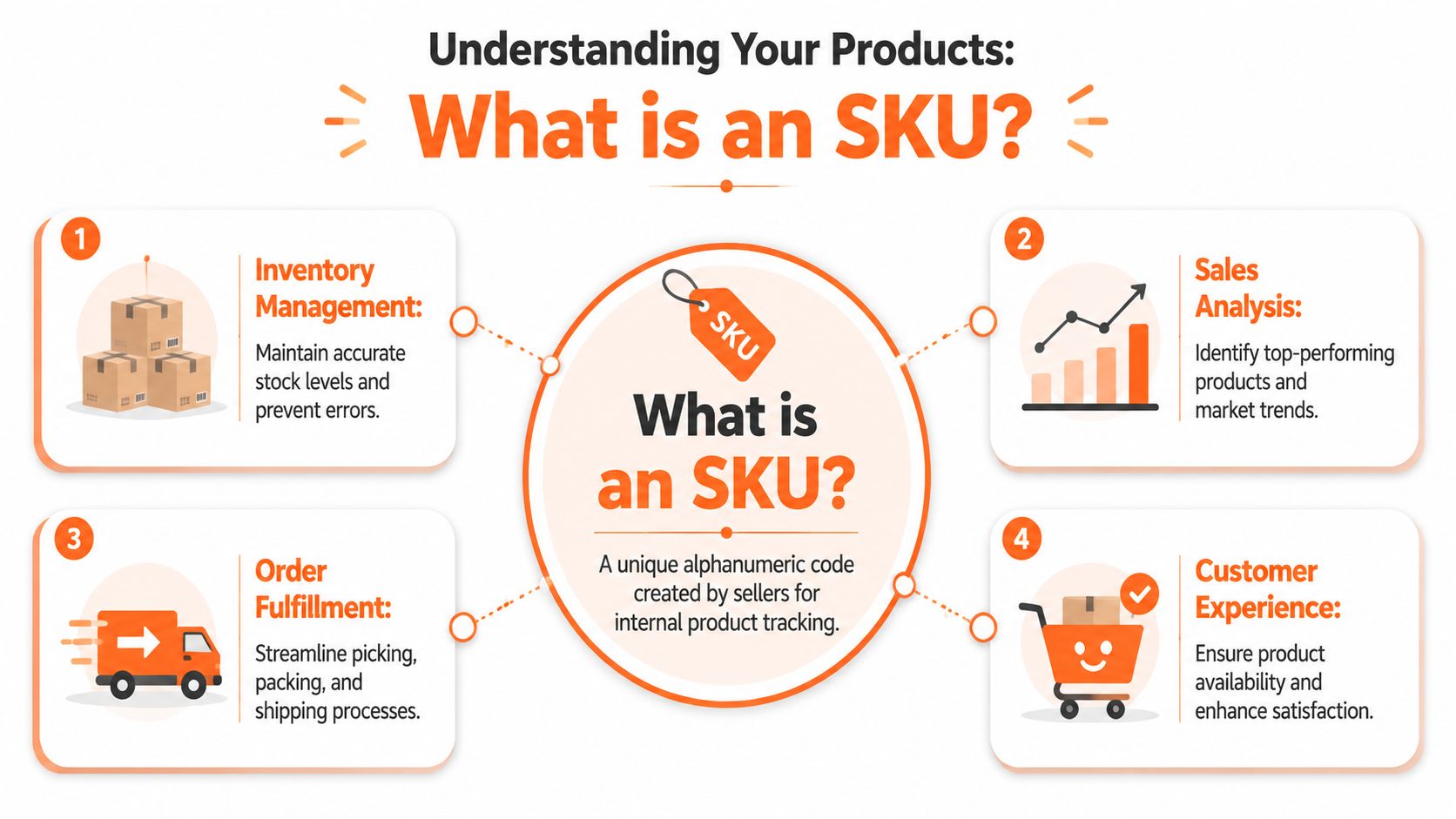
Think of an SKU as the product's internal filename. Not the public name your customer sees. Not the barcode standard used across retail. It's your business's own identifier for one exact version of one exact item.
The smallest sellable unit
This is the part many new sellers miss. The SKU does not describe a broad concept like “logo tee” or “ceramic mug”. It identifies the unit you can pick, pack, and ship.
As Orderful's explanation of stock keeping units puts it, a blue large T-shirt and a green medium T-shirt need different SKUs even when they share the same base product. That's what allows stock, sales, and replenishment to be tracked at the exact variant level.
Here's the practical test:
| If the item differs by | Should it usually have its own SKU |
|---|---|
| Size | Yes |
| Colour | Yes |
| Configuration or model | Yes |
| Same item in the same variant | No |
That distinction affects image operations immediately. If the black version and the navy version share one loose product label, image folders become unreliable. If each variant has its own SKU, image assignment becomes much cleaner.
Why sellers rely on SKUs
A solid SKU gives your systems something stable to work with. That matters in several places at once:
- Inventory control. The warehouse can track what is on hand for each variant.
- Sales analysis. You can see which exact item is moving, not just which product family looks popular.
- Fulfilment accuracy. Pickers and packers can match the order line to the correct unit.
- Catalogue maintenance. Merchants can connect images, descriptions, and attributes to the correct listing.
Practical rule: If your team can't tell which image belongs to which variant from the identifier alone, the identifier isn't doing enough work.
For a more merchant-friendly walkthrough, Shopstar's essential guide to SKUs is a useful companion piece.
The same logic helps when written content has to stay aligned with variant data. If you're managing large catalogues, AI product description workflows become much easier when each record already has a clean internal identifier.
SKU vs UPC GTIN and ASIN
A catalogue starts breaking down fast when teams treat every product code as interchangeable. Marketplace feeds, barcode labels, warehouse bins, and image folders each need an identifier, but they do not all need the same one.
The practical dividing line is ownership. Your SKU is the code your business creates and controls. UPC and GTIN come from global product identification standards. ASIN belongs to Amazon's catalogue.
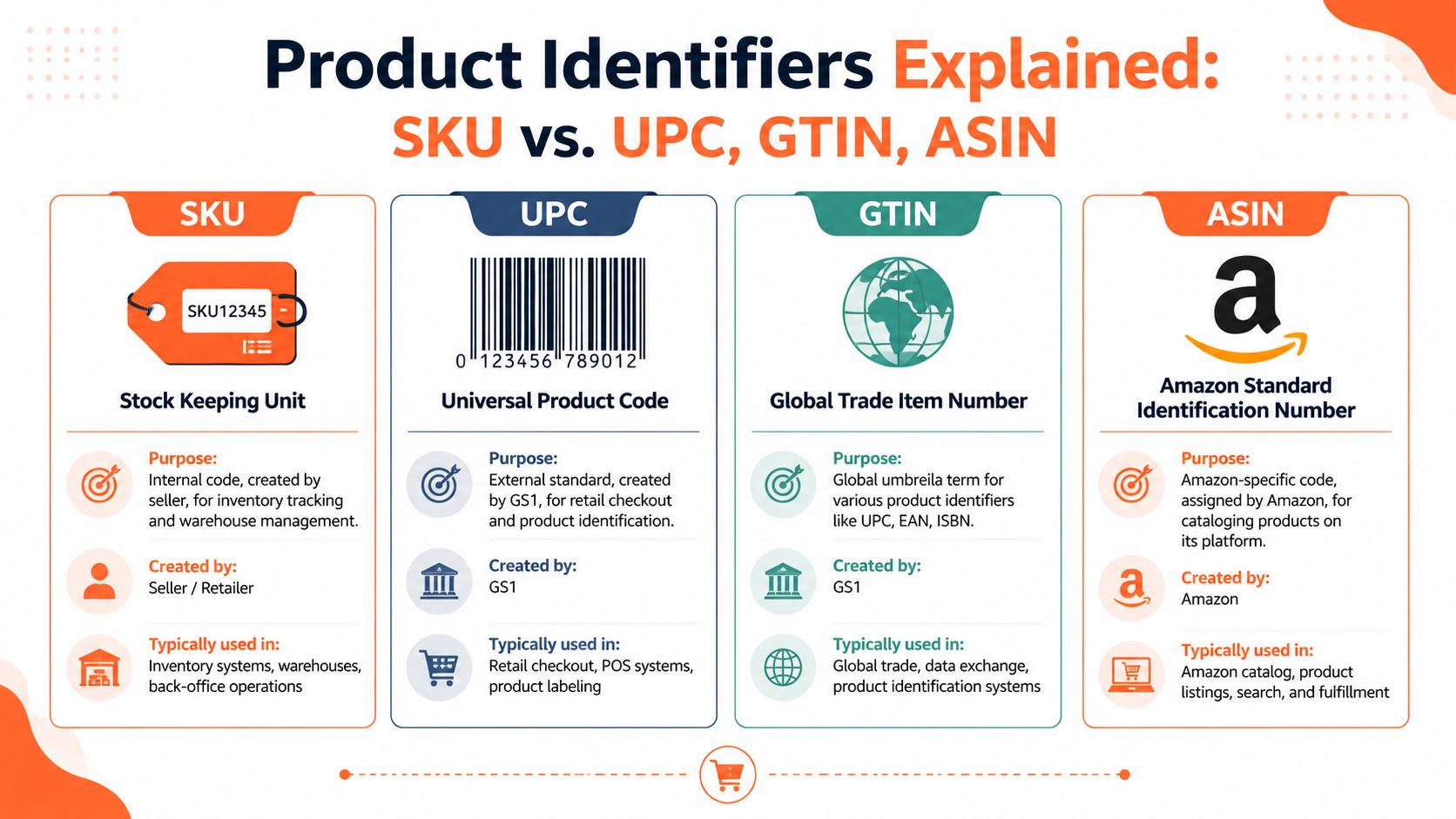
The quick comparison
| Identifier | Main purpose | Who creates it | Where it matters most |
|---|---|---|---|
| SKU | Internal inventory and catalogue tracking | The seller or retailer | ERP, WMS, POS, file naming, internal operations |
| UPC | Standardised retail barcode identification | GS1-issued company prefixes and brand owners | Retail checkout and broad product identification |
| GTIN | Standardised trade item number format used globally | Brand owners following GS1 standards | Global product identification across retailers and channels |
| ASIN | Amazon catalogue identifier | Amazon | Amazon listings and marketplace matching |
GS1, the standards body behind GTINs and UPCs, explains that a GTIN is the globally recognised item identifier used in commerce, while UPC is one GTIN format commonly used at retail. That matters because a seller can assign any internal SKU structure that fits its own operation, while standard product codes exist to identify the item consistently outside the business (GS1's guide to GTINs).
Why the distinction matters in real workflows
In day-to-day operations, these codes answer different questions.
- SKU: Which exact variant do we stock, pick, photograph, edit, and publish?
- UPC or GTIN: What is this trade item in the wider retail system?
- ASIN: Which product record does Amazon use for this listing?
That difference gets expensive on the image side. A UPC may identify the product family for retail scanning, but it often does not help your content team decide whether shirt-blue-medium-front.jpg belongs to the medium blue variant or a similar listing for another channel. The SKU usually does. In large catalogues, that internal code becomes the anchor for raw files, retouched exports, marketplace crops, and final upload batches.
I have seen teams rely too heavily on marketplace or barcode identifiers and create avoidable confusion. One Amazon listing can map to one ASIN, but your business may still need separate SKUs for FBA stock, local warehouse stock, bundle configurations, or channel-specific packaging. Amazon cares about the ASIN. Your operations team cares about whether the right carton, right images, and right variant metadata are tied to the right sellable unit.
For sellers working through Amazon requirements and fulfilment mechanics, 3DLogistiX's FBA Australia guide helps frame how marketplace identifiers fit into operational work.
A short explainer can help if your team is still untangling the acronyms:
Doing this for a whole catalog?
MerchLoom runs background removal, upscaling and AI editing across every product photo you have — one prompt, whole batch.
Try MerchLoomThe image workflow is where the difference becomes obvious. Amazon may validate a listing through an ASIN or standard product code, but your team still needs an internal handle for asset naming, variant matching, and bulk QA. Teams dealing with Amazon product image size requirements usually find that SKU is the only identifier flexible enough to connect source images, edited assets, and channel-ready listings without creating folder chaos.
Designing SKUs That Scale Your Business
A bad SKU format usually shows up first in a folder, not on a shelf. The launch is due, the retoucher has sent 400 finished images, and nobody agrees whether BLK, BK, and BLACK mean the same variant. At that point, the SKU is no longer an inventory label. It is either the control system for your catalogue or the reason your team is sorting files by hand.

The format has to do two jobs at once. Staff need to read it quickly in purchasing, warehousing, and support. Systems also need a predictable pattern they can use for imports, exports, image naming, and marketplace mapping. Shopify's help documentation on creating SKU formats reflects that practical point. Consistency matters more than finding a perfect universal model.
A structure that stays usable under load
Good SKU design starts with restraint. Teams often try to pack too much meaning into the code, then discover that long strings create mistakes in data entry, picking, and file management. Inventory planning guides such as Zoho Inventory's SKU overview make the same point in operational terms. Use a clear structure, then stop before the code turns into a sentence.
A workable pattern usually includes:
- Brand, channel, or business unit code if different teams sell similar products
- Category code such as TEE, MUG, BAG, or CAP
- Variant code for colour, size, material, or pack type
- Style or sequence code to separate similar items cleanly
Examples:
ML-TEE-BLK-LML-MUG-WHTAC-BAG-TAN-M
The exact formula matters less than keeping the same logic every time. If colour appears before size for one product line, keep that order everywhere. If black is BLK, do not let another team use BK because it feels shorter.
That discipline pays off outside inventory counts. A warehouse picker reads the code faster. A marketplace assistant maps variants with fewer mistakes. A photo team can tell at a glance whether ML-TEE-BLK-L_front.jpg belongs with ML-TEE-BLK-L_amazon.jpg or a different size.
Rules that prevent expensive messes
The best SKU systems are easy to scan and hard to misread.
- Keep characters readable. Avoid pairs such as O and 0, or I and 1.
- Set fixed positions. Put the same type of information in the same place every time.
- Use abbreviations your team will remember. Internal clarity beats clever coding.
- Check the format against filenames, not just inventory screens. If it breaks asset handling, it is incomplete.
- Leave room to grow. New colours, bundles, and channel packs should fit the logic without forcing a full reset.
I have seen companies build SKUs that worked well in the ERP and failed everywhere else. The code looked tidy in a spreadsheet, but image vendors named files differently, marketplaces used another variant label, and bulk uploads had to be cleaned manually before every launch. That is avoidable work.
A scalable SKU should support the physical product and the visual assets tied to it. The same code can anchor raw image names, edited outputs, ad creatives, and marketplace-specific crops. That operating discipline lines up with broader agentcentral's inventory insights. Clean identifiers keep operational data usable across teams.
For catalogues with heavy image volume, that connection matters even more. A bulk product photo editor workflow runs faster when every incoming file already matches a controlled SKU pattern. That is how a naming rule turns into a scalable catalogue system.
How SKUs Power Your Image Processing Workflow
A catalogue usually starts to break at the image layer before anyone admits there is a SKU problem. The team sees delayed launches, mismatched colour variants, duplicate crops, and marketplace uploads that attach the wrong photo to the wrong child listing. The editing queue gets blamed first. In practice, the bottleneck is usually identification.
If the variant is not pinned to a clean SKU from the start, every later step gets slower. Background removal, channel-specific resizing, filename mapping, approval, and upload all depend on knowing exactly which asset belongs to which sellable unit.
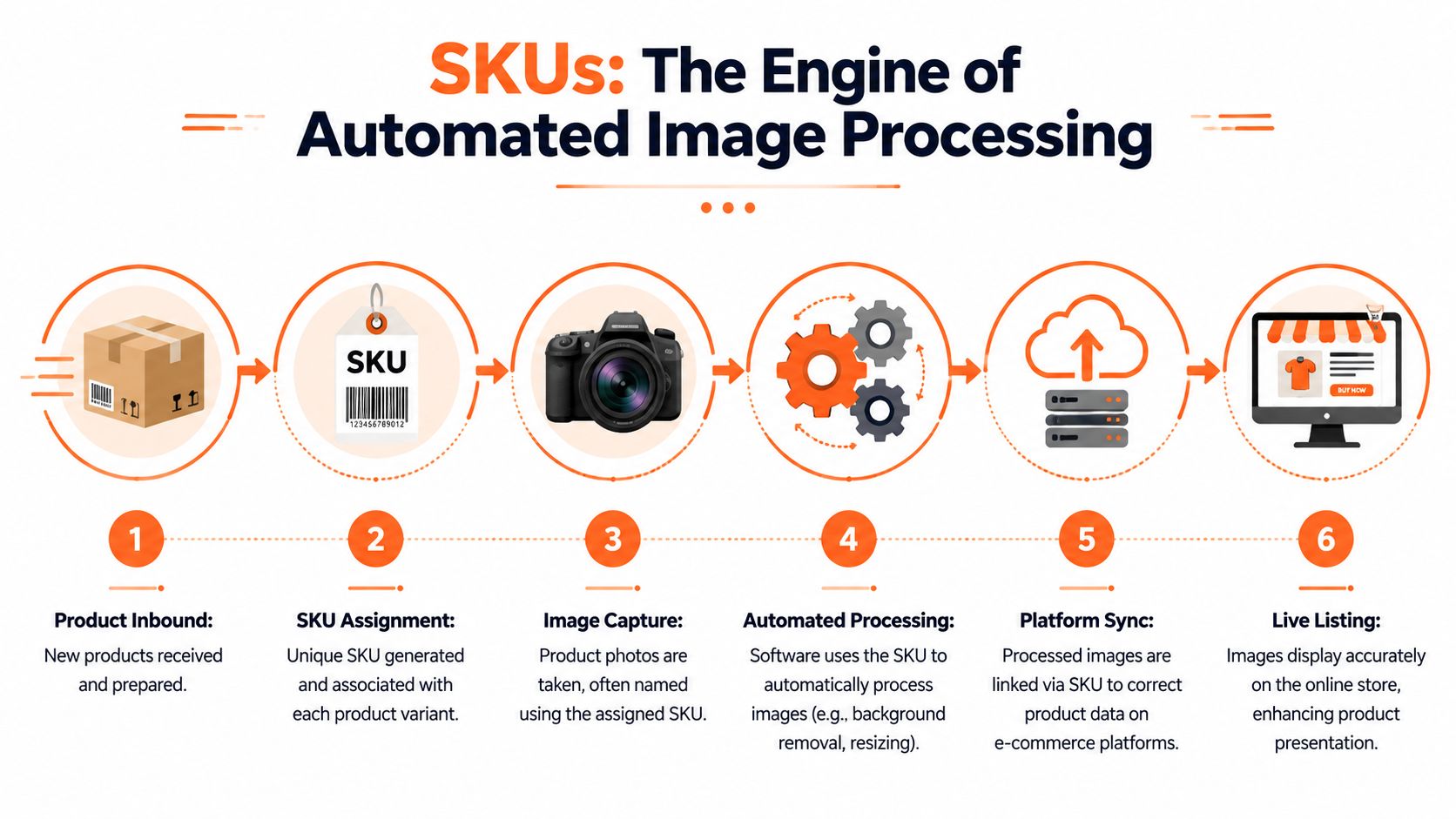
How the workflow looks in practice
Image operations work best when SKUs are treated as master data, not just warehouse shorthand. The code has to hold steady across the PIM, DAM, ERP, marketplace feeds, and the folders or cloud storage where raw and edited files live. That is what lets one variant identity survive the full trip from photo shoot to published listing.
A workable workflow usually runs like this:
Assign the SKU before assets start moving
The variant gets its internal identifier before the first photo is renamed, edited, or exported.Carry the SKU into the filename
Raw images use the SKU plus a controlled suffix such as front, side, detail, lifestyle, or packaging.Batch assets by exact variant
Editors and automation rules work on the SKU set itself, not a broad product family that mixes colours, sizes, or bundles.Apply channel rules against the SKU group
Amazon can require white backgrounds. Shopify may need square crops. Etsy may need larger, more editorial listing images.Return outputs to the right product records
The same SKU connects finished files back to the matching listing, feed row, or asset library entry.
That sounds basic until the catalogue reaches real volume. Then the difference between product-family naming and true SKU naming becomes expensive.
Why this matters at catalogue scale
A team can patch over weak naming when it is handling twenty products. It struggles when it is handling two thousand images across seasonal drops, retakes, bundles, and marketplace-specific versions. I have seen perfectly good photos become useless for a launch because nobody could say with confidence whether a file belonged to navy medium or black medium after three rounds of exports.
Clean SKU logic fixes three operational problems at once:
- Findability. Staff can locate the full image set for one variant without searching across multiple folders and channel exports.
- Batch processing. Retouching, cropping, and background rules can run against grouped files with less manual sorting.
- Attachment accuracy. Finished assets are much less likely to land on the wrong variant in Shopify, Amazon, or a feed management tool.
There is also a trade-off here. Highly descriptive SKUs can help humans spot errors faster, but they can create long filenames and edge cases in downstream systems. Shorter SKUs are easier to handle in bulk, but they depend on stronger documentation and tighter naming rules around the image suffixes. The right choice depends on catalogue complexity, channel mix, and how many hands touch the assets before publish.
Catalogue teams that process images well usually stop treating visuals as a separate creative task. They run it as an extension of product data control. Once SKU structure is stable, automation has something reliable to key off. That is what makes AI image workflow automation useful in practice instead of just fast in a demo.
Conclusion From Chaos to Control
The definition of SKU sounds simple on paper. In practice, it shapes how well your whole catalogue runs.
A good SKU isn't just a code for stock counts. It's the internal identity that keeps product variants, listings, warehouses, and image libraries aligned. When that identity is clear, teams spend less time matching files, correcting variant mistakes, and redoing marketplace uploads. They can process collections in batches, keep visual standards consistent, and adapt faster when products need to go live across several channels.
The opposite is also true. Weak SKU logic creates friction everywhere. Inventory gets murky. Listings drift. Image folders become unreliable. Every new sales channel adds another layer of manual checking.
For busy sellers, the payoff from getting this right is operational calm. A structured SKU system turns catalogue management from reactive clean-up into repeatable process. If your business depends on hundreds of product images, that isn't a minor detail. It's the backbone that makes scale manageable.
If your catalogue already has product images scattered across drives, stores, and marketplaces, MerchLoom is built for that reality. It processes whole image collections through chained AI workflows, so you can take SKU-organised batches and turn them into marketplace-ready assets for Amazon, Shopify, Etsy, and more without editing one file at a time.
Stop editing product photos one at a time
Upload your catalog or connect your store. Describe the result once. MerchLoom does the rest.
Try MerchLoom