
AI Product Description: Master High-Converting Strategies
Master high-converting AI product description for your catalogue. This 2026 guide covers batch processing, SEO, prompt engineering, and image integration.
You open a folder of new product photos and realise the writing work hasn't even started. The backgrounds still need cleaning, some images need square crops for Shopify, others need white backgrounds for Amazon, and every SKU still needs title tags, bullets, and body copy. That's where most sellers lose time. They treat the images as one job and the descriptions as another.
That split is expensive.
For a large catalogue, an AI product description shouldn't live as a separate copywriting task. It should be one output in the same production line that turns raw product photos into ready-to-publish listing assets. When that shift clicks, the work gets simpler. You stop asking, “How do I write better copy for this item?” and start asking, “How do I generate complete, consistent listing assets for this whole batch?”
Beyond Single Listings Why AI Descriptions Are a Workflow
The old habit is easy to recognise. You finish image edits, open a spreadsheet, and then start writing descriptions one by one. That feels manageable with five products. It breaks with fifty, and it becomes a bottleneck with hundreds.
The bigger problem isn't only speed. It's inconsistency. One listing gets detailed material notes, another gets generic benefits, a third is stuffed with keywords because someone rushed. The catalogue ends up sounding like three different stores.
The real unit of work is the batch
A seller managing volume doesn't process a “description”. They process a listing package. That package usually includes cleaned images, standard dimensions, structured attributes, title, bullets, body copy, and channel-specific variants.
That changes how AI should be used. Instead of prompting from scratch for every product, you create a repeatable system that takes the same input fields and produces the same classes of output every time.
Practical rule: If your text workflow starts after image editing is “done”, you're already creating an avoidable handoff.
This is why broad advice about AI writing often feels incomplete for commerce teams. General copy tools can help with tone and drafting, and a Practical guide to AI copywriting is useful for sharpening prompts and reviewing output. But catalogue operations need more than writing tips. They need a production method.
Creative writing is the wrong mental model
Most product pages don't need more flourish. They need clearer facts, tighter structure, and better portability across platforms. A 2026 guide on AI product descriptions says the best-performing descriptions are usually 90 to 150 words for most categories, while technical or considered-purchase categories such as electronics and furniture can extend to 200 to 300 words when they are built around structured spec data rather than filler prose, according to this guide on AI product descriptions.
That matches what operators see in practice. Short, scannable copy is easier to review, easier to repurpose, and easier to align with image-driven shopping behaviour.
A workflow mindset also reduces avoidable rework. If your team already thinks in batches for cropping, background removal, and file naming, the text should follow the same logic. The same operational principles behind AI image workflow automation apply to descriptions too. Standardise inputs. Run a small test batch. Catch the bad outputs early. Then scale.
What works and what doesn't
A few patterns hold up well in real catalogue work:
- What works: Building one repeatable system for categories like footwear, jewellery, home décor, or furniture.
- What works: Generating first drafts from structured inputs, then reviewing exceptions rather than rewriting everything.
- What works: Treating product text as one asset among many in a listing workflow.
What usually fails is equally clear:
- What doesn't: Asking a model to “write a compelling description” with only one product image and no schema.
- What doesn't: Letting every team member improvise prompts.
- What doesn't: Writing channel-specific versions manually after the main draft is finished.
Once you stop isolating description writing from the rest of listing creation, the whole process becomes easier to control.
Laying the Foundation with Catalogue-Wide SEO Strategy
Most AI description problems start before the first prompt. The issue usually isn't the model. It's that the catalogue has no shared language for categories, no clear tone rules, and no structured keyword map that can be applied across collections.
If you want useful output at scale, define the strategy at catalogue level first.
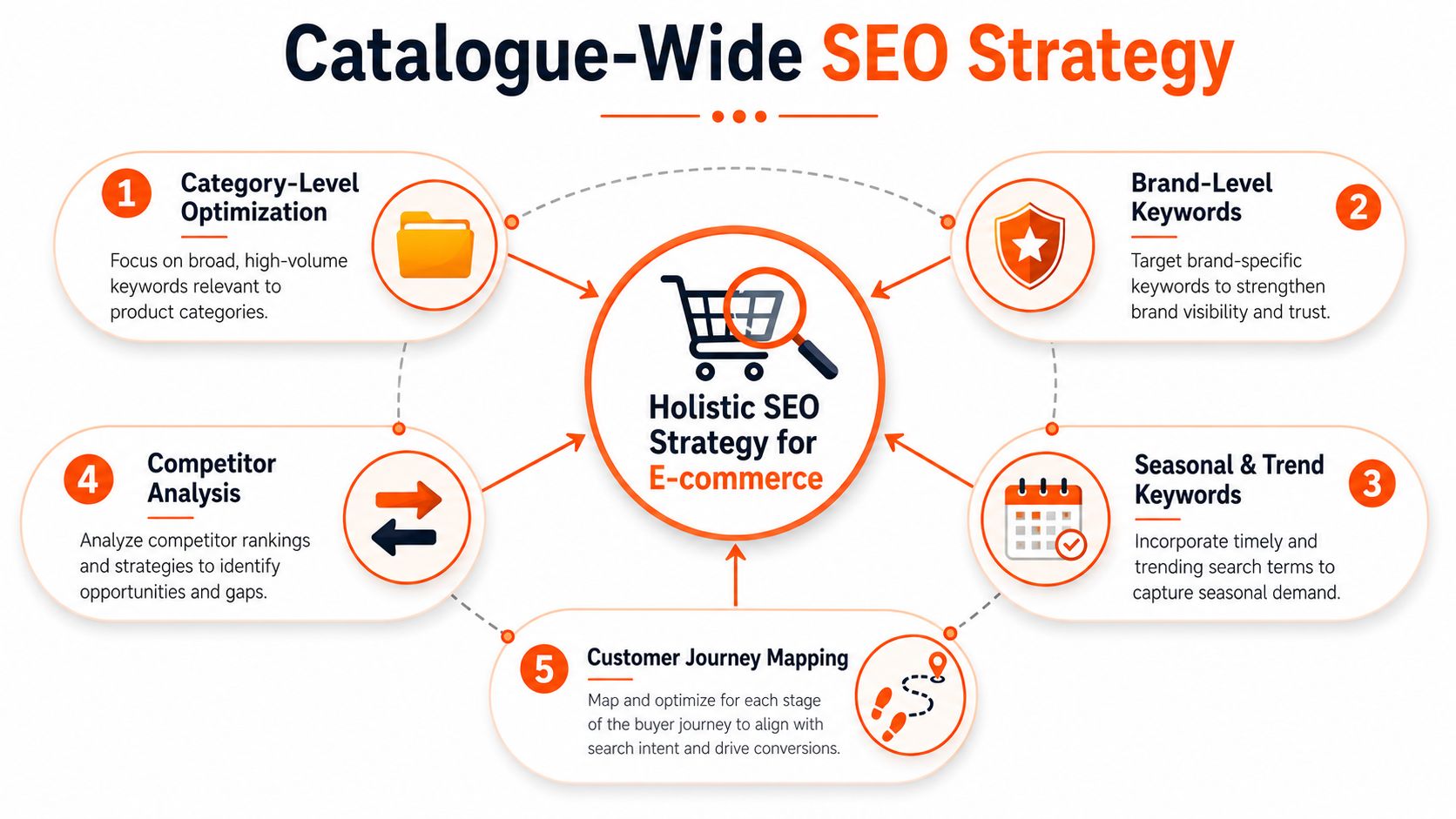
Start with category language, not product language
Sellers often begin with single-SKU keywords. That's backwards. Start with the language that applies to a whole group of items, then layer product specifics underneath.
A practical catalogue sheet usually includes:
| Layer | What to define |
|---|---|
| Category terms | Core phrases for product families such as linen shirt, wall shelf, ceramic mug |
| Attribute terms | Material, colour, fit, finish, dimensions, compatibility |
| Buyer language | Words customers use when comparing, gifting, replacing, or styling |
| Tone rules | Plain, premium, technical, playful, minimalist |
| Platform notes | Any formatting or wording constraints by marketplace |
Once that exists, prompting gets much easier because the model isn't inventing positioning for each SKU. It's selecting from a controlled language system.
AI visibility now depends on structure
There's another reason to work at catalogue level. Catalog-wide AI search visibility is often the fundamental gap, not whether an individual description sounds polished. Guidance on visibility gaps notes that competitors sometimes appear in AI-generated answers while your products do not, which usually points to missing specificity and structured data across the catalogue, as explained in this analysis of product-description visibility gaps.
That's why “SEO” here can't just mean sprinkling keywords into prose. It also means making descriptions easy for systems to parse, compare, and reuse.
If shoppers can't quickly confirm what the item is, what it's made from, who it suits, and how it differs, the listing is harder for both people and AI systems to trust.
A useful companion read is SearchMention's guide on how to optimize for AI search assistants. It's helpful because it pushes beyond old search habits and toward answer-ready content.
Build a reusable voice layer
Brand voice at scale has to be operational, not aspirational. “Warm and refined” is too vague for a batch workflow. Better rules sound like this:
- Use direct benefit language for skincare, home storage, and basics.
- Lead with material and construction for furniture, jewellery, and décor.
- Avoid unverified superlatives across every category.
- Keep sentence structure compact so the same copy can adapt to Amazon, Shopify, and Etsy.
The easiest way to manage this is to create voice rules by collection. Your vintage denim collection might allow more personality. Your electronics accessories catalogue probably needs cleaner, more factual wording.
Define what must always appear
Before any generation starts, decide which data points are mandatory whenever available.
For example:
- Fashion listings: fit, material, colour, care, standout detail
- Home goods: dimensions, material, room use, finish
- Beauty products: texture, intended use, scent if relevant
- Tech accessories: compatibility, materials, key specs
That small piece of discipline does more for an AI product description system than endless prompt tinkering later.
Engineering Prompts for Batch Generation
Batch generation lives or dies on input quality. A loose prompt can produce a decent paragraph for one product. It won't hold up across a full catalogue.
The most effective workflow for AI product descriptions involves a structured prompt pipeline. Start by ingesting all product attributes such as name, images, and features, standardise the inputs through a CSV or similar format, and test on a few products before running the batch, as described in the US Chamber guidance on AI tools for product descriptions.
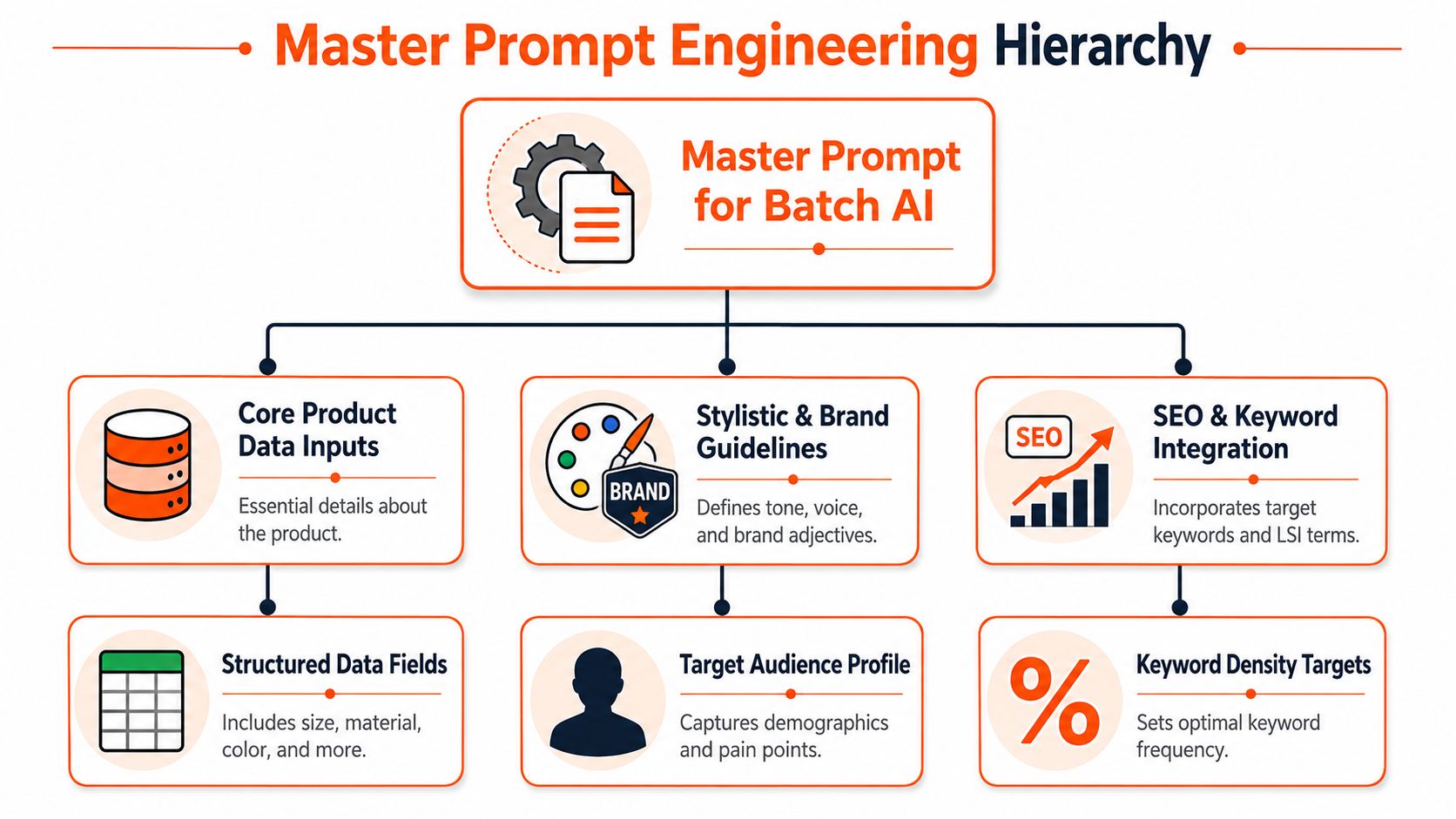
Build one master prompt, then parameterise it
The prompt that scales usually has fixed instructions and variable fields. The fixed layer defines voice, format, constraints, and output structure. The variable layer pulls in product data row by row.
A workable master prompt often includes these components:
Product facts
Product name, brand, category, material, colour, dimensions, size, compatibility, included parts.Visual cues
Image-derived observations such as silhouette, hardware, neckline, print, texture, sleeve shape, packaging style.Audience context
Who the item is for, what problem it solves, and what buying intent is likely.Output rules
Desired length, reading level, format, banned claims, required fields, keyword guidance.Platform instruction
Whether the output is for a marketplace body description, bullets, alt text, or a short summary.
If you want to improve your prompting discipline, LLMrefs' prompt engineering guide is a useful reference because it frames prompts as designed systems rather than one-off requests.
The fields matter more than the clever wording
A lot of teams over-invest in the poetry of prompting and under-invest in the schema. In real operations, the schema matters more.
Compare these two approaches:
| Approach | Likely result |
|---|---|
| “Write an engaging product description for this lamp” | Generic copy, repeated phrases, weak specifics |
| Structured row with category, material, shade style, bulb type, room use, dimensions, and tone rules | Cleaner output, fewer hallucinations, easier QA |
That's why image-first catalogues need a bridge between visuals and text. If the supplier sheet is incomplete, use image analysis to populate draft attributes first. Then send those structured fields into generation.
A simple template that holds up
Here's the logic, not a copy-paste spell:
- Tell the model what it is doing: generating product listing copy for e-commerce.
- Define the audience and tone: concise, factual, brand-aligned.
- Provide mandatory input fields: product type, materials, visible features, colour, intended use.
- Specify required outputs: short description, bullet points, key attributes.
- Add negative constraints: no unverifiable claims, no invented materials, no exaggerated marketing language.
- Set review flags: if a field is uncertain, mark it for human check.
Better prompts don't rescue missing product knowledge. They organise the product knowledge you already have and expose what you still need.
A related operational advantage of AI image prompts is that they push teams to think in reusable instructions. The same discipline improves copy generation too.
Test small before you trust the batch
The best safeguard is boring. Run a tiny sample first.
Pick products that stress the system in different ways:
- A simple item with complete metadata
- A variant-heavy item with size or colour complexity
- A messy item with weak source data but clear visuals
Review the outputs for pattern errors, not just individual mistakes. If the model keeps overstating materials, flatten the language. If it ignores dimensions, move dimensions higher in the prompt. If it writes elegant nonsense from weak photos, route those SKUs to manual review.
That iteration work is what makes the engine reliable.
The Full Pipeline From Raw Photos to Final Listings
In a healthy catalogue workflow, raw photos aren't the starting point for image editing alone. They are the starting point for all downstream listing assets.
Doing this for a whole catalog?
MerchLoom runs background removal, upscaling and AI editing across every product photo you have — one prompt, whole batch.
Try MerchLoomThat matters most when the inventory is visually rich but metadata-poor. For those sellers, AI image-to-text workflows are useful because they can analyse visual assets and generate a first draft of product attributes and descriptions when structured product data doesn't yet exist, as discussed in this overview of AI product description generators.
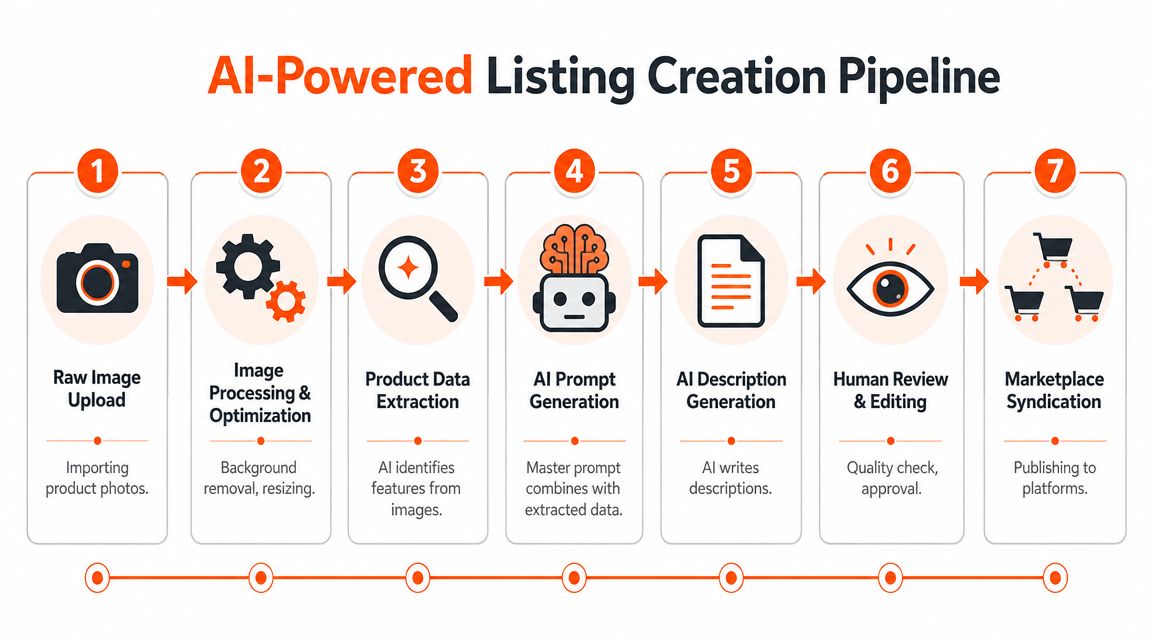
What the end-to-end system looks like
For most sellers, the practical sequence looks like this:
- Import raw images from a source folder, cloud drive, marketplace export, or photographer delivery set.
- Standardise the visuals by removing backgrounds, cropping, resizing, and correcting framing.
- Extract visible attributes from the cleaned images, especially when source data is patchy.
- Merge visual observations with whatever structured data exists in CSVs, PIM exports, or spreadsheets.
- Generate listing copy from that merged record.
- Review exceptions rather than reading every line equally.
- Publish platform variants to the right sales channels.
The strength of this setup is alignment. Your text reflects the latest processed images, and your images are prepared with listing requirements in mind from the beginning.
Why image cleaning should happen before text generation
If the source images are cluttered, oddly framed, or visually inconsistent, the extraction stage gets noisier. The copy then inherits those ambiguities.
A cleaner image set gives the system a better chance of recognising things like:
- Garment details such as collar style, sleeve length, visible texture, pocket placement
- Home product traits such as handle shape, finish, leg profile, surface pattern
- Packaging cues like bottle type, closure style, label hierarchy
That's why batch photo prep isn't only cosmetic. It improves the reliability of downstream description generation.
For sellers working at volume, the same logic behind batch product photo editing should inform copy operations. Clean the source once. Reuse the result everywhere.
Where human review still matters
This pipeline doesn't remove judgement. It concentrates judgement where it matters.
Human checks are still important for:
| Review area | Why it needs a person |
|---|---|
| Compliance claims | The model shouldn't decide legal or regulated wording |
| Material certainty | Images can suggest fabric or finish, but not always confirm it |
| Fit and sizing nuance | Visual inference is useful, not definitive |
| Premium brand voice | High-end positioning often needs tighter editorial control |
The fastest teams don't review every SKU equally. They review uncertainty, policy risk, and high-value products more closely than routine items.
That review model is what makes image-first AI practical for resale, vintage, fashion drops, and mixed-condition inventory. In those environments, the first pass matters more than perfect elegance. You need enough structure to get listings moving, then you tighten only where it pays off.
What usually breaks this pipeline
The common failure points are operational, not technical.
One is fragmented ownership. The photo team edits images, the marketplace team writes copy, and no one owns the merged product record. Another is weak naming discipline. If image files, SKU IDs, and spreadsheet rows don't align cleanly, the automation creates avoidable mismatches.
A third problem is trying to force every category through one output format. A ceramic bowl, a vintage blazer, and a Bluetooth adapter don't need identical description logic. They need the same pipeline architecture with different category templates.
That distinction is what turns AI from a novelty into production infrastructure.
Generating Platform Variants for Amazon Shopify and Etsy
One core description is rarely enough. The product may be the same, but the listing job changes by platform.
Amazon usually needs tighter structure and direct attribute clarity. Shopify often benefits from cleaner on-brand copy that supports the product page layout. Etsy listings tend to reward stronger personality and handcrafted or discovery-oriented framing. If you rewrite each version manually, automation loses most of its value.
Start from a canonical product record
The cleanest approach is to maintain one source description and one structured attribute set, then generate channel variants from that base.
Think of it this way:
- The canonical record holds facts, approved language, and mandatory details.
- The platform layer adjusts order, tone, formatting, and emphasis.
- The review layer checks only what's channel-sensitive.
That prevents drift. Without a source record, Amazon copy gets updated, Shopify lags behind, and Etsy still carries an old material note from three months ago.
Change the instruction layer, not the product facts
You don't need a new workflow for every marketplace. You need small prompt modifications.
A practical setup looks like this:
| Platform | Prompt adjustment |
|---|---|
| Amazon | Prioritise specs, compatibility, concise bullets, direct scannability |
| Shopify | Keep the body clean, readable, and aligned with brand voice |
| Etsy | Add more character, giftability, craft context, or styling language where accurate |
This matters for image workflows too. The same product photos may need white backgrounds for Amazon, square crops for Shopify, and larger lifestyle-friendly presentation for Etsy. Sellers already account for those visual differences. Text variants should be generated with the same mindset. If you're preparing Amazon listings, image constraints still matter, and this guide to Amazon product image size requirements is useful for keeping the visual side aligned.
Keep the differences controlled
A common mistake is asking the model to “make it more Amazon” or “make it sound like Etsy”. That's too vague. Define the changes precisely.
For example:
- Amazon version: lead with product type, material, size, and use case. Keep language compact.
- Shopify version: open with the strongest customer benefit, then support with features.
- Etsy version: include tasteful descriptive context if the item suits it, but stay factual.
That gives you distinction without contradiction.
What not to customise endlessly
Not everything needs platform-specific treatment. Keep these stable unless the channel requires otherwise:
- Core product facts
- Material language
- Dimensions and compatibility
- Warnings and care instructions
- Anything that could create a buyer dispute if phrased differently
The point of an AI product description system at catalogue scale isn't infinite variation. It's controlled reuse. The best setups produce different outputs that still sound like they came from the same merchant and the same product record.
Measuring and Scaling Your AI Content Engine
A fast pipeline isn't automatically a good pipeline. If the output publishes quickly but creates confusion, returns, or constant manual cleanup, you've just moved the bottleneck.
The measurement model has to cover both commercial outcomes and operational health.
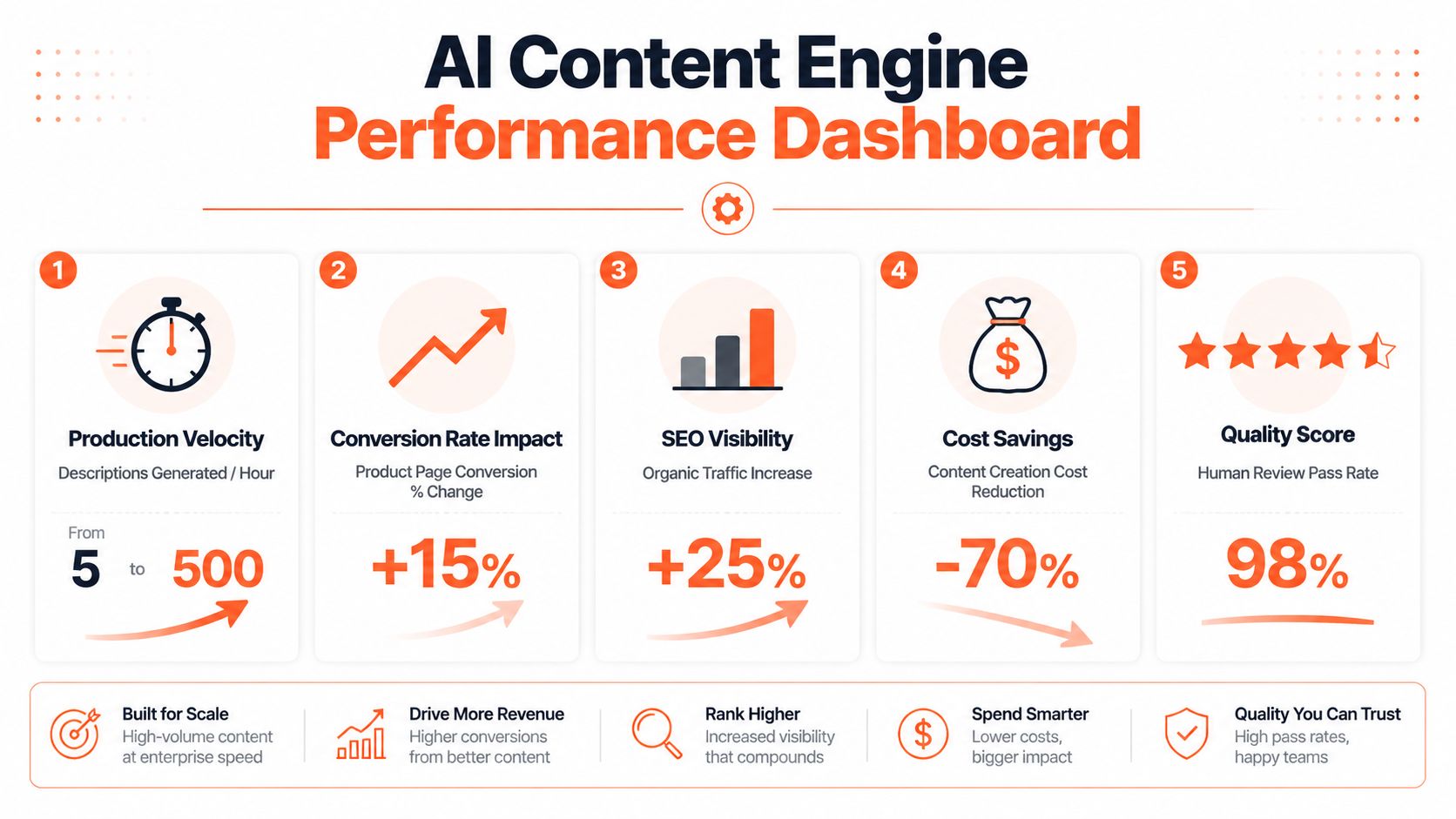
Track process metrics first
Before you obsess over page-level revenue impact, make sure the workflow itself is stable.
For AI product operations, one useful benchmark is to treat the workflow like a measurable process. Guidance on roadmap KPIs suggests a pilot target of cutting time-to-roadmap-ready by 50 to 75%, tracking prompt-library adoption above 80%, and monitoring a drop in requirements ambiguity of at least 40% as the workflow matures, according to this discussion of AI product process KPIs.
Those are product-team metrics, but the operating logic applies to catalogue work too. If your prompt library is ignored, the system isn't really standardised. If ambiguity stays high, your schema is weak. If throughput improves but rework explodes, the process isn't ready for scale.
A related systems view appears in broader ecommerce image automation, where workflow order and feedback loops matter as much as generation quality.
Then measure business impact where it's fair
Commercial measurement should happen at category or collection level, not by overreacting to one SKU.
Industry coverage reports that businesses using AI for product descriptions have seen conversion rate increases of up to 30%, according to Describely's overview of automated product descriptions. That doesn't mean every catalogue will see the same result. It does mean the work deserves to be treated as a revenue lever, not just a productivity trick.
Use that evidence carefully. In practice, I'd watch for patterns such as:
- Improved review pass rate after prompt changes
- Faster listing turnaround for new product drops
- Higher attribute completeness across channels
- Better collection-level conversion trends after copy and image upgrades are deployed together
A catalogue engine scales when operators can explain why an output was produced, where its inputs came from, and how to correct it without rebuilding everything.
Build feedback into the workflow
The strongest teams don't “finish” their AI setup. They keep tuning it.
A simple review loop looks like this:
- Flag recurring errors by category, not by isolated SKU.
- Update the schema or prompt library when the same issue appears repeatedly.
- Re-test on a small sample before the next large run.
- Promote only the improvements that reduce review friction.
That keeps the system from drifting into a pile of exceptions.
Scale by reducing decision load
The biggest win from a mature content engine isn't just output volume. It's fewer micro-decisions per listing. The team doesn't debate tone every time. They don't wonder what length to use. They don't rebuild bullets manually for each platform.
That operational calm is what makes large catalogues manageable.
If your catalogue work starts with folders full of raw product images, MerchLoom is built for that reality. It runs chained AI workflows across batches, so you can prepare marketplace-ready visuals at scale and keep the image side of listing production organised before the copy layer kicks in. If you want one system for processing whole collections instead of editing one image at a time, take a look at MerchLoom.
Stop editing product photos one at a time
Upload your catalog or connect your store. Describe the result once. MerchLoom does the rest.
Try MerchLoom