
Custom Decal Stickers for Car: E-Commerce Listing Workflow
Design, photograph, and list custom decal stickers for car at scale. Batch image workflows, mockup specs, and installation guidance for e-commerce sellers.
You're staring at a folder full of raw decal shots, a half-finished product page, and three different marketplace requirements that don't agree with each other. One photo looks fine on your laptop, but it falls apart when you try to crop it for Amazon, square it for Shopify, and make it feel contextual enough for Etsy. That's the core problem with custom decal stickers for car listings: the product isn't just a sticker, it's a repeatable image workflow that has to survive scale.
Why Most Car Decal Listings Fail at Scale
The first few listings usually work because the seller is only solving one problem at a time. A decal goes on a kitchen table, someone snaps a decent photo, and the listing goes live. At 200+ SKUs, that same approach starts breaking in obvious ways, because the images no longer look like one catalogue, they look like a pile of unrelated jobs.
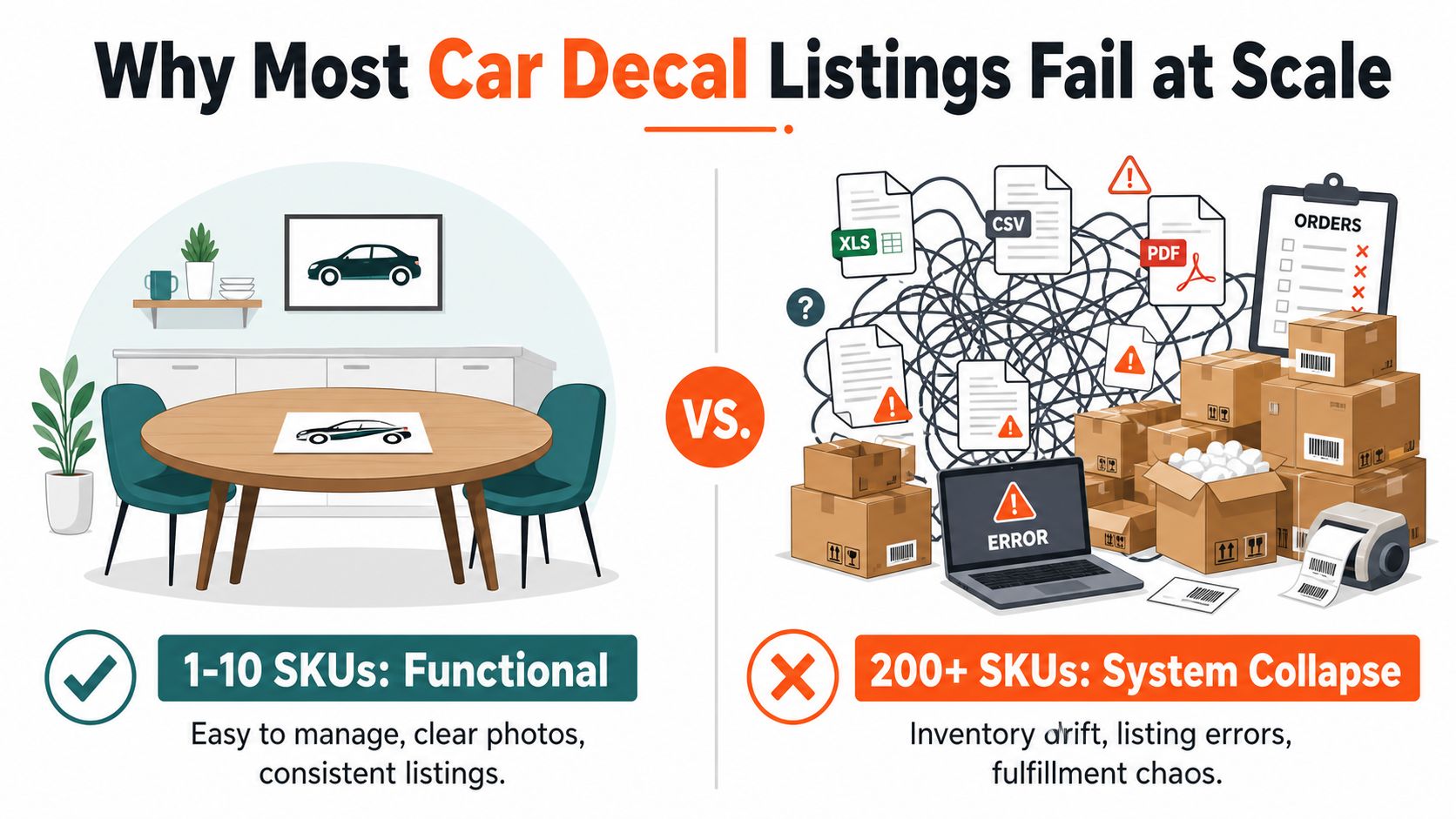
The bottleneck is visual consistency, not product ideas
The vinyl sticker category is already part of a broader market Business Research Insights valued at USD 5.12 billion in 2026 and projects to reach USD 8.35 billion by 2035, with 5.5% CAGR in that forecast period, and about 38% of global share from Asia-Pacific Business Research Insights. That doesn't matter because every seller needs to chase the same market trend, it matters because the category is large enough to reward operational discipline.
California is especially relevant here because it combines a huge vehicle base with a deep aftermarket customization ecosystem, so visual sloppiness gets expensive fast. If your decals look different from listing to listing, buyers assume the product is inconsistent too. That's why the failure isn't weak design, it's weak image governance.
Practical rule: once your catalogue grows, the product image system becomes part of the product itself.
The seller with ten SKUs can improvise. The seller with hundreds of images can't. What breaks first is usually the same thing, edge treatment, background consistency, crop discipline, and the ability to make every decal look like it belongs to the same brand family across Amazon, Shopify, and Etsy.
Batch image processing is the missing layer
Most decal guides stop at the craft level. They talk about sizing, placement, or vinyl finish, but they don't address what happens when your raw photos need to become a catalogue. That's where batch image processing matters more than another design tweak.
MerchLoom is one example of a tool that processes entire image collections through chained AI pipelines, which is the right mental model for a seller dealing with a large decal library. The point isn't to make one image prettier, it's to standardise hundreds of images so they can move through marketplace workflows without constant manual cleanup. For a visual check on how pixel problems show up in decal imagery, the article on pixelation in product visuals is a useful companion.
A kitchen-table workflow can still produce good art. It just can't reliably produce a catalogue.
Preparing Vector Files and Print-Ready Artwork
A clean listing starts before photography. If the artwork isn't production-ready, every later step inherits the same problem, proofing takes longer, colour shifts become harder to catch, and reprints become more likely. The sellers who treat the file as the source of truth usually ship cleaner catalogues than the sellers who try to “fix it in mockup.”
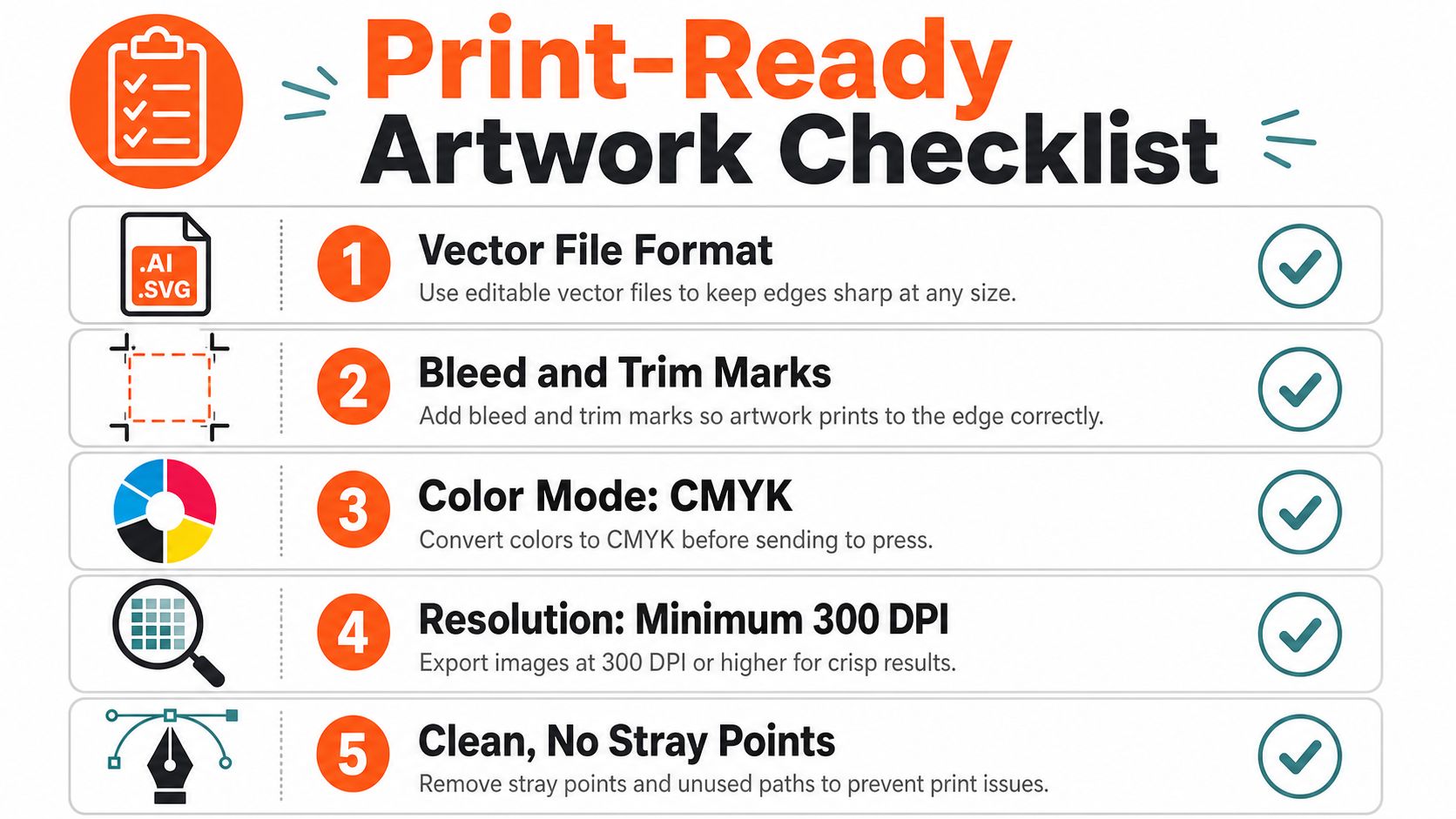
The file has to survive production, not just preview well
A practical decal workflow starts with vector-ready artwork. Anley's custom car decal page says customers can use an online design tool, upload images or logos, and receive a final proof for approval before production, while also allowing orders without uploading artwork immediately and sending files later by email Anley. That's a useful pattern because it lowers ordering friction without giving up proof control.
Decals.com adds a more technical constraint, requiring complete artwork files in .eps format to ensure print quality Decals.com artwork guidance. That's the kind of detail sellers need to build into their brief for designers. If the art department sends a flattened raster file and expects prepress to rescue it, the listing pipeline slows down before the first mockup is even built.
A decal file should be easy to proof, hard to misread, and ready for repeat production.
Colour mode is where a lot of beginner workflows go wrong. Screens show RGB, printers work from print-oriented colour logic, and vehicle decals need predictable output under real-world lighting. Resolution matters too, but only after the artwork is structured correctly. A high-resolution bad file is still a bad file.
The pre-press mistakes that cost real time
The expensive errors are rarely dramatic. They're usually small things that multiply across a catalogue.
- Stray points and messy paths: these create cleanup work in the production file and can change cut lines.
- Missing bleed or trim clarity: this causes edge surprises when the design is cut.
- Loose image sourcing: low-quality uploads can look fine in a browser and fail in print.
- Skipping proof approval: this pushes simple corrections into rework after the job is already queued.
For a practical refresher on turning a logo into a sticker-ready asset, the guide on logo to sticker preparation is a solid reference point. It fits the same operational reality, the better the source file, the smoother the catalogue.
The YouTube embed below is worth keeping nearby when your team needs a visual explanation for file prep and proof handoff.
Photographing Decals and Building Marketplace Mockups
A flat product photo tells only part of the story. A decal can look crisp on a white sweep and still fail to sell if buyers can't picture where it goes, how big it feels, or what surface it suits. That's why marketplace imaging for vehicle decals needs both clean product shots and realistic placement mockups.

Shoot once, format for every channel
Amazon, Shopify, and Etsy all reward different visual habits. Amazon leans on a clean product-first presentation, Shopify can tolerate branded catalogue styling, and Etsy often benefits from context that feels handmade or lifestyle-aware. That means one source shoot has to feed several output rules without drifting in colour or crop.
For a useful external reference on layout and print presentation, the article on custom sticker printing UK is relevant because it shows how print-focused sellers think about finish and buyer expectations. The transferable lesson is simple, the shoot has to show the sticker accurately, not just attractively.
Build mockups around the actual use case
For custom decal stickers for car, the strongest images are usually the ones that show scale on glass, painted panels, or a realistic body section. That doesn't mean every listing needs a full lifestyle scene. It means the mockup has to answer the buyer's first question quickly, where does this go and how does it sit on the vehicle?
MerchLoom is one option for this kind of batch imaging because it can turn a raw photo set into marketplace-ready outputs across a catalogue, including background removal, reframing, colour correction, and realistic placement mockups in sequence. For a more detailed look at mockup generation strategy, see the internal guide on AI product mockup generation. The key advantage is consistency, not novelty.
Doing this for a whole catalog?
MerchLoom runs background removal, upscaling and AI editing across every product photo you have — one prompt, whole batch.
Try MerchLoomA practical workflow looks like this:
- Shoot one controlled set of raw product images.
- Remove the background before scaling or resizing.
- Generate a vehicle-context mockup from the same base asset.
- Export channel-specific versions for Amazon, Shopify, and Etsy.
- Review the batch for edge quality and placement drift.
That sequence matters because once the mockup starts drifting, every platform version starts looking like a different product. A clean batch pipeline keeps the catalogue readable, especially when the SKU count rises.
Installation Methods and Compliance Considerations
A listing can convert and still disappoint if the buyer can't install the decal cleanly. That's where return friction starts, because the product is only “simple” until someone has to place it on a curved panel, rear glass, or a tinted window at home.
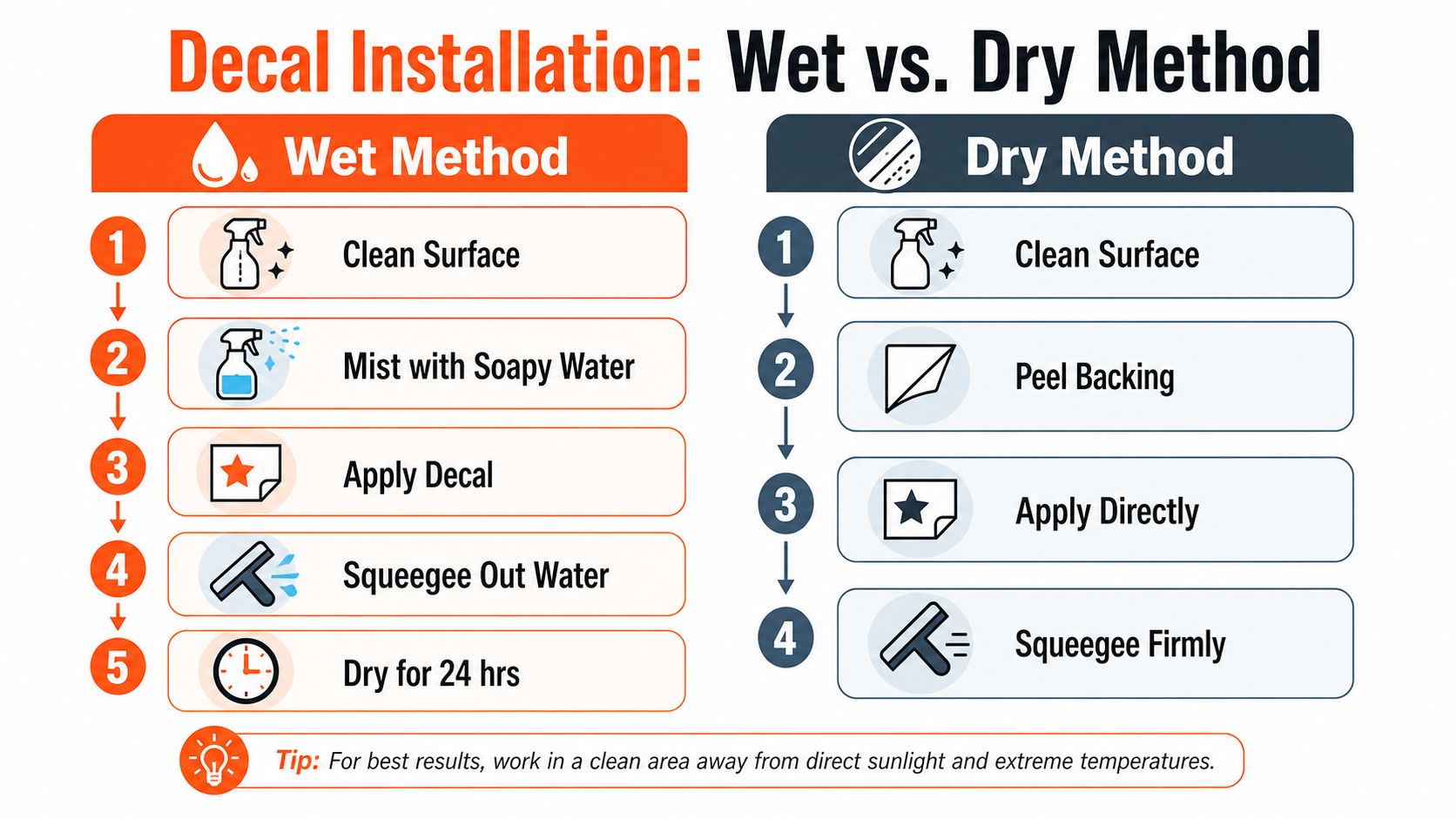
Wet and dry application solve different problems
In California installation guidance, technicians often clean and air-dry the surface, mist the adhesive side with water plus a drop of mild detergent, then position the decal and use a scraper to remove excess liquid; perforated decals are the main exception and get installed dry Sign Servant. That method is useful for larger decals because it gives a little room to reposition before the adhesive fully grabs.
An independent installation guide recommends a 50/50 isopropyl-alcohol-and-water prep on factory paint or glass, then firm overlapping squeegee strokes from the centre outward, and peeling the transfer tape back at a sharp 180-degree angle to reduce edge lift and trapped air Custom Sticker Shop. It also warns against ammonia-based cleaners like Windex because residue can reduce adhesive performance. That's a small detail with big consequences, especially when buyers blame the sticker for a surface-prep mistake.
The install instructions should match the surface, not the seller's favourite method.
Curves, glass, and legal fit need honest copy
Curved panels are where many generic apply-and-squeegee pages get too casual. Rear windows, tinted glass, and inside-glass placements each change the install decision. A vendor guide that only says “clean, align, squeegee” leaves too much unsaid for real customers, especially when the application surface isn't flat Loom Signs.
The same gap shows up in compliance. Sellers often focus on design, but the more important buyer question is whether the decal interferes with visibility or creates placement problems on windshield or front-window glass. A general decal catalogue rarely answers that clearly, which is exactly why product descriptions need to set expectations on where the decal belongs and where it doesn't.
For sellers who also promote vehicle graphics, the internal guide on advertising on cars is a helpful reminder that logo placement and panel fit matter as much as colour. The practical takeaway is blunt, if the decal's installation surface is unclear, the listing should say so.
A strong FAQ does three things:
- Names the surface: glass, painted panel, or indoor-style display use.
- States the method: wet, dry, or surface-specific exception.
- Flags limitations: curved sections, tinted glass, and visibility-sensitive zones.
That kind of copy lowers support tickets because it tells buyers what the product can realistically handle before they hit checkout.
Scaling Visual Workflows with Batch AI Processing
Once the catalogue passes a certain point, the image team stops being a support function and becomes the pace-setter for the whole storefront. Manual editing can still work for a handful of designs, but it becomes the bottleneck when every new decal needs background removal, crop variation, and platform-specific formatting.
For a broader workflow reference outside the decal niche, sellers who want to find content automation strategies will recognise the same pattern. The content changes, but the operational logic is identical, one source asset can fuel multiple outputs if the pipeline is arranged correctly.
Chain the steps, don't repeat the labour
The strongest batch systems don't run one big “AI edit” and hope for the best. They chain steps in a useful order, then reuse intermediate results. Remove the background first, reframe second, correct colour third, and then generate the final listing variants. That order reduces unnecessary work because you're not upscaling pixels or reprocessing a messy source more than once.
Real-time streaming changes the review process too. Instead of waiting for a whole batch to finish before spotting a problem, sellers can check output mid-run and adjust the workflow on the fly. That matters when one decal family needs a slightly different crop or a particular vehicle mockup angle.
Marketplace output should be treated as a repeatable system
This is the part most small shops miss. Amazon wants one kind of visual discipline, Shopify another, Etsy another, and the image workflow should know that before the design team starts exporting files manually. A repeatable pipeline gives you the same product identity across all three without rebuilding each asset from scratch.
The product workflow side matters just as much as the catalogue side. MerchLoom fits naturally here as a batch image platform that can process collections through chained AI steps, with cloud-source imports from common storage systems and reusable outputs across a full catalog. That doesn't replace a designer, it replaces the repetitive hand-editing that slows the designer down.
A good batch setup is less about creativity and more about control:
- Ingest once: pull the raw assets from storage or your marketplace source.
- Transform in sequence: remove, reframe, correct, and mock up.
- Review mid-batch: catch drift before it spreads across the set.
- Reuse outputs: feed the processed assets into more listings without re-uploading.
That's how a decal catalogue stays clean when it grows. The images don't just look better, they behave better operationally.
Launching and Maintaining Your Decal Catalogue
A decal catalogue should launch like a managed asset, not a pile of one-off listings. Before anything goes live, check file validity, export the right platform versions, and make sure the description answers the install question clearly. If those three pieces don't line up, the listing may sell once and cost support time forever.
For buyers who care about long-term finish, the practical question often overlaps with protection and durability. A useful adjacent read is why ceramic coating helps vinyl wraps, because it reminds sellers that the surface story doesn't end at install.
Post-launch, the job is maintenance. Refresh mockups when vehicle styles shift, update seasonal artwork in batches, and reprocess images when your crop standard drifts across channels. A catalogue with consistent decals and consistent imagery is easier to trust, easier to search, and easier to scale.
MerchLoom gives e-commerce sellers a way to turn raw product photos into marketplace-ready image batches without editing one file at a time. If your decal catalogue needs cleaner mockups, tighter platform exports, or a repeatable workflow across Amazon, Shopify, and Etsy, visit MerchLoom and see how chained AI image processing fits into that job.
Stop editing product photos one at a time
Upload your catalog or connect your store. Describe the result once. MerchLoom does the rest.
Try MerchLoom