
Advertising on Cars: A Guide for E-commerce Brands
Explore advertising on cars with our step-by-step guide. Learn to design, budget, and create vehicle ad mockups for your e-commerce brand at scale.
68% of LA County residents reported noticing branded vehicles in high-traffic corridors, yet only 12% of small businesses surveyed had tested vehicle branding according to a California Department of Transportation study cited here. That gap matters for e-commerce brands. Most online sellers compete inside the same paid social auctions, the same search placements, and the same crowded marketplace listings. Very few take a catalogue-first approach to physical visibility.
That's why advertising on cars is more interesting than it looks. It isn't just a local service-business tactic. For a DTC brand, it can work as a moving awareness layer, a content asset, and a way to create campaign visuals that connect the physical world back to product listings, landing pages, and marketplace-ready image sets.
The catch is operational. Busy sellers don't need another one-off marketing idea that creates design chaos across hundreds of SKUs. If you're managing a large catalogue, the question isn't whether a car wrap looks good. It's whether you can plan, mock up, approve, publish, and repurpose the creative without breaking the image workflow that already feeds Amazon, Shopify, Etsy, and your ad accounts.
Choosing Your Mobile Billboard Strategy
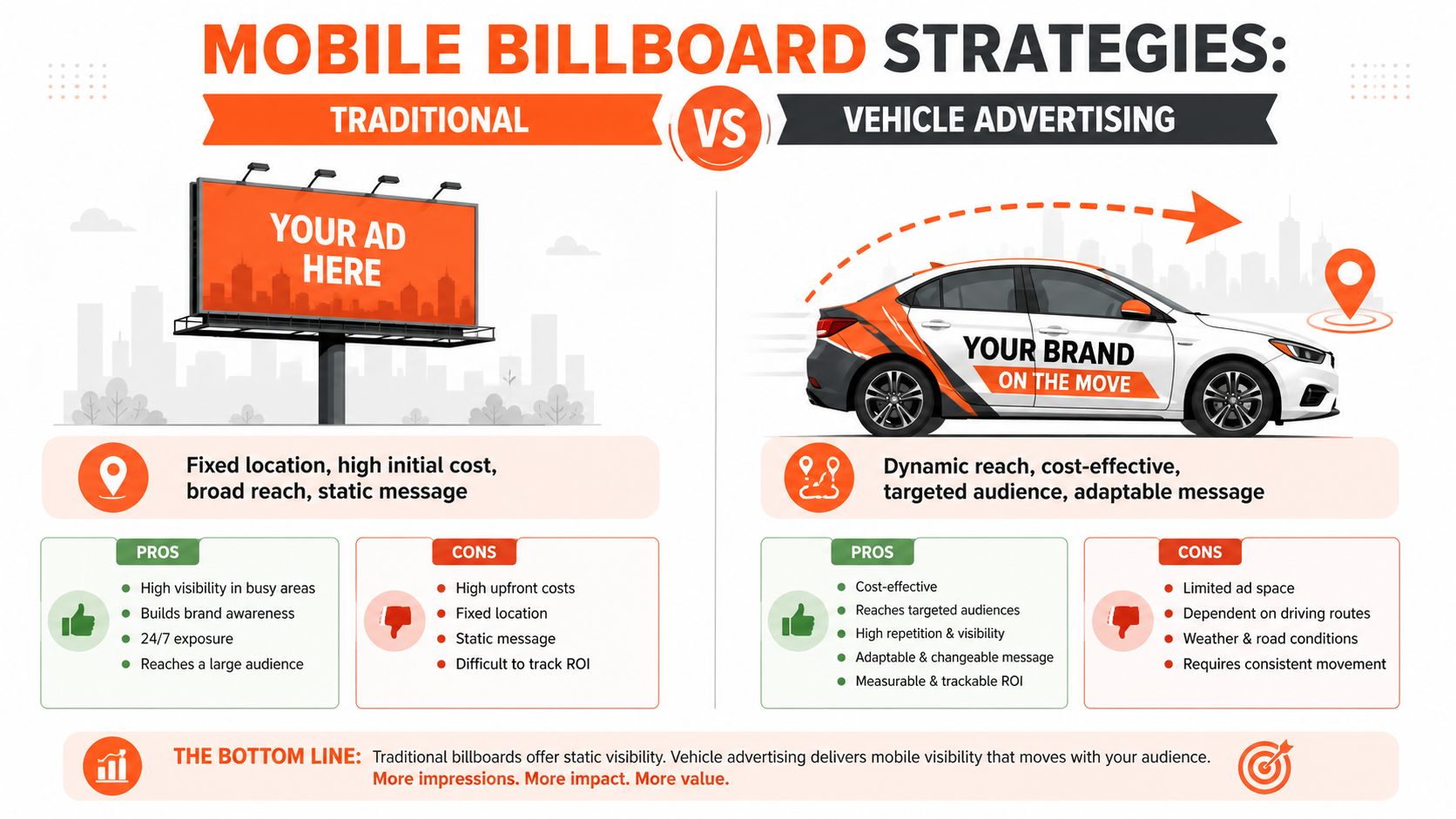
Most sellers underestimate how useful a branded vehicle can be because they compare it to a flat billboard buy. That's the wrong comparison. A car, van, or small fleet gives you movement, repeated local exposure, and a format that can show up in customer photos, creator content, event footage, and delivery-day social posts. The underused part is what makes it attractive.
Pick the format that matches campaign reality
A full wrap makes sense when the vehicle is part of the brand experience itself. If the car appears at pop-ups, fulfilment runs, or regular city driving, a full wrap gives you the strongest visual consistency. It also demands the most approval work because every panel, curve, and seam affects the final look.
A partial wrap is usually the better option for sellers testing the channel. You get a strong branded presence without committing the whole vehicle surface. That matters when the campaign is seasonal or when you're still working out which message belongs on the car and which belongs on the landing page.
Custom decals are the practical middle ground. They're easier to swap for a new collection drop, a limited promotion, or a product launch. If you already create campaign badges, collection logos, or hero graphics for your store, decals are often the easiest extension of assets you already own.
Magnetic signs offer flexibility, but they rarely look as deliberate as wrapped graphics. They can work for temporary use or internal testing, though many e-commerce brands outgrow them quickly because the finish doesn't usually match a premium consumer-facing aesthetic.
Use an e-commerce filter, not an auto industry filter
The best choice depends less on vehicle type and more on workflow pressure.
| Option | Best for | Main drawback |
|---|---|---|
| Full wrap | Long-running brand campaigns | Harder to update |
| Partial wrap | Testing and regional campaigns | Less visual dominance |
| Decals | Seasonal drops and flexible messaging | Smaller visual footprint |
| Magnetic signs | Temporary use | Often looks less polished |
Practical rule: If your brand refreshes creative every collection cycle, don't lock yourself into a format that's expensive or slow to revise.
Online sellers require a different planning process. You're not just choosing signage. You're choosing how many asset variations your team will need for listing images, campaign mockups, launch decks, influencer kits, and social edits. If the asset can't move cleanly across your catalogue workflow, it becomes a bottleneck.
A useful reference point is Creative Graphic Solutions' vehicle marketing guide, especially for thinking through visibility, branding basics, and practical setup choices before production. The missing piece for most sellers is tying that offline decision back to repeatable digital asset production, which is why a structured AI image workflow automation approach matters early, not after the wrap is already on the vehicle.
Designing Vehicle Ads That Capture Attention
A vehicle isn't a poster. It's curved, interrupted by handles and windows, and usually seen at an angle. Design that looks sharp on a laptop screen can fall apart once it stretches across doors and wheel arches.
Keep the message glanceable
The strongest vehicle ads are brutally edited. One brand mark. One short message. One action.
Before:
- Too much copy: brand story, offer text, product claims, social handles
- Weak hierarchy: everything fights for attention
- Small details: readable only in a static mockup
After:
- One focal point: logo or product category first
- One supporting cue: short URL, QR code, or campaign phrase
- Large-scale contrast: shapes and type built for motion
If someone needs time to decode the design, the car has already passed them.
Design for body panels and movement
Door seams split words. Rear panels crop artwork. Curves distort circles, faces, and fine lines. That's why vehicle creative needs to be tested across actual placement zones, not just dropped onto a generic side-profile template.
A few principles hold up consistently:
- Use bold typography: Sans serif fonts with generous spacing survive distance better than decorative type.
- Protect the logo area: Don't place critical branding across handles, arches, or trim breaks.
- Use colour for visibility: High-contrast combinations read faster from the kerb or next lane.
- Limit QR dependence: QR codes can help at stops, but the design still needs to work when nobody scans.
- Treat the rear separately: Tailgates and back windows are often the best place for a simple action prompt.
Good vehicle design reduces information until recall improves. It doesn't shrink your homepage onto sheet vinyl.
That same discipline helps online listing images. Sellers who already build clean product thumbnails usually adapt well here because they understand visual hierarchy. The difference is that the product isn't the hero now. The brand mark, shape system, and route to action are.
Build variants before approval
If you run multiple storefronts or seasonal campaigns, create several layout directions before committing. One version may prioritise brand awareness. Another may support a specific collection. Another may function better in user-generated content and social reposts after the vehicle hits the road.
The practical move is to generate those concepts in batches, then review them like ad creative. That's the same logic behind AI ad creative generator workflows for ecommerce. A moving vehicle raises the cost of bad layout decisions, so the preview stage matters more.
The E-Commerce Workflow for Vehicle Ad Mockups
A Shopify seller launches a new line of removable decals and wants a regional campaign built around real-world driving scenes. The team doesn't just need one hero mockup. They need side views for landing pages, square crops for Shopify, vertical cuts for social, cleaner white-background product imagery for marketplaces, and enough variants to test different messages without redoing the whole job each time.
That's where most vehicle advertising projects stall. The physical idea is solid, but the asset production becomes manual.
Start with one master visual
The efficient approach starts with a single high-resolution master. That could be a logo lockup, a decal graphic, or a campaign design prepared with transparent background support. From there, the seller creates mockups across multiple vehicle types so the team can compare a hatchback, van, and small truck before paying for production.

A good mockup workflow does more than paste artwork onto a car. It handles angle matching, scale consistency, shadow logic, and panel placement, then exports reusable assets for the rest of the marketing stack. For sellers exploring product visualisation alongside campaign assets, a dedicated AI product mockup generator is useful because it keeps the output process closer to how catalogue teams already work.
Batch output matters more than the first mockup
One mockup is design. Ten coherent mockups are workflow.
Doing this for a whole catalog?
MerchLoom runs background removal, upscaling and AI editing across every product photo you have — one prompt, whole batch.
Try MerchLoomThat difference matters because marketplace requirements diverge. Amazon requires a minimum of 2,000 pixels on the longest side to enable zoom, Shopify recommends 2,048 x 2,048 pixels for square images, and Etsy requires a minimum of 2,000 pixels on the shortest side, as outlined in this guide to Amazon, Shopify, and Etsy image requirements. If you build vehicle campaign assets one at a time, you end up resizing, cropping, and re-exporting the same creative over and over.
For a seller with hundreds of images, the better system looks like this:
- Create the base campaign art once, with clean logo, colour, and cut-path files.
- Generate vehicle placements across several body styles and angles.
- Approve a small set of brand-safe compositions for use across ads and listings.
- Export platform variants from the same source file set, instead of redesigning for every channel.
- Reuse the outputs for social teasers, collection pages, marketplace graphics, and print handoff.
Connect physical campaign planning to content production
Vehicle advertising becomes more than signage. The mockups feed your launch calendar. The approved art becomes part of your catalogue. The campaign visuals can support a product page for the decal itself, a blog feature, a retailer pitch deck, or a local event announcement.
If the brand also wants motion content, ShortGenius AI ad generator is a practical companion for turning approved visual directions into short-form video concepts without building every ad from scratch. The broader lesson is simple. Don't treat the wrapped car as the output. Treat it as one asset class inside a larger e-commerce content system.
Estimating Costs and Measuring Campaign ROI
A wrapped vehicle can generate tens of thousands of daily impressions at a reported CPM below many traditional outdoor formats, according to these vehicle wrap advertising statistics. That cost profile gets interesting fast for an e-commerce brand, but only if the campaign is set up like a measurable acquisition channel rather than a vanity project.
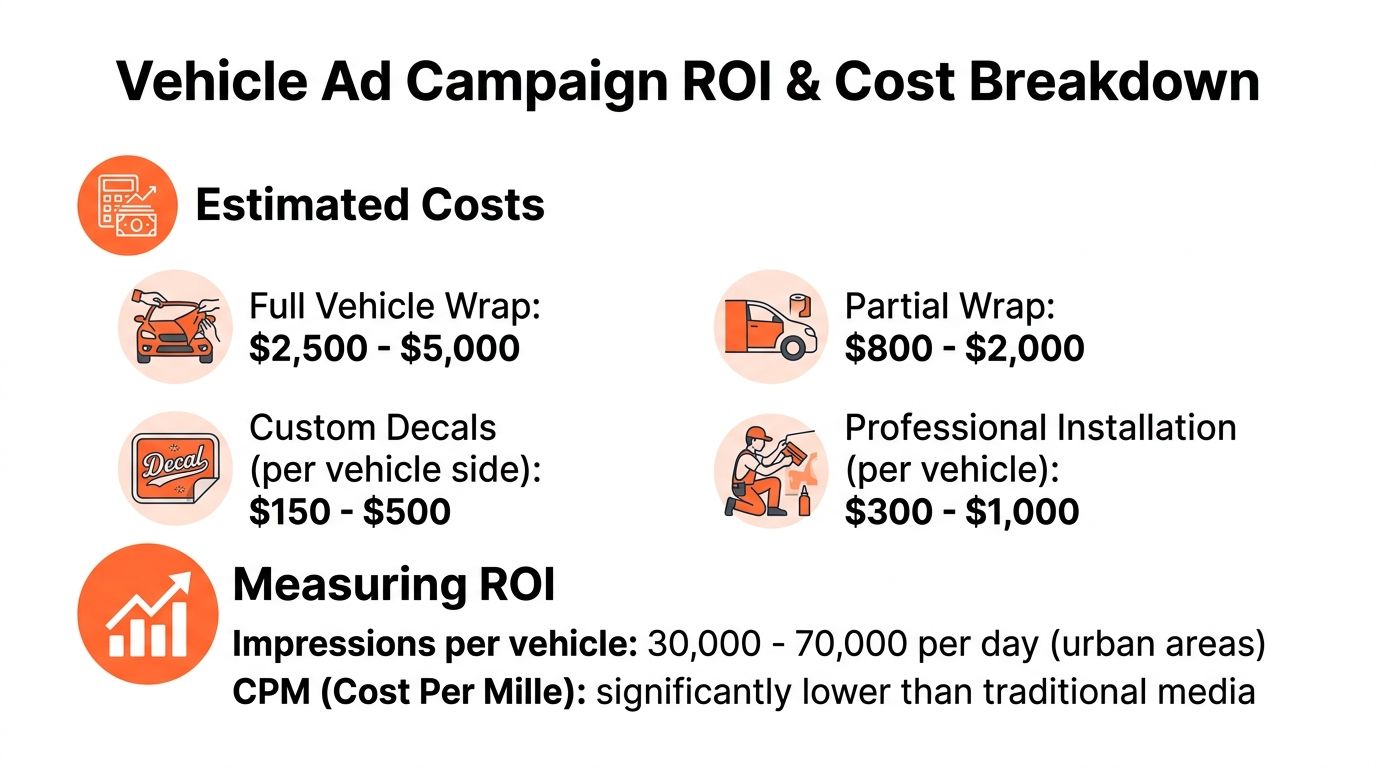
The actual budget is wider than print and install. A serious estimate needs four buckets: creative production, mockups and approvals, fabrication and installation, then ongoing upkeep and replacement. For sellers running multiple SKUs or regional offers, pre-production can expand quickly because every route, message, and vehicle type creates another asset variant to review.
That is why I treat ROI on car advertising as an operations question first. If the team cannot tell which design ran on which van, in which city, with which QR code and offer, the campaign becomes hard to judge and hard to improve.
What to measure
Start with response paths you control:
- Dedicated landing page: Use a short, readable URL tied to one campaign or route group.
- Unique discount or referral code: This captures direct response even when traffic attribution is messy.
- QR code by creative version: Separate scans by message, vehicle, or region so weak creative is easy to spot.
- Regional lift: Compare sessions, branded search, and orders in the areas where the vehicles drive.
- Assisted conversion patterns: Check whether direct traffic, branded queries, or returning visitors increase after launch.
For e-commerce teams, the cleanest setup is simple. Put one trackable destination on each vehicle, keep the message readable at a glance, and match every creative version to a named campaign in analytics. If you run several vehicles, assign each one its own code set. That extra setup work pays for itself the first time you need to answer which route or message is producing sales.
Build the ROI model before you print
Use a basic model that includes fixed costs, variable costs, and a realistic response window.
| Cost or return input | What to include |
|---|---|
| Fixed launch costs | Design, mockups, print prep, installation |
| Variable costs | Replacement decals, cleaning, repairs, reprints |
| Tracking inputs | QR scans, code use, regional traffic lift, assisted conversions |
| Revenue inputs | Orders, average order value, repeat purchase behaviour |
| Time horizon | Initial launch period plus the period where the wrap keeps generating attention |
This is also where the article's e-commerce angle matters. Batch mockup workflows reduce wasted revisions before anything goes to print. If you are testing multiple products, seasonal offers, or fleet formats, a structured AI image workflow for Cloudinary-based catalogues keeps source files, approved variants, and export history organized enough to compare performance later. That makes vehicle branding easier to scale across a catalogue instead of treating every van or car as a one-off design job.
Review it like a paid channel
A practical review cadence works better than broad brand-language summaries. Check early signals in the first few weeks, then review sales impact after enough exposure has built up. For a small fleet, I look for three things first: scan activity, traffic quality, and whether the campaign is producing cheaper qualified visits than the next local channel on the media plan.
If those signals are weak, change the message, route, or offer. If they are strong, keep the design system stable and increase coverage with the same tracking structure.
The wrap itself is static. The workflow around it should not be.
Navigating Legal and Maintenance Requirements
Ignoring compliance and upkeep is one of the fastest ways to turn a smart campaign into avoidable cost. A vehicle ad isn't just creative. It's a public-facing commercial asset, and that means rules, documentation, and maintenance standards apply whether you planned for them or not.
Compliance affects the message, not just the sale
For brands in automotive retail, California changed the advertising environment in a major way. California's 2024 CARS Act altered how vehicle advertisements must disclose pricing, prohibited junk fees, and required clear disclosure of the total price in first communications, changing the compliance requirements for advertisers in the region, as noted in this summary of dealer ad spend and regulatory context.
That example matters even if you don't sell cars. Regulations can reshape what a marketer is allowed to claim, display, or omit. If your wrapped vehicle promotes financing, bundles, promotional pricing, or add-ons, you need the same discipline you'd apply to a paid social ad or product page.
Maintenance protects both appearance and spend
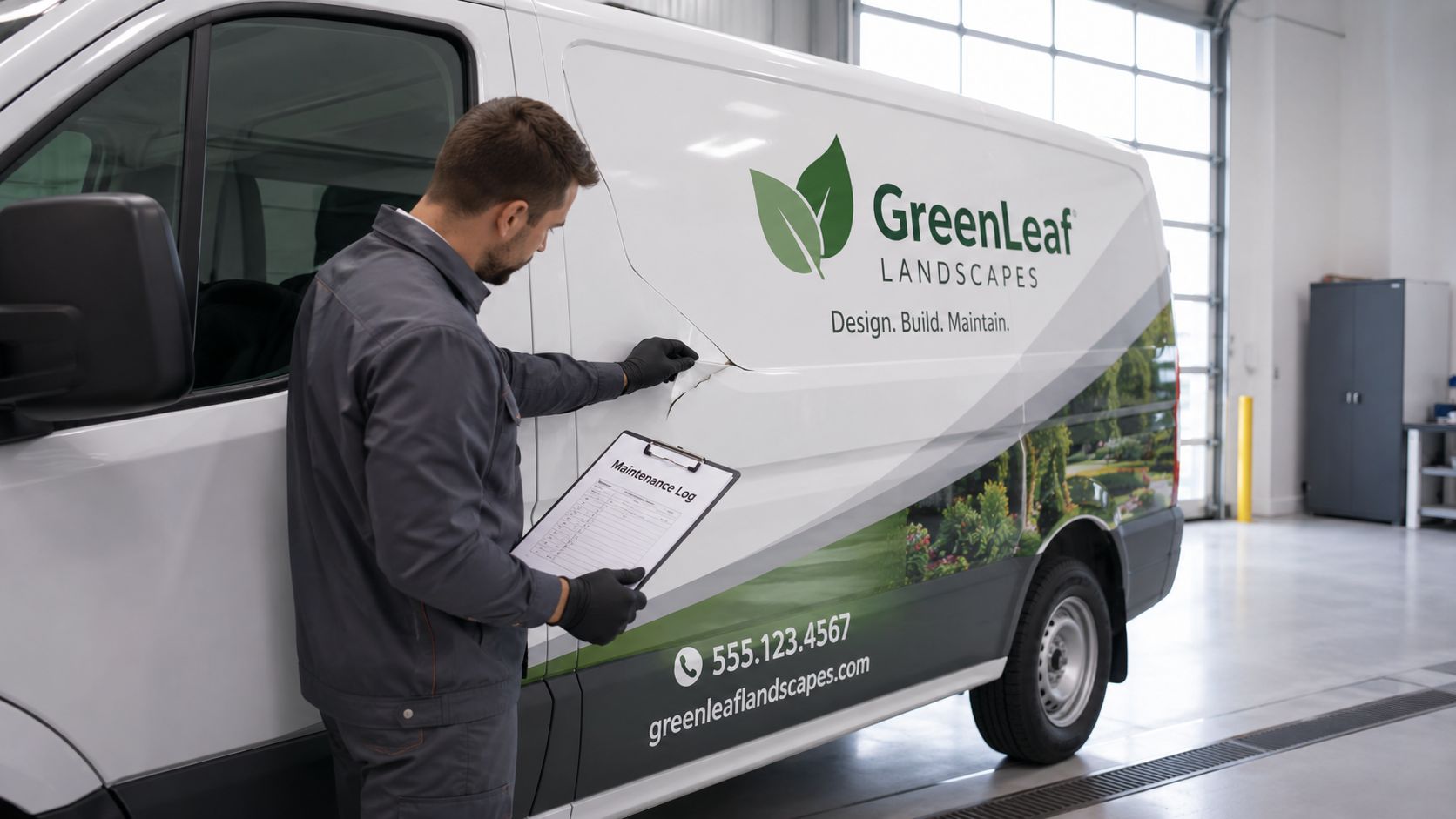
A faded or lifting wrap does more damage than a plain vehicle because it signals neglect. That's especially risky for premium brands that rely on clean visual presentation across every customer touchpoint.
A practical maintenance checklist looks like this:
- Inspect edges regularly: Look at seams, corners, and high-contact areas first.
- Wash with care: Avoid harsh treatment that shortens wrap life or dulls the finish.
- Document condition: Keep photos and service notes so replacements aren't delayed.
- Check insurance and local rules: Some municipalities and insurers treat commercial branding differently from personal use.
- Retire damaged creative quickly: A half-peeled campaign graphic shouldn't stay on the road because the replacement file is missing.
A branded vehicle should look as controlled as your storefront. Customers won't separate the physical asset from the brand behind it.
There's also a production convenience angle. If you create decals or sticker variants from existing logos, keeping clean master artwork on hand speeds up reprints and panel repairs. A simple logo-into-sticker workflow is useful for that reason alone. It reduces the scramble when a small graphic element needs replacement and no one can find the right source file.
Your Next Steps in Vehicle Advertising
A vehicle wrap gets attention in places paid ads cannot reach: parking lots, delivery routes, service calls, and repeat local exposure near the same neighborhoods. For an e-commerce brand, the upside is not just visibility. It is the ability to turn one physical campaign into a repeatable asset pipeline that supports approvals, print files, listing imagery, social posts, and local landing page creative from the same source set.
That is why vehicle advertising works for digital-first teams that already manage products in batches. The hard part is rarely the first design. The hard part is keeping every variant organised, approved, measurable, and ready for reprint when a panel needs replacement or a seasonal offer changes.
A practical rollout looks like this:
- Start with a controlled test: Launch with 3 to 5 vehicles so routing, creative response, and tracking issues are visible before you expand.
- Give the campaign time to produce signal: Review lead quality and assisted conversions after enough exposure has built up, instead of judging performance too early.
- Measure against margin: Compare cost per lead and cost per acquisition with gross profit per order or customer lifetime value.
- Keep the test operationally tight: Use one offer, one tracking method, and one visual system before adding new routes or creative versions.
- Scale only what holds up: Expand the routes, vehicle count, or format after the numbers and field execution both look solid. Earlier guidance on fleet rollout discipline from Unalike's trucking company marketing overview supports that phased approach.
This section matters most at the handoff point between idea and execution. Brands with large catalogues already know the pattern. If mockups live in random folders, print files are versioned poorly, and campaign images are recreated by hand for every channel, vehicle advertising becomes slow and expensive to maintain.
Batch AI workflows solve that operational problem. Teams can generate vehicle mockups across multiple products, regions, and promo variants, then reuse the same approved visuals across Amazon, Shopify, Etsy, paid social, and email without rebuilding each asset one by one. That makes car advertising easier to test like any other acquisition channel. It also reduces the lag between a winning concept and a live rollout.
Done well, vehicle branding is not a one-off awareness play. It is a physical media unit that fits inside a modern e-commerce production system.
If you want to turn vehicle branding ideas into usable catalogue assets without editing one file at a time, MerchLoom is built for that kind of batch work. It processes full image collections through chained AI pipelines, so you can generate mockups, reframe creatives for Amazon, Shopify, and Etsy, keep campaign visuals consistent across hundreds of images, and move from concept to listing-ready assets without rebuilding the workflow for every channel.
Stop editing product photos one at a time
Upload your catalog or connect your store. Describe the result once. MerchLoom does the rest.
Try MerchLoom