
An AI Image Workflow for Cloudinary That Scales
Build a scalable AI image workflow for Cloudinary. This guide shows how to connect tools for batch processing, optimize costs, and automate e-commerce visuals.
Your Cloudinary library might already be tidy. Products are tagged. Folders make sense. Delivery is fast. But the work still piles up every time a new collection launches, a marketplace changes image rules, or paid social needs fresh creative by tomorrow.
That's the main constraint for most online sellers. It isn't storage. It's output. One source image has to become listing-safe, channel-specific, and visually varied across Amazon, Shopify, Etsy, Instagram, ads, and email. If you manage hundreds of SKUs, that job stops being a design task and becomes an operations problem.
Beyond Storage The E-commerce Image Bottleneck
A new collection lands on Monday. By Tuesday, the same product photos need white-background marketplace images, cropped storefront thumbnails, higher-resolution detail shots, and fresh creative for ads. Cloudinary handles storage and delivery well, but the pressure usually shows up somewhere else. Teams managing growing catalogs run into a production gap. The approved asset exists, yet turning it into every channel-ready variation still takes too much manual work.
That gap gets expensive fast.
Fashion and apparel teams often need multiple images per SKU to meet shopper expectations and merchandising needs, as outlined in this fashion product photo workflow analysis. Multiply that across color variants, seasonal campaigns, and retail channels, and the work stops looking like occasional design support. It becomes a recurring operations task with deadlines, approval steps, and a real cost per output.
Where Cloudinary helps and where it doesn't
Cloudinary is strong at the infrastructure layer. It stores approved assets, applies delivery transformations, and serves images quickly across storefronts, apps, and campaigns. If the job is format conversion, compression, cropping, or responsive delivery, Cloudinary is the right system to keep in the center.
The bottleneck starts when teams ask that same system to produce net-new commercial creative at scale.
A delivery transformation can resize a packshot or remove some repetitive editing work. It does not generate a believable lifestyle scene, spin out marketplace-specific visual sets for an entire catalog, or create batches of ad mockups from a single source image. That work belongs in a dedicated AI production layer such as MerchLoom for bulk e-commerce image generation, where the goal is high-volume creative output rather than asset custody.
One practical rule helps here. If the task changes the commercial context of the image, not just its file properties, you are dealing with production workflow, approvals, and batch generation, not simple delivery optimization.
Why operators feel this early
Sellers running catalogs above a few dozen active SKUs usually feel this before larger brands with in-house studio support. In many small commerce teams, one person is covering listing ops, merchandising, marketplace compliance, and creative requests in the same week. A single approved product photo can turn into six or more downstream tasks, each with a different spec and deadline.
That is also why basic enhancement tools only solve part of the problem. This e-commerce image optimization guide is a useful reference for sharpening, cleanup, and resolution work. Those fixes matter, but they are different from building a repeatable pipeline that can generate, review, approve, and publish visual variations across a full catalog.
The practical architecture is to separate asset management from creative generation, then connect them cleanly. Cloudinary stays responsible for the image library and final delivery. A specialist AI studio handles the heavy production work that would otherwise slow the team down or force expensive manual editing back into the process.
Cloudinary as the Bank MerchLoom as the Studio
The cleanest way to think about a modern AI image workflow for Cloudinary is this. Cloudinary is the image bank. It's where approved assets live, where metadata belongs, and where delivery should happen. A specialist AI layer is the studio. That's where you generate commercial variations, test creative directions, and run heavier batch workflows.
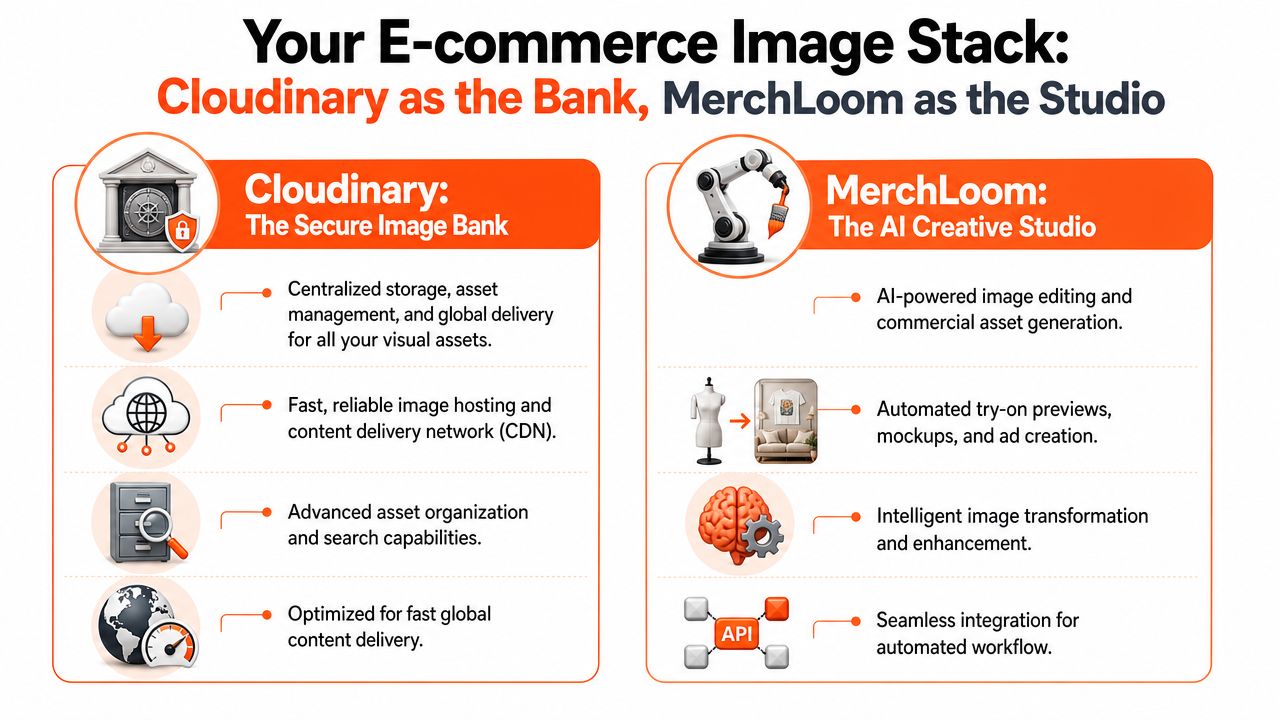
The bank model
When teams blur these roles, they usually end up with one of two problems. Either they try to force a DAM to handle high-variation visual generation, or they let AI outputs sprawl across folders, drives, and export downloads with weak governance.
Cloudinary fits the bank role because it gives you a stable centre for:
- Asset custody so originals, derivatives, and approved finals don't scatter across random storage locations.
- Delivery control so one approved file can still be transformed for speed and format at request time.
- Operational consistency because the same image system can serve product pages, apps, emails, and ad landing pages.
In February 2025, Cloudinary launched AI Vision, which added smarter image management features including auto-tagging and programmable media capabilities, as described in this Cloudinary AI Vision announcement. That strengthens Cloudinary's role as an intelligent DAM. It doesn't erase the distinction between DAM functions and tools built for generative product visualisation.
The studio model
A studio layer does a different job. It pulls source assets from the bank, runs them through chained AI operations, and sends finished outputs back into the managed library. That's where product photos become commercial assets rather than just stored files.
Useful studio tasks include:
| Workflow need | Better handled in the studio layer |
|---|---|
| Lifestyle scene creation | Product inserted into contextually relevant environments |
| Try-on previews | Product visualised on people or models |
| Mockups and ad variants | Batch creation of campaign-ready outputs |
| Collection-wide edits | Repeated processing across folders instead of one image at a time |
That's why teams using Cloudinary often add a complementary processing layer such as MerchLoom. The point isn't replacement. The point is separation of concerns. Cloudinary stays responsible for storage, governance, and delivery. The AI layer handles production-heavy visual generation and returns outputs to the stack you already trust.
Use the DAM to control assets. Use the AI studio to make new commercial outputs from those assets.
This split also helps non-creative stakeholders. Merchandising teams can request “same bag, three spring lifestyle scenes, square crop, paid social variant” without asking the DAM to become a design tool.
Designing a Cost-Optimized AI Image Workflow
The initial focus often centers on whether the APIs connect. That's not the hard part. The expensive part is getting the order of operations wrong.
A cost-conscious AI image workflow for Cloudinary should be built around a simple pattern: ingest, trigger, process, store, deliver. The mistake is treating all transformations as equal. They aren't. Some AI steps are materially more expensive than others, and if you apply them in the wrong sequence, batch costs rise fast.
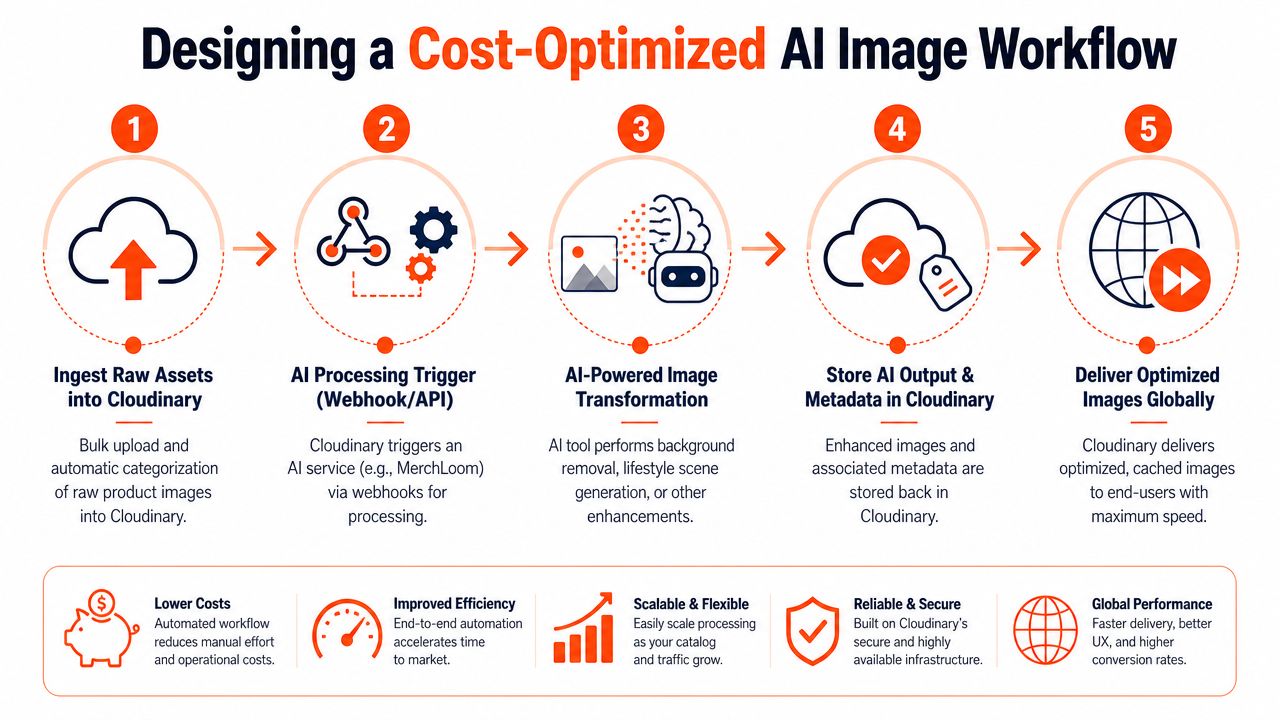
Start with the cheapest reduction step
The clearest example is background removal before upscaling. Optimising the order of AI steps, such as removing the background before running an expensive upscale operation, can reduce processing costs by up to 87% in high-volume e-commerce workflows, based on the business context documented for this workflow design.
That single sequencing choice changes the economics of batch processing because you reduce image complexity before the heavier compute step. If you upscale first and remove later, you've paid to enlarge pixels you didn't need.
A practical architecture
A workable setup usually looks like this:
Upload raw assets into Cloudinary
Keep originals untouched. Use folders or tags that clearly separate raw intake from approved publishable assets.Trigger the processing job
Use a webhook, API call, or queue event when new assets land in a “for-processing” location.Run a chained AI pipeline outside the delivery layer
Put cleanup, visual generation, and enhancement steps in a sequence that reduces waste early.Write outputs back with metadata
Return finished files, job status, and useful tags so they can be reviewed and reused.Let Cloudinary handle delivery
Once approved, delivery transforms should stay lightweight and channel-specific.
What a sensible chain looks like
For most catalogue jobs, the order should follow this logic:
- First remove what won't survive such as the original background or mannequin.
- Then normalise colour and composition so every later output starts from a cleaner base.
- After that run expensive enhancement such as upscale or heavier generative edits.
- At the end produce channel variants for marketplace and storefront requirements.
If your team also creates apparel graphics or print-style visuals, the same sequencing logic still applies. The creative source may come from tools listed in a top t-shirt design software roundup, but once those files enter a commerce pipeline, cost still depends on what you do first and what you postpone until the end.
Keep storage and compute loosely coupled
One reason this model scales is that Cloudinary doesn't need to be the place where every expensive AI decision is made. It needs to be the stable home before and after that work. A separate processor can read from your asset bank, do the heavy lifting, then return organised outputs.
For a concrete example of that kind of ingestion pattern, this AI image processing workflow from Amazon S3 shows the same architectural principle applied to another storage source. The lesson carries over cleanly to Cloudinary.
The cheapest image step is the one you avoid. The second cheapest is the one you run on a smaller, simpler file.
From Raw Photo to Marketplace-Ready in Minutes
A typical intake asset looks usable until the channel requirements start stacking up. A handbag shot on a mannequin may be fine for internal review in Cloudinary, but the same file still needs cleanup, format changes, and creative derivatives before it can earn its keep across marketplaces, paid social, and your storefront.

Doing this for a whole catalog?
MerchLoom runs background removal, upscaling and AI editing across every product photo you have — one prompt, whole batch. Try 2 batches free, no signup.
Try it freeThe fastest teams treat Cloudinary as the image bank, not the editing desk. The source asset lives there, versioned and easy to retrieve. A specialized AI studio such as MerchLoom handles the heavier creative work, then sends approved outputs back to Cloudinary for delivery, caching, and downstream use.
One source image, multiple sellable assets
In practice, a single product photo becomes a small production run. The job starts with the archived original in Cloudinary and ends with a structured set of ready-to-publish files.
A clean workflow usually produces:
- Marketplace primary image with a plain background and tight framing
- Storefront crop set sized for collection grids, PDP galleries, and mobile cards
- High-resolution master for channels that reject softer exports
- Creative variants such as lifestyle scenes, ad crops, or seasonal campaign edits
The value is not just speed. It is consistency. Once the cleaned product cutout becomes the parent asset, every derivative inherits the same shape, color treatment, and framing logic.
Output planning by channel
Different channels ask for different things, and the friction comes from volume rather than difficulty.
| Output | Purpose |
|---|---|
| White background version | Amazon listing compliance |
| Square crop | Shopify collection grid |
| High-resolution export | Etsy-ready master |
| Lifestyle scene set | Social ads and campaign creative |
Those requirements are manageable for one SKU. They become expensive across hundreds. That is why batch architecture matters. Cloudinary holds the original and the finals. The AI studio generates the variations that would otherwise eat design hours.
Apparel teams run into the same pattern from a different angle. They may need campaign-style composites, on-model scenes, or flat-lay alternatives that go well beyond catalogue cleanup. This apparel mockup generator guide is a useful reference if your catalogue workflow also has to feed marketing creative.
Here's a practical walkthrough of the same general idea in action:
What changes once the batch is working
The operating model changes first. Teams stop assigning edits one file at a time and start pushing collections through a defined pipeline with review points, naming rules, and output presets.
That shift matters because it changes where labor sits. Manual retouching time drops. Review, exception handling, and channel QA take a larger share of the work, which is a healthier bottleneck for most commerce teams.
There is also a cost angle. Running creative generation outside Cloudinary keeps your media library stable while reserving higher-cost AI work for assets that need it. That split is usually cheaper than treating every image as a bespoke design task inside the content workflow.
If you want a more detailed example of collection-level execution, this batch product photo editing workflow shows how teams turn repeat edits into a controlled batch process instead of a queue of one-off requests.
Automating Your Workflow with Webhooks and API Calls
Once the workflow works manually, automate the trigger. That's where an AI image workflow for Cloudinary stops being a useful experiment and becomes part of day-to-day operations.

The event pattern that holds up
The most dependable approach is folder-based or tag-based automation. New uploads land in a designated intake location. That event triggers an external process. The external process runs the image job and writes approved outputs back to Cloudinary under a different path.
A simple logic flow looks like this:
Upload to intake folder
Example intent:products/for-processing/seasonal-dropCloudinary sends a webhook
The webhook passes asset identifiers and any metadata needed to choose a workflow.Your processing service starts the job
It decides whether the asset needs cleanup, generation, channel exports, or all three.Results return to Cloudinary
Finals and review copies are stored separately from the original.
A minimal payload shape
The exact implementation will vary, but the payload design should stay boring and explicit.
{
  "asset_id": "cloudinary-asset-id",
  "public_id": "products/for-processing/bag-001",
  "workflow": "handbag-marketplace-and-social",
  "outputs": ["amazon", "shopify", "etsy", "lifestyle_ads"]
}
On the receiving side, your service can map that to a predefined image chain. Keep credentials outside request bodies. Use signed requests where possible. Don't let one generic endpoint do everything without validation.
Security and operational hygiene
A few habits save trouble later:
- Separate intake from publish paths so raw uploads never appear live by accident.
- Store workflow names centrally rather than letting users type arbitrary processing instructions into production jobs.
- Return status metadata so failed or partial batches are visible inside your asset system.
- Log every batch run with enough detail to reprocess only the affected subset.
For teams building toward a more hands-off system, this e-commerce image automation guide is a useful model for how batch jobs, approvals, and output routing can fit together without turning into a fragile tangle of scripts.
Automate the trigger, not the judgement. The system should start the work automatically, but approval still needs a deliberate checkpoint.
Troubleshooting and Validating Your AI Batches
Automation fails in ordinary ways. A crop parameter lands in the wrong place. A generated background looks fine on one product and odd on the next. One malformed source image gums up a batch that should have finished hours ago. The teams that trust their workflow aren't the teams that avoid errors. They're the teams that expect them and design around them.
Sequencing errors are expensive
Many Cloudinary-centred pipelines often become inefficient. Independent benchmarks show that incorrect transformation parameter sequencing can produce 23 to 31% higher render times and a 15% increase in failed asset derivations, according to this Cloudinary workflow benchmarking summary. That's not just a technical annoyance. It means slower turnaround, more retries, and less confidence in automated output.
The operational answer is straightforward. Validate the chain before you scale the chain.
Review small before you run big
Don't send 700 images through a fresh workflow without sampling. Run a representative set first.
A practical validation routine looks like this:
- Pick edge cases first such as reflective products, soft fabrics, complex straps, or low-contrast backgrounds.
- Check each stage separately rather than only reviewing the final export.
- Approve template outputs for each channel before applying them across a collection.
- Create a retry lane so one failed file doesn't block the rest of the batch.
Build previews into the process
Previewing isn't a nice extra. It's the control surface that keeps AI outputs commercially usable. If you can't inspect a subset before publishing, you'll eventually push inconsistent images live.
That matters even more when you're correcting quality issues that are subtle but cumulative. Compression artefacts, edge halos, colour drift, and over-sharpening often slip through when teams only glance at thumbnails. This JPEG compression artefacts guide is a useful reminder of how quickly “almost fine” becomes visibly poor once the same flaw repeats across a catalogue.
Bad batches rarely fail all at once. They fail one acceptable-looking image at a time until the catalogue starts to look inconsistent.
Validation also changes team behaviour. Buyers, merchandisers, and marketers stop distrusting automated outputs when they can see a clear review step, a clean rollback path, and consistent naming for approved finals. That trust is what turns a clever workflow into a routine part of operations.
If your team already uses Cloudinary as the asset bank, MerchLoom fits well as the processing layer for batch AI image work. It's built for taking existing product images, running chained edits across full collections, and producing marketplace-ready outputs, mockups, lifestyle scenes, try-on previews, and ad creative without replacing the delivery stack you already depend on.
Stop editing product photos one at a time
Upload your catalog or connect your store. Describe the result once. MerchLoom does the rest.
Try it free — no signup