
AI Ad Creative Generator for Ecommerce: A Scalable Workflow
Ditch manual edits. Learn a scalable workflow using an AI ad creative generator for ecommerce to produce campaign assets for your entire product catalog.
Your product catalogue is ready for promotion, but the creative queue isn't. You've got a Black Friday collection to launch, holiday email banners to refresh, social ads to version for different placements, and marketplace promo assets that all need the same product to look consistent. That's where the gap between a clever AI image demo and an actual AI ad creative generator for ecommerce workflow becomes evident.
Single-image tools are fine when you're testing one hero product. They break down when you need campaign visuals for hundreds of SKUs, across Shopify, Amazon, Etsy, Instagram, email, and paid social. The hard part isn't getting one good image. The hard part is building a repeatable system that keeps product identity intact, handles batch image processing, and produces assets that fit listings and ads without turning review into a full-time job.
The teams that scale this well treat AI like an operations layer, not a slot machine. They prepare source files, standardise prompt structures, chain steps in the right order, and review outputs as a collection instead of one image at a time. That's what makes catalogue-scale creative production workable.
Laying the Groundwork for Scalable AI Creatives
Most failures start before generation. If the source catalogue is messy, the outputs will be messy too. Garbage in, garbage out applies brutally to ecommerce creative, especially when you're processing batches instead of touching one photo by hand.
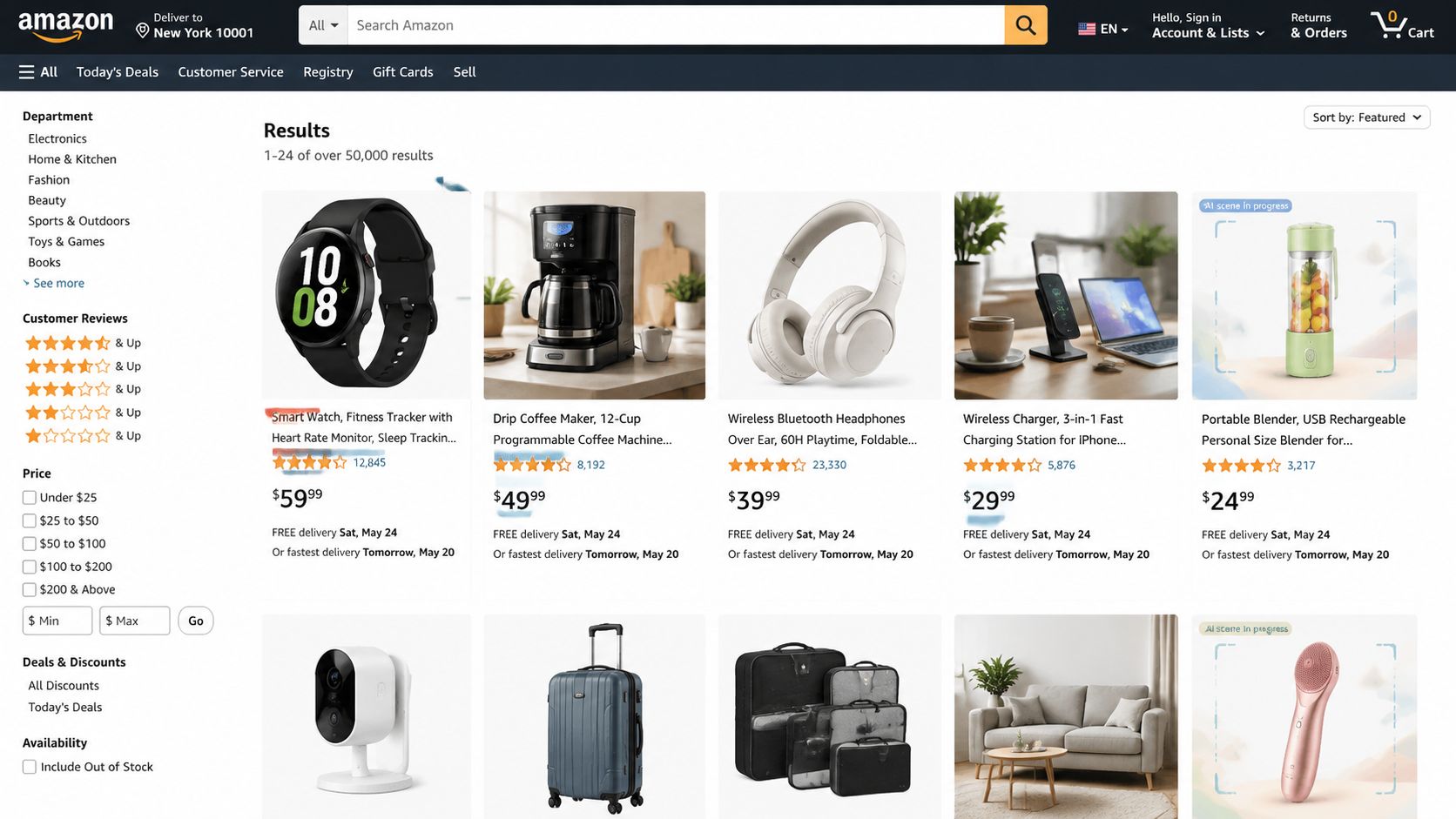
If you're feeding AI a mix of low-resolution marketplace grabs, uneven lighting, cropped edges, and products photographed from inconsistent angles, you won't get a clean campaign set. You'll get drift. One product looks oversized, another changes shape slightly, and a third picks up details that were never in the original image.
Start with isolated product assets
For campaign generation at scale, isolated product images are the cleanest starting point. Transparent PNGs give you control. The model can place the product into seasonal scenes, ad layouts, and lifestyle setups without fighting a leftover shadow, printed backdrop, or cropped shelf edge from the original photo.
Batch background removal is usually the first real production step. It's not glamorous, but it's what makes the rest of the pipeline predictable across a collection. If you want a deeper operational view of how teams automate that handoff from raw catalogue to usable AI inputs, this breakdown of AI image workflow automation is useful.
A practical prep checklist looks like this:
- Use your best master image first: Pick the product photo with the clearest shape, accurate colour, and complete silhouette.
- Keep angle consistency within a product family: If mugs are shot three-quarter view, don't mix in top-down shots unless the campaign calls for it.
- Remove clutter before generation: Hangers, support stands, labels, dust, and studio artefacts often echo through the outputs.
- Group by catalogue logic: Seasonal collection, margin tier, ad priority, category, or launch date all work better than one giant dump folder.
- Name files so humans can review them: SKU plus product name plus angle beats camera-export filenames every time.
Practical rule: If a product image wouldn't be acceptable as your main listing image after light cleanup, it's probably not good enough to become the base asset for AI campaign generation.
Organise imports before you chase variation
Busy sellers rarely have assets in one place. Some live in Google Drive. Others sit in Shopify, a CDN, shared Dropbox folders, or a photographer's export directory. The goal isn't to rebuild your storage system. The goal is to create one intake path that can pull approved product images into a repeatable workflow.
That matters even more when you're planning ad variants for holiday campaigns, gift guides, or promo banners across several storefronts. Your team shouldn't be re-uploading files one by one every time a sale period starts.
If video is part of the same campaign mix, it helps to review adjacent tools with a similar production mindset. This guide to find the best AI video software is worth scanning because static ad creative and short-form product video often need the same catalogue discipline.
What good preparation looks like in practice
A solid setup for catalogue-scale work usually includes:
- One approved source image per product for generation.
- A background-free version for scene placement and ad layouts.
- A review status so the team knows which assets are safe to use.
- Collection-level grouping for campaigns like Black Friday, gifting, spring launch, or clearance.
- Output notes by platform so Amazon, Shopify, Etsy, and social don't get mixed together.
When that groundwork is done, the rest gets faster. Not magically. Just operationally.
Crafting Reusable Prompts and Creative Templates
Most prompt advice online is built for one image at a time. That's not how ecommerce teams work when they're building creative for a catalogue. You don't need fifty inspired prompts. You need prompt systems that can generate a consistent campaign look across many products.
That changes the job. Instead of writing “red candle on festive table” from scratch, you build a template with variables you can swap across categories and promotions.
Build prompts like a template library
A reusable prompt should have fixed brand elements and flexible product fields. The fixed part controls the visual language. The flexible part lets you apply it across candles, skincare, kitchenware, jewellery, or packaged food without rewriting the creative direction every time.
A basic template might look like this in plain language:
| Template part | What it controls | Example |
|---|---|---|
| Product field | What changes per SKU | product name, category, packaging type |
| Surface field | Where the item sits | oak table, stone counter, fabric backdrop |
| Lighting field | Campaign mood | soft winter morning light, bright retail light |
| Seasonal props | Promotional context | gift ribbon, pine sprig, confetti, florals |
| Framing rule | Output consistency | centred composition, negative space for text |
That structure is more useful than a clever one-liner because it scales. One prompt family can handle Black Friday sale tiles, holiday hero images, spring collection emails, and marketplace promo assets with only minor variable changes.
For prompt ideas tuned to product photography rather than general AI art, this library of AI image prompts is a good reference.
Separate the non-negotiables from the flexible details
The most common mistake is stuffing every possible detail into every prompt. That makes outputs brittle. When the prompt is overloaded, the model starts improvising in the wrong places.
Keep these elements stable across a campaign:
- Brand atmosphere: clean, luxe, playful, minimal, rustic, premium
- Colour direction: warm neutrals, high contrast monochrome, festive jewel tones
- Camera intent: close-up hero, mid-shot banner framing, top-down flat lay
- Composition rules: centred product, room for text, product always dominant
Then vary only what should change:
- Seasonal props
- Background environment
- Promotional message context
- Aspect ratio and crop priority
The prompt shouldn't be a poem. It should behave like a production brief.
What works and what doesn't
What works is modular prompting. You define a campaign look once, then plug products into it. That's how you keep a skincare line looking like one collection instead of twelve unrelated AI experiments.
What doesn't work is writing bespoke prompts for every SKU. It feels creative at first, then creates review chaos. Product identity drifts, props become inconsistent, and your email banner no longer matches the social ad or Shopify hero image.
I've found it useful to maintain templates by campaign type rather than by platform first. For example:
- Black Friday promo template: darker backdrop, stronger contrast, sale-energy composition
- Holiday gifting template: warmer lighting, soft seasonal props, premium packaging emphasis
- Always-on social template: lighter scene, faster read, cleaner crop for feed placements
- Marketplace promo template: restrained environment, heavy product focus, minimal distraction
Add approval rules to the template itself
A good prompt library isn't just text. It includes review rules. That's the difference between creative generation and creative operations.
Include notes like:
- Product label must remain legible
- Packaging colour must match source image
- No extra accessories unless the bundle includes them
- Reflections should be subtle
- Scene elements can support the product, not compete with it
When your team stores prompts with those rules attached, campaign production gets easier. Someone can generate a new seasonal collection without relearning the brand from scratch. That's the value of templates. They turn AI from a creative novelty into a repeatable catalogue process.
Building Your Automated Image Processing Pipeline
A catalogue run usually breaks in the same place. Product images are approved, prompts are ready, and then the team starts moving files by hand between background removal, generation, resizing, QA, and export. That works for 20 assets. It creates delays, version confusion, and wasted processing once you are producing creative across hundreds of SKUs.
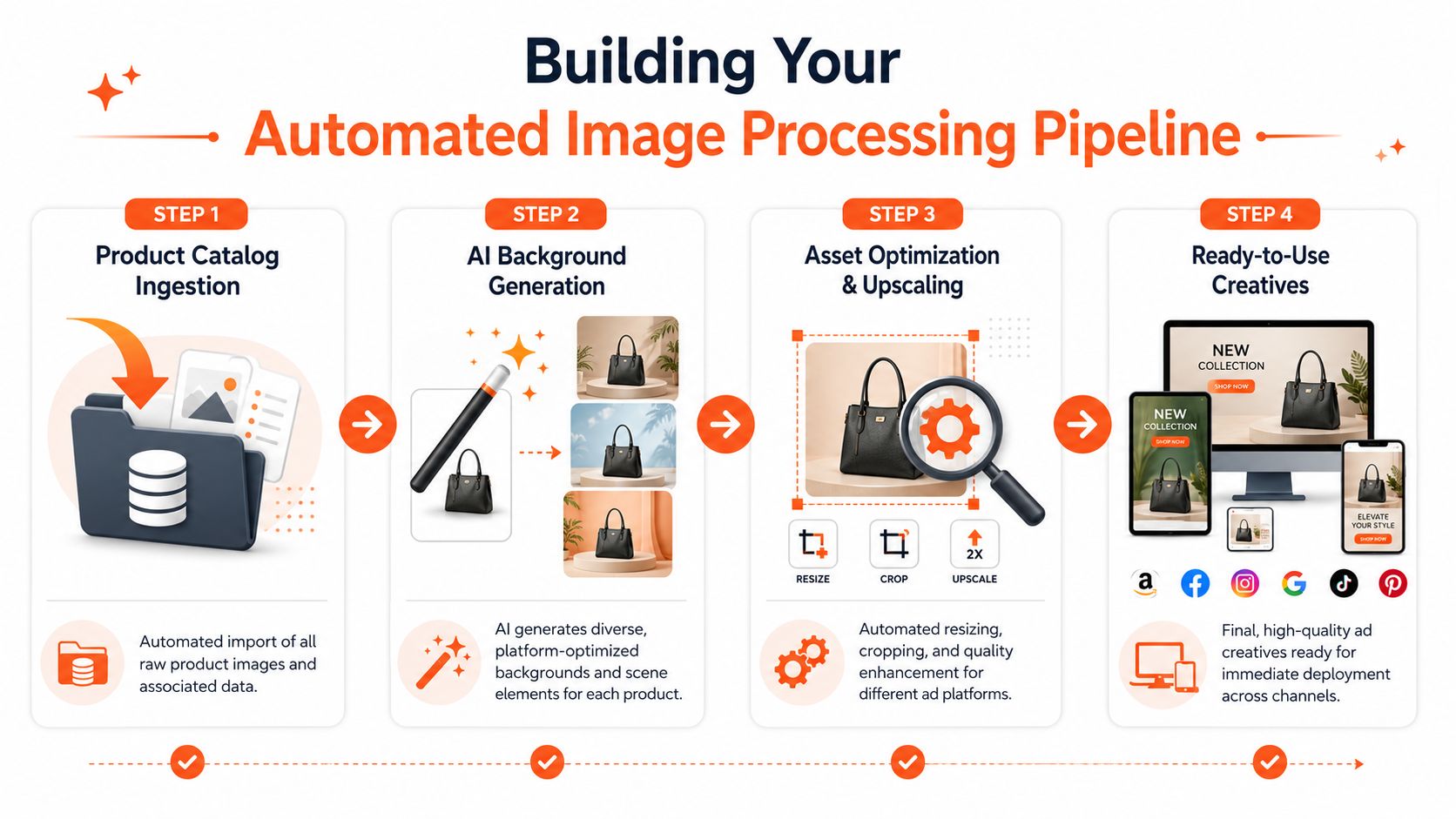
The fix is a defined pipeline with a strict step order. In practice, an AI ad creative generator for ecommerce works best when every product moves through the same chain:
- Import the catalogue batch
- Clean the source image or remove backgrounds
- Generate campaign scenes
- Create size and crop variants
- Review outputs while the batch is still running
- Upscale approved assets
- Export by destination
That order protects both quality and budget. Upscaling early increases cost on files that may still be rejected. Generating scenes from messy source images pushes edge problems, label defects, and color errors into every derivative.
If your team is building repeatable production instead of one-off edits, this AI batch image editing workflow for large product sets is the right model to follow.
Build around stages, handoffs, and failure points
Teams often focus on tool selection first. The harder problem is handoff control. Every stage should answer three questions: what goes in, what gets rejected, and what moves forward automatically.
A practical holiday or promo workflow usually looks like this:
| Stage | Operational goal | Common failure if skipped |
|---|---|---|
| Intake | Pull approved product files and SKU metadata into one queue | Missing products, duplicate files, wrong variants |
| Cleanup | Standardise edges, orientation, and base quality | Dirty cutouts, shadows, inconsistent source quality |
| Generation | Apply the approved campaign setup across the full batch | Scene drift, prop inconsistency, off-brand outputs |
| Reframing | Produce required crops and aspect ratios in bulk | Manual resizing queues, broken compositions |
| Review | Approve, reject, or rerun weak outputs before final processing | Low-quality assets spread across every channel |
| Final polish | Upscale and optimise only approved winners | Extra processing cost and bloated file sizes |
One sentence I repeat to creative ops teams is simple. Fix problems before multiplication. A weak source image becomes a larger cleanup job once it has six crops, three platform versions, and two campaign variants attached to it.
Cost control comes from step order
Doing this for a whole catalog?
MerchLoom runs background removal, upscaling and AI editing across every product photo you have — one prompt, whole batch. Try 2 batches free, no signup.
Try it freeAI creative costs do not come only from the model or vendor. They come from where expensive steps sit in the workflow.
Background cleanup should happen before enlargement. Approval should happen before final upscaling. Export optimisation should happen after generation, once you know which files will go live. Those choices sound small, but they decide whether you process 50 useful assets or 500 unnecessary ones.
For ad testing and lighter delivery files, Otter A/B's free image optimizer is a practical way to shrink approved assets without sending them back through a full editing cycle.
Review during the batch, not after it
Late QA is one of the most expensive habits in catalogue-scale creative production. If the team waits until the full run is finished, a prompt mistake or rendering issue can affect the entire batch before anyone catches it.
Streaming review fixes that. As outputs come in, reviewers can flag recurring issues, pause the run, adjust the setup, and rerun only the affected SKUs. That matters more than flashy generation features when launch dates are tight. It keeps one bad instruction from turning into a catalogue-wide rework job.
Generating Platform-Specific Ad Creatives at Scale
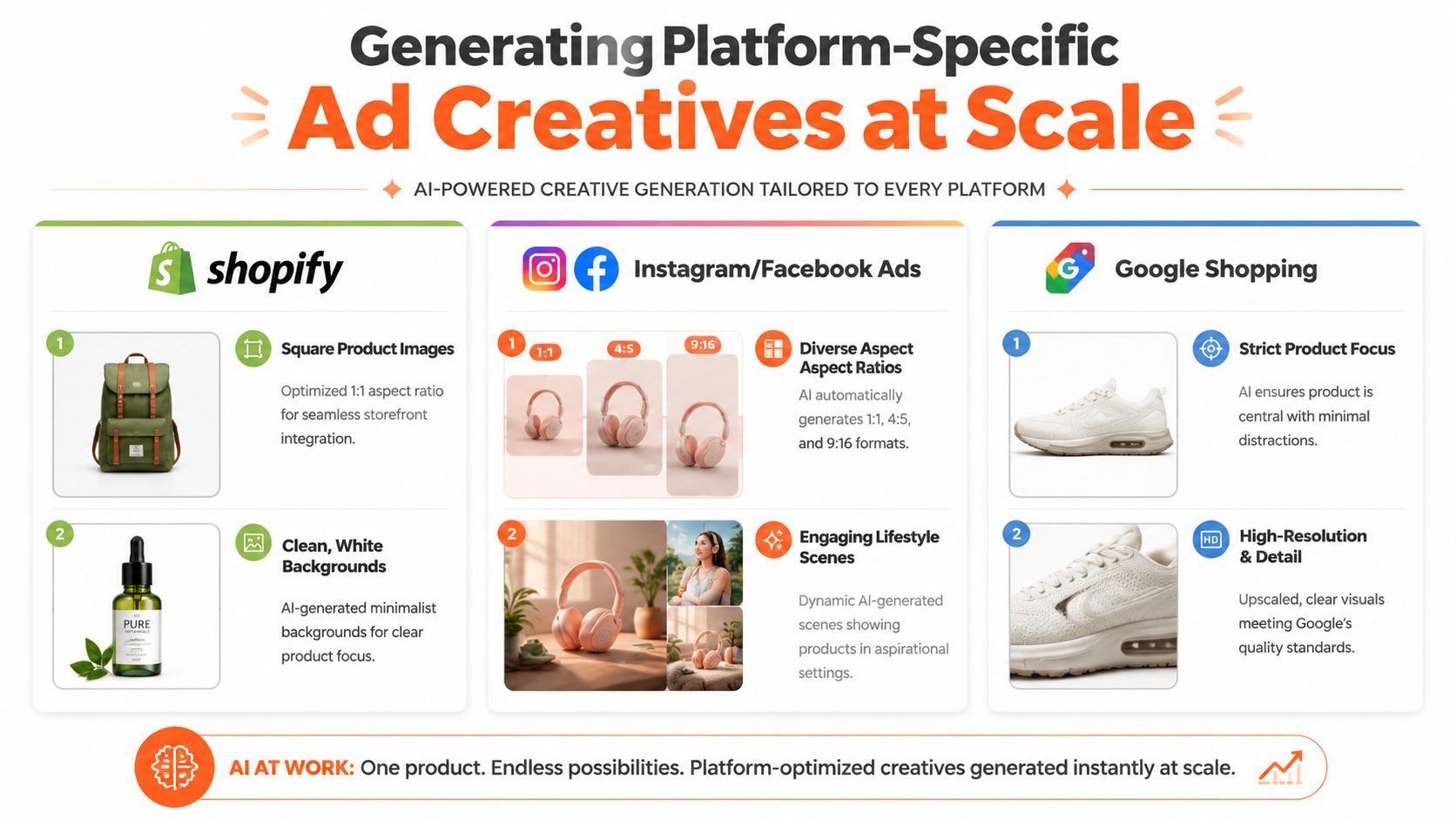
A product image that works on Shopify usually won't work unchanged on Amazon, Instagram, Etsy, and a promotional email banner. Each channel has different visual expectations, crop behaviour, and tolerance for styling. The trick is not making separate assets from scratch. It's branching from one approved product source into channel-specific variants.
One catalogue, different channel rules
Here's the practical comparison many in marketing run into:
| Platform | What usually works | What usually fails |
|---|---|---|
| Amazon | clean product-first image, white background, minimal distraction | heavy props, dramatic shadows, lifestyle clutter |
| Shopify | branded hero visuals, collection consistency, lifestyle context | flat listing-only imagery across the whole storefront |
| Instagram and Facebook ads | bold framing, square and vertical crops, quick visual read | wide compositions with tiny product scale |
| Etsy | clear handmade or crafted feel, high-resolution imagery, detail visibility | generic ad-like scenes that lose product character |
| Email banners | simple composition with room for copy | busy scenes with no safe text space |
This is why catalogue-scale reframing matters. You don't want to manually crop each SKU for every placement. You want one system that can preserve product focus while adapting to feed, story, banner, and listing requirements.
For social formats specifically, this reference on Instagram portrait size is useful when you're deciding how much vertical space to give the product versus the surrounding scene.
Marketplace images need restraint
Amazon and many marketplace environments reward discipline. The image has a job. Show the product clearly, keep edges clean, and avoid anything that muddies the listing.
Shopify is different. Your storefront benefits from stronger atmosphere, campaign cohesion, and a brand point of view. A candle can sit in a winter dinner scene on a homepage hero, while the same candle might need a plain white-background image for a listing or marketplace promo panel.
That split is where many teams overuse AI. They generate beautiful scenes for everything, then discover they've made assets that are attractive but operationally wrong.
A great ad image can still be a bad listing image. Treat those as separate outputs, even when they come from the same source file.
Social, email, and promo assets need composition discipline
For paid social and email banners, the product doesn't just need to look real. It needs to leave room for marketing. That means the prompt and framing rules should account for overlays, headlines, promo badges, and CTA space before generation starts.
Useful campaign branches often include:
- Black Friday paid social: contrast-heavy square and vertical variants with bold negative space
- Holiday email banners: wider hero crops with room for subject-line-aligned copy blocks
- Seasonal Shopify hero images: branded scene work with category-level consistency
- Marketplace promo assets: restrained styling that supports the offer without obscuring the product
If your campaign also needs motion, this guide to AI video for marketers can help when you're mapping static and video creatives together. The key is to keep the product presentation consistent so the buyer recognises the same item across ad, email, and store.
The scalable approach
The strongest workflow I've seen is simple in concept. Approve one product base image. Apply one campaign template. Then branch outputs by destination:
- Amazon-ready listing asset
- Shopify square collection image
- Instagram feed crop
- Story or vertical ad variation
- Email banner cut
- Etsy high-resolution promo visual
That's how an AI ad creative generator for ecommerce becomes useful to a real team. It stops being a toy for one-off mockups and becomes a production path for listings and campaigns across the whole catalogue.
Testing Performance and Integrating Your Workflow
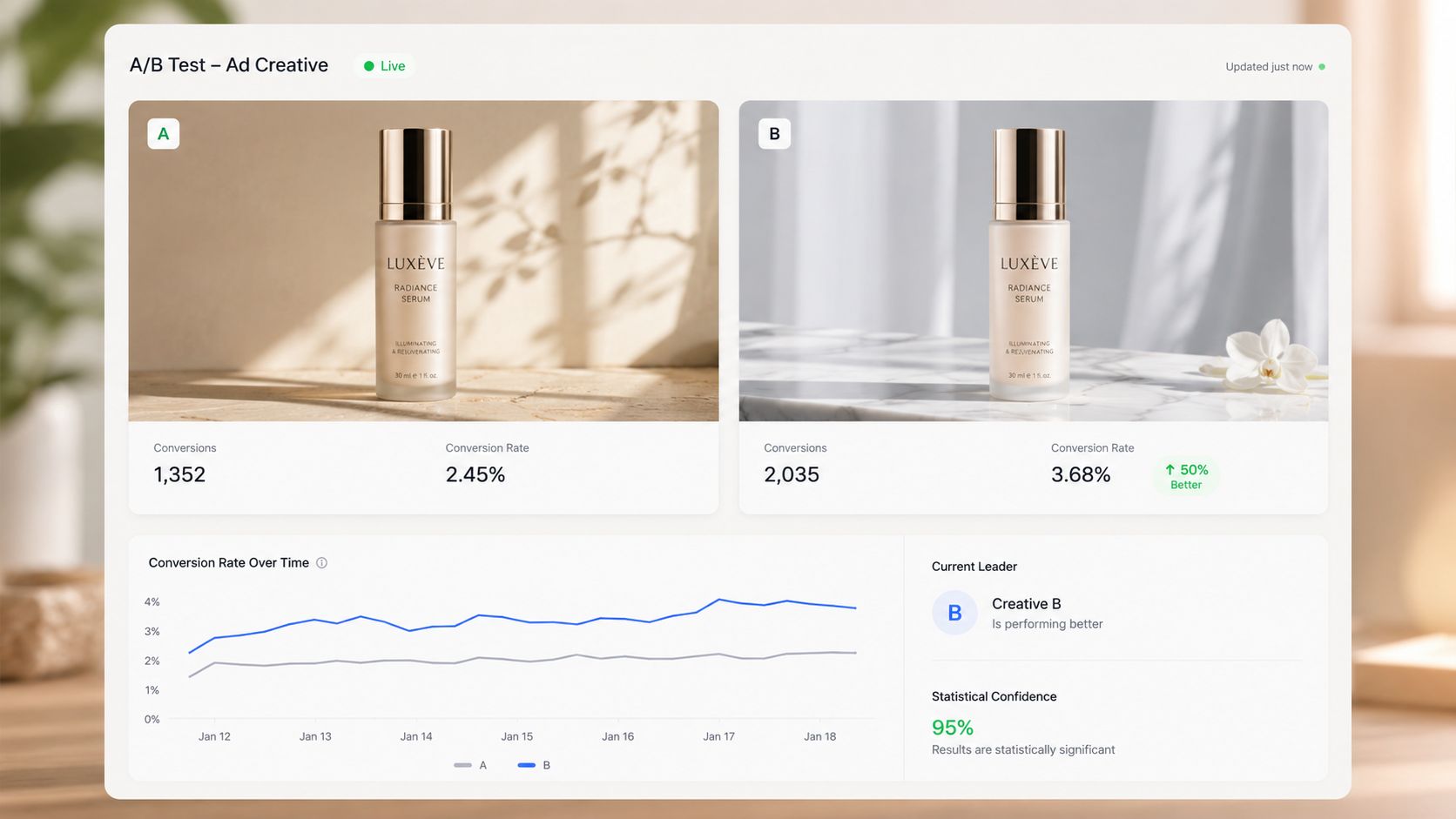
Creative generation isn't the finish line. It only becomes valuable when you can learn which version earns attention and which one gets ignored. AI helps here because it makes structured variation easier. Instead of debating one concept in a meeting, you can create several controlled versions of the same product asset and test them properly.
Test one variable at a time
The fastest way to waste a test is to change everything at once. If one image has a new background, different crop, stronger lighting, and alternate text treatment, you won't know what mattered.
A cleaner testing routine looks like this:
- Background test: same product, same crop, different scene context
- Lighting test: same scene, one brighter and one moodier
- Prop test: same core setup, one with seasonal accents and one without
- Framing test: same creative direction, different product scale in the canvas
This approach works especially well for sellers handling many campaign images from the same catalogue. Once you identify a pattern that performs well for one category, you can roll the same test logic into adjacent collections without rebuilding the workflow from zero.
Track creatives as grouped sets
Don't review AI outputs as isolated files. Review them as campaign sets tied to a product family, platform, and hypothesis. That's how you keep your findings usable.
For example, organise output labels around questions like:
| Test group | Variant idea | Why it's useful |
|---|---|---|
| Holiday skincare set | warm spa scene vs clean white counter | tests atmosphere against clarity |
| Black Friday electronics set | bold dark promo look vs minimalist retail look | tests urgency against simplicity |
| Home decor social set | close crop vs wider room context | tests product detail against lifestyle appeal |
Field advice: When a creative wins, document the pattern in plain English. “Tight crop with visible packaging and light seasonal props” is more reusable than a file name buried in an ad account.
Use integrations to remove handoff work
Once the test process is stable, the next bottleneck is handoff. Teams waste time moving files between storage, review folders, ad platforms, and listing systems.
That's where integrations matter. APIs and webhooks can connect your generation workflow to a DAM, catalogue source, or campaign production stack. The gain isn't theoretical. It means approved product images can flow into processing, route to review, and then land in the right publishing destination with less manual sorting.
After your first round of testable variants is live, video can help the team align on what changed between versions and why. This walkthrough is useful for that kind of visual review:
The practical takeaway is simple. Generate broadly, but test narrowly. Then feed what you learn back into the prompt library and processing pipeline so the next batch starts smarter than the last one.
Conclusion Systemizing Creativity for Ecommerce Growth
The core value of an AI ad creative generator for ecommerce isn't novelty. It's systemised output. When your team can move from approved product images to campaign-ready assets through a repeatable process, creative stops being a bottleneck and becomes something the business can scale.
That matters most when the catalogue is large. A seller with one product can survive on manual work and a few one-off AI experiments. A brand with a broad range, seasonal launches, and multiple sales channels needs more discipline than that. It needs clean source assets, reusable prompt templates, an ordered processing pipeline, and a review process that works at collection level.
Why the system matters more than the tool
The tool only handles one part of the problem. The rest is operational:
- Which image becomes the approved source
- How campaign templates are stored and reused
- When products get background cleanup
- How variants are generated for different placements
- Where teams review, reject, and rerun outputs
- How final files move into listings, emails, and ad accounts
That's why batch image processing keeps coming back to the centre of the conversation. Ecommerce sellers don't just need prettier images. They need a way to process image collections, maintain consistency across hundreds of listings, and adapt assets for Amazon white-background requirements, Shopify square layouts, Etsy high-resolution needs, and social formats without rebuilding the work every time.
Faster campaigns are the strategic advantage
When the workflow is organised, the team can react faster. Black Friday creative doesn't become a fire drill. Holiday refreshes don't require rebuilding old assets by hand. Marketplace promo images, social ads, and hero banners can all branch from the same approved catalogue source while keeping the product recognisable.
That's the shift worth making. Not “AI replaces the creative team”. More like “AI supports a better production system”. The team still decides the campaign angle, protects brand consistency, and judges what feels credible. The system handles the repetition.
If you're refining that operating model, this guide on ecommerce image automation is a useful next read because it connects creative production back to the broader catalogue workflow.
If you want a product-image-first workflow built for catalogue-scale campaigns, MerchLoom is worth a look. It's designed for online sellers who need to import real product images, generate scenes and ad visuals across full collections, keep product identity consistent, review outputs in real time, and upscale final assets without managing each file one by one.
Stop editing product photos one at a time
Upload your catalog or connect your store. Describe the result once. MerchLoom does the rest.
Try it free — no signup