
AI Furniture Visualization: E-commerce Workflow for 2026
Master a scalable AI furniture visualization workflow for e-commerce sellers. Discover 2026 strategies for batch processing, scene generation, and cost
A new furniture collection lands, and the clock starts immediately. You need a clean hero image for the product page, room scenes for Shopify, white-background images for Amazon, square crops for collection pages, and something tall enough for social placements. If you sell sofas, chairs, rugs, lamps, wall art, tables, shelves, or plants, the hard part isn't creating one attractive image. It's producing an entire catalogue that looks consistent, believable, and ready for every channel.
That's where AI furniture visualization stops being a novelty and becomes an operations tool. A Cylindo whitepaper on AI and 3D product visualization in furniture reports that 56% of furniture organisations use AI tools to automatically generate or modify images. The same source notes strong consumer readiness as well, citing Adobe survey findings that 49% of Americans have already used AI for an interior design project. For sellers, that matters. Buyers already expect to preview furniture in context.
The practical question isn't whether you can generate a pretty staged living room. It's whether you can turn a pile of raw product photos into a repeatable image workflow that handles hundreds of SKUs without wrecking margin, brand consistency, or trust.
Beyond the White Background
A common starting point looks like this. You've received new-season inventory, maybe a run of sectionals, accent chairs, side tables, and floor lamps. The supplier gave you uneven product photos. Some are clipped on white. Some are shot in a warehouse. A few are good enough for the PDP, but none are ready for a lifestyle campaign.
In the old workflow, you'd book a studio, move product, style rooms, hire a retoucher, then wait while the backlog grew. That still works for a flagship launch. It does not scale well for catalogue churn, seasonal updates, marketplace variants, and constant creative testing.

What changed
AI furniture visualization fits the actual pressures of online retail. You can start from a clean cut-out of a sofa, dining chair, rug, or wall print, then generate room scenes that match the collection's intended style. That's useful for a single launch asset, but its full value appears when you apply the same logic across a whole range.
For example, a home décor store can stage one lamp in a bedroom, reading nook, and entryway without building three physical sets. A rug seller can show the same design in a compact condo living room and a larger open-plan layout. A marketplace seller can keep the product itself consistent while changing context for different buyer segments.
Practical rule: White-background photography still matters. It just isn't the end product anymore.
That's why the clean cut-out remains the base layer. If your source image is reliable, you can reuse it across channels, crops, scenes, and campaigns. If it isn't, every downstream edit gets harder.
Why sellers are moving past isolated product shots
White-background images are still required in many places, and they're still useful for trust. But furniture rarely sells on silhouette alone. Buyers want to see scale, style, mood, and how a piece sits with other objects in a room.
That's especially true when the item needs context to make sense. A floating shelf needs a wall. Wall art needs sightlines. A sofa needs a room around it. Plants and lamps usually need supporting décor so the image doesn't feel empty.
A good workflow keeps both. You maintain clean catalogue imagery and generate contextual scenes from the same master files. If you're still working from inconsistent cut-outs, it helps to standardise that foundation first with a workflow built for images with white background.
Preparing Your Product Images for AI
Most failures in AI furniture visualization begin long before prompting. They begin with weak source images. If the chair is shot from a strange angle, if the sofa arm is cropped off, or if the product colour shifts because of mixed lighting, the model has to guess. Guessing is where bad outputs come from.
The goal is simple. Give the system a clean, accurate product input that can survive staging, reframing, and marketplace export without visual drift.
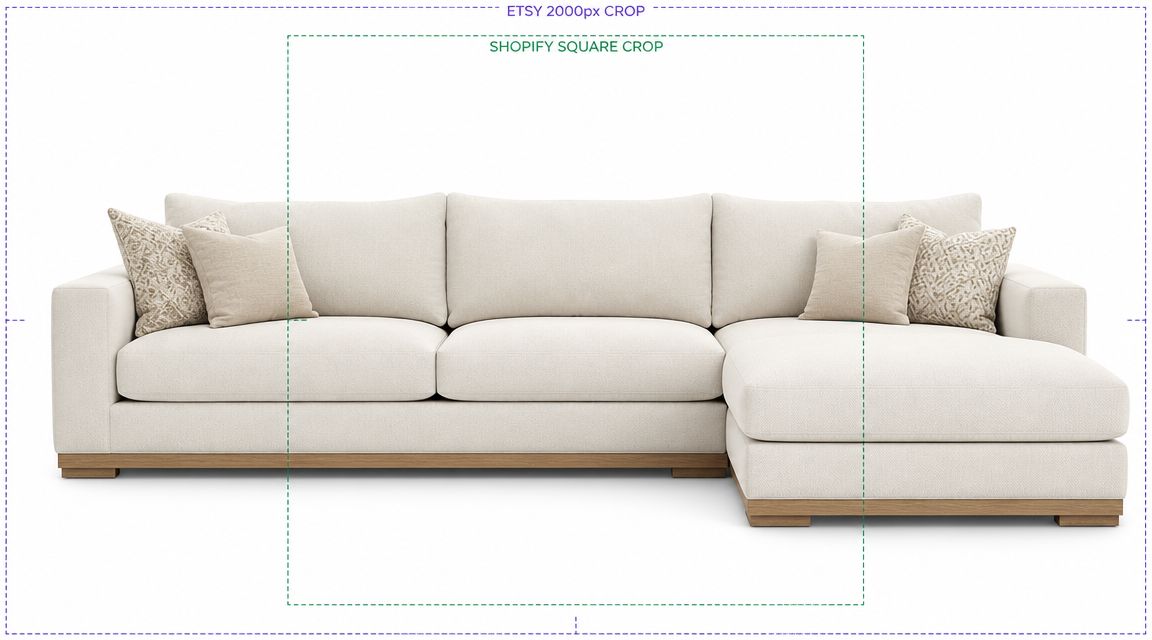
What an AI-ready furniture image looks like
You don't need a cinematic studio shoot for every SKU. You do need discipline.
- Clean separation from the background: The product should be easy to isolate. A neutral backdrop helps, but what matters most is a clear edge around legs, arms, shades, frames, and plant leaves.
- Stable lighting: Avoid deep shadows, mixed colour temperature, and harsh reflections. Furniture materials such as velvet, glass, lacquer, and brushed metal react badly to inconsistent lighting.
- Useful angles: Front and three-quarter views do most of the work. Side views matter for products where depth is a buying factor, such as sofas, shelving, and media units.
- Complete object visibility: Don't crop the bottom of chair legs or the edge of a rug. Missing geometry creates strange completions later.
- True product colour: If the beige sofa looks cream in one image and taupe in another, your staged outputs won't stay aligned.
The preparation checklist that saves rework
Before generating scenes, review the catalogue like an operator, not like a designer.
| Check | Why it matters |
|---|---|
| Product edge quality | Prevents halos and broken contours after isolation |
| Naming convention | Keeps variants and room outputs organised |
| Angle consistency | Makes batch scene generation far easier |
| Variant labelling | Stops oak, walnut, black, and brass versions from being mixed |
| Source resolution | Gives you room to crop without damaging detail |
A warehouse snap can sometimes be rescued, but it usually costs more in clean-up than reshooting. That's the recurring theme in batch work. Small shortcuts at input level become expensive across hundreds of images.
If you're processing a large catalogue, treat image prep as a production line. Don't let every SKU become a custom fix.
Isolate first, stylise second
This is the step many teams rush. They jump straight to scene generation, then wonder why table legs melt into flooring or pendant lamps pick up pieces of the original ceiling.
Background removal should happen before anything creative. Once you have a transparent product asset, you can test room prompts, swap environments, and export multiple versions without repeating the isolation step. For sellers handling large collections, that usually means batching the prep rather than editing item by item with a bulk product photo editor workflow.
That approach matters even if you're only staging one hero image today. The moment that chair becomes part of a range page, a promotion, or a seasonal refresh, the clean isolated file becomes the asset you keep reusing.
Generating Realistic Room Scenes at Scale
Once your products are isolated properly, AI furniture visualization becomes a direction problem. You're no longer asking the model to invent the item. You're asking it to place a known item into a believable setting.
That distinction matters. It's the difference between catalogue production and generic interior inspiration.
The broader market is moving that way. The AI interior design market outlook from Market.us projects growth from USD 829 million in 2023 to USD 7,299 million by 2033, a 24.3% CAGR. The same source notes that 34% of furniture organisations automate image creation and editing with AI. Sellers are doing this because buyers need to see products in realistic context before purchase.
Prompt for placement, not poetry
A weak prompt asks for “a beautiful modern living room”. That usually produces a stylish image with weak product fidelity. A stronger prompt defines room type, style, lighting direction, camera position, material palette, and the role of the product.
Here are the kinds of instructions that work better in production:
- For a sofa: Place this cream sectional in a bright contemporary living room, oak flooring, soft afternoon light from the left, neutral walls, minimal décor, camera at seated eye level.
- For a rug: Place this rug flat in a calm Scandinavian lounge, centred under a light wood coffee table, overhead perspective with slight angle, daylight, visible floor edges.
- For wall art: Mount this framed print above a slim console table in a warm entryway, straight-on composition, plaster wall texture, soft shadowing, restrained styling.
- For a lamp: Position this table lamp on a walnut side table in a reading corner, evening ambience, chair nearby, visible wall falloff from the lamp glow.
- For shelving or plants: Place this shelving unit against a clean wall in a compact apartment office, front three-quarter camera angle, realistic spacing from adjacent furniture.
Build room templates for each category
Don't prompt every SKU from scratch. That wastes time and produces visual drift.
A better system is to create a small set of room templates by category. One for sofas. One for dining. One for bedroom accent pieces. One for wall décor. Then you reuse those templates across the collection, swapping the product and making only small style adjustments.
That creates three benefits:
- Brand consistency: Your catalogue starts to look organised rather than randomly generated.
- Lower review time: Teams spot anomalies faster when the visual structure stays stable.
- Easier testing: You can compare product performance without changing every other variable.
If you sell into property-adjacent channels, it also helps to study how staging professionals think about scene selection. Stage AI's a realtor's guide to virtual staging is useful because it frames staging around commercial presentation, not just decoration.
Good prompts don't chase novelty. They remove ambiguity.
What to vary and what to lock
For batch image processing, keep some variables fixed and let others change.
Lock these:
- camera height
- room brightness
- wall and floor realism
- shadow behaviour
- styling density
Vary these carefully:
- room style
- décor accents
- seasonal cues
- crop orientation
- supporting furniture
If everything changes at once, the collection loses coherence. The buyer starts noticing the image treatment instead of the furniture.
For catalogue-scale production, it helps to run staged outputs through a repeatable AI product scene generator workflow so the same logic can be applied to chairs, rugs, lamps, and tables without rebuilding the process every time.
Where scale usually breaks
Doing this for a whole catalog?
MerchLoom runs background removal, upscaling and AI editing across every product photo you have — one prompt, whole batch. Try 2 batches free, no signup.
Try it freeGenerating a strong hero shot is often straightforward. Problems appear at image twelve, not image one.
That's when you start seeing mismatched floor lines, chairs floating slightly above the rug, shadows falling the wrong direction, or the same side table appearing too large in one room and too small in the next. Scale work isn't mainly about generating. It's about reducing variation so your review team only has to catch genuine errors.
Refining and Standardizing Your Visuals
The first pass is rarely ready for a live listing. It may look attractive, but commercial imagery has a stricter job. It has to represent the product faithfully, meet platform requirements, and hold up when a shopper zooms in.
That's where QA earns its keep. An industry whitepaper discussed by Intiaro reports that 37% of IT leaders identify poor data quality as a major barrier to AI success. In furniture visualization, that shows up as wrong dimensions, incorrect style cues, and made-up details that don't exist on the actual product.
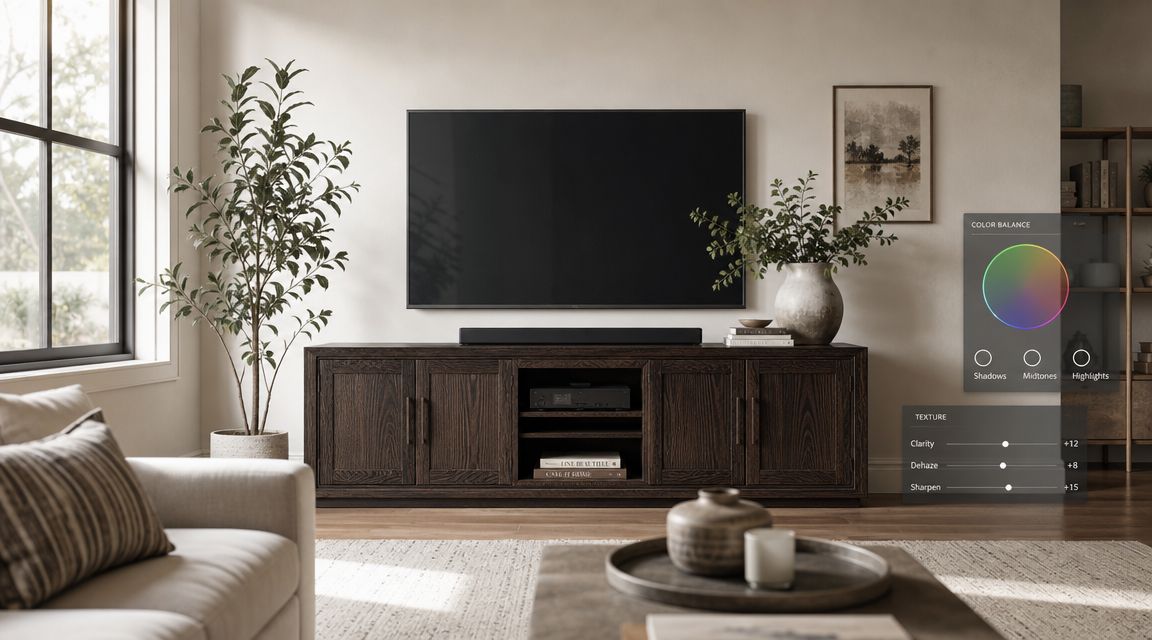
The commercial QA pass
Review staged furniture images in layers. Don't just ask whether the room looks nice.
Start with the product itself:
- Shape accuracy: Are the arms, legs, seams, cushions, frames, or shade proportions intact?
- Material truth: Does boucle still read as boucle, or did it turn into a generic woven texture?
- Colour discipline: Does walnut stay walnut? Does matte black remain matte?
Then review the scene:
- Shadow logic: Furniture should sit on the floor, not hover.
- Scale credibility: A side table shouldn't look like a coffee table in one image and a toy in the next.
- Contact points: Rugs must meet the floor naturally. Wall art should align with the wall plane.
Finally, review the output file:
- Crop safety: Don't let marketplace crops remove key product features.
- Resolution suitability: Generate enough detail for zoom and platform display.
- Naming and versioning: Keep source, staged, square, and white-background variants separated.
Style inspiration versus layout accuracy
Many teams blur two very different uses of AI. One use is inspirational. It helps a buyer picture an aesthetic direction. The other is spatial. It helps a buyer judge whether a product feels plausible in a real room.
Those are not the same thing.
A moody scene with a compact sofa in a stylish apartment can be persuasive even if the room proportions are a little idealised. But if you sell to buyers who care about fit, circulation, or room size constraints, then layout accuracy matters much more. A beautiful image can still mislead if the scale relationship feels wrong.
A staged image should sell style without inventing physical reality.
This is especially important for larger products. Sofas, dining tables, shelving, and media units don't just need to look good. They need to look believable in relation to walls, doors, rugs, and walkways.
Standardisation beats one-off perfection
For catalogue teams, the right question isn't “Is this image perfect?” It's “Does this image meet the same standard as the other 300?”
A workable standard often includes:
- one approved lifestyle treatment per category
- one approved white-background export
- one approved square crop
- one checklist for shadow, colour, and scale
- one escalation path for items that need manual correction
That's also where upscaling and final polish fit in. If an image will be used for high-resolution listing zoom, upscale after the product and scene are already approved. Don't pay to enlarge flawed drafts.
Automating for Marketplaces and Optimizing Costs
Once the image looks right, the job still isn't finished. Each sales channel wants a different format, and manual exporting becomes a hidden cost fast.
A furniture seller usually needs several variants from the same approved master. The main product page may need a lifestyle image. Amazon may need a white-background primary image. Shopify collection pages often benefit from square crops. Social channels favour vertical layouts. If you repeat those exports by hand for every SKU, the workflow slows down immediately.
The practical export matrix
Use one approved source image and generate channel-specific variants from it.
| Platform | Primary Image Type | Recommended Minimum Size (px) |
|---|---|---|
| Amazon | White background product image | 2000 x 2000 |
| Shopify | Square product or lifestyle image | 2000 x 2000 |
| Etsy | Lifestyle or product image | 2000 x 2000 |
| Instagram Stories | Vertical lifestyle image | 2000 x 2500 |
These aren't universal rules for every account setup, but they're a solid operating baseline for furniture sellers managing multiple channels.
The cheapest workflow is usually the one with the fewest repeats
Cost control in AI image production is mostly about sequencing. Teams often focus on the per-image price and ignore the order of operations. That's a mistake.
A better sequence usually looks like this:
- Isolate the product.
- Correct obvious colour issues.
- Generate room scenes.
- Review and reject bad outputs early.
- Reframe for channel variants.
- Upscale only approved finals.
If you upscale before review, you pay more for images that may never ship. If you generate five room concepts before fixing a bad cut-out, you multiply the cleanup problem. Cost balloons when mistakes happen early and get carried forward.
The publisher's workflow note is useful here because it highlights a real operational principle: removing backgrounds before upscaling can reduce processing cost significantly. That matters more in furniture than in many other categories because file sizes climb fast, especially once you start working with room scenes and zoom-ready exports.
Where automation earns its keep
The gains from automation are most obvious in repetitive tasks:
- Marketplace reframing: Turning one approved asset into square, vertical, and white-background variants.
- Batch naming: Keeping style, size, colour, and channel versions organised.
- Mid-batch review: Stopping poor outputs before they consume more processing.
- Reusable pipelines: Applying the same sequence to new collections without rebuilding it every season.
For catalogue teams, the useful model is not “generate image”. It's “run image workflow”. That's the difference between occasional AI usage and an operating system for content production. If you're designing a repeatable process around imports, transformations, approvals, and exports, an AI image workflow automation approach becomes more valuable than isolated editing tools.
Advanced Techniques and Future-Proofing Your Workflow
The next level of AI furniture visualization isn't a prettier single image. It's consistency across a set.
That's a harder problem than most sellers realise. Generating one strong hero shot is manageable. Generating several views of the same staged room, with the same sofa in the same position, while the camera angle changes, is much more difficult.
According to Edensign's explanation of multi-view virtual staging, some advanced systems now build a 3D spatial map and keep furniture placement consistent across up to 4 camera angles. That matters because room-based selling rarely stops at one image. Property listings, premium furniture PDPs, and designer portfolios all benefit from coherent photo sets rather than isolated scenes.
Why multi-angle consistency matters
If one room image shows the rug tight to the sofa and the next shows a different spacing, the viewer notices. If the lamp jumps sides between shots, trust drops. Buyers may not articulate the problem, but they feel the inconsistency.
That's why future-proof workflows should start storing more structure, not just more images. Keep clean cut-outs, approved room templates, fixed style directions, and reusable prompt logic. Those become the ingredients for multi-view sets, richer campaigns, and eventually motion-based outputs.
Build for reuse, not novelty
A lot of AI content still behaves like a campaign trick. It makes one striking image, then stops. That's too fragile for furniture retail.
A stronger approach treats AI furniture visualization as a reusable content system. Today, that means faster room scenes, marketplace variants, and cleaner batch exports. Later, it can support more advanced outputs, including more spatially coherent sets and interactive presentations. Tools are moving quickly, and the workflows that last are the ones built around structured assets, consistent QA, and repeatable steps rather than one-off prompting.
If your team is experimenting with newer model-driven workflows and wants to understand where general-purpose AI fits into catalogue production, Gemini AI in e-commerce image workflows is a useful starting point.
If you need to process a furniture catalogue instead of one image at a time, MerchLoom is built for that kind of batch work. You can import product images, isolate them if needed, place sofas, chairs, rugs, lamps, wall art, tables, shelves, and plants into room scenes, then reframe and upscale them for listing-ready use across Shopify, Amazon, Etsy, and other channels. The useful part isn't just AI generation. It's being able to run chained image workflows across an entire collection without turning every SKU into a manual design task.
Stop editing product photos one at a time
Upload your catalog or connect your store. Describe the result once. MerchLoom does the rest.
Try it free — no signup