
AI Background Removal for E-Commerce Catalogs
Master AI background removal at catalog scale. Learn techniques, platform requirements, batch workflows, and cost-saving strategies for e-commerce sellers.
You've got 500 supplier images in a folder, the seasonal launch is approaching, and none of the photos match. Some have grey backgrounds, some show warehouse clutter, and others are too small for your marketplace listings. Editing one photo is manageable. Repeating the same work across hundreds of SKUs is where the schedule and budget break.
Start by grouping the originals by product type and source quality. Keep the highest-resolution files, remove obvious duplicates, and test AI background removal on a small mixed sample before processing the catalogue. That sample should include white products, reflective packaging, transparent items, fine details, and products photographed together.
Why Product Photo Editing Breaks at Catalogue Scale
A supplier folder can contain hundreds of product images, each requiring a different correction. One file needs the subject selected, another needs its old background removed, and a third needs repositioning before export. At catalogue volume, those decisions create a queue faster than one editor can clear it.
Quality also falls as the queue grows. Early files may have clean edges, while later images develop clipped corners, faint halos, missing straps, or shadows removed by mistake. A single inconsistent edit can then appear across several variants and weaken the presentation of an entire collection.
Practical rule: Treat background removal as a production stage, not a finishing touch for individual photos.
AI background removal uses machine learning to separate the foreground subject from its background. Rather than relying only on a flat colour, the model evaluates shape, edge detail, contrast, and visual context. That makes it useful for varied source images, but every output still needs a quality check.
The commercial market now serves retailers, agencies, and sellers processing large image libraries. One industry report estimated the market at about US$412.8 million in 2025 and projected US$2,184.6 million by 2034, with a 20.2% CAGR. Its analysis of software demand helps explain why batch catalog workflows are becoming a standard use case. The AI background removal market analysis
For Amazon, Shopify, Etsy, eBay, WooCommerce, Poshmark, and Depop listings, consistent treatment matters more than one impressive cutout. Keep framing, spacing, and background handling consistent from one SKU to the next. Otherwise, strong products can look less trustworthy because the catalogue appears assembled from unrelated files.
The order of operations matters. Fix source photography and scale references before processing images, then apply background removal, review exceptions, and store approved outputs in a controlled library. Product dimensions, size references, and repeatable framing are easier to manage when suppliers follow a consistent setup. ClothME's guide on how to take sizing photos helps clarify scale and measurement context in supplier imagery. A structured product image library workflow keeps edited assets connected to the correct SKU instead of scattering them across disconnected folders.
How AI Background Removal Works
AI background removal starts with a pixel-level decision: which areas belong to the product, and which belong to its surroundings. Semantic segmentation classifies those areas and creates the product's broad silhouette. It performs well when the object has clear boundaries.
Matting refines uncertain pixels along that silhouette. It estimates partial transparency around hair, fur, fabric, glass, plastic, and fine mesh. Commercial pipelines often run segmentation first, then use matting to clean the edge.
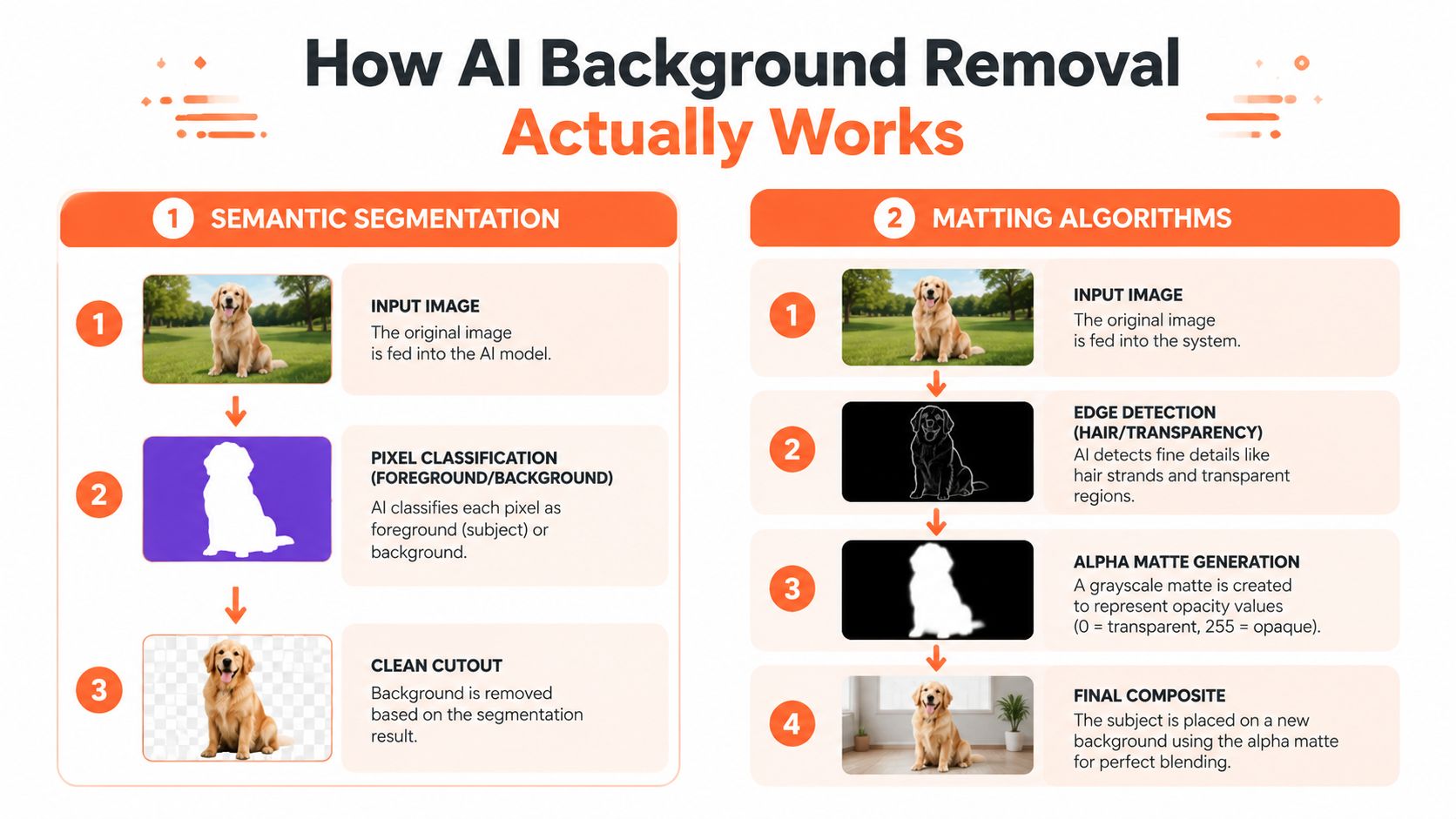
Tool selection changes the failure pattern. A model trained mainly on people may understand hair but misread a product silhouette. A product-focused model may process boxed goods efficiently yet struggle with transparent packaging, reflective metal, jewelry chains, or mesh fabric. Test against the product types in the catalog, not just easy sample images.
Before 2022, U-Net-style architectures made pixel-level foreground extraction practical. An industry summary describes early tools as commonly using U-Net-based methods, with reported segmentation accuracy around 85% to 90%. Later models improved handling of difficult edges, complex backgrounds, and transparent objects. This background remover market overview places that shift within the move from manual masking to cloud and API workflows.
The first mask is only one quality checkpoint. In benchmark testing across eight datasets, the FeyNoBg model achieved the best published S-measure on four benchmarks and came within 2% of the leader on the remaining benchmarks. For catalog work, that matters because edge handling and generalization determine whether hair, glass, and irregular contours survive processing. The background-removal research paper provides the technical context.
Resolution creates a direct cost trade-off. Downscaling speeds processing but removes edge information before the model analyzes the image. Full-resolution processing preserves detail while consuming more compute. Behind the mask, a probability map records model confidence. A high threshold can clip fine edges, while a low threshold can leave halos.
For a practical comparison, use the same mixed product set with best free background remover tools, then inspect transparent outputs over white and dark backgrounds. In a catalog pipeline, preserve the original, mask, and final export as separate assets. The AI batch image editing workflow shows how to organize those stages for repeatable batch processing.
Platform Requirements and Catalog Consistency
Background removal is only the first layer. The replacement background, canvas, margin, product position, and file output determine whether the finished catalogue looks controlled.
Amazon's main product image rules require a pure white background with RGB 255,255,255. The image should be at least 500 pixels on the longest side, with 1,000 pixels or more needed for zoom, and Amazon allows up to 10,000 pixels on the longest side. The seller guidance also requires the product to dominate the main image and excludes props, logos, watermarks, and other non-product elements. Check the Amazon image rules guide before building an export preset.
Etsy listing photos are commonly prepared at 2,000 pixels on the shortest side, with square 1:1 presentation recommended for much of the marketplace. Shopify themes can accept images up to 4,472 × 4,472 pixels, while Shopify community guidance recommends 2,048 × 2,048 pixels for square product photos. These figures come from the platform-specific guidance for Etsy image sizes and Shopify image standardization.
| Platform | Background Requirement | Min Dimensions | Aspect Ratio | Format |
|---|---|---|---|---|
| Amazon | Pure white, RGB 255,255,255 for the main image | 500px longest side, 1,000px or more for zoom | Marketplace template | JPEG or PNG, according to listing needs |
| Etsy | Seller-selected background, consistent across the shop | 2,000px shortest side | Square 1:1 commonly recommended | JPEG, PNG, or WebP where supported |
| Shopify | Store-defined background and theme treatment | 2,048 × 2,048px practical square target | Square 1:1 commonly used | JPEG, PNG, or WebP where supported |
Build the consistency layer
Set one canvas per channel. Define the amount of empty space around the product, the vertical alignment, and whether a soft shadow remains. Don't let the AI decide these values independently for every image.
Use transparent PNG output when another process still needs the cutout. Use JPEG when the destination needs a flattened white background and smaller files. Use WebP when your storefront and image pipeline support it reliably. Apply color correction after the background is removed, because the old background may have cast color onto the product edge.
The batch is finished only when the files have matching dimensions, predictable naming, consistent margins, and platform-specific exports. A clean cutout with random framing still produces a chaotic catalogue.
Batch Processing Strategies for Large Inventories
Processing 50 product photos can fit into a weekend. Processing 5,000 is an infrastructure decision. The right method depends on image volume, SKU turnover, product complexity, and how much review you can perform before publishing.
| Method | Best For | Cost per 1K Images | Processing Time | Quality Control |
|---|---|---|---|---|
| API automation | Large catalogues and recurring imports | Varies by provider | Fast, subject to queue and API limits | Automated checks plus sample review |
| Desktop batch processing | Smaller inventories and local control | Software and compute costs vary | Depends on hardware and batch size | Manual review is usually required |
| Hybrid AI plus human QA | Mixed products and marketplace-sensitive images | AI processing plus review time | Fast first pass, slower exceptions | Strongest balance for difficult SKUs |
API workflows suit sellers who refresh catalogues regularly. They can process incoming files automatically, preserve a failure log, and retry only the images that fail. Build around idempotent filenames or job IDs so a timeout doesn't force you to process the entire batch again. Rate limits and concurrency still matter, so start with controlled parallel jobs rather than sending every file at once.
Desktop tools offer more direct control and can be useful when source files can't leave a local environment. They also put the burden of storage, hardware, updates, and export consistency on the seller. A local batch can finish quickly, but it won't solve the catalogue problem if the output still needs manual resizing and repositioning.
A hybrid workflow is usually the practical choice. Let AI process standard boxed products, clothing on plain backgrounds, and other predictable subjects. Route transparent packaging, reflective goods, fine jewelry, and multi-product shots to review.
Doing this for a whole catalog?
MerchLoom runs background removal, upscaling and AI editing across every product photo you have — one prompt, whole batch. Try 2 batches free, no signup.
Try it freeThe throughput trade-off can be substantial. In a clinical imaging setting, one background-removal model processed approximately 306 images per second in simple precision and 27 images per second in double precision on an A6000 GPU. The result shows why processing mode affects infrastructure cost and why expensive downstream steps shouldn't run on every raw pixel. The published imaging study documents the precision and throughput comparison.
Don't standardize dimensions after every other operation has already run. Establish the source canvas and crop policy early, then remove the background, review, resize or upscale, and export by channel. This explanation of batch processing is a useful reference for designing repeatable jobs rather than treating each upload as a separate task.
Order of Operations and Hidden Cost Traps
The order of image operations changes the amount of work your system performs. It also changes how often you have to redo an image after a late correction.
A practical sequence is:
- Inspect and normalize the source. Remove duplicates, identify the highest-quality original, correct orientation, and apply a controlled initial crop.
- Resize only when necessary for the AI step. Keep enough edge detail for segmentation. Don't feed a tiny compressed thumbnail into a process that needs to recover fine contours.
- Remove the background. Generate a transparent cutout or a precise white-background version while the subject is still clean.
- Run quality control. Review the alpha edge, product completeness, shadow treatment, and spacing.
- Apply color correction and optional shadow styling. Keep the product consistent across the collection.
- Upscale or resize for the channel. Produce Amazon, Etsy, Shopify, and other marketplace variants from the approved master.
- Export and validate. Check dimensions, background values, format, naming, and file readability before upload.
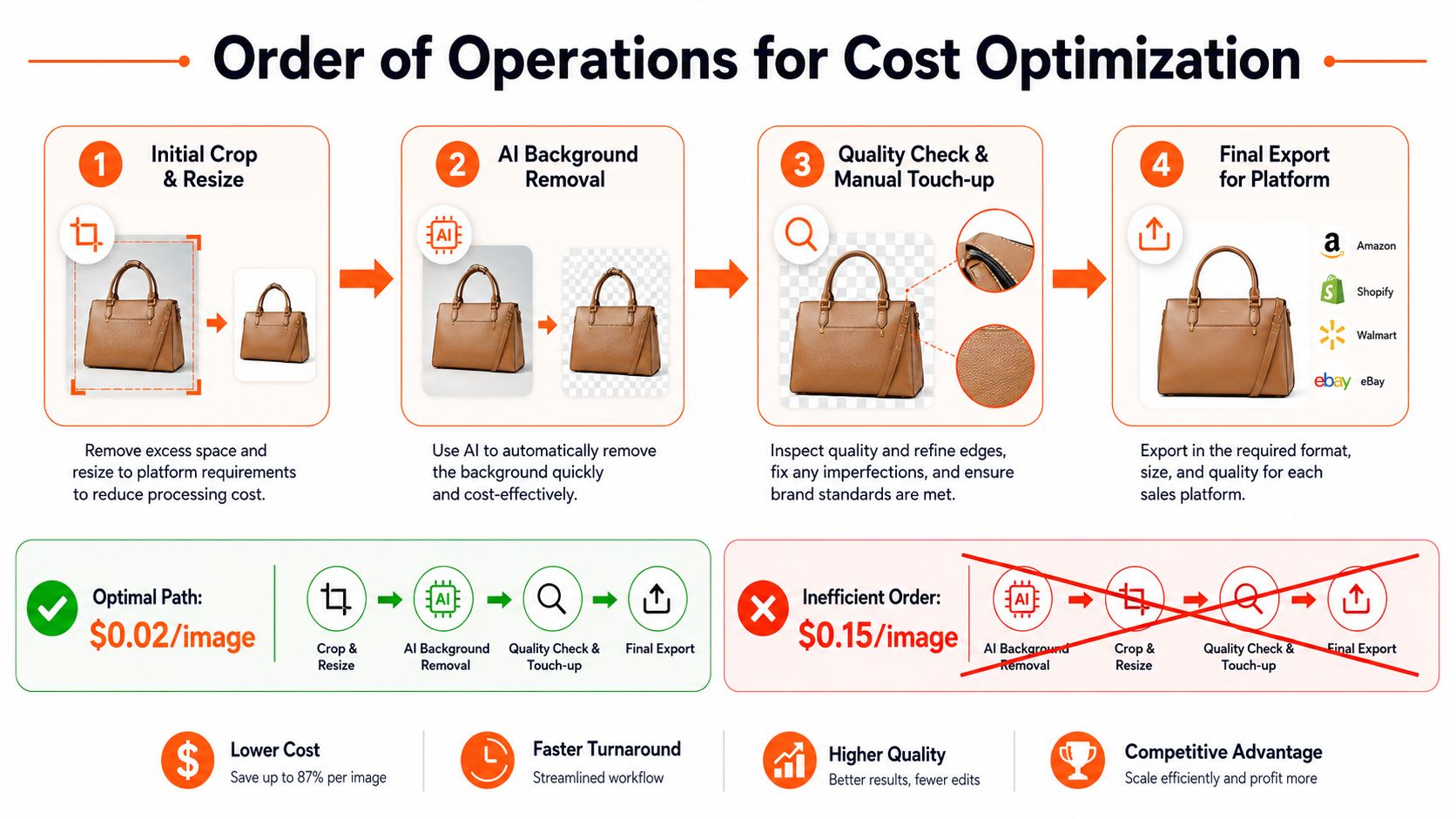
The costly mistakes are predictable. Color correction before removal can change the edge relationship and force another pass. Applying AI to an already-compressed image can destroy the small differences that separate a product from its background. Processing thousands of files without sampling means the first serious review may happen after the entire batch is complete.
The stated example of $0.02 per image versus $0.15 per image belongs in a planning model, not a universal promise. Those prices depend on the provider, resolution, processing steps, credits, storage, and review time. Likewise, a claimed annual saving of $1,200 for a 5,000-SKU catalogue should be treated as a scenario to test, not a guaranteed result.
Calculate your real cost per image by adding:
- Processing: The tool or API charge.
- Compute and storage: Local hardware, cloud processing, temporary files, and exports.
- QA: The time spent sampling and checking exceptions.
- Rework: Failed masks, reshoots, manual paths, and repeated exports.
- Rejection risk: Marketplace corrections and delayed listing publication.
A phased rollout is safer than a full catalogue conversion. Use a representative sample, record failure types, and estimate rework before committing to a large run. The workflow economics guidance from bulk background removal for product photos is most useful when you adapt the order to your own image sizes and product mix.
Troubleshooting Common Edge Cases
AI background removal fails in patterns. Your QA process should search for those patterns instead of reviewing files randomly.
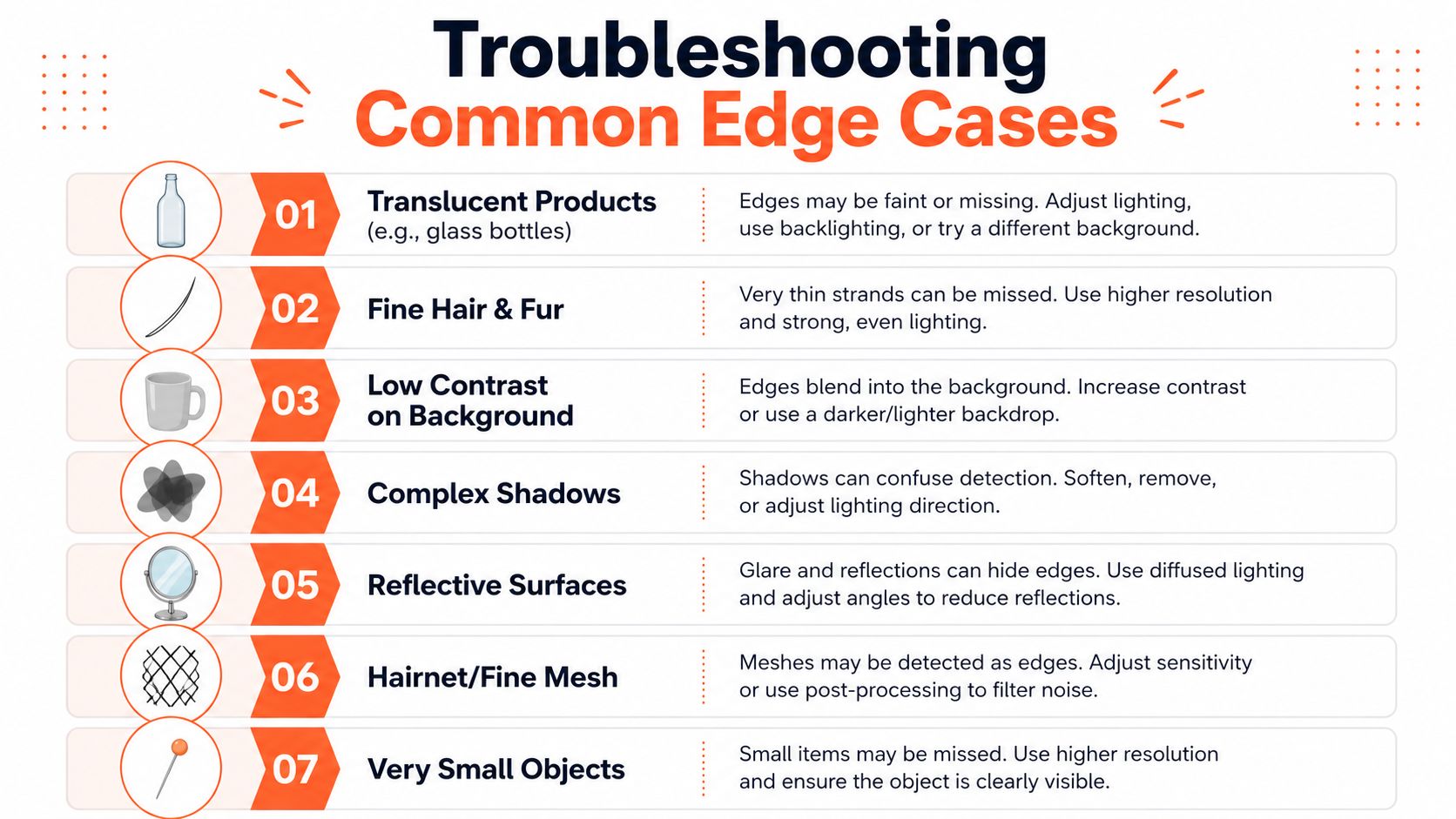
Seven failures to catch early
- Translucent products: Glass bottles and clear plastic can merge with the old background. Reshoot against a contrasting surface when possible. If the product must stay, use a matting-capable model and inspect transparency manually.
- Fine hair and fur: The model may clip strands or create a light halo. Review against a dark preview, then soften or repair the edge manually when the product's texture matters.
- Low contrast: A light grey item on white can disappear at its boundary. Improve lighting and contrast at capture, or use a different model with stronger shape separation.
- Complex shadows: AI may remove a useful grounding shadow with the background. Decide whether the marketplace image needs a natural shadow, a generated shadow, or no shadow, then apply that choice consistently.
- Reflective surfaces: Mirrors, polished metal, and glossy packaging contain background reflections. A cutout may be geometrically correct while still looking visually wrong. Manual retouching is often safer.
- Hairnet and fine mesh: Open structures contain alternating subject and background pixels. Matting can help, but zoomed inspection remains necessary.
- Very small objects: A tiny pin, clasp, or charm may lack enough source detail for reliable separation. Use the original high-resolution file or reshoot.
Review the edge twice: Check the object over white for halos and over black for missing details.
Multi-product shots need separate handling. If two items touch, the model may treat them as one subject or remove a component. Crop or separate the products before processing when each SKU needs its own listing image.
Low-resolution originals are not fixed by exporting them at a larger size. Upscaling can make the final file meet a dimension requirement, but it can't recreate a missing edge reliably. Reshoot when the product outline, label, or fine detail affects purchase decisions.
Use a simple escalation matrix:
| Result | Action |
|---|---|
| Clean mask and consistent spacing | Approve |
| Small halo or minor missing detail | Manual touch-up |
| Transparent or reflective product is visually wrong | Try matting or another model, then review |
| Product is too small or badly blurred | Reshoot |
| Multiple products merged | Separate the source image before rerunning |
A white-background removal workflow can help with simple images, but don't apply one preset blindly to every category. Review samples by product type, not only by upload batch.
Building Your Workflow Decision Framework
Choose the workflow from the catalogue backward. A seller with a few hundred uncomplicated products can tolerate more manual review. A seller with thousands of changing SKUs needs repeatable automation, exception routing, and a clear publishing gate.
Start with a 200-image pilot batch. Include ordinary products and the images most likely to fail. Measure which categories need manual correction, how often products are clipped, and whether the final framing meets each marketplace's requirements. Don't judge the pipeline from a folder of easy white-background boxes.
Match the workflow to the operating conditions
| Condition | Practical workflow |
|---|---|
| Under 500 SKUs, simple products | Batch AI processing with a manual review loop |
| 500 to 5,000 SKUs, recurring updates | API or workflow platform with sampling and exception queues |
| Over 5,000 SKUs, frequent catalogue changes | Automated imports, chained processing, logs, and category-based QA |
| Transparent, reflective, or intricate products | AI first pass with mandatory human approval |
| One marketplace | One export preset and one canvas standard |
| Multiple channels | Approved master plus channel-specific derivatives |
| Limited design capacity | Fixed templates, fixed margins, and fewer manual decisions |
| In-house technical capacity | API integration or custom orchestration, provided failures are logged |
The build-versus-buy decision depends on repetition. Custom scripts can connect storage, image processing, and exports, but they also require maintenance when APIs, file formats, or marketplace rules change. A SaaS workflow reduces that engineering burden, but pay-per-image pricing and platform dependence need to fit your catalogue economics.
MerchLoom is designed for this middle layer. You can bring images from cloud storage, Shopify, WooCommerce, Amazon S3, Cloudinary, and other connected sources, then run chained AI pipelines across a collection instead of editing one image at a time. The first images can be tried with no account, and the service is pay-per-image with credits that never expire. It still needs human review for difficult outputs, and it isn't a full Photoshop replacement.
The most important operating rule is simple: background removal must not become the bottleneck that delays listing publication. A clean, consistent image that clears the channel requirements is usually more valuable than a perfect edge that keeps a product off the shelf.
MerchLoom lets you import product photos, run background removal with reframing, resizing, color correction, and platform exports, and reuse the same pipeline across a full collection. Try the first images without an account, review the results, and visit MerchLoom when you're ready to turn the process into a repeatable batch workflow.
Stop editing product photos one at a time
Upload your catalog or connect your store. Describe the result once. MerchLoom does the rest.
Try it free — no signup