
Product Image Library Management: Master Your Assets
Master product image library management. Organize, automate, & reuse images across Amazon, Shopify, & more with our strategic guide.
You know the pattern. The hero image is in Shopify, the retouched close-ups are in Dropbox, the original shoot lives in a photographer's WeTransfer folder that somebody copied into Google Drive, and your marketplace team is still downloading files from old emails because no one can find the “final final” version. Then a new listing goes live, the wrong crop appears on Etsy, Amazon rejects the main image, and someone uploads the master file straight to the storefront.
That's not a storage problem. It's a workflow problem.
Good product image library management isn't about building one perfect folder tree and hoping people behave. It's about turning scattered assets into a working system that supports batch image processing, derivative creation, rights control, and re-use across every listing channel you sell on. For online sellers with hundreds of images, that system becomes part of operations in the same way inventory control or feed management does. Even if you only edit one image now and then, the same logic applies. The difference is that catalogue-scale work exposes every weak spot faster.
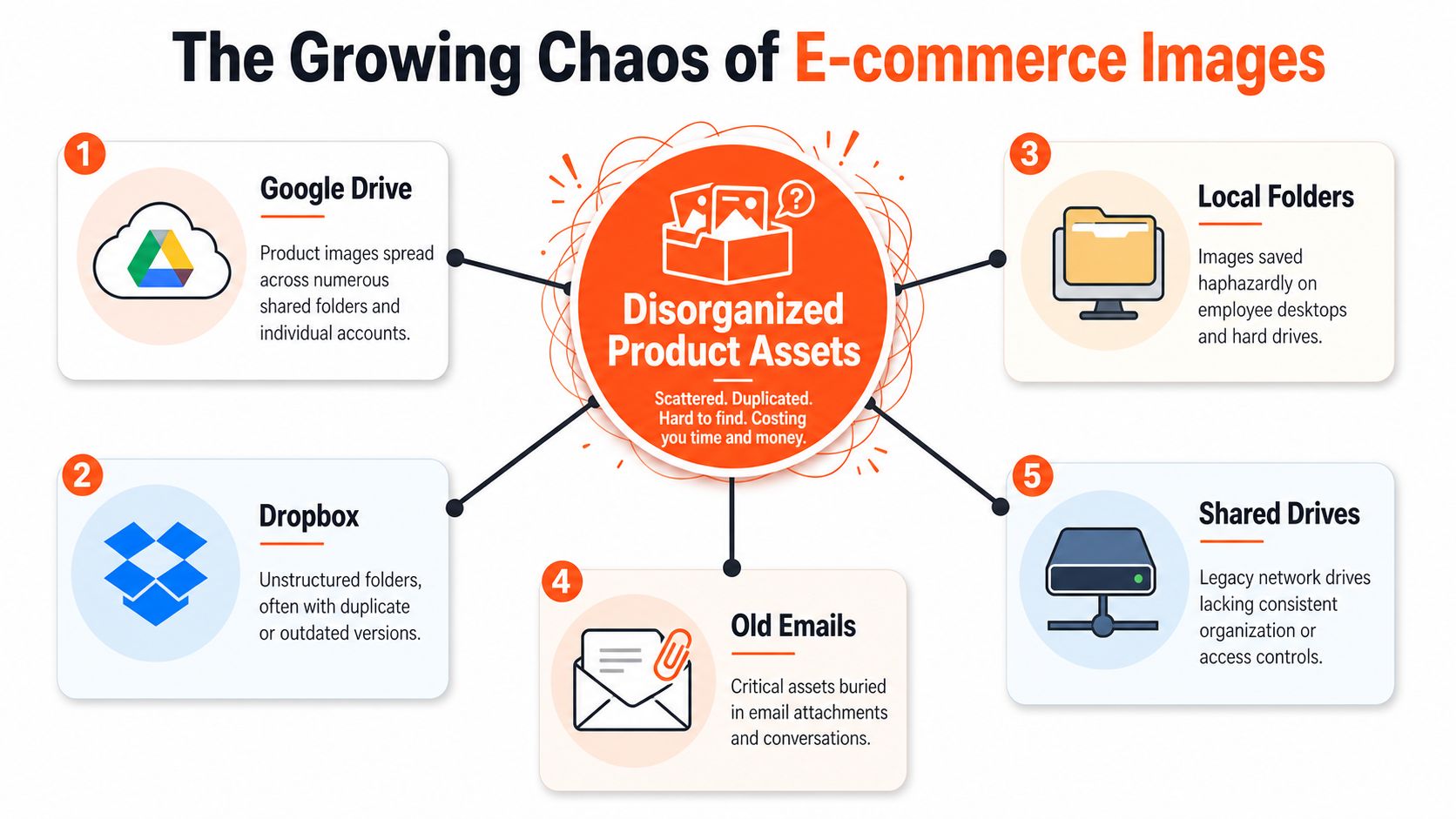
The Growing Chaos of E-commerce Images
The mess usually starts innocently. A team launches with a shared drive, a few local folders, and whatever Shopify can hold. Then the catalogue expands. A photographer delivers alternate angles. Paid social needs new crops. Amazon wants a white background. Etsy needs a different size. Someone duplicates files instead of creating derivatives from the master, and now there are four versions of the same mug, all named slightly differently.
What scattered storage actually breaks
When images are spread across Google Drive, Shopify, Dropbox, S3, Cloudinary, local folders, and marketplace uploads, teams lose three things first:
- Findability: people can't tell which file is the approved master.
- Repeatability: every new channel request turns into manual work.
- Trust: teams start re-uploading from scratch because the library no longer feels reliable.
That's when product image library management becomes operational, not administrative.
In California's e-commerce sector, a typical catalogue of 500 SKUs requires between 2,500 and 5,000 individual product images, and a retailer with that inventory often ends up managing 3,000 to 4,000 assets to stay competitive on platforms such as Amazon and Shopify, according to Rewarx's analysis of catalogue image scale. At that volume, “we'll just keep it organised in folders” stops working.
The hidden cost of re-uploading
Re-uploading is one of the biggest signs that the library is failing. Teams download from one system, edit in another, upload somewhere else, and then repeat the cycle for web, ads, social, and marketplace listings. That creates drift.
Practical rule: If your team regularly asks “Where's the latest version?”, you don't have a library. You have a pile of files.
The fix isn't to centralise everything into one physical location overnight. That usually stalls because no one wants to migrate years of messy assets. The fix is to treat the library as a hub. One source of truth for status, naming, derivative rules, and approvals. Storage can stay distributed for a while. Governance and processing logic can't.
A healthy image operation lets you pull from existing sources, process in batches, keep outputs tied to the original SKU, and avoid touching the raw file more than necessary. That's the difference between surviving catalogue growth and getting buried by it.
Unifying Your Assets A Centralized Library Approach
A centralized library doesn't mean one giant folder. It means one working record for each product asset set: the master, approved derivatives, usage context, and where each version belongs. Teams often confuse cloud storage with a source of truth. They're not the same thing. Google Drive and Dropbox are places to keep files. A library is the system that tells the business what those files are for.
What a useful central library contains
At minimum, the library should answer five questions without anyone opening Slack:
| Need | What the library should show |
|---|---|
| Master file | Which image is the approved original |
| Listing readiness | Whether the asset is valid for Amazon, Shopify, Etsy, and ads |
| Derivatives | Which resized or cropped versions already exist |
| Ownership | Who can edit, approve, or publish |
| Reuse status | Whether processed outputs can feed another workflow |
Marketplace requirements aren't negotiable. Amazon requires a pure white background (RGB 255, 255, 255) and a minimum resolution of 1600 pixels to enable zoom. Shopify recommends a square 1:1 aspect ratio, often 2000x2000px, for mobile optimisation. Etsy requires a minimum of 2000 pixels on the widest side, as outlined in Squareshot's guide to e-commerce image management. If your team stores only one final JPEG per product, someone will keep editing that same file for every channel. That's how quality gets chipped away.
Before and after the single source of truth
A fragmented setup usually behaves like this:
- Creative keeps originals in Dropbox.
- Ecommerce exports resized files from Shopify.
- Marketplace staff save Amazon-ready versions on local machines.
- Agencies ask for assets by email.
- Nobody knows which crop was used in last month's ads.
A unified setup behaves differently. The master remains untouched. Channel-specific outputs are generated as derivatives. Product pages use the right web-sized file. Marketplace teams don't re-upload the raw source. Ads and catalogues pull from approved outputs, not random attachments.
The strongest libraries reduce decision-making at the point of use. Staff shouldn't have to guess which image belongs on which platform.
That's also why a processing layer matters. You need a way to run consistent transformations across collections, not just open single files one by one. Teams working from object storage or marketplace-connected sources often benefit from a workflow model similar to AI image processing from Amazon S3, where the image system works against existing storage instead of forcing another round of downloads and uploads.
Trade-offs worth making
A central library adds discipline, and discipline feels slower at first. Someone has to define statuses, naming, and derivative rules. Some staff will resist because ad hoc editing feels faster in the moment.
It isn't faster over a quarter.
What works is a practical standard: keep masters separate, generate derivatives for channels, and tie every output back to the same product record. What doesn't work is treating each marketplace as a separate image universe.
Organizing Your Library for Scalable Workflows
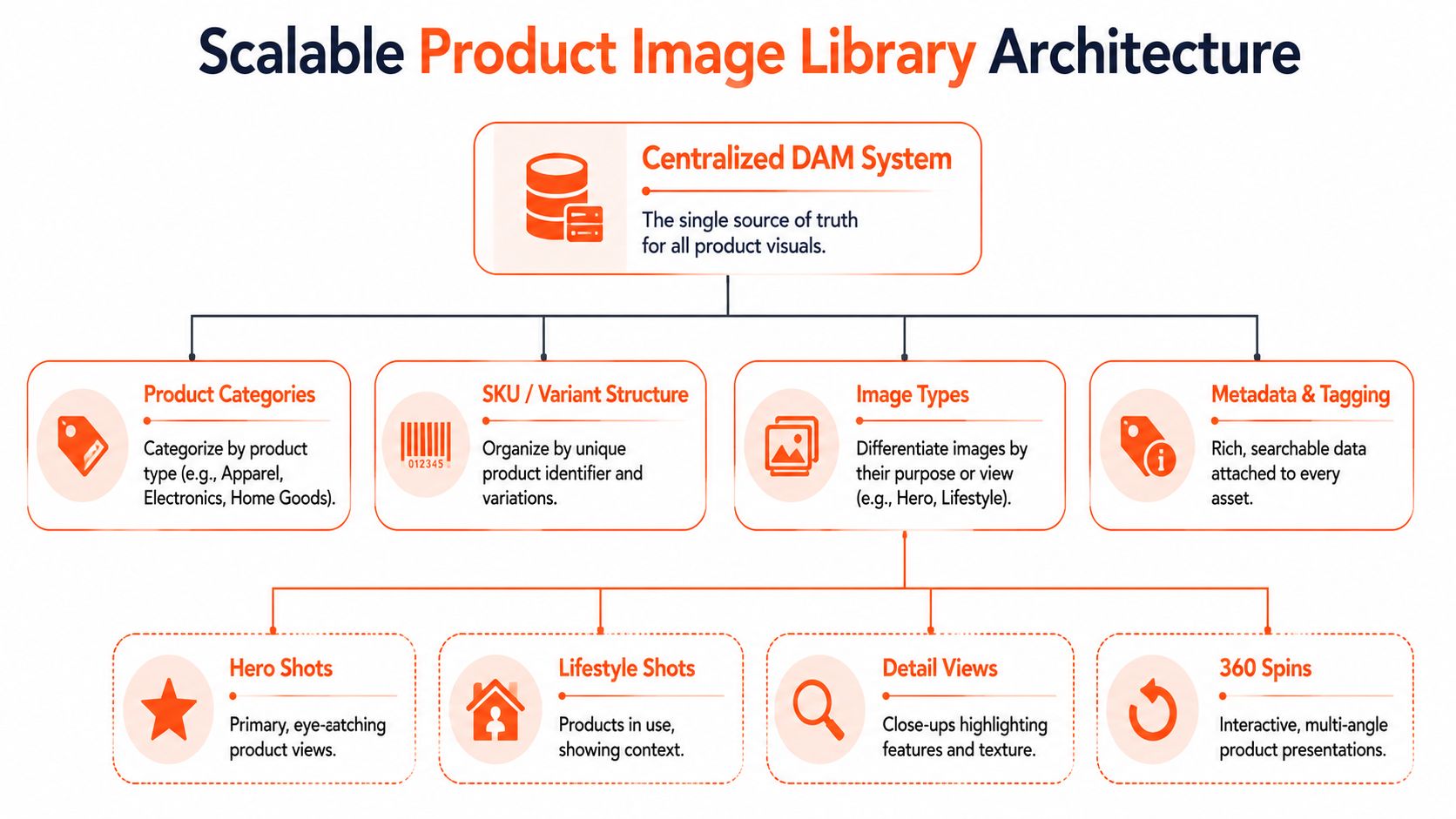
Organisation needs to serve automation. If the structure only makes sense to one employee, it won't survive the next catalogue refresh. The best libraries are boring in the right way. Clear naming, predictable folders or records, searchable metadata, and version rules that make batch processing possible.
Start with SKU-first naming
If you don't anchor the library to the SKU, everything else gets fuzzy. Campaign names change. Photographer folder names change. Product names get rewritten by merchandising. The SKU stays stable.
A practical naming pattern is SKU_View_Variant_Version. For example:
- TSHIRT123_Hero_Black_v1
- TSHIRT123_Detail_Collar_v2
- MUG204_Lifestyle_Blue_v1
Implementing a SKU-first naming convention immediately upon ingestion can reduce manual classification time by 60 to 70% when paired with AI-driven auto-tagging, and it also supports an 87% reduction in processing costs when background removal is executed before upscaling in batch workflows, based on Retouchable's guidance on large product image libraries.
That's not just a tidy naming exercise. It's what makes the image set machine-readable.
For teams still formalising identifiers, this short explanation of the definition of SKU is useful because image architecture usually falls apart when the business treats product IDs loosely.
Build metadata that helps real users
File names do part of the job. Metadata does the rest. Tag what people need to search for:
- Channel use: Amazon, Shopify, Etsy, catalogue, paid social
- Image type: hero, lifestyle, detail, packaging, size chart
- Visual attributes: white background, transparent background, model shot, flat lay
- Status: raw, approved master, derivative, archived
- Rights: owned, licensed, expiry tracked, platform-limited
A lot of teams over-tag and then stop maintaining tags. Keep the schema tight. If nobody searches by “creative mood”, don't tag “creative mood”.
Working advice: Tag for retrieval and compliance first. Tagging for abstract brand theory comes later, if ever.
Separate masters from outputs
Many libraries fall short in these scenarios. Teams overwrite the source with the web version, or they save all derivatives beside the master without status markers. Consequently, no one knows which one should feed the next workflow.
Use a simple split:
| Asset class | Purpose |
|---|---|
| Master | Highest-quality approved base image |
| Marketplace derivatives | Amazon, Shopify, Etsy listing outputs |
| Marketing derivatives | Ads, email, social, catalogue |
| Experimental outputs | Concept visuals, scene placements, tests |
That separation also helps when you're optimizing social media images for PPC. Social and paid formats have different creative needs from listing images, and you don't want those versions contaminating the marketplace set.
Version for reuse, not just archiving
Processed outputs should become usable inputs when needed. A clean cut-out can feed a catalogue layout, then a lifestyle composition, then an ad variation. That only works if versions are clearly labelled and easy to trace.
What doesn't work is creating endless “final2” files and leaving the team to sort it out later.
Automating Image Processing with AI Pipelines
Once the library is organised, the next bottleneck appears. Teams still spend too much time doing the same edits across batches: remove background, centre subject, resize, export, rename, upload, repeat. Such repetition means product image library management shifts from storage discipline into production logic.
Doing this for a whole catalog?
MerchLoom runs background removal, upscaling and AI editing across every product photo you have — one prompt, whole batch. Try 2 batches free, no signup.
Try it free
Think in pipelines, not edits
An AI pipeline is a chain of tasks applied in a fixed order across a set of images. Instead of asking, “Who can edit these 80 files today?”, the better question is, “What sequence should every file in this collection go through?”
A typical catalogue pipeline might look like this:
- Ingest existing images from storage or commerce platforms.
- Remove background on the images that need a white or transparent base.
- Reframe and centre for marketplace composition.
- Resize into channel derivatives for listing and web use.
- Generate alternate outputs for ads, catalogues, or scene visualisation.
- Return outputs to the library as approved derivatives linked to the same SKU.
That's the practical appeal of workflow tools that operate on top of existing storage. Sellers don't want another content graveyard. They want a processing layer that can use what's already in Google Drive, Dropbox, S3, Cloudinary, or Shopify, then write usable outputs back into the system.
Why batch beats one-off editing
One-off editing feels efficient because you see a result quickly. It breaks down when you need consistency across a collection. If one person crops image sets manually over a week, the catalogue often ends up with tiny shifts in framing, background edges, shadow treatment, and file naming.
Batch processing fixes consistency first. Speed is the second benefit.
This also changes how teams think about creative reuse. The same clean product shot can become:
- a marketplace hero image
- a catalogue cut-out
- a paid social variant
- a product visualisation inside a styled scene
That's where a dynamic library wins. It doesn't just store files. It keeps feeding downstream production.
For teams planning broader automation around storefront operations, this piece on AI agents for Shopify growth is useful context because image workflows work best when they fit into a wider operational system rather than a standalone creative tool.
Order matters in AI workflows
A lot of teams automate the right tasks in the wrong sequence. They upscale first, then do background removal, then create derivatives. That can increase cost and create unnecessary processing load.
A better rule is simple: do the transformations that simplify the image early, then generate the heavier outputs later. Clean product extraction first. Larger derivatives after. Distribution last.
Clean inputs produce better batches. If your source set mixes poor crops, random orientations, and half-approved files, automation just scales the mess.
When you connect workflows to cloud-based asset stores, this model starts to look less like photo editing and more like content operations. The process resembles AI image workflow for Cloudinary, where images stay tied to their delivery environment while processing handles the derivative logic.
After the first pass, processed outputs can become the next input set. That's an important shift. You don't need to keep returning to the original raw file every time you want a new use case. A cleaned, approved cut-out can feed visualisation work later without another upload cycle.
A quick product walkthrough makes that easier to picture:
What works and what doesn't
What works:
- processing collections by rules
- keeping outputs linked to the source SKU
- reusing approved derivatives as new workflow inputs
- generating channel-specific assets without touching the master each time
What doesn't:
- downloading and re-uploading every round
- storing edited files in personal folders
- mixing experimental creative outputs with approved listing assets
- running automation before the library has basic naming and status discipline
The end goal isn't “use AI”. It's to remove repetitive production labour while keeping your catalogue visually consistent across all the places you sell.
Governance and Operational Excellence
Libraries decay when no one owns the rules. A neat setup can slide back into chaos in a season if intake, access, versioning, and rights are left informal. Governance sounds heavy, but in practice it's just the minimum operating discipline that keeps the image system usable.
Rights and permissions are not admin trivia
A 2025 survey of CA-based e-commerce brands found that 32% of legal disputes in product image management stem from unclear usage rights tagging when images are repurposed across marketplaces, according to Canto's image library glossary. That's the kind of issue teams usually discover late, after an image has already spread into ads, listings, social posts, and partner channels.
If you reuse imagery across platforms, every asset record should make clear:
- Who owns it
- Where it can appear
- Whether a model, photographer, or agency licence limits use
- When the right expires or changes
This matters even for technically simple assets such as images with white background. A clean marketplace image can still have licensing constraints if the underlying shoot agreement was narrow.
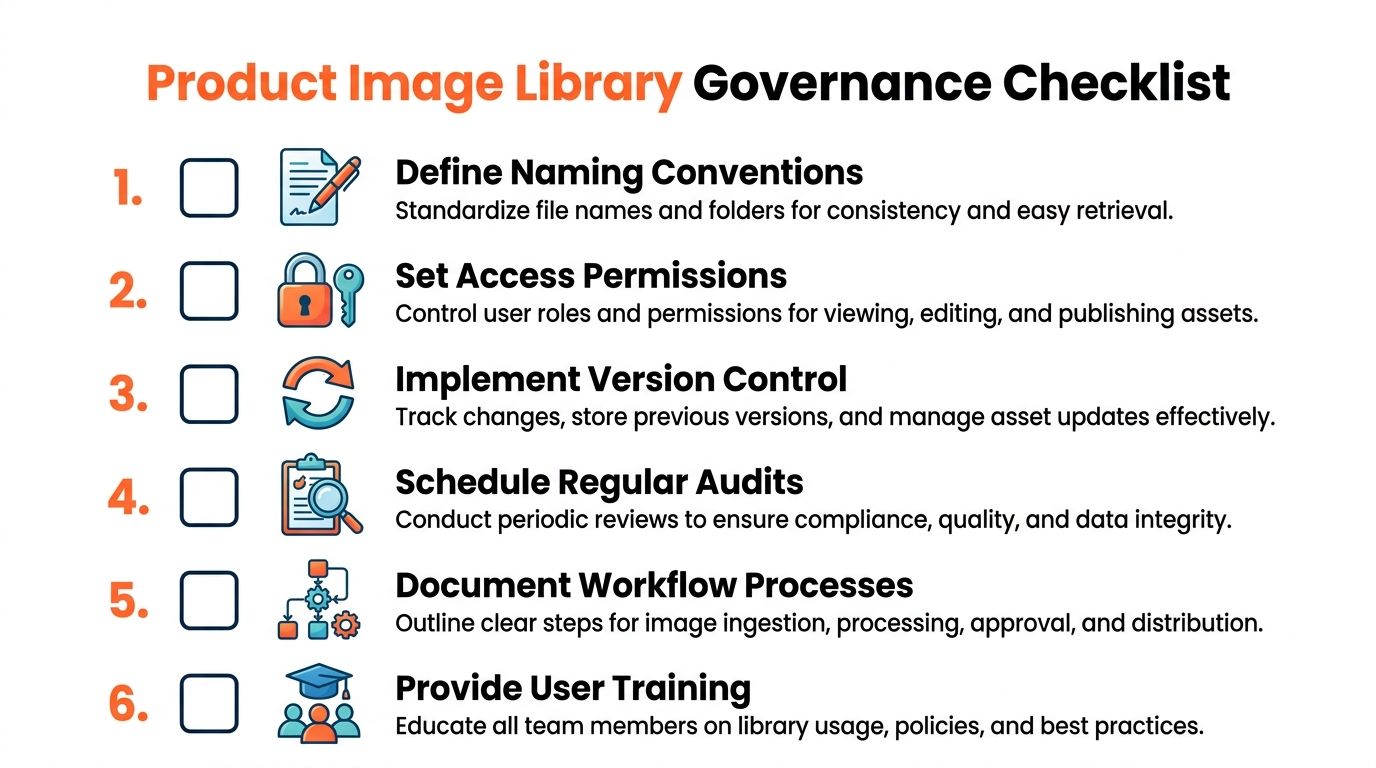
The checklist that keeps the system healthy
A large policy manual is often unnecessary. A repeatable operating checklist is what's needed.
- Intake rules: every new file gets named, tagged, and assigned status before anyone publishes it.
- Role control: not everyone should be able to overwrite masters or approve derivatives.
- Version separation: approved outputs stay distinct from work-in-progress files.
- Audit rhythm: somebody reviews the library regularly for duplicates, stale derivatives, and rights gaps.
- Workflow documentation: if the only person who understands the process is on holiday, the system is fragile.
- Training: new staff need a short operating brief, not tribal knowledge.
Governance is what stops a useful library from becoming another shared folder with better branding.
The practical trade-off
The trade-off is freedom versus reliability. Loose systems let individuals move quickly for a day. Governed systems let teams move reliably for years.
That's especially important when assets are repurposed from listing use into paid campaigns or catalogues. Without explicit ownership, derivative rules, and permissions, you don't just create clutter. You create publishing risk.
Getting Started and Measuring Success
The entire image operation shouldn't be rebuilt in one go. Start with one slice of the catalogue and make it work end to end. That's enough to expose the naming gaps, derivative needs, and approval points that matter.
A phased rollout that's realistic
Begin with an audit. Pull together the current image sources, identify the approved masters, and mark duplicates or obviously outdated files. Then lock in a naming format and a small metadata set before processing anything at scale.
After that, run a pilot:
- Choose one product group with enough variation to test the system properly.
- Create the required derivatives for your active channels.
- Review outputs for consistency before the process spreads wider.
- Document the workflow while the decisions are fresh.
If your team also needs a baseline for source quality, this guide on how to make product photos look professional is a practical starting point. Better processing always begins with workable inputs.
What success actually looks like
Measure outcomes in operational terms, not vanity metrics. You want fewer image-related publishing errors, faster listing preparation, cleaner handoffs between creative and ecommerce, and less rework when a new sales channel appears.
You should also see a behavioural shift. Staff stop asking for files by email. Marketplace teams stop creating independent folder systems. Processed outputs get reused instead of rebuilt.
The direction of the broader market supports that shift. The global photo management software market was valued at $520 billion in 2024 and is projected to reach $850 billion by 2027, with a 17.2% CAGR, according to Verified Market Research's photo management software market report. For ecommerce teams, that doesn't just signal software growth. It signals that managing image volume through structured, scalable workflows is becoming normal operating practice.
Product image library management works best when you stop treating it as a storage clean-up project and start treating it as a workflow hub. That's how a scattered archive becomes a repeatable production system.
If your catalogue is spread across cloud folders, marketplaces, and old shoot archives, MerchLoom gives you a practical way to process those existing images in batches, chain AI steps together, reuse outputs as new inputs, and create marketplace, catalogue, ad, and visualisation assets from the same library without rebuilding your workflow from scratch.
Stop editing product photos one at a time
Upload your catalog or connect your store. Describe the result once. MerchLoom does the rest.
Try it free — no signup