
AI No Beard Filter: Professional E-commerce Catalogs
Master the no beard filter for professional e-commerce catalogs. Use AI tools and batch workflows to create consistent, high-quality product images.
You've got a product set ready to publish, the garments are shot well, the lighting is consistent, and then one detail breaks the grid. Half the menswear images feature a model with a full beard, the rest are clean-shaven, and the collection no longer feels organised. Reshooting isn't practical. Manually retouching every image is worse.
That's where the No Beard Filter stops being a novelty and starts acting like an operations tool. For a casual user, it might be one edited portrait. For an online seller, it's a catalogue problem. The core question isn't “can AI remove a beard?” It's “can it do it across hundreds of images without making the model look fake, the brand look sloppy, or the listing fail marketplace requirements?”
Beyond the Prank The Real Use for a No Beard Filter
A common catalogue problem looks like this. A brand shoots a seasonal line with one model across multiple outfits, then decides the campaign needs a cleaner grooming standard for the storefront, paid ads, or a specific sub-collection. The beard itself isn't the problem. The inconsistency is. One set of listings feels rugged, another feels polished, and the customer sees two different brand moods inside the same shop.
Most public discussion around the no beard filter still misses that completely. Existing content overwhelmingly treats it as a Snapchat-to-TikTok prank trend, and one overview of the trend shows that 100% of search results focus on social media pranks, while zero discuss batch processing for retail (CNET coverage of the no beard trend). That's fine if you're editing a joke selfie. It doesn't help when you're cleaning up an apparel collection before launch.
Where the commercial use actually shows up
The operational use case is much narrower, but much more serious.
- Brand alignment: A seller wants every model image in a collection to follow the same grooming direction.
- Variant creation: The same hero shot may need one version for a rugged campaign and another for a cleaner, more minimalist storefront.
- Reshoot avoidance: The garments are already photographed, approved, and colour-corrected. Changing the face is cheaper than rebuilding the entire shoot.
- Multi-channel consistency: Marketplace listings, theme banners, social ads, and lookbooks often need different crops but the same visual identity.
Practical reality: The beard isn't just facial hair in a product photo. It changes how buyers read the entire listing.
If you're handling one portrait, almost any decent editor can get you close. If you're handling a collection, the problem shifts from novelty editing to process design. That's the same reason sellers often look for adjacent portrait cleanup tools such as AiHeadshots app recommendations before standardising creative across a store. The issue is rarely one imperfection. It's the cumulative effect of dozens of inconsistent images.
For fashion teams planning shoots, the better move is to think about editability before the camera comes out. A practical checklist for that appears in this guide to model photo shoot planning for e-commerce, especially when you know certain catalogue variants may be generated after the shoot rather than on set.
Manual Photo Editing vs Scalable AI Solutions
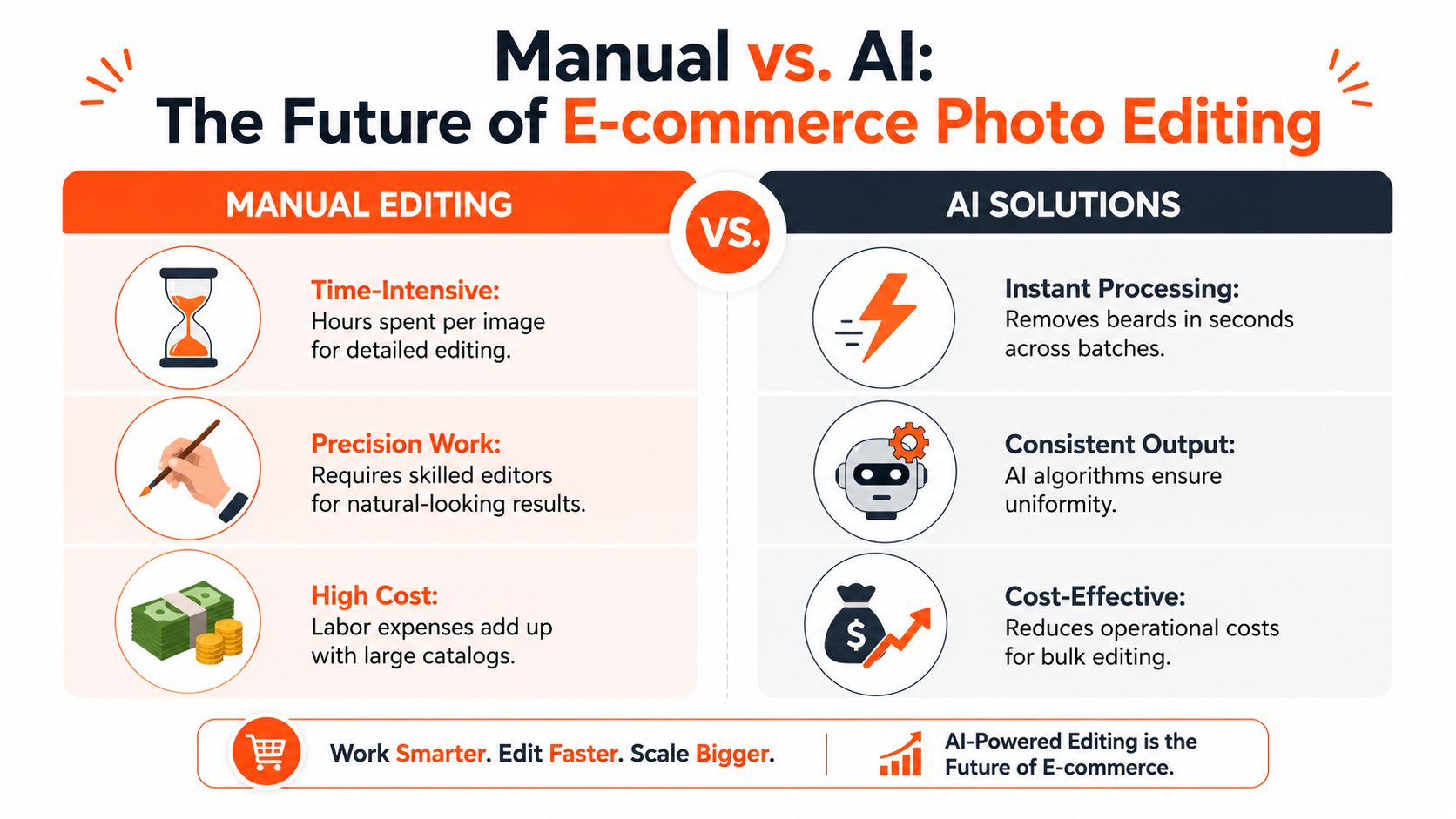
Manual beard removal can look excellent. It can also become an expensive bottleneck the moment you move past a few images. The editor has to rebuild skin, preserve lip edges, infer the jawline, correct colour shifts, and make sure the result still looks like the same person. On a single hero image, that might be worth the effort. On a large catalogue, it's hard to justify.
What manual editing gets right
The traditional Photoshop route gives an expert editor full control. They can decide exactly how much stubble remains, where skin texture needs rebuilding, and how to handle difficult transitions around the moustache, beard line, and chin shadow.
That matters in edge cases such as:
- Heavy contrast lighting
- Strong side angles
- Dense beards covering most of the jaw
- Editorial close-ups where skin texture is under scrutiny
But manual control comes with its own failure points. One editor reconstructs a soft jawline. Another creates a sharper chin. A third leaves too much beard shadow. Across a collection, those inconsistencies become visible fast.
Why AI wins at catalogue scale
For sellers, the better comparison isn't “which method is artistically superior?” It's “which method produces acceptable, consistent output at operational speed?” That's where AI usually wins.
A modern no beard workflow handles the repetitive part well:
| Approach | Best for | Main limitation |
|---|---|---|
| Manual retouching | Hero images, campaigns, edge cases | Slow and difficult to standardise across a full catalogue |
| Single-image AI apps | Casual use, one-off profile edits | Weak for workflow control and collection consistency |
| Batch AI workflows | Product collections, marketplaces, repeated listing formats | Still needs human review for edge failures |
The biggest practical difference is repeatability. If the same transformation needs to run on a whole set, AI gives the team one set of rules instead of a different interpretation on every file. That's especially useful when paired with broader AI batch image editing workflows for retailers, where grooming edits sit alongside cropping, background work, and export preparation.
Manual retouching solves an image. Batch AI solves a production queue.
What doesn't work well
Sellers usually run into trouble when they use consumer selfie apps and expect catalogue-grade output. Those tools are built for speed and amusement, not for maintaining the same jaw structure, skin tone, and visual polish across a launch set.
AI also struggles when the source files are weak. If the face is too small in frame, the beard overlaps heavy shadows, or the image is compressed beyond usefulness, no automation layer can invent a convincing clean-shaven lower face every time. In those cases, manual cleanup still has a place, but it should be the exception, not the default workflow.
Understanding How AI Reconstructs a Face
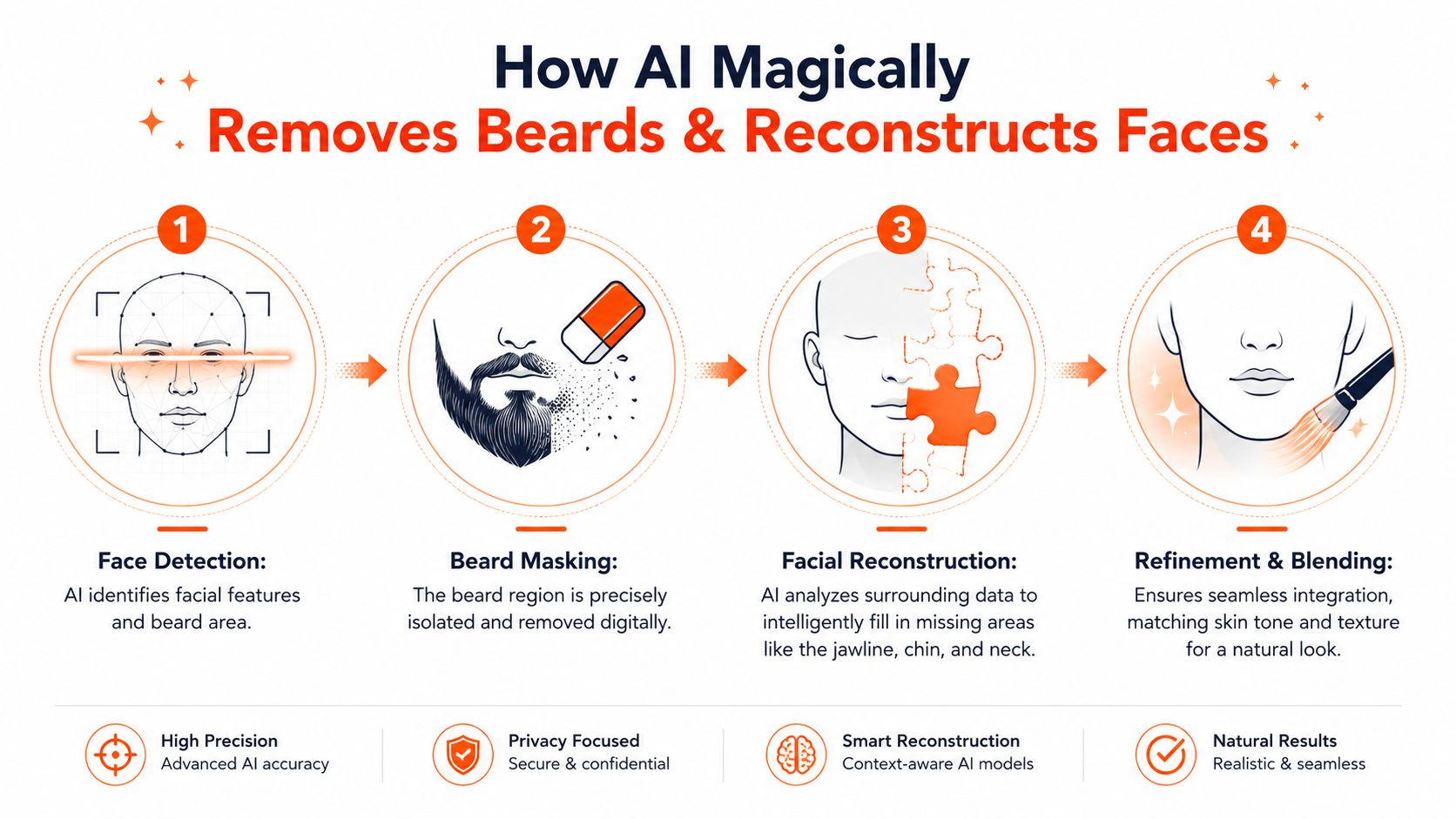
A good no beard result doesn't happen because the tool “erases hair”. It works because the system maps the face first, then rebuilds what the beard was covering. Once sellers understand that, the output becomes easier to judge and easier to improve.
The input standards matter more than most people think
The no beard filter pipeline works best with a front-facing portrait, more than 50% face coverage, and a minimum 800×800 pixel resolution. In that workflow, the system detects facial hair, reconstructs underlying skin texture using identity-preserving methods, and matches the treated area to the subject's natural skin tone (beard removal tutorial and method details).
That one requirement explains most bad output. Sellers often feed the tool a cropped campaign image where the face occupies a small part of the frame, or they use a heavily compressed export pulled from a website instead of the source image. The AI then has less facial information to work with and the rebuild gets weaker.
What the reconstruction is actually doing
In plain terms, the process has a few separate jobs:
Map the face
The tool identifies the visible facial structure, including the beard region and neighbouring features.Isolate the hair area
It needs to know what should be removed and what should remain untouched, especially around lips, cheeks, and neckline.Rebuild hidden skin and contour
This is the hard part. The system estimates the missing lower-face surface so the jaw and chin still look natural.Blend the result back in
Skin tone, texture, and lighting need to match the rest of the portrait or the edit will look obvious.
If you want a plain-language primer on the first stage, PeopleFinder's guide on face recognition is a useful companion read because it explains how systems identify and map facial features before any cosmetic transformation happens.
The best outputs don't look edited. They look like the beard was never there in the first place.
What improves realism
A few setup choices matter more than endless tweaking:
- Use even front lighting: Harsh directional shadows make the beard area harder to rebuild cleanly.
- Choose a face-dominant crop: If the model's face is tiny inside a full-body frame, the tool has too little detail.
- Match beard density to edit strength: Some pipelines let you adjust removal intensity from light stubble through full beard removal. That control helps avoid over-processing.
- Review at full size: A thumbnail can hide texture problems that become obvious on a product detail page.
If you already know Photoshop's healing and fill tools, this breakdown of content-aware fill techniques gives a useful mental model for why AI beard removal succeeds when the surrounding facial information is clean and fails when the source is too compromised.
Batch Processing Beard Removal for an Entire Catalogue
Once you move from one portrait to a live product collection, beard removal becomes a pipeline issue. The seller isn't asking for a clever edit. They need a repeatable sequence that can take a folder of images, apply the same facial adjustment, keep the outputs visually aligned, and prepare the files for listing.

The practical batch sequence
A workable catalogue-scale flow usually looks like this:
Doing this for a whole catalog?
MerchLoom runs background removal, upscaling and AI editing across every product photo you have — one prompt, whole batch. Try 2 batches free, no signup.
Try it free- Import the image set from wherever the team already stores it.
- Group by shoot, collection, or model so similar images are processed together.
- Apply beard removal to the qualified portraits.
- Check edge quality on the lower face and neck.
- Run supporting steps such as background removal, reframing, or upscaling.
- Export platform-specific versions from the approved masters.
Teams often underestimate the value of batch logic. Beard removal is only one stage. In real operations, it sits inside a chain of tasks.
The order of operations affects cost
One useful rule in image pipelines is to avoid expensive operations on files that still contain removable bulk. Removing backgrounds before upscaling can reduce image file size prior to the expensive upscaling step, saving up to 87% in processing costs. That matters when a seller is processing a full catalogue rather than a handful of approved campaign shots.
This is also why general workflow concepts such as the benefits of batch processing matter in e-commerce imaging. The gains don't come from one dramatic edit. They come from reducing repetitive handling across an entire collection.
What sellers should batch and what they should isolate
Not every file deserves identical treatment. The best teams split images into two categories.
| Image group | Recommended handling |
|---|---|
| Standard front-facing portraits | Batch together with one consistent no beard setup |
| Difficult angles or problem shadows | Pull aside for individual review or manual cleanup |
That separation prevents the common mistake of over-automating difficult files just because they're in the same folder.
A stable review rhythm
Batch systems work best when the team reviews in small, controlled sets instead of sending the entire season through one unchecked run. One practical guideline for background workflows is to process images in groups of 20, review edge quality after background removal, and re-process problem files individually before applying a consistent background across the collection (batch review guidance for product photos).
That logic applies well to beard removal too. Review a manageable group. Look for recurring failure patterns. Adjust once. Then continue.
Operational rule: If one bad setting affects a hundred images, it's not a design issue. It's a workflow issue.
Sellers syncing from commerce and storage systems also need the image process to meet the catalogue where it already lives. A useful reference for that handoff is this guide to AI image editing from Shopify and connected sources, because the efficiency comes from avoiding manual download-edit-upload cycles.
The biggest shift is mental. Beard removal shouldn't be treated like a novelty effect pasted onto a portrait app. It belongs in the same production conversation as background extraction, resizing, and marketplace exports. Once it's handled that way, it becomes manageable.
Quality Control for Marketplace-Ready Images
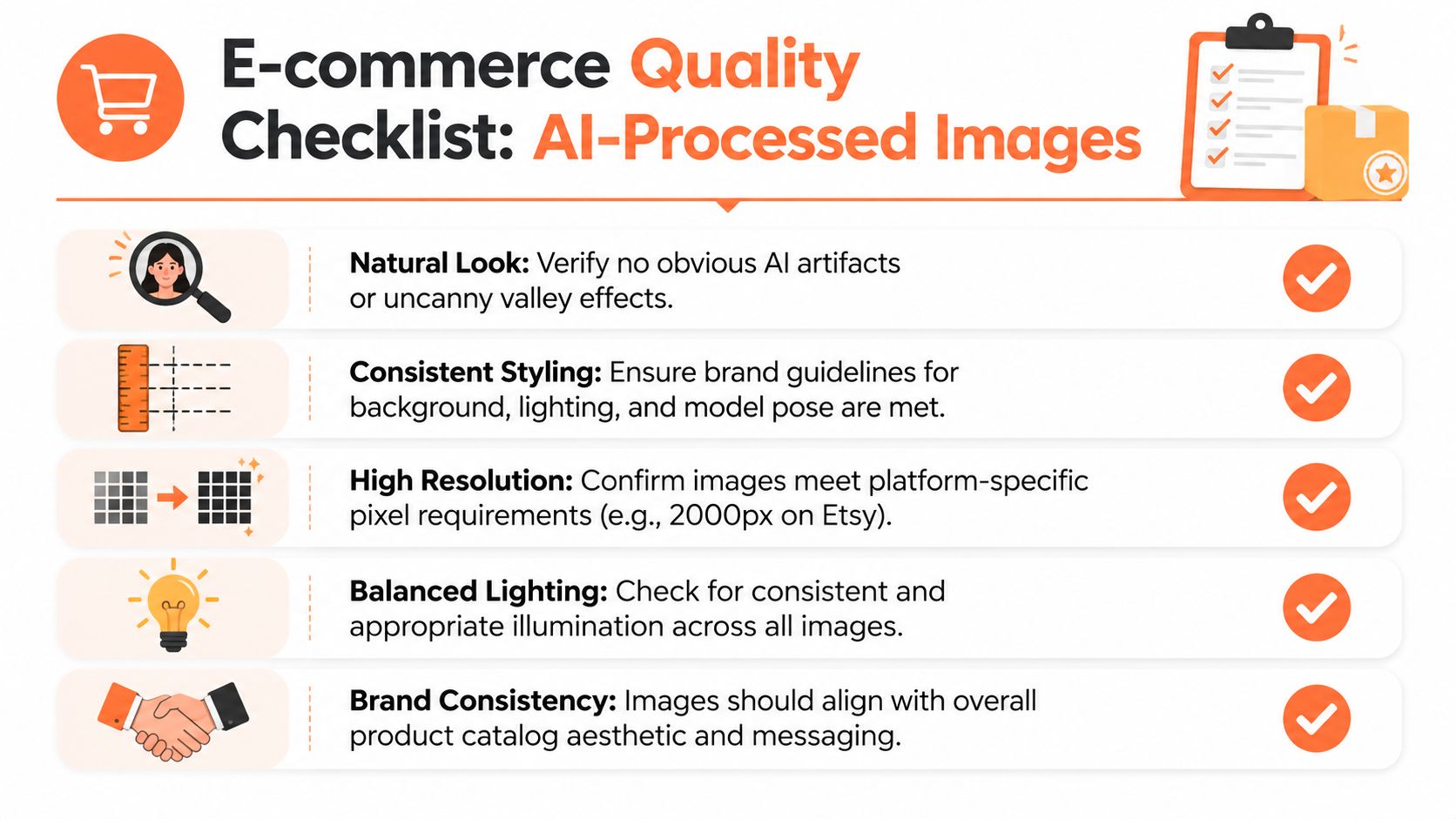
A believable facial edit is only half the job. The file still has to pass listing standards, stay consistent with the rest of the catalogue, and look clean in both thumbnail view and zoomed product pages.
Start from one approved master
For catalogue consistency, the safest workflow is to approve one master image per final asset and export each marketplace crop from that file. Platform guidance differs, so sellers should work from a common source and then create channel-specific outputs. A practical standard is to export Amazon as a 2,000px square JPEG, Shopify to the theme ratio often used at 2,048 x 2,048px, and Etsy at 2,000px, all in the sRGB colour profile (platform image spec reference).
That prevents a common failure. One team exports a beard-removed image for Amazon, another crops a different source for Shopify, and now the same product appears to have two different models or two different jawlines depending on the channel.
The facial edit checklist
When reviewing beard-removed outputs, I'd keep the checks blunt and visual:
- Jawline credibility: Does the lower face look anatomically plausible, or does it flatten into a smooth patch?
- Skin continuity: Look for abrupt changes in texture between cheek, chin, and neck.
- Mouth and moustache edges: These are often the first places where masking errors show up.
- Shadow logic: If the original lighting created natural facial depth, the edited area should still respect that.
- Collection consistency: Compare similar shots side by side, not one by one.
A single image can look fine in isolation and still look wrong once it sits next to the rest of the collection.
Marketplace-specific checks
Different channels expose different problems.
- Amazon main image background: If you're exporting on white, don't trust your eyes alone. The QA step should verify that every pixel in the background is RGB 255, 255, 255, using a colour picker or automated luminance check, because visual inspection can miss corner gradients (Amazon white background QA guidance).
- Thumbnail recognition: Amazon thumbnails display at approximately 120 x 120px on desktop, so if the product isn't recognisable at that size, the main image should be re-cropped for stronger frame fill (thumbnail visibility guidance).
- Load speed after export: E-commerce images should load in under 1.5 seconds on 3G mobile networks, which usually means compressing to keep files under 500 KB after upscaling and sharpening with an unsharp mask at 0.3 to 0.5px radius (e-commerce image performance playbook).
A short approval framework
Use a simple pass/fail table before publishing:
| Check | Pass if | Fail if |
|---|---|---|
| Face edit | No obvious artefacts at normal zoom | Chin, neck, or lip edges look synthetic |
| Background | Uniform and compliant for the target channel | Off-white corners or inconsistent cutout edges |
| Crop | Product reads clearly in grid and detail views | Model dominates while product gets lost |
| Export | Correct size, format, and colour profile | Mixed ratios or inconsistent rendering across channels |
For Amazon-heavy teams, this guide to Amazon product image requirements is worth keeping near the final review stage, because marketplace compliance issues often show up after the facial edit has already been approved.
Ethical Considerations and Model Transparency
Changing grooming is a lighter edit than changing body shape, skin tone, or age cues, but it still alters a real person's appearance. That means the operational question has to be paired with a consent question.
The ethical line is usually straightforward. Creating a clean-shaven variant to keep a catalogue visually consistent is one thing. Altering a model's face in ways they didn't approve, or using the edit to imply an appearance they never agreed to represent, is another.
What responsible teams put in writing
A professional workflow should cover this before the edit happens.
- Model consent: Contracts should state whether facial appearance may be digitally adjusted for commercial use.
- Scope of edits: Define what counts as acceptable grooming cleanup versus more substantial identity alteration.
- Approval rights: For campaign-facing work, give the model or agency a review path when the edit materially changes appearance.
- Channel usage: Clarify whether the edited asset is limited to product listings, paid ads, social creative, or all channels.
This isn't just legal hygiene. It protects brand trust.
If the edit supports presentation, it's usually defensible. If it changes who the person appears to be, it needs closer scrutiny.
The customer side matters too
Most buyers won't care that a beard was digitally removed. They will care if a brand's imagery starts to feel manipulated, inconsistent, or misleading. That's why restraint matters. The best commercial use of a no beard filter is usually the most boring one: modest, repeatable grooming normalisation across a set of images.
It also helps to separate model presentation from product representation. You're not changing the garment. You're standardising the face around it so the product line reads cohesively. That's a reasonable production goal when handled openly and with consent.
Teams should also keep original files. If a dispute comes up, or the campaign direction changes, having the unedited source matters.
The sellers who use this technology well don't treat it as a trick. They treat it as post-production, with the same discipline they'd apply to colour correction, background cleanup, or retouching stray threads.
If you're managing a large catalogue and want beard removal to be one step inside a repeatable image workflow, MerchLoom is built for that kind of batch operation. It lets sellers process full image collections through chained AI pipelines, so beard cleanup can sit alongside background removal, reframing, upscaling, and marketplace exports without turning the job into a manual editing queue.
Stop editing product photos one at a time
Upload your catalog or connect your store. Describe the result once. MerchLoom does the rest.
Try it free — no signup