
Can I Use Editorial Images on Social Media? Risks & Rules
Find out can i use editorial images on social media for your e-commerce store. Understand risks, licensing rules, and safe alternatives for social media posts.
You've found the image. It's timely, recognisable, and far better than the generic stock options sitting in your content folder. Maybe it shows a celebrity wearing something close to your new drop. Maybe it's a red-carpet shot, a street-style moment, or a photo from a major event that perfectly matches the mood of your campaign. Then you see the label: Editorial Use Only.
That's the point where a lot of sellers ask the same question: can I use editorial images on social media if I'm only posting, not running ads? For e-commerce brands, that question matters more than it seems. A single image rarely stays in one place. Today it's an Instagram post. Tomorrow it's repurposed for Shopify, dropped into an email banner, resized for Etsy, and handed to a freelancer for a seasonal promo.
That's where the significant risk starts. The issue isn't only whether you can post the image once. It's whether your team can keep a catalogue-scale workflow compliant when assets move quickly across channels. If you manage hundreds of SKUs, image rights can't depend on someone remembering which folder had the “safe” files and which one had the risky ones.
The Temptation of the Perfect Editorial Photo
The temptation is easy to understand because editorial images are often exactly what branded content wants to borrow: relevance, status, and cultural context. They feel current in a way studio product shots often don't. When a brand manager is under pressure to post daily, an editorial photo can look like a shortcut to better engagement and stronger brand identity.
For a seller with a fast-moving catalogue, the shortcut looks even more attractive. One strong image can anchor a launch post, inspire a seasonal collection, or give a small brand the polish of a much larger creative team. That's why these files keep appearing in Slack threads, shared drives, and “maybe we can use this?” folders.
Why the label gets ignored
Organizations don't ignore Editorial Use Only because they're reckless. They ignore it because the line between content and promotion feels blurry on social media. A post can look casual while still serving a clear business purpose. If the image helps sell the brand, the product, or the shop, the risk doesn't disappear just because the caption sounds conversational.
I've seen this happen most often when brands are building mock posts before a campaign. The feed layout looks great, the references are strong, and someone assumes the image is acceptable because it isn't a paid ad yet. That assumption usually breaks the moment the same asset gets reused in a wider campaign. If your team is already designing polished social concepts, it helps to understand the production side too, especially when working with an Instagram post mockup workflow.
Editorial images are attractive because they look authentic. They're risky for the same reason. They usually include people, places, brands, or events that were never cleared to promote your business.
The catalogue problem
One questionable image is a legal issue. A repeated workflow is an operational issue. If your team handles product launches in batches, a bad rights decision rarely stays isolated.
Common failure points look like this:
- A social asset gets repurposed for a product page, paid post, or email header without anyone rechecking the licence.
- A freelancer crops and edits the image and assumes that enough changes make it safe.
- A content team saves files by visual theme, not by rights status, so editorial and commercial assets end up mixed together.
- Marketplace variants multiply and the same base visual gets adapted for Amazon, Shopify, and Etsy with no licence review at all.
That's why the right answer can't stop at “probably not”. You need a system that still works when the image count goes from one post to a full catalogue refresh.
Editorial vs Commercial The Core Distinction
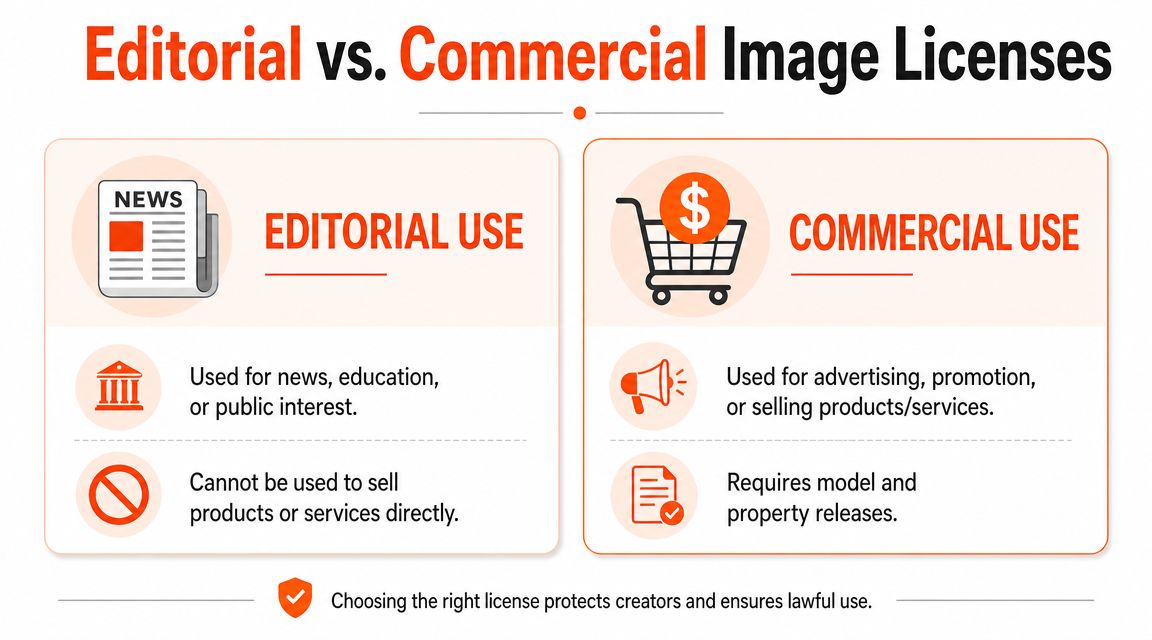
The cleanest way to think about this is simple. Editorial use explains or reports. Commercial use promotes or sells. A newspaper image attached to a story about an event is one thing. The same image attached to a product promotion is another.
That difference exists because permission is different. Commercially usable imagery is typically cleared for promotional use. Editorial imagery generally isn't.
What editorial really means
Editorial images are commonly used in contexts tied to news, commentary, education, or matters of public interest. They often include recognisable people, logos, branded products, locations, or event settings that haven't been cleared for commercial promotion.
That's why the licence matters more than the image style. A polished photo can still be editorial-only. A rougher photo can be commercially usable if the necessary permissions were handled correctly.
What commercial use actually includes
A lot of sellers think “commercial use” means only formal advertising. In practice, it's broader. If your post helps market your business, raise brand awareness, support product sales, or strengthen a branded campaign, you're operating in commercial territory.
For e-commerce sellers, these usually count as commercial uses:
- Product launch posts that direct people to buy.
- Lifestyle content built to support a collection or category page.
- Branded social content designed to grow awareness for your shop.
- Promotional graphics reused in emails, marketplace banners, or paid media.
Practical rule: If you'd be happy for the post to influence sales, treat it as commercial.
Editorial vs. Commercial Image Use at a Glance
| Attribute | Editorial Licence | Commercial Licence |
|---|---|---|
| Primary purpose | News, commentary, education, public-interest context | Advertising, promotion, selling products or services |
| People and property permissions | Often not cleared for promotional use | Typically requires the relevant releases for intended use |
| Brand marketing use | Usually not allowed | Allowed if licence terms permit it |
| Social media by a business | Only if the post is genuinely editorial in context | Suitable for branded and promotional posting |
| Editing freedom | Often limited | Usually more flexible, subject to licence terms |
| Best fit for sellers | Rarely useful for catalogue marketing | The right baseline for listings, ads, and branded social |
Why sellers get tripped up
The confusion usually comes from format instead of intent. People see an Instagram post and think of it as “content”, not advertising. But platforms don't change the underlying use. If the post exists to help the business sell, it functions commercially.
That's why the safe workflow starts with the licence, not the channel. Once an image is in your content pipeline, it needs to survive resizing, cropping, localisation, collection pages, and seasonal reuse. Editorial assets usually fail that test immediately.
The Legal Risks of Misusing Editorial Photos
When teams misuse editorial photos, the risk isn't abstract. It shows up in rights claims, takedown demands, account disruption, and legal exposure tied to the person or property shown in the image. For a brand moving fast, the most expensive part is often the interruption. Campaigns get pulled, assets need replacing, and internal teams waste hours fixing something that should never have entered production.
The right-of-publicity problem
One of the biggest mistakes sellers make is assuming that if an image is available through a stock library, the rights must already be handled. That's not how editorial files work. A photo can be licensed for editorial distribution while still being unsafe for promotion.
In California, this line matters sharply because the state's right-of-publicity law provides a postmortem publicity right for 70 years after death under California Civil Code Section 3344.1, and unauthorised commercial use of a person's name, voice, signature, photograph, or likeness can create liability, according to Adobe community guidance discussing editorial image restrictions and California publicity rights. The same guidance also notes that “Editorial Use Only” images may be used for newsworthy or public-interest contexts, not for advertisements, promotions, endorsements, or merchandise, and generally can't be modified beyond minor technical edits or slight cropping while preserving editorial context and integrity.
That matters for social content because a branded post can easily cross into commercial use even when it looks informal.
Canada isn't a loophole
Some teams assume social posting is looser outside the United States. That's a bad assumption. In Canada, editorial images are generally not cleared for promotional social media use unless the licence explicitly allows commercial use or the post is strictly news or editorial in context, based on Shutterstock contributor guidance on commercial versus editorial content.
So if your business serves Canadian customers, runs Canadian social accounts, or repurposes content across regions, you can't treat editorial files as a harmless shortcut.
The risk stack for online sellers
For e-commerce teams, the legal issue usually comes bundled with practical damage:
- Copyright claims when the usage exceeds the licence terms.
- Publicity rights issues when a recognisable person appears to endorse a product or brand.
- Trademark friction when logos, branded environments, or protected elements appear in a promotional context.
- Operational rework when a flagged post forces the team to pull matching creatives across multiple channels.
A seller rarely gets hurt by one image alone. The bigger problem is reuse. Once a risky asset enters the catalogue, it spreads into every format your team needs.
That's why image compliance should be treated like inventory accuracy. If the source record is wrong, the error multiplies everywhere else.
Social Media Platform Policies Explained
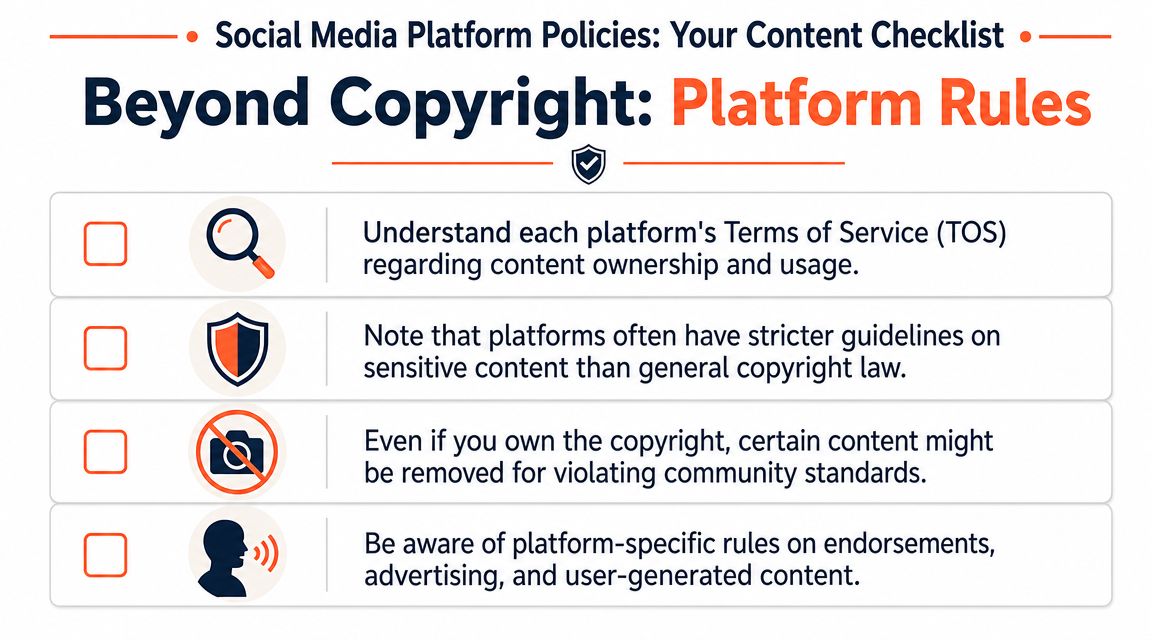
Social platforms don't give you commercial rights just because they let you upload a file. That's the misunderstanding behind a lot of risky posting decisions. A platform provides distribution. It doesn't rewrite copyright law, publicity rights, or stock licence terms.
Your intent defines the use
If you're posting from a brand account, the key question is usually not “Is this on Instagram?” but “Why are we posting it?” If the goal is to attract customers, strengthen the brand, support a launch, or drive traffic, the use is commercial in practice.
That applies whether the content appears as a feed post, a Story, a Reel cover, a pinned post, or a carousel. The format doesn't rescue the rights problem.
Platform rules sit on top of rights rules
Platforms also have their own moderation and advertising standards. Those are separate from image licensing. A post can satisfy a platform's technical rules and still violate the image licence you relied on. For teams that need a broader operational view, this social media compliance guide for 2026 is useful because it frames compliance as a workflow issue, not just a legal one.
For visual teams, that means two checks need to happen before publishing:
- Rights review to confirm you can use the image for the intended business purpose.
- Platform review to confirm the post meets the platform's content and promotion rules.
Why this matters in production
The pain usually appears after the design work is already done. The image has been cropped vertically for Stories, squared for grid previews, and adapted for several placements. Then someone realises the original asset wasn't safe for commercial use at all.
That's one reason format planning and compliance should happen together. If your team is constantly adapting the same assets for portrait layouts, a practical reference like this guide to Instagram portrait size requirements helps reduce rework, but only if the underlying image rights are sound in the first place.
How to Verify Image Rights for Your Catalogue
Most sellers don't need a legal lecture. They need a repeatable way to decide whether an image can go into the content pipeline at all. The simplest approach is to treat image rights as intake data, not a final review task.
Doing this for a whole catalog?
MerchLoom runs background removal, upscaling and AI editing across every product photo you have — one prompt, whole batch.
Try MerchLoomWhat to check before the file enters production
When you evaluate an image from a stock source, agency, freelancer, or creator, check these items first:
Licence type
Look for clear language such as commercial, editorial, or editorial use only. If the terms aren't obvious, stop there.Release status
Many libraries indicate whether model releases or property releases are available. If recognisable people or protected locations appear and releases are missing, treat the file as unsafe for promotion.Usage restrictions
Some licences limit how much you can edit, where you can publish, or whether the file can appear in branded content.Source record
Save the licence details with the asset. Don't rely on a buyer, designer, or social manager remembering where it came from.
A practical outside resource for this initial review is this guide on how to check image rights. It's useful for building the habit of verifying before reuse.
Why manual checking breaks at scale
The one-by-one method collapses once a catalogue grows. A single launch can involve hero images, square crops, mobile banners, marketplace variants, and social derivatives. Add seasonal refreshes and international storefronts, and you're suddenly tracking rights across hundreds of files.
That's where teams usually fail. Not because they don't know the rule, but because the process isn't built for speed.
Common breakdowns include:
- Folder confusion between approved and unapproved images.
- Missing licence records after a freelancer delivers edited exports.
- Derivative assets that no longer carry the original rights notes.
- Cross-platform reuse where the same image moves from editorial context to promotional context without review.
If a catalogue depends on manual memory, someone will eventually publish the wrong image.
The better model is to make rights status part of the asset system itself. Teams that are already thinking about automation should apply the same thinking to visual production. An AI image workflow automation approach becomes useful conceptually, because repeatable workflows reduce the odds that risky files get mixed into approved production batches.
Creating Compliant Visuals at Scale
The safest answer to “can I use editorial images on social media?” is usually no for brand promotion. The practical answer for sellers is more useful: build visuals you can reuse everywhere.
That doesn't mean booking a fresh location shoot every time you need a lifestyle image. For most online sellers, the scalable path is to start with product-owned source material and generate compliant variations from there.
Start with assets you control
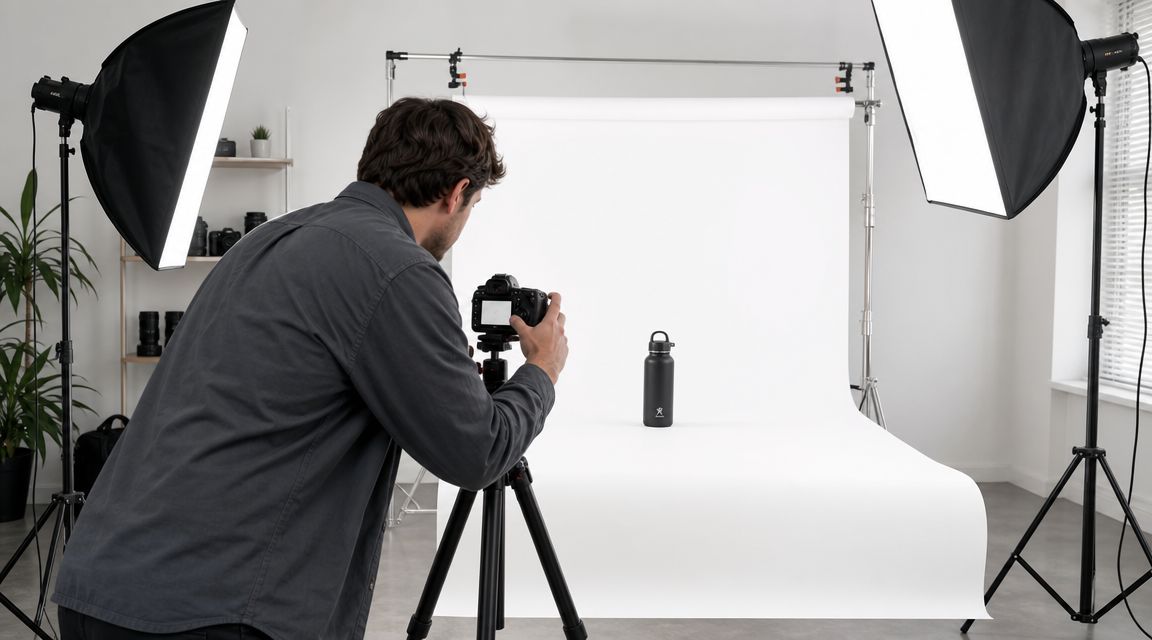
If you own the base product photo, your options improve immediately. You can remove the background, extend the canvas, create square and vertical crops, and build styled scenes around the product without borrowing a rights problem from someone else's event image or paparazzi shot.
For growing catalogues, this matters because one clean source image can support many outputs:
- Marketplace-ready listings with plain backgrounds for Amazon-style requirements
- Shopify and DTC visuals with branded framing and collection consistency
- Etsy-friendly formats with larger, detail-oriented presentation
- Social lifestyle variants that show context without using unlicensed third-party photography
AI is useful when it replaces risk, not when it hides it
A lot of teams use AI badly here. They start with an unsafe source image and hope heavy editing will somehow wash away the licence issue. It won't. If the source is risky, the output often stays risky.
AI becomes valuable when the starting point is clean. A controlled product image can be transformed into multiple commercially useful visuals with consistent lighting, aspect ratios, and styling. That's far more practical than hunting for “inspiration” photos that your team can't legally promote with.
A simple example is a seller with a large home décor catalogue. Instead of using magazine-style editorial interiors, the team can work from its own cut-out product shots and generate room-context visuals across an entire collection. The same logic applies to cosmetics, packaging, apparel accessories, and kitchenware.
For teams exploring physical setup options before moving into broader visual production, a guide on choosing a product photography booth can help tighten the source-image quality that later workflows depend on.
Build a batch process, not a one-off fix
What works for one SKU won't carry a catalogue. You need a workflow that can turn a folder of base images into channel-specific outputs without hand-editing every variation.
That usually means:
- One approved source set for each product
- Preset transformations for platform requirements
- Consistent scene logic across a category or collection
- Central review points before publish
This kind of production flow is easier to grasp when you see it in action:
The core trade-off is simple. Editorial images feel fast at the start and slow later, because they create approval friction, reuse limits, and replacement work. Controlled product-origin visuals take more setup discipline and then scale cleanly across the catalogue.
A Risk-Reduction Workflow for Your Team
If your team posts often, you need a standard operating procedure, not a vague warning. The goal is to make the safe choice the default choice, even when launches are rushed and several people touch the same assets.
A workable SOP for fast-moving brands
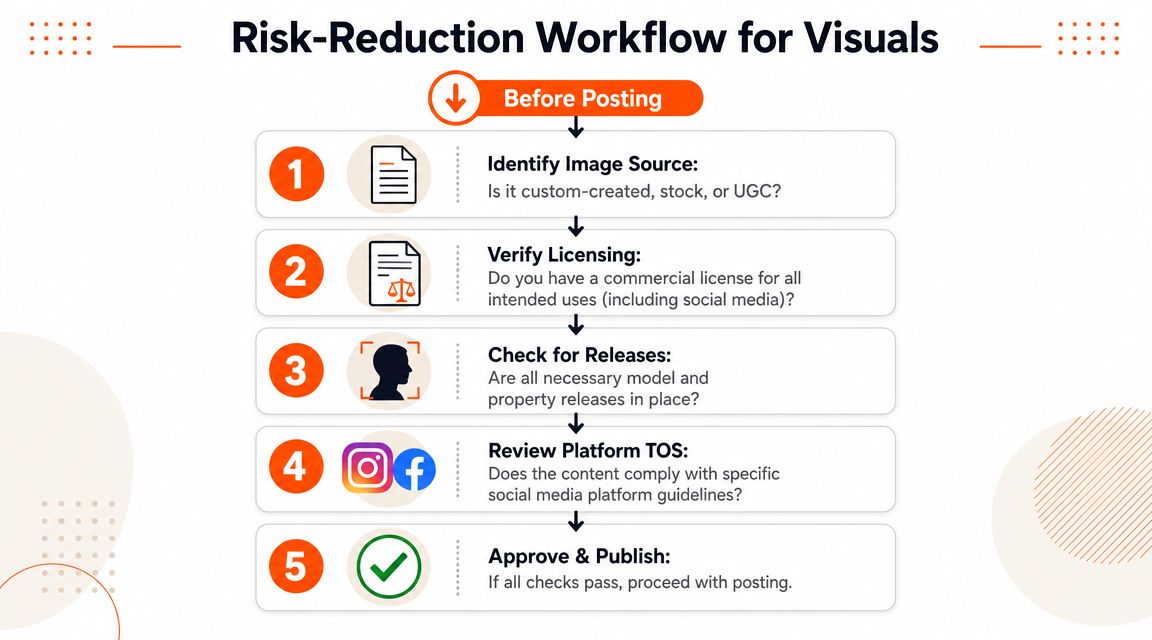
Use a simple approval path like this:
Begin with source control
Default to owned product photography, approved commercial stock, or clearly licensed creator assets. If no one can confirm the source, the image shouldn't move forward.Separate inspiration from production
Moodboards can include editorial references. Publishing folders can't. Keep those environments distinct so no one mistakes a reference image for an approved asset.Tag assets by rights status
Approved for commercial use, editorial only, needs review, expired, creator permission pending. The label should follow the file wherever it goes.Create variants only from approved files
Social crops, collection banners, listing images, and paid creatives should all inherit from the safe source set.Centralise scheduling after approval
Once images are cleared, publishing can move quickly through your social process. Teams that want to streamline that final step often use tools and references like this guide to a Social Media Scheduler for Instagram, but scheduling only helps if the assets were compliant before they entered the queue.
The rule that saves the most trouble
The clearest internal policy is also the easiest to enforce: no third-party image enters a branded workflow without confirmed commercial rights.
That one rule prevents most of the usual chaos. It also protects junior staff and freelancers, who are often the ones asked to move quickly with incomplete context.
When teams write the rule down, label assets properly, and keep approved files in one place, compliance stops feeling slow.
Make batch production safer
For catalogue teams, the primary gain comes from linking approval to batch processing. Once your source set is approved, your editors and marketers shouldn't rebuild the same judgement call for every SKU.
That's why many teams pair asset governance with repeatable production logic such as AI batch image editing workflows. The point isn't only speed. It's reducing the number of manual decisions that can reintroduce legal risk across dozens or hundreds of outputs.
Frequently Asked Questions
Does a brand-building post count as commercial use
Usually, yes. If the post supports your business, strengthens your brand, attracts customers, or helps sell products, treat it as commercial. It doesn't need a visible price tag to create promotional value.
What if I'm not selling the exact product in the image
That doesn't solve the issue. If the image helps promote your store, collection, or brand identity, the use can still be commercial even when the pictured item isn't your product.
Can I edit an editorial image heavily and make it safe
No. Cropping, filtering, compositing, or stylising an editorial file doesn't automatically create commercial rights. It usually creates a derivative version of the same rights problem.
What if logos appear in the photo
Logos can create added trademark sensitivity, especially when the post suggests endorsement, partnership, or affiliation. Even when copyright isn't the only concern, branded elements can still make the image unsuitable for promotion.
Are editorial images ever acceptable on social media
Yes, but only in an editorial context. That usually means commentary, reporting, education, or public-interest discussion rather than product promotion. Most seller posts don't fit that category.
Is internal-only use different
Internal decks, drafts, and moodboards are different from public promotion, but internal use can still create workflow risk. Teams often pull reference images into public campaigns later by accident. That's why it's smart to label internal reference assets clearly and keep them out of production folders.
What's the safest long-term approach
Use visuals that start from assets you control or licenses that clearly permit commercial use. Then build your catalogue outputs from those approved sources only. That gives you far more flexibility across social, marketplaces, landing pages, and future campaigns.
If your team is trying to turn owned product photos into compliant social, marketplace, and lifestyle visuals without editing one file at a time, MerchLoom is built for that kind of batch workflow. You can process full collections through chained AI image pipelines, keep outputs consistent across channels like Amazon, Shopify, Etsy, and Instagram, and avoid building your catalogue around risky third-party imagery.
Stop editing product photos one at a time
Upload your catalog or connect your store. Describe the result once. MerchLoom does the rest.
Try MerchLoom