
Best AI Product Staging Software for Full Catalogs
Find the best AI product staging software for full e-commerce catalogs. Compare image quality, batch processing, export formats, and pricing.
You're staring at a stack of raw product photos and a marketplace deadline that doesn't care whether you're on Shopify, Etsy, Amazon, or eBay. The job isn't editing one clean hero shot, it's getting two hundred, five hundred, or two thousand images to look like they belong to the same catalog. The fastest path is to treat staging as a pipeline, not a one-off edit.
| Criterion | Dedicated staging platforms | General AI photo editors | Batch workflow platforms |
|---|---|---|---|
| Image quality and resolution | Strong if built for catalog output | Can be good on single images | Strong when tied to export rules |
| Cutout fidelity | Usually the main focus | Varies by editor and tool mode | Strong if cutout is part of the chain |
| Automation depth | Often batch-friendly | Usually lighter automation | Best fit for catalog runs |
| Integrations and connectors | Sometimes limited | Usually basic import and export | Often strongest for cloud and store sources |
| Output formats and sizing | May support marketplace presets | Usually manual | Best for repeated platform-specific exports |
| Pricing model | Often per image or credits | Often subscription-led | Often usage-based or hybrid |
| Speed and throughput | Fast on staged batches | Good for quick edits | Best when the same flow repeats |
| Consistency across a catalog | Good if presets hold | Can drift across many files | Best when one pipeline drives every SKU |
Two Hundred Photos, Not One
A single image can fool you. It looks fine on your screen, the background is gone, the product sits in the middle, and you move on. Then the listing team uploads 300 more files, and the problems show up, different shadows, mismatched crops, cut edges that change from SKU to SKU, and main images that miss platform rules.
That's why the best AI product staging software has to be judged at catalog scale. If you sell across Amazon, Etsy, Shopify, WooCommerce, eBay, Poshmark, or Depop, the question isn't whether one image looks good. It's whether the same workflow can turn a full folder into a clean, platform-ready batch without drifting.
Practical rule: if a workflow can't be repeated across a 500-SKU catalog without manual babysitting, it's not really a staging system, it's a one-image editor.
For marketplace sellers, the unit of work is the catalog, not the photo. That means the software has to handle import, preprocessing, staging, sizing, review, and export in one run, then do it again next week with the same output rules. The best systems are the ones that keep the same light, angle, crop, and background treatment across every SKU, because that's what makes a store look deliberate instead of patched together.
This article is built for that reality. If you want a quick refresher on how product photos should look before staging, the baseline is covered in how to make product photos look professional. The focus here is what changes when the job moves from one image to hundreds, and how to pick software that can keep up.
What to Judge AI Staging Software On
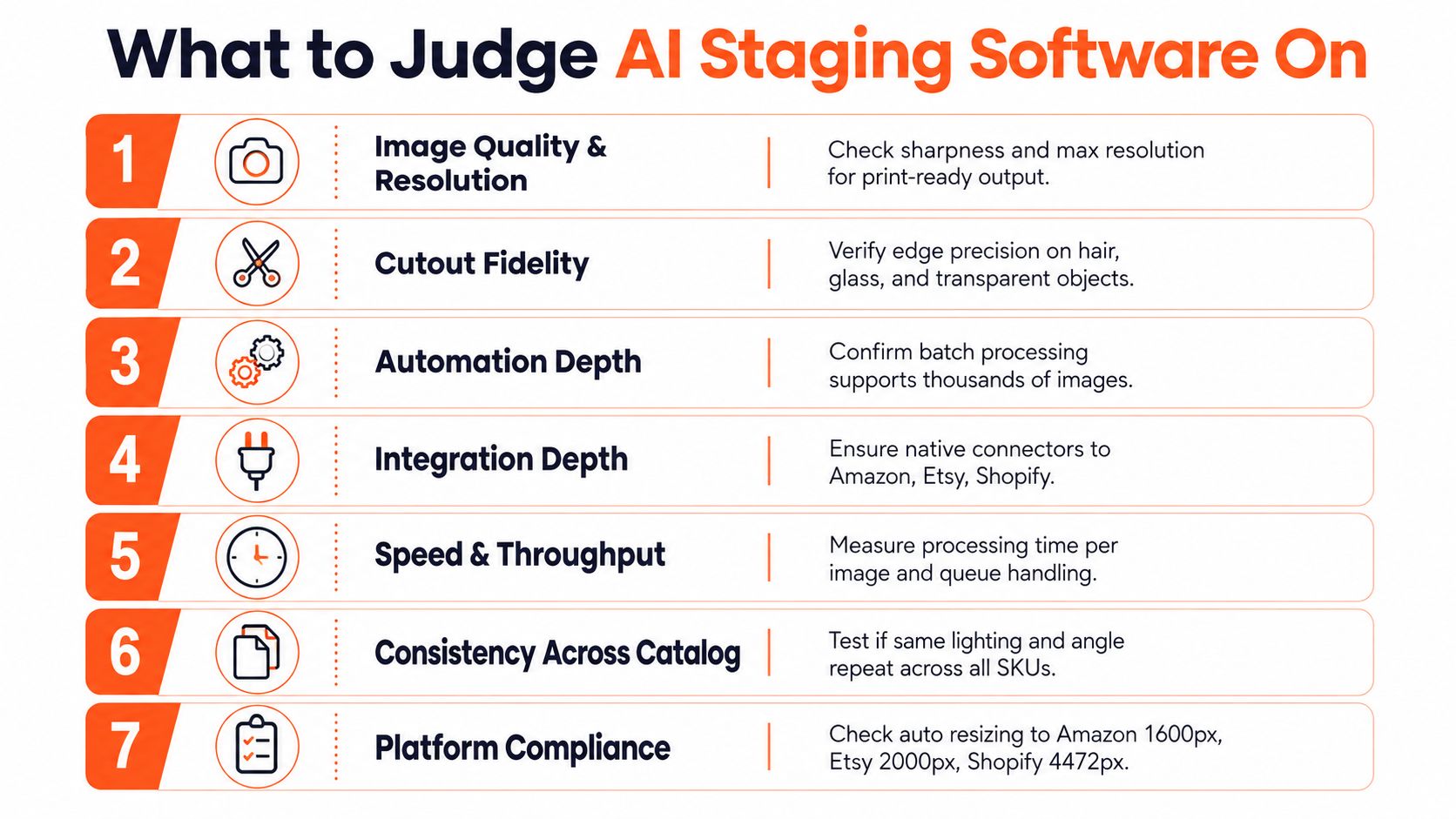
Start with platform compliance, not scene style
A staging tool can produce a nice hero image and still fail the job if it exports the wrong file shape. Amazon main images need pure white RGB 255,255,255 and the longest side at 1600px or more. Etsy's guidance uses 2000px on the shortest side, while Shopify supports square images up to 4472x4472. If the software cannot hit those targets cleanly, the batch stalls before it reaches a listing team.
The seven criteria that matter most at catalog scale are image quality and resolution, cutout fidelity, automation depth, integrations, output formats and marketplace sizing, pricing per image versus subscription, speed, and consistency across hundreds of files. I put the heaviest weight on pipeline control, because a staging stack has to process imports, preprocessing, staging, sizing, review, and export in the same run, then repeat that workflow next week with the same output rules. A tool that looks polished in a demo can still break when the same preset runs across a 500-SKU catalog.
Edge handling separates usable software from a nice screenshot. Glass, transparent packaging, fine hair, and product shadows need to hold up after cutout and relighting, or the catalog starts to look patched together. The tested tool comparison in the verified data showed one system with direct export to major ecommerce platforms, up to 8K output, and clean edge preservation, while others were limited to manual export only, 4K output, or showed visible edge artifacts and fringing. That gap becomes obvious when every SKU has to follow the same preset.
Speed matters too, but only alongside output control. The workflow-speed comparison shows some AI-first pricing as low as $0.28 to $0.40 per image with turnaround in seconds, while designer-led staging is roughly $10 to $35 per image and can take 24 to 48+ hours. Those ranges shape how a seller schedules listing work, but the question is whether the software can keep that pace without changing the crop, background treatment, or export settings from batch to batch workflow-speed comparison.
For a practical baseline on what marketplace-ready product photography has to support, the Headline Marketing Agency guide is a useful reference. The same logic applies if you read MerchLoom's image workflow automation guide, because catalog staging is a control problem first and a render problem second.
How the Current AI Staging Tools Compare
Three buckets, three different bottlenecks
The current field falls into three buckets. Dedicated virtual staging platforms usually center on scene generation and fast batch output. General AI photo editors are better at broad image cleanup, but staging is only one part of what they do. Batch workflow platforms are built for catalog operations, so import, chaining, review, and export matter as much as the final render.
That split matters because the bottlenecks are different. A solo seller with 20 photos needs convenience. A marketplace seller with 2,000 images needs repeatability, source connectors, and output control. The tested comparison of product staging tools showed that the deciding factors were not just scene quality, but pipeline control, especially batch-ready export resolution and cutout fidelity versus manual export, capped output sizes, and edge artifacts tested tools comparison.
| Criterion | Dedicated staging platforms | General AI photo editors | Batch workflow platforms |
|---|---|---|---|
| Main strength | Fast scene generation | Flexible editing | Repeatable catalog processing |
| Weak spot | May be less flexible outside staging | Staging can be one feature among many | Can feel heavier than a simple editor |
| Export control | Often decent, sometimes limited | Often manual | Usually strongest |
| Catalog fit | Good for moderate batches | Better for mixed editing jobs | Best for full catalog runs |
| Edge fidelity | Varies by tool | Varies by feature set | Strong when cutout is part of the pipeline |
What changes in real use
Dedicated staging platforms work well when the input is already clean and the output target is straightforward. They can be enough for a small catalog refresh or a seasonal drop. They get weaker when you need chained steps, for example background removal, sizing, scene placement, and platform-specific export in one run.
General AI photo editors are flexible, but flexibility can turn into drift. If one person uses one preset and another person changes the crop rule, the catalog stops matching. That causes problems on Shopify and WooCommerce, where storefront consistency affects how the whole brand feels, not just one SKU.
Batch workflow platforms are the closest match for a busy operator. They are built for repeated runs, source connectors, and reusing processed files without re-uploading. For a seller managing multiple channels, that often matters more than having the fanciest background scene.
Market Edge software comparison is a useful parallel if you have ever compared tools by workflow instead of feature list. The same buying logic applies here. If you are comparing platform styles directly, MerchLoom's comparison page shows how the workflow question can be framed without treating every tool as the same kind of product.
Running a Catalog-Scale Staging Workflow
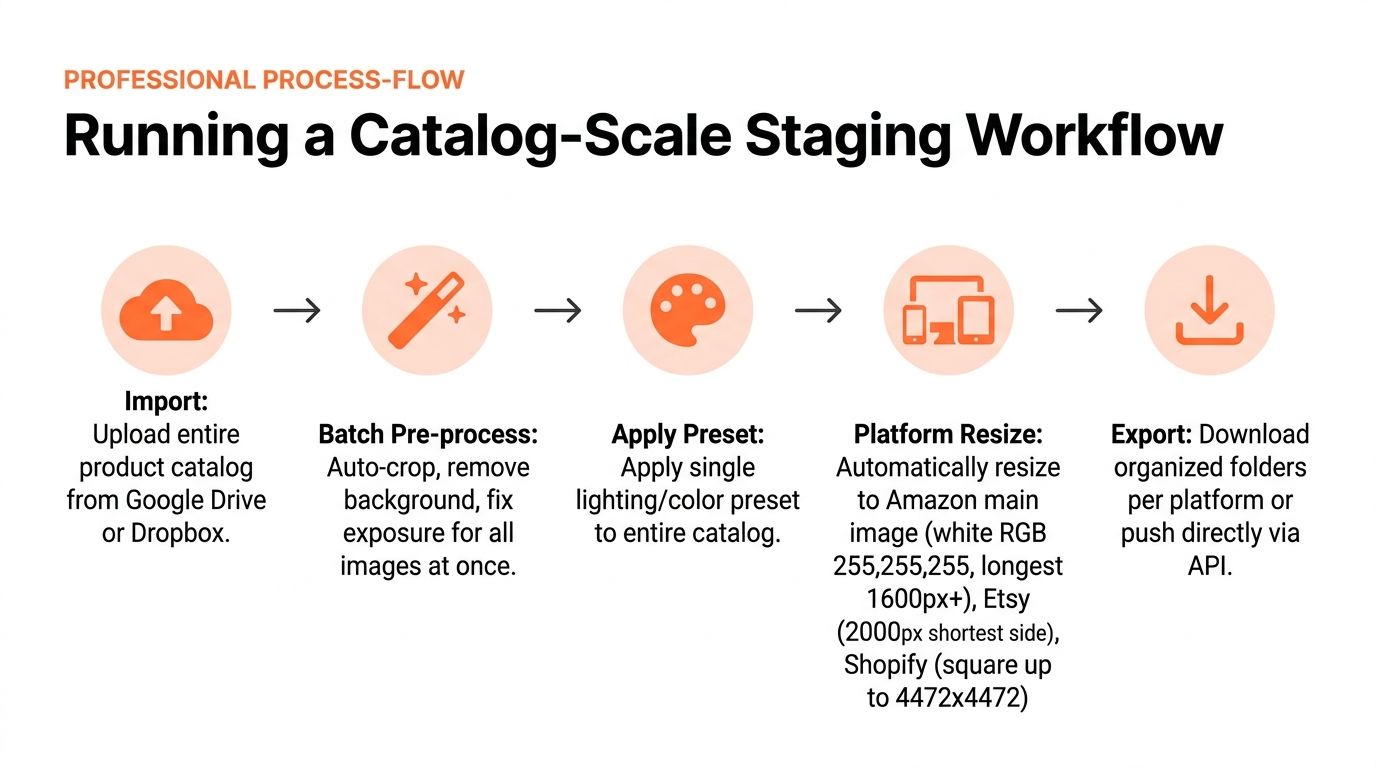
Import first, then describe the output
Doing this for a whole catalog?
MerchLoom runs background removal, upscaling and AI editing across every product photo you have — one prompt, whole batch.
Try MerchLoomA catalog workflow starts by pulling files from the places you already use, Google Drive, Dropbox, Shopify, WooCommerce, Amazon S3, Cloudinary, or similar sources. Don't upload one file at a time. Bring in the whole folder so the software can see the pattern across the set.
Next, describe the output in plain language. Say white background hero image, lifestyle scene, consistent studio lighting, or square storefront crop. The system should convert that into a reusable preset so every SKU follows the same rule set.
The most useful order is the one that reduces cost before the expensive step. In practice, that means remove the background before upscaling, because shrinking the image first can reduce the amount of work the later step has to do. Across a whole catalog, that kind of step ordering saves real time and money.
Practical rule: background removal before upscaling is the right order for big batches, because you want the file as small as possible before the costly part runs.
Review mid-batch, not after the whole run
A good batch system streams results while it works. That gives you a chance to inspect the first 20 or 50 images, catch a bad crop rule, and adjust the pipeline before the rest of the catalog finishes with the same mistake. If you wait until the end, you waste the whole run.
Then export into organized folders per platform, or push the output directly where the platform supports it. The output should stay reusable, because you'll often need the staged image again for ads, marketplace listings, or a seasonal refresh. Reusing processed images as inputs without re-uploading keeps the workflow from turning into file management hell.
MerchLoom's batch image editing guide reflects this same operating logic. One catalog, one pipeline, multiple outputs, with review points in between so a full batch doesn't drift.
Which Category Fits Which Seller
High-volume stores need consistency first
A high-volume Shopify or WooCommerce seller usually needs batch staging more than anything else. Thousands of SKUs mean the same lighting, crop, and background treatment have to repeat cleanly, and Shopify's square canvas up to 4472x4472 makes that even more relevant when you're building a storefront grid. If the output drifts, the whole collection looks disjointed.
A multi-platform arbitrage seller has a different problem. Amazon wants the main image on pure white RGB 255,255,255 with the longest side at 1600px or more, while Etsy uses 2000px on the shortest side. That seller needs software that can export the same source image into multiple compliant versions without manual rework.
A single-platform hobbyist can get by with simpler tooling if the catalog is small and the listing cadence is light. The moment the photo count rises or the workflow has to repeat every week, the value shifts toward automation and preset control.
Match the tool type to the job
Furniture and home decor sellers usually need room scenes and scale consistency. Fashion and apparel sellers need on-model or try-on visuals that stay visually aligned across a collection. Thrift and vintage sellers on Poshmark and Depop often need speed and cleanliness more than elaborate staging.
Agencies and in-house creative teams should think about handoff and repeatability. If different people touch the same pipeline, the tool has to preserve rules across batches, not just produce a nice sample frame. Real estate teams sit in a similar place, where staged output has to be repeatable across many listings, not just one showcase property.
For marketplace-heavy sellers, the rule is blunt. If the tool can't generate compliant output at the right size, or if the same batch looks different from item to item, it's the wrong category for the job.
Pricing and Unit Economics at Catalog Scale
The pricing decision gets clearer once the workflow has to run across a catalog instead of a single hero image. For sellers who stage in batches, the question is what each finished listing costs after retouching, export, and rework are included. AI-first tools usually stay in a low per-image band, while designer-led services sit much higher and add wait time into the cost of every run. That difference matters more when the same pipeline has to process 500 SKUs with consistent output.
A 20-photo listing can be economical with lower-cost AI bulk tools, or expensive with premium human services, depending on how much manual handling sits behind each image. The exact total matters less than the structure behind it. If every batch needs a person to review each frame one by one, the labor cost grows with the catalog. If the software keeps the same settings, crop rules, and staging logic across the run, the cost per image stays closer to the machine rate instead of the labor rate.
That is the unit-economics test. A seller should calculate cost per approved image, not just cost per generated image. Revisions, failed exports, and size fixes belong in the same bucket, because those are the hidden steps that turn a cheap-looking tool into an expensive one at scale.
MerchLoom pricing follows the pay-per-image logic that fits spiky or seasonal catalogs. That model works best when volume comes in bursts, such as launches, drops, or holiday prep, because idle capacity does not sit on the books between runs. For sellers whose catalog size changes from month to month, that kind of pricing keeps the staging budget tied to actual throughput instead of a standing seat or a fixed production minimum.
The bigger operational question is consistency across batches. If the same product set has to be exported in multiple sizes, with the same cutout quality and the same visual rules, then the cheapest image is the one that does not need to be touched again. For catalog-scale sellers, unit economics are not only about the sticker price of generation. They are about how many images clear the pipeline cleanly the first time, how much review time each batch consumes, and whether the workflow can keep repeating without a new manual pass.
Why Pipeline-Based Platforms Change the Work
The shift is not prettier output. It's that the work stops being a loop of open, edit, export, repeat, and turns into a repeatable pipeline the seller describes once. That matters when you're processing a full collection, because the seller is no longer managing individual photos, they're managing a system.
One option in that category is MerchLoom, which runs chained AI image workflows across existing catalogs, so the first images can be tried without an account and the model is pay-per-image with credits that never expire. It's not a substitute for human review, and it shouldn't be treated like a full Photoshop replacement. It's a way to run the same staging logic across a batch instead of opening the same tool two hundred times.
That's the practical takeaway. Pick the category that fits your catalog size, your platform mix, and how much control you need over export sizing, cutout quality, and batch consistency. Build the pipeline once, test it on a real batch, then reuse it on the next drop without starting over.
If you want a batch workflow that can run across a full catalog instead of one image at a time, visit MerchLoom and test it on a few product photos first. You'll see how staged outputs, chained steps, and catalog-level processing fit the way a busy seller works.
Stop editing product photos one at a time
Upload your catalog or connect your store. Describe the result once. MerchLoom does the rest.
Try MerchLoom