
Benefits of Workflow Automation for E-commerce Teams
Discover the benefits of workflow automation for e-commerce image pipelines: faster processing, fewer errors, lower costs, and consistent visuals that boost
You're staring at a folder of product photos and a launch deadline that doesn't care how tired you are. The first few images look fine, then the edits start drifting, the backgrounds stop matching, and one export gets missed because you're clicking through the same steps for the hundredth time. That's where the benefits of workflow automation stop being abstract and start being operational.
The fix is not “edit faster.” The fix is to stop treating each image like a separate project. Build one repeatable pipeline for the whole catalog, then make that pipeline do the boring work the same way every time.
The Moment a Catalog Outgrows Manual Editing
The wall usually shows up right before a restock, a seasonal drop, or a marketplace expansion. You think you're just cleaning up 300 listings, but by image 47, the white balance is already drifting and by image 120 you're making judgment calls you shouldn't have to make at all. The result is a catalog that looks assembled by different people on different days, because it was.
That's the true failure of manual editing at scale. The first ten files get careful attention. The last ten get whatever speed and focus you have left. Somewhere in the middle, a couple of files miss the right background treatment, a crop gets tighter than the rest, and the listing grid starts looking sloppy.
This guide is for the seller who has to ship the whole batch, not perfect one hero shot. The unit of work is 200 images, not 1. If you still want a step-by-step on editing a single file, that's not the problem here, and this batch editing guide is the better place to start.
Practical rule: if you're repeating the same image fix more than a few times, it should become a workflow, not a manual habit.
What matters now is consistency across the catalog. Once you have enough SKUs, the question isn't whether you can edit one image well. It's whether you can produce the same result 200 times without burning hours and attention you need elsewhere.
What Workflow Automation Means for Image Operations
Workflow automation for image work is a saved sequence of steps that runs across a batch without asking you to re-decide every file. It starts with a trigger, like importing a folder from Shopify, Dropbox, or a camera dump, then it moves through rules that keep the process consistent. In plain English, you define the recipe once, then reuse it.
A useful pipeline for a product image usually looks like this. Import the raw file. Normalize the orientation. Remove the background. Set the canvas. Resize for the target marketplace. Export in the right format. Verify that the result passes the rule set. That is not a design task, it's a production task.
The reason this matters is simple. Repetitive work such as approvals, routing, file prep, quality checks, and reporting can be turned into repeatable workflows, and that lets people focus on exception handling and customer-facing work instead. McKinsey research cited in industry analyses found that 66% of organizations had experimented with business-process automation in at least one function, up from 57% the year before, and estimated that 60% of occupations contain at least 30% of activities that could technically be automated (source). That's why the automation conversation is no longer niche.
For a deeper look at how chained steps fit together, the agentcentral guide to agent workflows is a useful reference because it frames automation as orchestration, not one-off actions.
MerchLoom does this as chained AI pipelines across batches, so you're not babysitting every file. The image workflow overview is relevant if you want to see how the pieces connect in a catalog context.
Useful distinction: a single-image tool solves one file. A workflow solves the same file type 500 times without changing the logic.
The Four Operational Benefits at Catalog Scale
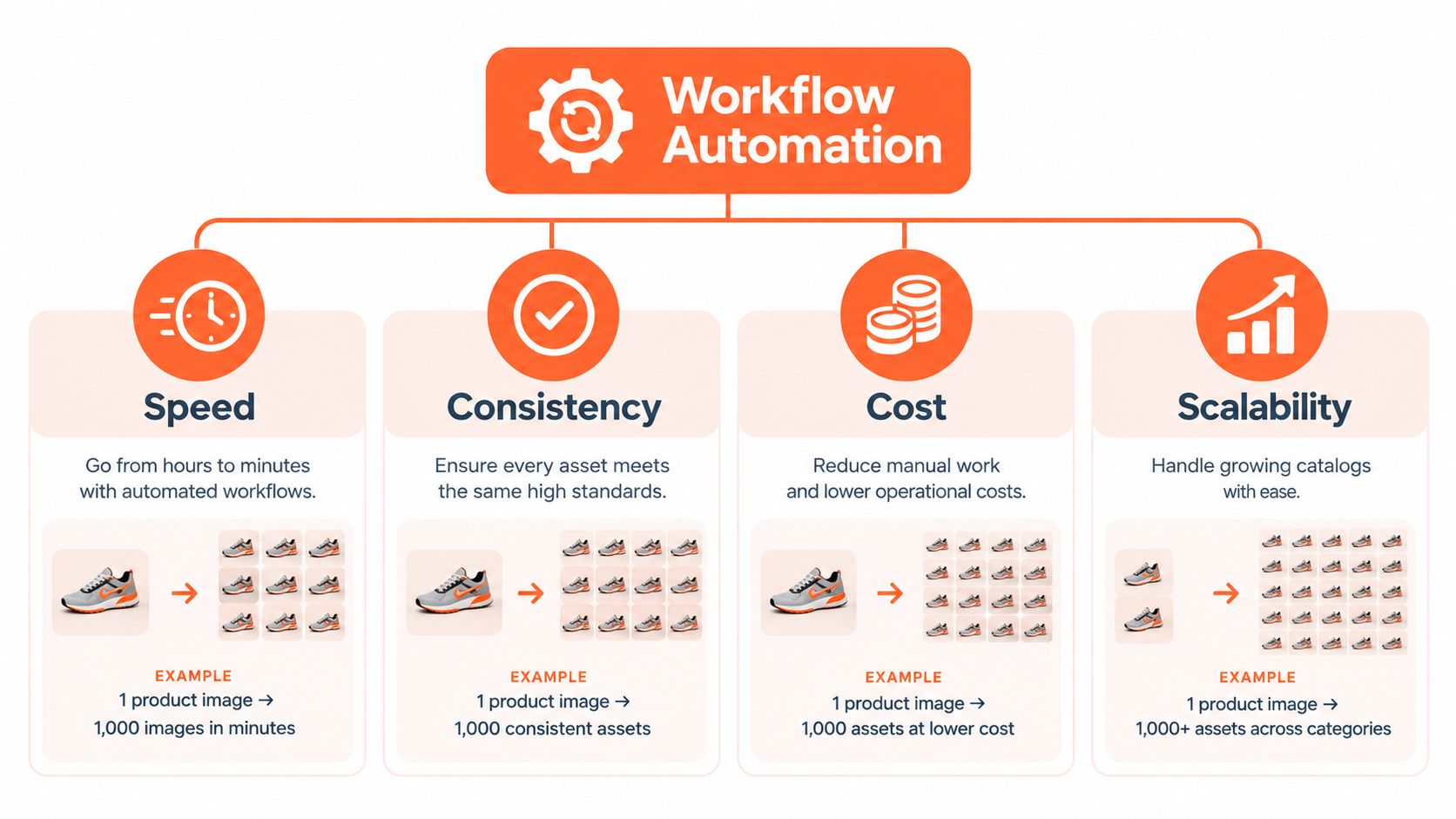
A catalog does not become efficient because one image processes faster. The workflow has to improve every asset moving toward publication. Speed, consistency, cost control, and scalability work as one operating system. Speed without consistency produces bad listings faster, while cost control without scale creates a process that breaks as the catalog expands.
Speed
Manual editing stalls on repeated decisions about crops, backgrounds, dimensions, and file output. A batch workflow sets those decisions once, then applies them across the launch set. The practical gain is clearing a product batch before its market window closes, not merely saving a few minutes on individual files.
Consistency
A catalog looks unreliable when product images use different crops, shadows, margins, or color treatment. Automated rules keep those variables aligned across Amazon, Etsy, and Shopify, where shoppers scan a grid of listings rather than judge one isolated image. That visual control also reduces rework before upload.
Cost
Processing order affects the bill. Removing the background before upscaling shrinks the file before the expensive step runs, which is why pipeline order can cut cost dramatically. Normalize dimensions and trim files early, then reserve heavier transformations for assets that still need them. For a fuller treatment of getting more output from the same process, see this guide to improving workflow efficiency.
Scalability
A reliable recipe should handle 50 SKUs or 5,000 without requiring a matching increase in staff. If every catalog expansion adds manual operators, the bottleneck remains, regardless of how polished the process looks. A real workflow absorbs volume while preserving the same rules and review points.
These benefits reinforce one another. Fast processing reduces launch delays, consistent outputs reduce corrections, lower processing demand controls spend, and scale lets the operation support a larger catalog without becoming a staffing problem.
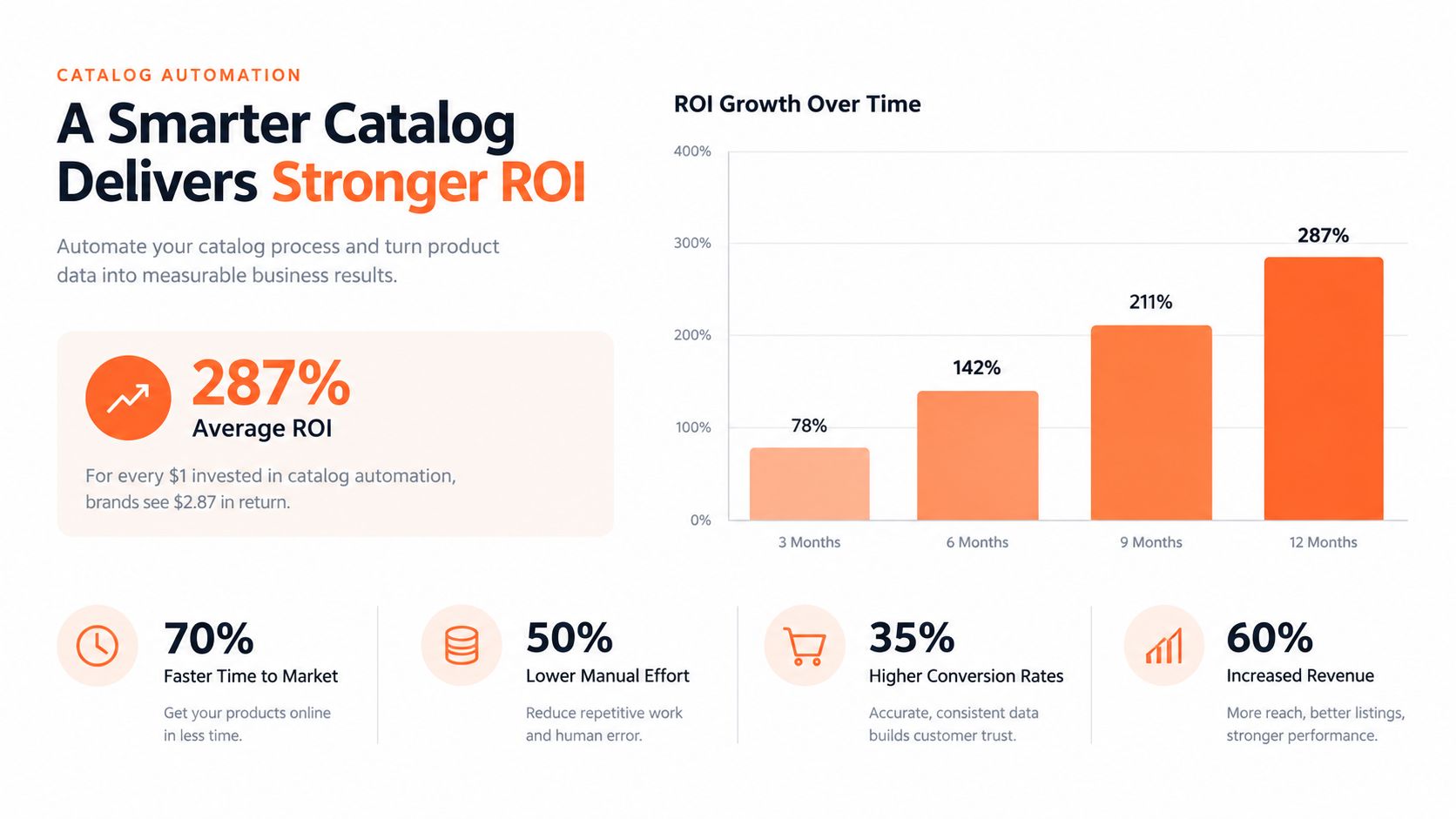
Measure the ROI through processing time, rework, error rates, and output capacity. A study of workflow automation implementations reported an average 28% increase in production efficiency and a 32% reduction in error rates across sampled enterprises (source). Those figures are benchmarks, not promises for every catalog, but they identify the operational levers worth tracking.
Marketplace Specs a Workflow Must Enforce
Doing this for a whole catalog?
MerchLoom runs background removal, upscaling and AI editing across every product photo you have — one prompt, whole batch. Try 2 batches free, no signup.
Try it freeYour workflow should enforce marketplace rules automatically, because checking them by eye on every image is a waste of time and a recipe for misses. Amazon, Etsy, and Shopify all want different output behavior, and a catalog-scale process has to respect those differences without turning every file into a special case.
| Platform | Background | Recommended size | Format | Key rule |
|---|---|---|---|---|
| Amazon | Pure white, RGB 255,255,255 | Longest side 1600 px or more for zoom, up to the platform's accepted range | JPEG is recommended, and Amazon accepts JPEG, TIFF, PNG, and non-animated GIF | Main image should show the actual item, fully visible, and occupy about 85% of the frame |
| Etsy | No special background rule for every listing image, but color handling matters | 2000 px on the shortest side is the practical recommendation | JPG, GIF, PNG, but no animated GIFs or transparent PNGs | Convert to sRGB if colors appear off, and keep the first image strong in the grid |
| Shopify | Consistent square aspect ratio | Square outputs around 2048 x 2048, within Shopify's image limits | Accepted product-media formats, with files under 20 MB | Keep subject position and margins consistent so bulk uploads display evenly |
Amazon is the strictest place to fail. The official image guide requires a pure white background with RGB values 255,255,255, the product must be the actual item sold, show the full item, and occupy about 85% of the frame. Amazon also says the longest side should be at least 1600 pixels to enable zoom, and it accepts JPEG, TIFF, PNG, and non-animated GIF files, with JPEG recommended (Amazon image guide). If your workflow doesn't enforce those rules, you'll end up fixing listings after upload.
Etsy is less rigid on the background, but the image quality still matters. Etsy recommends images with width and height of at least 2000 pixels, supports JPG, GIF, and PNG, and warns against animated GIFs and transparent PNGs. It also advises converting to sRGB when colors appear incorrectly (Etsy image requirements). That's a color and sizing problem, not a design problem.
Shopify is about consistency and fit. Shopify's official guidance says product and collection images can be up to 5,000 by 5,000 pixels or 25 megapixels, with file size below 20 MB, and that square product images at 2048 by 2048 usually display best. Its developer documentation also lists a maximum of 4,472 by 4,472 for product media (Shopify product media guidance). If you're also running ads, these TikTok ad specs and ratios are a useful reminder that every channel has its own framing rules.
The point is not to memorize rules. The point is to bake them into the workflow so bad files get flagged before upload. For a tighter Amazon-specific breakdown, the Amazon product image requirements guide is the kind of reference you should keep close.
Operational rule: don't let people “check” marketplace specs by eyeballing 300 files. Make the pipeline reject what doesn't fit.
Manual Editing vs Automated Batch Workflows
The gap between manual work and automation shows up fast once a catalog gets large. Manual editing feels flexible at first, then it turns into fatigue, drifting standards, and missed exports. Batch workflows remove those failure modes by applying the same validation every time.
| Dimension | Manual one-by-one editing | Automated batch workflows |
|---|---|---|
| Time per image | Every file needs fresh attention | The recipe runs repeatedly with little extra effort |
| Cost per approved asset | Labor rises with volume and rework | Lower labor per file when the workflow is stable |
| Consistency | White balance, framing, and background drift over time | Rules stay the same across the full catalog |
| Peak season | Review queues pile up and slow launches | The same process handles bigger batches without extra handwork |
A manual workflow usually breaks in the same places. Someone gets tired and the crop shifts. Someone forgets the export preset. Someone approves a file that should have been routed back for cleanup. None of that is surprising, it's just what happens when human attention is the main control system.
Automation changes the operating model. The workflow becomes the control system, and humans step in only when a file breaks the rule set. For a seller managing seasonal spikes, that means the catalog doesn't stop because one person is still clicking through the same cleanup steps.

If you want a broader automation lens beyond image prep, the Amazon marketing automation playbook is useful context because it treats automation as an operating layer, not a software feature.
Building a Simple ROI Model for Catalog Automation
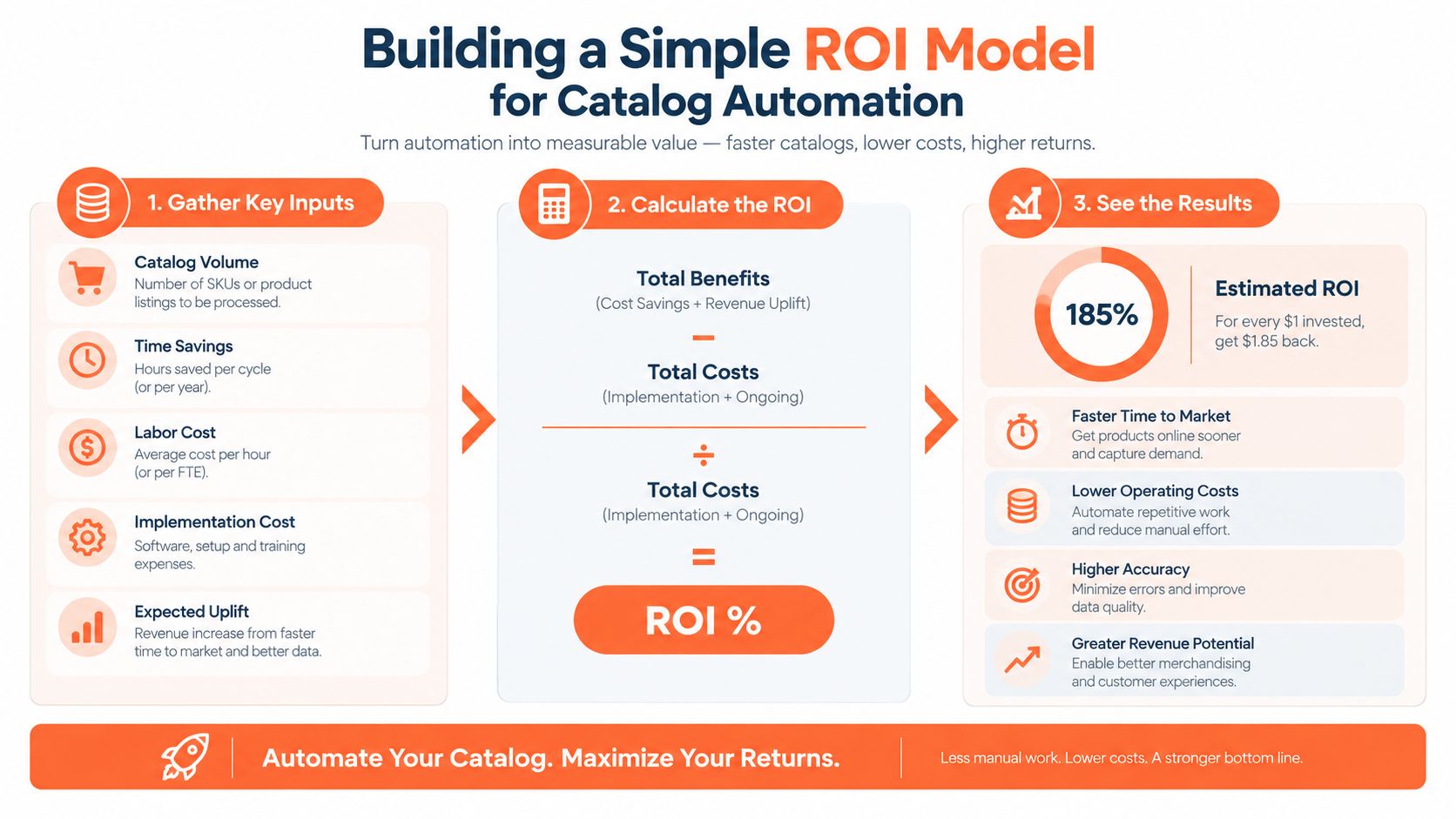
Start with one number, the cost per approved image. Add labor minutes, AI credits, and rework minutes. That gives you the actual unit cost, not the fantasy number people use when they forget to count the time spent fixing rejected files.
Then add the gains people usually skip. The first is avoided rework, because fewer bad files means fewer exports, fewer corrections, and fewer listing delays. The second is earlier marketplace launch, which matters when seasonal demand is already moving. The third is reduced repeat processing, because a good workflow puts cheap steps before expensive ones and avoids doing the heavy work twice.
The OECD's SME research is a good reality check here. Among SMEs using generative AI, 65.1% reported improved employee performance, yet 83% reported no change in staffing, which suggests value often shows up as increased capacity and reduced workload rather than headcount reduction (OECD report). That's the right lens for catalog automation too. Don't promise layoffs. Measure throughput, rework, and speed to publish.
For a monthly catalog of 500 images, the question is whether manual processing time plus rework costs more than a batch run with per-image credits. In most real operations, the break-even point shows up inside one cycle because the savings come from labor avoided, not just labor reduced. If you move faster and reject fewer files, the catalog pays back sooner than people expect.
Practical metric set: track time-to-publish per SKU, percent of outputs accepted without revision, and cost per approved asset.
The price-for-product-photography guide is worth keeping nearby if you need a simple way to compare internal labor cost against a per-image workflow.
High-Value Batch Image Automation Use Cases
The fastest payback usually comes from the work you do every season. White-background main images for Amazon are the obvious one, because the rules are strict and the output is repetitive. Marketplace-specific variants for Amazon, Shopify, and Etsy from a single source file are next, because one product shot can become several channel-ready versions without starting over.
Lifestyle scenes and on-model mockups are useful when the same SKU needs ad creative as well as listing images. Packaging mockups help before a launch when the buyer needs context, not just a cutout. Consistent color correction matters when product photos come from different shoots, different cameras, or different lighting conditions.
A good workflow chains those use cases together. Background removal can feed marketplace sizing. Marketplace sizing can feed ad creative. Ad creative can feed collection pages. That reuse is where the time savings stack up.
The second run should feel almost cheap compared with the first. The workflow already knows the crop, the export rules, the color treatment, and the destination format. You're not rebuilding the process, you're reusing it.
Keeping Human Review and Trust in the Loop
The biggest mistake is pretending automation should run unattended. It shouldn't. AI output still needs human review, especially on color, proportions, realism, and marketplace compliance. If you remove the human check, you're just scaling mistakes faster.
Governed automation is the right model. Keep the source assets. Set approval thresholds. Show the cost before the run starts. Route only flagged outputs to review. That way, the workflow does the repetitive work, and you keep control over the decisions that affect trust.
BCG's 2025 global survey of more than 10,600 leaders, managers, and frontline employees found frontline AI use stalled at 51%, while employees in organizations undergoing full-scale AI-driven workflow redesign reported higher job-security concerns at 46% versus 34% elsewhere (BCG survey). That's the trust problem in plain numbers. If people think automation is hidden, they resist it. If they can see the rules and the review path, they're more likely to use it.
MerchLoom fits for catalog work. It runs chained AI pipelines across whole collections instead of one image at a time, and you can try the first images without an account. It's pay-per-image, credits never expire, and you still review the output like a human who cares about the brand.
Treat workflow automation as the catalog operating system, not a shortcut. Build the rules once, run them across the batch, and keep your judgment on the files that actually need it. If you want to cut the manual grind on product photos and keep listings consistent across Amazon, Etsy, and Shopify, visit MerchLoom and test a batch on your own catalog.
Stop editing product photos one at a time
Upload your catalog or connect your store. Describe the result once. MerchLoom does the rest.
Try it free — no signup