
Stable Diffusion Reddit: AI Art for E-commerce 2026
Discover the Stable Diffusion Reddit community. Find prompts, learn tips to generate consistent, batch-processed product images for your e-commerce store in
You've got a folder full of product photos, a launch date that won't move, and a budget that doesn't leave room for hand-editing every shot. That's where Stable Diffusion Reddit becomes useful, but not in the way most threads suggest.
Most Reddit posts about Stable Diffusion focus on one striking image. A cinematic portrait. A fantasy render. A clever prompt that works once. Sellers don't need that. They need a workflow that can clean, extend, resize, and standardise a whole catalogue without turning every SKU into a different visual style.
That gap matters more now because batch workflow automation for e-commerce catalogues is rarely discussed in Stable Diffusion Reddit communities, despite a 68% year-over-year increase in AI image generation adoption among CA-based e-commerce brands. If you sell on Amazon, Shopify, or Etsy, the problem isn't whether AI can make one good image. It's whether you can trust it across hundreds.
From Reddit Creativity to E-commerce Catalogs
Stable Diffusion Reddit is messy, opinionated, and often brilliant. It's also full of ideas that break the moment you try to apply them to a real product catalogue.
A seller looking for lifestyle scenes for 300 SKUs runs into the same problem fast. Reddit gives you prompts designed for visual drama, not listing consistency. You'll see amazing examples with moody lighting, aggressive stylisation, and model-specific tricks that are hard to repeat across a full collection. That's useful for inspiration, but it doesn't solve operational work.
What Reddit is good at
Reddit is strong in three areas that matter to sellers:
- Prompt discovery. You can spot language patterns that create the lighting, depth, texture, or environment you want.
- Parameter testing. Threads often reveal what settings produce stable outputs and what settings cause drift.
- Failure diagnosis. When generations look waxy, distorted, or off-brand, Reddit usually has examples of what went wrong.
The mistake is treating those threads as ready-made production methods.
Practical rule: Use Reddit to collect techniques, not to copy workflows wholesale.
A better approach is to translate creative experiments into a controlled production process. That means identifying which parts of a Reddit post are reusable. Usually it's the lighting language, framing logic, or material description. It's rarely the full prompt.
The shift from one image to many
For e-commerce, the effective bridge between Stable Diffusion Reddit and business value is batch processing. A single good output proves possibility. A repeatable batch proves usefulness.
If you're editing one hero image, you can tolerate trial and error. If you're processing a collection, you need rules:
- Group similar products together so reflective metal items aren't processed with matte paper goods.
- Lock the visual intent before you generate variants.
- Define output requirements by platform before the first batch runs.
Sellers who also care about discoverability should think beyond the image itself. Product visuals increasingly sit inside a broader content system that includes titles, metadata, and answer-ready descriptions. That's why it's worth understanding optimizing for AI-generated answers alongside image production. The images and the surrounding product information now influence each other.
If you need a practical reference for turning raw product photos into AI-ready inputs, this write-up on an AI product photo generator workflow is useful because it frames the job as a catalogue problem, not an art prompt exercise.
Navigating the Stable Diffusion Reddit Ecosystem
Not every subreddit helps a seller equally. Some communities are excellent for technical tuning. Others are mostly galleries. If you're using Stable Diffusion Reddit for commerce, you need signal fast.
The biggest centre of gravity is r/stablediffusion, which has over 1.2 million members globally as of 2025. Size helps because more users means more prompt examples, workflow screenshots, and troubleshooting threads. It also creates noise. A popular post may be visually impressive and still be useless for catalogue work.
Which communities are worth your time
Here's the filter I use when evaluating a subreddit or thread: does it help me make outputs more repeatable, more compliant, or less manual?
| Subreddit | Primary Focus | Best For E-commerce Sellers For... | Content Type |
|---|---|---|---|
| r/stablediffusion | General Stable Diffusion discussion | Broad troubleshooting, model discussions, workflow discovery | Mixed posts, showcases, technical Q&A |
| Model-specific communities | Particular checkpoints, LoRAs, or interfaces | Understanding how a model behaves before you test product images | Narrow technical threads, examples |
| Tool-focused communities | UI and workflow tooling | Learning interface-specific setup and automation habits | Tutorials, config discussions |
| Prompt-sharing communities | Prompt experimentation | Borrowing lighting, scene, and composition language | Prompt examples, image pairs |
This is less about subreddit branding and more about post patterns. The best commercial insights often come from technical users who show inputs, settings, and outputs together.
What to click and what to skip
A seller usually gets the most value from posts that include:
- Workflow details such as sampler, prompt structure, or before-and-after examples
- Comparisons between settings, models, or prompt variants
- Problem-solving threads where users explain why something failed
- Commercially neutral examples that focus on objects, materials, and lighting instead of character art
Skip threads that only show a finished image with no method. They can inspire art direction, but they won't help you build a process.
Posts with reproducible detail beat beautiful results without context.
Reading Reddit like an operator
The strongest Stable Diffusion Reddit users think like lab technicians. They change one thing, observe the output, then document the result. That mindset transfers well to product imaging.
Watch for these unwritten rules:
- Respect the model context. Advice for anime, portraits, or fantasy scenes often doesn't transfer well to bottles, furniture, or packaging.
- Check whether the prompt depends on a specific LoRA or checkpoint. If it does, your result may collapse on another stack.
- Read the comments, not just the post. The comments often contain the real fix, especially when the original poster leaves out a key setting.
If you're a seller with limited time, don't browse endlessly. Save examples into three folders or notes: lighting language, environment language, and troubleshooting. That gives you a practical library you can use when a product line needs fresh visuals without rebuilding your approach from scratch.
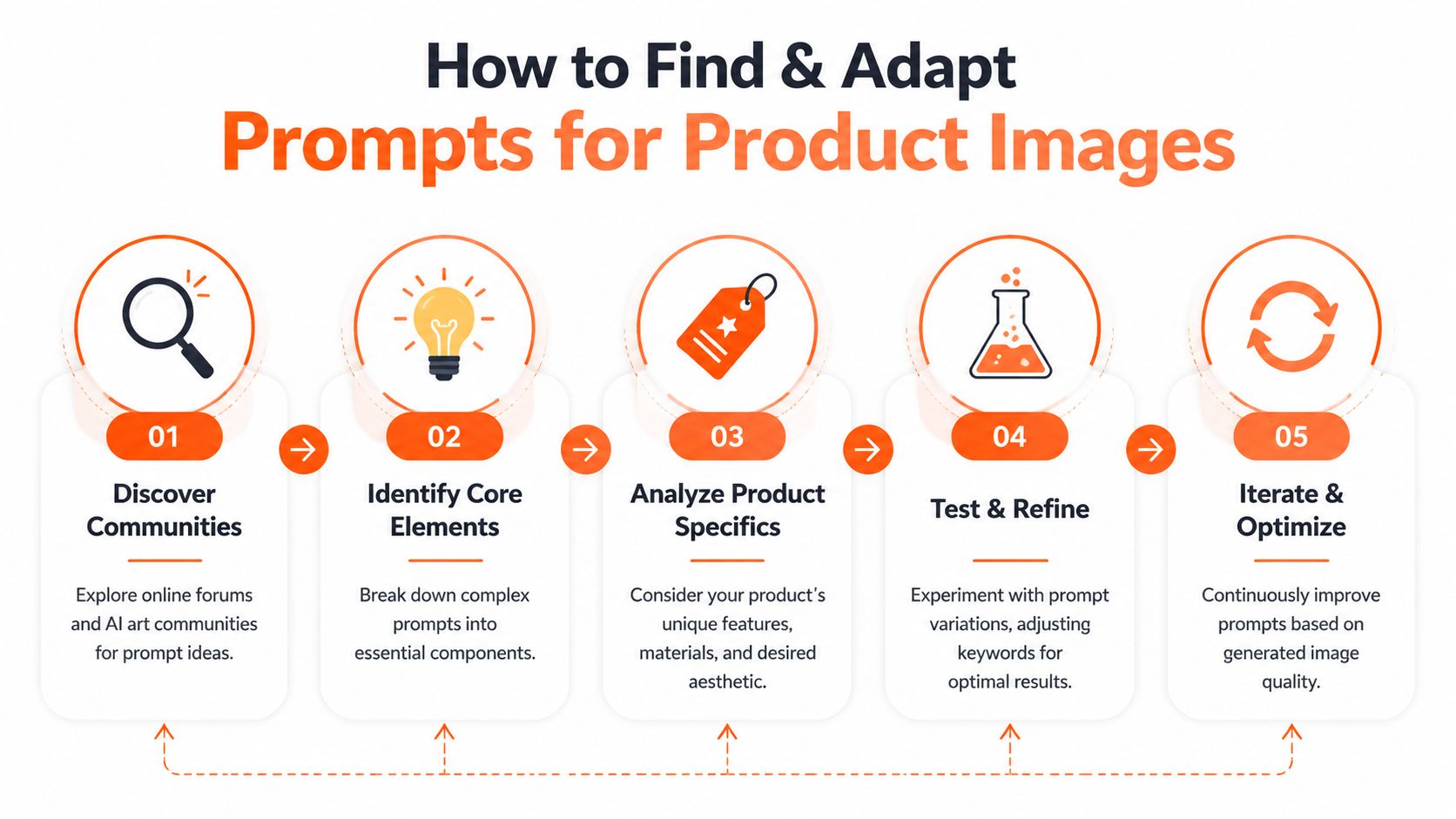
How to Find and Adapt Prompts for Product Images
Most Reddit prompts aren't written for products. They're written for spectacle. That doesn't make them useless. It just means you need to strip them down to the parts that affect commercial imagery.
Start with the structure, not the subject
When I review a Reddit prompt, I ignore the original subject first. I look at what the prompt is doing mechanically:
- Is it defining camera distance?
- Is it creating soft studio light or hard directional light?
- Does it specify surface material like marble, linen, wood, or glass?
- Is the image anchored by composition terms such as centred, top-down, close-up, or isolated?
That's the reusable layer. A fantasy sword prompt may still contain lighting language that works perfectly for a stainless steel water bottle.
A practical example helps. If a Reddit prompt says the scene is a dramatic object on a stone surface with rim lighting and shallow depth of field, the product term can change completely while the visual logic stays useful. Replace the sword with a serum bottle, remove the cinematic excess, and keep the texture and lighting cues.
Use a stable testing baseline
Reddit is helpful here because new users often overcomplicate parameter changes. For prompt testing, setting the CFG scale to 4 and steps to 50 with the default negative prompt creates a stable baseline, according to this Stable Diffusion Reddit discussion for new users. For sellers, that matters because consistency starts with controlled tests.
Once that baseline is locked, change one variable at a time:
- Swap the environment. Change “forest clearing” to “white marble bathroom counter”.
- Refine the product language. Add material, colour, finish, and packaging details.
- Tighten the composition. Define isolated, centred, front-facing, overhead, or angled.
- Adjust for commercial realism. Remove adjectives that push the image into stylised or surreal territory.
Most prompt adaptation often fails at this point. People change five things at once, then can't tell which change improved the result.
A strong commercial prompt is usually less poetic than a Reddit showcase prompt.
A concise product prompt often outperforms a dramatic one because it gives the model fewer chances to improvise.
Turn prompt language into listing-ready output
Video walkthroughs can help if you need to see how people iterate rather than just read their final prompts.
Prompt adaptation also has a content side. Once an image is good enough to publish, the supporting text matters. If you're generating or refining catalogue visuals, it's worth pairing that work with a solid guide to alt text for accessibility, especially when the final images need to communicate product details clearly to all users.
A practical adaptation method
Use this three-part prompt format for products:
Product anchor
Name the item clearly, including material or finish if it matters.Scene control
Add the surface, background type, lighting direction, and camera angle.Commercial restraint
Exclude mood terms that create drama but hurt realism.
Doing this for a whole catalog?
MerchLoom runs background removal, upscaling and AI editing across every product photo you have — one prompt, whole batch.
Try MerchLoomIf you want more examples of how to phrase prompts for commercial visuals, this collection of AI image prompts for product work is a useful reference point.
The goal isn't to write the cleverest prompt on Reddit. It's to write the one that survives repetition.
Scaling Up Prompts for Batch Processing Workflows
A prompt that works once is not a workflow. Sellers learn that fast when they move from one hero image to a collection.
The first batch usually exposes the problem. One candle jar looks perfect. The next has a different glass tint. The third shifts the label shape. The fourth gets a shadow style that doesn't match the line. Single-image success creates false confidence because the output can hide inconsistency until you compare many SKUs side by side.

Build a master prompt around a product family
For catalogue work, think in collections. A skincare line, a set of kitchen tools, a range of framed prints. Each group needs a master prompt that defines the essential elements:
- Lighting behaviour across the whole set
- Background treatment for the collection
- Framing rules so thumbnails look related
- Material realism for glass, metal, fabric, paper, or plastic
Then add product-specific inserts only where needed. That keeps the family resemblance intact while allowing for item differences.
This works better than writing fresh prompts for every SKU. Per-image prompt writing almost always causes style drift.
Order matters in chained AI pipelines
A lot of Stable Diffusion Reddit advice treats each action as isolated. Generate. Upscale. Remove background. Retouch. In production, step order changes cost and output quality.
One useful rule is to process background removal before upscaling, because that can reduce image file size before the expensive step and save up to 87% in computational costs for large batches when the pipeline is designed that way. For sellers running large catalogues, that's not a minor optimisation. It's the difference between a testable workflow and an expensive one.
That same ordering logic also makes quality control easier. Clean the object first. Then enlarge or reframe it. If you upscale too early, you spend more resources on pixels you may throw away after masking.
The best batch workflow isn't the one with the most steps. It's the one with the fewest expensive mistakes.
Group before you process
Reliable batch output starts before the AI does anything. Similar products should be grouped by background, lighting, and framing because consistently shot images produce more stable automated results, as explained in this guidance on batch product photo editing.
That means you shouldn't run these together in the same job:
- reflective jewellery and matte ceramics
- flat-lay apparel and upright packaging
- white-background source photos and dark lifestyle captures
The more variation in the input set, the more cleanup you create downstream.
Use batching rules that fit marketplace operations
Parallel processing is one of the practical advantages in modern AI image tools. Some batch systems allow up to 50 images per batch, and that kind of structure matters when you're moving through a catalogue in chunks that are still reviewable.
For quality control, don't inspect every image manually if the workflow is already stable. A better operating habit is to spot-check the output. One practical rule cited for AI batch pipelines is to review exactly 10% of the output to catch issues like product drift, colour inconsistency, or template errors before publishing.
That review step becomes much easier when your workflow is organised around marketplace outcomes rather than one-off edits. If the batch is meant for Amazon, every image should resolve toward that destination. If it's for Shopify, your framing and crop rules should already reflect the storefront layout.
For sellers exploring systems that are built around this kind of repeatable processing, this guide to AI batch image editing is worth reading because it treats the job like operations, not experimentation.
Practical E-commerce Examples and Marketplace Compliance
The fastest way to judge whether Stable Diffusion Reddit advice is useful is to run it against a marketplace requirement. Creative tricks that survive platform rules are valuable. The rest belongs in a test folder.
Amazon main images
A common seller problem is having decent raw photos but inconsistent white backgrounds and mixed aspect ratios. The right workflow isn't “make them prettier”. It's “make them compliant”.
Amazon requires main product images to be exactly 2000x2000 pixels to activate the zoom feature. If your process ignores that threshold, you can end up with acceptable-looking images that still miss an important listing function.
For Amazon, the practical sequence is simple:
- Remove the background cleanly.
- Reframe the product into a square composition.
- Export at the required resolution.
- Check edge quality on reflective or transparent items.
If you want a detailed reference point for those platform rules, this guide to Amazon product image requirements covers the technical side clearly.
Shopify collection pages
Shopify gives you more creative flexibility, but that freedom creates a different risk. Sellers often end up with a homepage where each product line looks like it came from a different brand.
Reddit-sourced prompt language can offer assistance if used carefully. Borrow one lighting style and one environmental tone for the entire collection, then keep the background geometry and crop logic consistent. Shopify doesn't punish variation the way Amazon does, but customers still notice visual inconsistency immediately.
A practical use case is a home goods store that wants soft daylight scenes across candles, mugs, and textiles. The prompts should differ by product, but the scene logic should stay fixed.
Consistency sells trust before the buyer reads a word of copy.
If you're also thinking about how product images surface in AI-driven discovery, this article on Boosting product visibility in AI search adds useful context.
Etsy vintage and low-resolution source images
Etsy sellers often start with weaker source material. Older photos, mixed cameras, non-standard crops, and inconsistent lighting are common. In those cases, the workflow has to do two jobs at once: improve the asset and preserve the item's authenticity.
For vintage pieces, overprocessing is the main mistake. Reddit often celebrates dramatic enhancement, but a marketplace buyer wants the object to look believable. The best result usually comes from restrained cleanup, careful reframing, and resolution handling that keeps fabric texture, patina, or wear marks intact.
That's also where multi-platform thinking matters. A seller may need a white-background variant for one channel, a square crop for Shopify, and an Etsy-ready listing image at the same time. The smartest workflows build those outputs from one controlled source set instead of editing each destination separately.
Ethics Moderation and Commercial Use
Stable Diffusion Reddit can solve technical problems quickly, but it can also create brand risk if you treat community content as free commercial material.
Subreddit rules and moderation
Start with the obvious. Every subreddit has its own posting and self-promotion rules. If you join only to extract value or drop links, you'll get ignored or banned. For sellers, the bigger issue is practical: once you lose access to a useful community, you lose a live troubleshooting channel.
Read the rules before posting prompts, model questions, or product examples. Some communities are open to commerce-oriented discussion. Others aren't.
Style imitation and brand exposure
A second risk sits in prompt language that references living artists or recognisable styles. Even when a result looks great, it can create reputational issues if customers or peers see the output as imitation rather than original brand work.
For commercial use, it's safer to describe visual characteristics directly. Talk about lighting, material realism, colour restraint, and composition. Don't build your catalogue around someone else's signature style.
Custom models and training data
The third risk is model provenance. Reddit threads often recommend custom checkpoints or LoRAs without much discussion of how they were trained. That matters if you're using outputs in a storefront, ad campaign, or packaging mockup.
One technical thread on achieving unbiased output in Stable Diffusion also highlights a broader operational point: quality degrades when people train on the wrong base model or use poor captions. That same logic applies commercially. If you don't know what data shaped a model, don't assume the output is safe for brand use.
For sellers working with editorial, licensed, or mixed-source imagery, this explainer on using editorial images on social media is a sensible companion read because the same caution applies across image rights and usage contexts.
If you're trying to turn scattered AI experiments into a repeatable catalogue workflow, MerchLoom is built for that operational layer. It helps sellers process full image collections through chained AI steps instead of editing one photo at a time, which is the difference between a clever test and a usable production system.
Stop editing product photos one at a time
Upload your catalog or connect your store. Describe the result once. MerchLoom does the rest.
Try MerchLoom