
Background Removal API Guide for E-Commerce
Learn how background removal APIs work for batch e-commerce catalogs. Covers integration, performance, costs, and best practices for Shopify, Amazon, and Etsy.
You've got two hundred product photos waiting in a folder, and the marketplace deadline is tomorrow. One image is easy to clean up. Two hundred images create a different problem: inconsistent margins, gray pixels around edges, oversized files, missed shadows, and products that look different from one listing to the next.
Start with a small category-specific test batch. Include ordinary products, transparent packaging, reflective surfaces, fine straps, holes, and images with shadows. Process those files through the background removal API you're considering, then inspect the masks before sending the full catalogue through the workflow.
Why Background Removal APIs Matter for Catalogues
Manual editing works until the catalogue becomes larger than a handful of products. You might remove a background correctly on the first shoe, then use a different crop, margin, or canvas on the next one. After hundreds of edits, the store looks assembled from unrelated photos even when every individual cutout seems acceptable.
A background removal API changes the unit of work. Instead of opening each image, you send source files to a repeatable process that identifies the subject, creates a transparent cutout, and passes it to resizing, compositing, or export steps. That distinction matters for Shopify stores, Amazon catalogues, Etsy shops, eBay listings, WooCommerce stores, and resale platforms such as Poshmark and Depop.
The value isn't only extraction quality. Consistency across the catalogue often matters more. Product scale, padding, background color, aspect ratio, and export format should follow the same rules for every SKU.
Practical rule: Treat background removal as one stage in a catalogue pipeline, not as a standalone retouching task.
A batch workflow also gives you a place to record failures. If a necklace loses its chain or a glass bottle keeps part of the original backdrop, the system can flag that file for review instead of publishing it. The workflow described in this Amazon product background removal guide is useful because marketplace preparation requires framing and validation after the cutout, not just a transparent result.
How Background Removal APIs Work Under the Hood
A typical background removal API follows a simple sequence. You upload an image or provide a source URL. A segmentation model identifies the foreground subject, produces a mask or alpha matte, and returns an output that another service can resize, place on a new background, or prepare for a marketplace.
This represents a shift from local image-editing software to programmable, remotely accessible infrastructure. Microsoft's Azure AI Image Analysis 4.0 Segment API generated alpha mattes that separated foreground subjects from surrounding backgrounds and could divide an image into multiple regions. Microsoft later retired that Segment API and its background-removal service on March 31, 2025, showing why lifecycle policies and replacement planning belong in an API evaluation. The Microsoft background removal documentation records that progression.
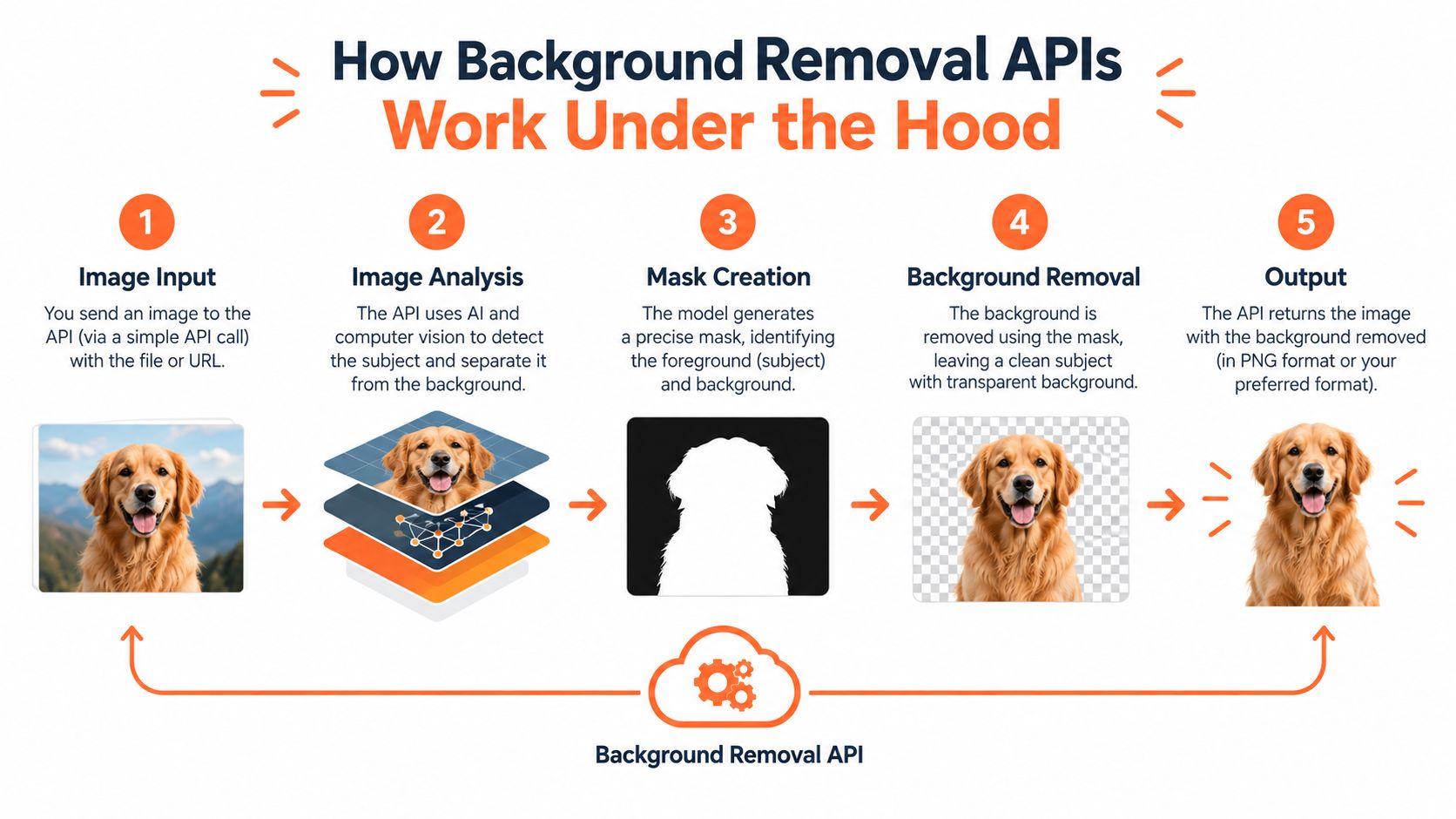
What the response should contain
A binary mask says only whether a pixel belongs inside or outside the subject. A soft alpha matte preserves partially transparent edge pixels. In PNG, alpha values range from fully transparent to fully opaque, with intermediate values useful for hair, fur, translucent packaging, glass, and anti-aliased product contours. The PNG good-practice guide explains why alpha handling and non-premultiplied color matter during export.
For production, inspect the API contract for:
- Cutout and mask URLs, so you can retain both the finished asset and the source matte.
- Output dimensions and processing status, so downstream jobs don't assume a completed file.
- Color profile and alpha bit depth, which affect compositing and consistency.
- Transparent-pixel RGB behavior, because later compositing may depend on those stored channels.
A successful HTTP response isn't proof of a usable product image. The pipeline still needs checks for edge quality, framing, file size, and marketplace rules.
Watch the process in context before choosing an integration pattern.
Evaluating API Quality Beyond Headline Accuracy
A catalogue can pass an API's headline accuracy test and still generate expensive manual work. One damaged strap, clipped handle, or pale fringe may force an operator to reopen the source file, adjust the mask, and repeat the export. The risk rises when products include reflective surfaces, transparent materials, or fine edges.
Published model metrics illustrate why the test design matters. One implementation trained a U-Net with residual connections on 64,115 images and validated it on 2,693 images. It reported 90.7% validation accuracy, while validation mean Intersection over Union, or mIoU, was 78.7%. Because mIoU evaluates mask overlap more strictly, the gap warns against judging an API by pixel accuracy alone. The segmentation study includes the implementation and reported results.
Test the errors your catalogue contains
Build test batches by product type, not just by image cleanliness. Include shoes with laces, apparel with fine fibers, jewelry, cosmetics, reflective packaging, transparent containers, products with holes, and images containing cast shadows. Keep difficult samples in the set after launch, so a model or vendor change cannot improve average scores by hiding failures in the sample mix.
Review outputs against a fixed acceptance checklist:
- Boundary accuracy: Does the mask retain small product parts?
- Edge behavior: Do dark or light halos appear on contrasting backgrounds?
- Interior holes: Are openings between handles, straps, and structural components preserved?
- Shadows and props: Are unwanted objects removed without deleting useful product detail?
- Framing: Does the complete product retain consistent margins across the catalogue?
Set accept and reject thresholds before batch processing. Send low-confidence results to review rather than exporting them automatically. Track the review rate, correction time, and rejected outputs alongside image quality, because those measures determine total operating cost at catalogue scale.
For a neutral service comparison, see this MerchLoom versus remove.bg evaluation. Apply its findings to your own product categories and correction workload.
Choose the API that produces manageable errors and gives your workflow a clear way to catch the rest.
Integration Patterns for Batch Workflows
A synchronous request works for testing one image, then starts failing under catalogue load. Hundreds of files can produce timeouts, queue backlogs, duplicate charges, or repeated outputs after a temporary network error. Design the workflow around recovery before sending the first production batch.
Use asynchronous jobs when the service supports them. Assign each source image a stable job identifier, retain the original URL and processing parameters, and poll or receive a completion callback. An idempotent retry must resume the same job or safely replace its previous result, rather than start an uncontrolled second operation.
The integration choice affects operating work:
- Direct request-response calls have low setup complexity and suit small groups.
- Queued processing adds planning but provides rate control, progress tracking, retries, and a review state.
- A queue is easier to manage when file sizes and image difficulty vary across a catalogue.
Record enough context to debug a failed run:
- Source identity: SKU, filename, source location, and original dimensions.
- Processing state: queued, running, completed, rejected, or awaiting review.
- Output metadata: cutout URL, mask URL, dimensions, format, and color profile.
- Failure context: timeout, unsupported input, segmentation concern, or export failure.
Before delivery to Shopify, Amazon, Etsy, or another channel, validate dimensions, aspect ratio, alpha behavior, background color, and file size. The batch processing guides cover practical approaches to queues, retries, and job tracking.
Store the transparent cutout and mask separately from presentation assets. Generate channel-specific canvases, crops, and background colors later, so a presentation change does not rerun extraction across the catalogue. A chained AI image workflow for Cloudinary follows this separation, which also makes partial reruns easier to control.
A production pipeline should make each job traceable from source file to approved output. That record is what turns batch recovery from manual investigation into a repeatable operation.
Optimizing Costs Across Your Processing Pipeline
A catalogue run can become expensive in places the API invoice does not show. Uploading source files, downloading results, polling jobs, storing originals and outputs, retrying failures, resizing oversized inputs, and reviewing uncertain cutouts all add operating cost.
A background-removal API comparison found listed prices ranging from $0.009 to $0.110 per image, with only a small quality difference on its test set. It also recorded input limits of 4 MB and 512–3000 pixels. Those limits may trigger preprocessing or reject files before segmentation, so the cheapest request can still create the highest total cost.
Price the accepted output
Model one complete product path: source upload, background removal, canvas creation, selective upscaling, review, and delivery. Run extraction before expensive enlargement when the enlarged background would be discarded. The rule is simple: avoid paying for high-cost transformations on pixels you intend to discard.
Doing this for a whole catalog?
MerchLoom runs background removal, upscaling and AI editing across every product photo you have — one prompt, whole batch. Try 2 batches free, no signup.
Try it freeTrack these cost drivers per batch:
- Transfer: upload and download volume.
- Processing: removal, reframing, resizing, and upscaling.
- Retries: failed jobs and rejected inputs.
- Storage: originals, masks, cutouts, and channel exports.
- Review: human time for difficult products.
Compare providers by the cost of accepted, marketplace-ready images, not successful API calls alone. A lower request price can lose its advantage if weak masks create repeated corrections, reprocessing, or delayed approvals. A higher-priced service may cost less on products that consistently need cleaner edges.
Reject predictable failures before the API call. Check file size, dimensions, orientation, and whether the source is a collage or usage-step photo. Record rejection reasons so preprocessing rules can be improved instead of sending the same bad inputs repeatedly. These process optimization examples show how workflow changes can reduce avoidable processing.
Store the transparent cutout and mask separately from presentation assets. Channel-specific canvases and backgrounds can then change without rerunning extraction across the catalogue. That separation also limits the scope of partial reruns and keeps cost forecasts tied to real production work.
Platform Requirements and Compliance Checks
A cutout isn't marketplace-ready until it satisfies the destination's image rules. Each platform handles dimensions, formats, transparency, and presentation differently, so one transparent PNG shouldn't become the default export for every channel.
Amazon's main image requires a pure white background with RGB 255,255,255, and the product must appear realistically, entirely within the frame, occupying about 85% of the image area. Amazon allows images from 500 pixels to 10,000 pixels on the longest side and recommends 1,000 pixels because that size enables zoom. Its documentation also states that the product image should not contain edge-touching borders or shadows. See the current Amazon product-image specification.
Etsy recommends listing photos with width and height of at least 2,000 pixels, while the first listing photo must be at least 635 pixels in both dimensions. Etsy supports JPG, GIF, and PNG, but animated GIFs and transparent PNGs aren't supported. A finished opaque background is therefore safer for Etsy exports. The Etsy image requirements explain these rules.
Shopify accepts images up to 5,000 by 5,000 pixels, or 25 megapixels, with each file smaller than 20 MB. It identifies PNG as the best general format for many product images and recommends 2,048 by 2,048 pixels for square product images. A consistent aspect ratio helps featured and main images display uniformly. Review the Shopify product-media requirements before selecting an export preset.
| Platform | Min Dimensions | Background Color | Format Rules |
|---|---|---|---|
| Amazon | 500 pixels on longest side | Pure RGB 255,255,255 for the main image | JPEG recommended, with other accepted formats |
| Etsy | 2,000 pixels wide and high recommended | Finished opaque background | JPG, GIF, and PNG supported, but transparent PNGs aren't supported |
| Shopify | 2,048 by 2,048 pixels recommended for square images | Store-specific | PNG or JPEG commonly used, each file under 20 MB |
A production validator should sample corner pixels, detect colored fringes, confirm the complete product is inside the frame, and verify the selected canvas and file format. Don't rely on checking the final folder by eye.
Handling Difficult Product Categories
The hardest catalogue images aren't always the most visually complex. Transparent and reflective materials create ambiguous boundaries because the product and background share light. Glassware, jewelry, cosmetics, packaging, footwear with thin straps, and apparel with fine fibers can all expose weaknesses that standard solid products don't reveal.
Documentation for background-removal services acknowledges problems with transparent or reflective materials, unclear subjects, usage-step images, close-ups, SKU collages, and major input or output size changes. These aren't edge cases for a broad store. They can represent the exact products that require the most merchandising attention. The e-commerce image editing documentation describes these sources of deviation and quality loss.
Build a category test matrix
Don't ask an API to process the full catalogue before you know how it behaves. Group your images by SKU type and evaluate the same checks in every group:
- Edge accuracy: Does the outline follow fine parts and curves?
- Haloing: Do light or dark fringe pixels appear after compositing?
- Missing parts: Are chains, handles, holes, or straps lost?
- Shadows: Are useful grounding shadows retained or unwanted shadows removed?
- Color shifts: Does the cutout preserve the product's original appearance?
- Framing: Does the subject fit the intended canvas consistently?
Record failure rates by category, not only as one catalogue-wide result. Require a confidence score or mask preview if the API provides one. If neither exists, use image-difference checks and a human review queue for categories with known ambiguity.
The cost of review belongs in the comparison. A service that looks inexpensive on standard product photos may require repeated corrections on glass, fur, or reflective packaging. Automation rate alone isn't a business metric unless you also know how many outputs pass without intervention.
Building Workflows with MerchLoom
A catalogue workflow needs more than a background-removal endpoint. It needs source imports, ordered processing steps, consistent export settings, progress visibility, and a way to reuse outputs. MerchLoom runs chained AI pipelines across collections, so background removal can be followed by reframing, resizing, background replacement, or upscaling instead of requiring one image at a time.
You can bring images from sources such as Google Drive, Dropbox, Shopify, WooCommerce, Amazon S3, Cloudinary, Google Cloud, DigitalOcean Spaces, Cloudflare R2, and Backblaze B2. The important part is the repeated rule set. For example, one collection can produce opaque white Amazon exports, square Etsy assets, and Shopify-ready files from the same preserved cutout.

Use processing order to control spend
Remove the background before upscaling when the workflow allows it. That keeps the expensive enlargement step focused on the product and final composition rather than on discarded background pixels. MerchLoom shows real-time progress and an exact cost preview before processing starts, which helps you decide whether to run a full collection or refine the test batch first.
The model is pay per image, with credits that never expire. You can try the first images without an account, then decide whether the output and workflow fit your catalogue. Human review still matters for difficult products, and the system should be treated as a batch workflow platform, not a full Photoshop replacement.
For developers connecting image pipelines through an AI interface, the MerchLoom MCP documentation covers the integration path. Sellers who don't need a custom integration can still work from imported folders and platform connections, then review results as they arrive.
Technical Best Practices for Production
Alpha handling causes failures that can look like poor segmentation. The W3C compositing specification defines source-over alpha as αo = αs + αb(1-αs). With premultiplied color, the corresponding output color is co = cs + cb(1-αs). If one part of the pipeline treats an image as straight alpha and another treats it as premultiplied alpha, product edges can develop dark or light halos. The W3C compositing specification defines the relevant behavior.
Validate the image contract
Before committing a full catalogue, confirm how the API handles:
- Alpha representation: Straight or premultiplied, with documented bit depth.
- Color management: Original color space, embedded profile, and conversion behavior.
- RGB in transparent pixels: Whether those channels remain available for later compositing.
- Geometric transforms: Whether the alpha channel follows the same resize and crop operation as RGB.
- Output testing: Appearance on both light and dark backgrounds.
Keep the original image and returned mask. If a new background, crop, or marketplace canvas is needed later, you should be able to re-composite without rerunning segmentation.
Add automated edge checks after compositing. Sample pixels just outside the subject boundary, detect unexpected fringe colors, and reject outputs with edge shadows or borders. Preserve processing parameters with each result so a corrected batch can use the same settings and remain visually consistent.
Production check: Never judge a transparent cutout only against the checkerboard preview. Test the final asset on the actual background and canvas used by the marketplace.
Start with a controlled category batch. Compare the mask, the finished composite, the export metadata, and the review time. Only then increase queue volume.
Final Checklist for API Selection
Choose a background removal API by the workflow it supports, not by its demo image. A catalogue seller needs predictable behavior across product categories, a clear response contract, recoverable jobs, and exports that pass channel validation.
Use this checklist before processing the full collection:
- Category coverage: Test standard products, transparent materials, reflective surfaces, fine fibers, holes, straps, shadows, and collages.
- Mask inspection: Confirm that you can access a soft matte or mask, not only a flattened image.
- Failure routing: Check for confidence data, rejected-job states, retries, and a human review queue.
- Output contract: Record dimensions, color profile, alpha behavior, format, and processing status.
- Cost model: Include transfer, storage, retries, polling, review, resizing, and upscaling.
- Input limits: Validate file size, dimensions, orientation, and unsupported image types before submission.
- Marketplace exports: Apply separate Amazon, Etsy, Shopify, eBay, WooCommerce, Poshmark, and Depop presets where necessary.
- Consistency: Fix the canvas, product scale, padding, background color, and aspect ratio for each channel.
- Lifecycle planning: Document provider versioning, retirement policies, and how you'll replace a service if calls stop working.
- Audit trail: Retain originals, masks, outputs, parameters, and review decisions by SKU.
The best production setup is rarely the one with the lowest per-image price. It's the one that produces accepted marketplace assets with the fewest retries and manual corrections, while preserving enough source data to fix a problem without starting again.
MerchLoom lets you run background removal and follow-up image steps across whole collections through chained AI pipelines, with pay-per-image credits that never expire and an option to try the first images without an account. Import your catalogue, review the difficult outputs, and test the workflow at MerchLoom before committing to a larger batch.
Stop editing product photos one at a time
Upload your catalog or connect your store. Describe the result once. MerchLoom does the rest.
Try it free — no signup