
Create Cute Backgrounds for Pictures with AI in 2026
Create cute backgrounds for pictures instantly with AI & batch workflows. Speed up e-commerce processing & meet Amazon, Shopify, Etsy requirements effortlessly.
A seller in California can have a clean product line, a solid price point, and still lose the click because the image feels flat. When hundreds of SKUs need new styling, cute backgrounds for pictures stop being a hobby choice and become part of the listing system. That matters in a state where U.S. e-commerce sales reached $1.192 trillion in 2024, accounting for 16.1% of total retail sales, so presentation isn't decoration, it's part of the conversion path. U.S. Census Bureau e-commerce sales context
For California sellers, the pressure is even clearer because the state's retail, beauty, fashion, home, and lifestyle brands already compete inside a highly visual economy. The right background can make a product easier to scan, easier to trust, and easier to reuse across marketplace listings, social posts, and ads. A one-off pretty backdrop is fine for a single portrait. A catalog of 500 products needs something more disciplined.
Introduction to Catalog Scale Cute Backgrounds
A lot of teams start with one polished hero shot, then discover the bulk of the work begins when the next 200 images need the same treatment. That's where cute backgrounds for pictures either help or hurt. If the background feels charming but distracts from the product, you've added editing time without adding clarity.
California is a strong place to care about this because the visual economy is huge. The state generated $307.7 billion in arts and cultural production value in 2023, the highest total of any state, and that sector represented 9.9% of California's gross state product. U.S. Bureau of Economic Analysis arts and cultural production data That's a useful reminder that local consumers and local brands are already tuned to design-led presentation.
For batch work, the main question isn't whether a background looks cute. It's whether it still reads clearly after you apply it across a family of products, sizes, and marketplaces. In practice, that means keeping edges clean, keeping the product dominant, and making sure the background doesn't break on a white-label marketplace or a social crop.
Practical rule: if the background competes with the product at thumbnail size, it's too busy for catalog use.
That's why AI pipelines matter. Instead of treating each image as a separate design job, a batch workflow lets you define the look once, then apply it across a collection with controlled variation. For busy sellers, that's the difference between a background idea and an operational system.
Planning Style and Brand Consistency
A batch-friendly background starts with the catalogue you already own, not with a fresh prompt. Pull a sample across one product family, then compare the images side by side. Which ones still feel like one brand, and which ones look like they came from different sellers?
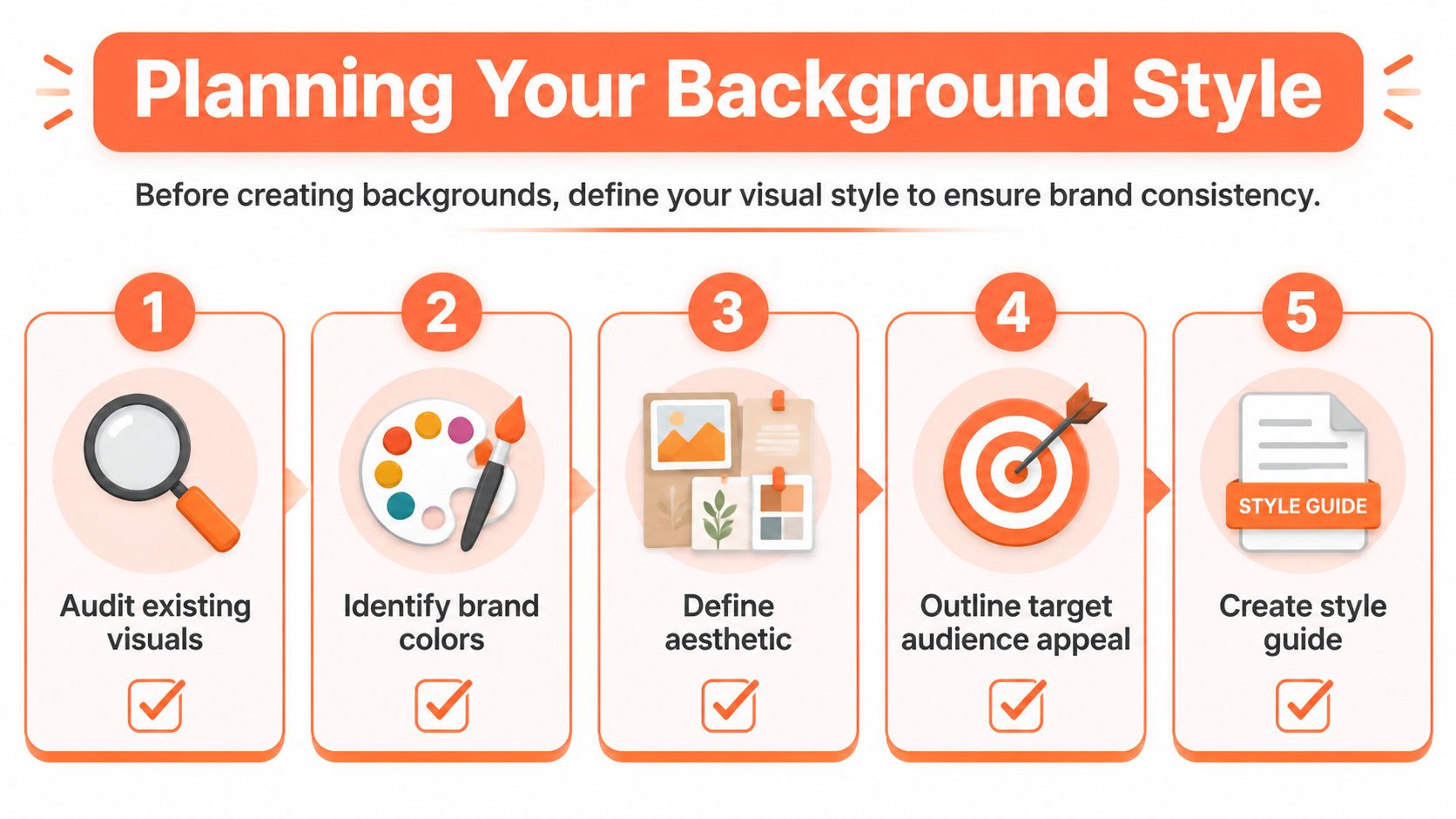
The product category should drive the style. A beauty brand may use soft colour fields, tiny sparkles, or pastel gradients. A home decor seller may get better results from gentle textures, paper grain, or light-toned props. Define what “cute” means for your catalogue before an AI tool applies it across every SKU.
Build a short style guide
Keep the rules short enough that a producer, editor, or VA can follow them without guessing.
- Audit existing visuals: Pull the best-performing and most on-brand images from each product family.
- Identify brand colours: Lock in the tones that repeat across packaging, props, and product labels.
- Define the aesthetic: Decide whether your “cute” leans playful, soft, handmade, whimsical, or minimalist.
- Outline audience appeal: Match the background mood to the buyer's expectations, not just your own taste.
- Create the guide: Write the rules down so every batch follows the same visual logic.
For teams building a larger asset system, image library management for product catalogues is worth using as the organising layer before styling starts. Background decisions get harder when source files are messy, inconsistent, or stored without a clear naming pattern.
That same subject-first approach shows up in Secta Labs on professional portrait backgrounds. The use case is different, but the trade-off is the same. The background has to support the subject, keep the frame readable, and avoid pulling attention away from the product.
A style guide saves more time than any single edit trick because it removes guesswork before the batch starts.
Generating Backgrounds with AI and Photography
Once the style rules are set, the work shifts to building a reusable background library that holds up across product lines. AI helps here, but only if the prompts are specific enough to produce assets you can use in catalog production. Broad phrases like “cute pastel background” usually create pleasant-looking noise. Better prompts call out texture, motif, depth, and the empty space around the product zone.
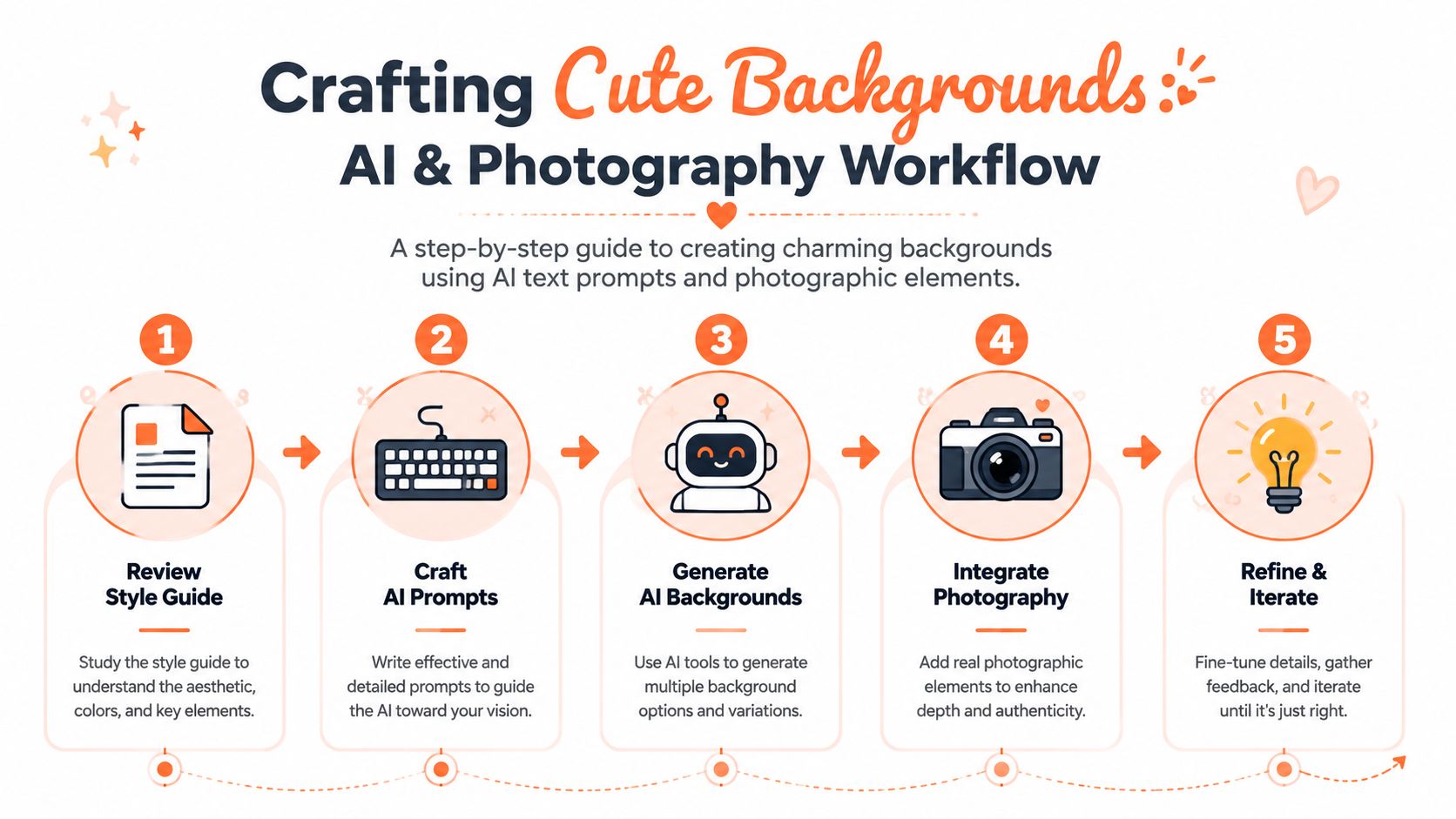
A useful ecommerce prompt does three jobs at once. It sets the mood, protects legibility, and avoids overfilling the frame. A pastel concept can still leave a clean centre zone where the product sits without visual conflict. That matters more than novelty, because marketplace listings fail fast when the background competes with the item.
Mix AI generation with real textures
Pure AI backgrounds can look too smooth for some catalogues. In practice, better results come from blending generated motifs with simple photographic reference shots, such as fabric texture, paper grain, tabletop shadow, or a lightly staged corner. That mix keeps the asset from feeling synthetic while still moving quickly through production.
For prompt discipline, Prompt Builder's prompt engineering guide is useful because it reinforces the habit of specifying subject, style, and constraints clearly. The same standard applies to background generation, the more exact the language, the less cleanup the team needs later.
A practical test is to drop one real product into the background straight away. If the label turns muddy, the surface texture pulls focus, or the edges need heavy masking, the asset is not ready for batch use. A cute concept that cannot survive a real product overlay does not help at scale. For teams experimenting with greener tones, green background light examples can help calibrate how much colour the scene can carry before product legibility starts to slip.
Prompt structure matters too, and AI image prompts gives a useful reference for building repeatable templates instead of one-off creative bursts.
Keep at least one plain version in every background set. The simpler option is what keeps the decorative option usable.
Applying and Refining Backgrounds Across Batches
Doing this for a whole catalog?
MerchLoom runs background removal, upscaling and AI editing across every product photo you have — one prompt, whole batch.
Try MerchLoomThe bottleneck isn't making one background look good. It's making 300 images keep the same edges, colour balance, and visual tone after you process them together. That's where batch logic matters more than individual retouching habits.
A catalogue-scale workflow usually starts with a carefully edited reference image, then applies synced adjustments across the related SKUs. That's the same logic that makes collection-level editing efficient, because the first file becomes the visual anchor for the rest. Batch product image processing workflow
What to lock before you run the batch
- Edge treatment: Keep cut-out edges consistent so products don't look pasted in from different jobs.
- Shadow direction: Match shadow style across the family, even if the background changes slightly.
- Colour correction: Apply the same balancing logic across the set so white labels and fabric tones stay believable.
- File naming: Preserve a clean naming convention so exports don't get lost between channels.
- Preview checkpoints: Review intermediate results before the batch finalises, especially on dense catalogues.
That workflow is much easier when the pipeline is built to process whole collections rather than one image at a time. MerchLoom is designed for that kind of chained processing, which is why it fits sellers who need background swaps, masking, and export steps to happen in sequence without restarting the job each time.
If you want a practical discussion of this kind of batched editing approach, AI batch image editing is a useful complement. The core idea is simple, do the first image carefully, then let the system carry the style forward across the family.
The main operational win here is consistency. Once the rules are set, you can make small refinements mid-batch instead of redoing the whole catalogue. That keeps the creative feel intact while protecting throughput.
Optimising Images for Marketplaces
Marketplace requirements can kill a good design if you ignore them early. Amazon, Shopify, and Etsy do not all want the same file, the same crop, or the same background treatment. If you build cute backgrounds without planning the export rules, you'll spend time undoing the creative work later.
Amazon's main image is the strictest. It must show only the product, use a pure white background, fill at least 85% of the frame, and be at least 1,000 pixels on the longest side for zoom compliance. Amazon image requirement reference That means a charming background can't live in the hero image, even if it works beautifully elsewhere in the listing.
Shopify is more forgiving, but consistency still matters. Square images tend to display more cleanly across themes and devices, which is useful when one asset needs to work in collections, on product pages, and in reused social assets. For a practical walkthrough, make images square is a good reminder that format choices save rework later.
Etsy pushes you in a different direction. Its seller guidance calls for images to be at least 2000 pixels on the shortest side for high-quality zoom and allows up to 10 photos per listing, so you need a fuller image set with multiple views and context shots. Etsy seller help reference
| Marketplace | Image Size | Background Rule |
|---|---|---|
| Amazon | At least 1,000 px on the longest side | Pure white, product only, fills 85% of frame |
| Shopify | Square images help consistency | Background can vary by theme and brand |
| Etsy | At least 2000 px on the shortest side | Flexible, but listing set needs visual coherence |
The smartest export strategy is to separate creative styling from compliance output. Make the cute version for social, secondary gallery images, and promotional assets. Keep the marketplace hero shot compliant, clean, and unmistakable.
Quick Prompts and Presets for Fast Results
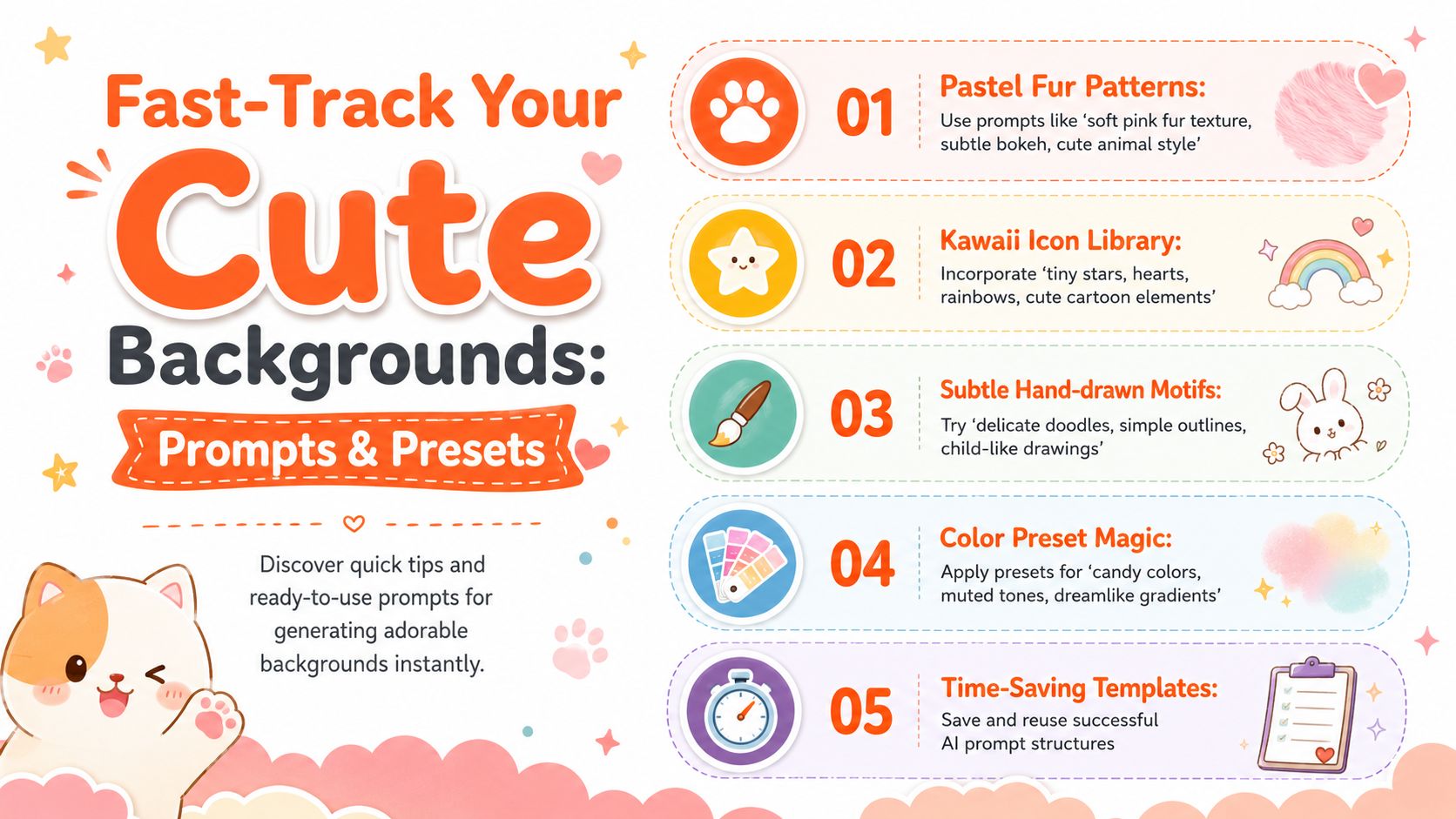
When turnaround is tight, you need prompts that produce usable results on the first pass. I keep templates for different product moods because reinventing the prompt every time slows the whole batch. A better system is to start with one structure and swap the descriptive parts.
Prompt patterns that work
- Pastel fur patterns: “soft pink fur texture, subtle bokeh, cute animal style”
- Kawaii icon libraries: “tiny stars, hearts, rainbows, cute cartoon elements”
- Hand-drawn motifs: “delicate doodles, simple outlines, child-like drawings”
- Colour presets: “candy colours, muted tones, dreamlike gradients”
- Reusable templates: Save the prompt structure once, then swap product category, palette, and texture
The same discipline helps when the asset isn't a still image. If you're also experimenting with motion or ad creative, creating compelling AI videos gives a good sense of how structured prompting keeps outputs coherent across formats.
For background creation, presets are doing most of the heavy lifting. A preset can fix the mood, colour balance, and shadow behaviour while leaving room for category-specific variation. That's especially useful for seasonal collections, where you want freshness without rebuilding the whole visual system.
If you're moving from prompt testing into repeat production, AI image prompts is a practical reference point for keeping the wording tight. The more reusable the prompt, the easier it is to scale the background library across multiple catalogues.
Conclusion and Next Steps
Cute backgrounds work best when they're treated as part of the production pipeline, not as a last-minute decoration. In high-volume e-commerce, the goal is to make images feel warm and on-brand while still staying legible, compliant, and easy to batch. That's what turns a styling idea into a real operational advantage.
A sensible next move is straightforward. Audit one product family, write down the style rules, generate a small asset set, and test the outputs against Amazon, Shopify, and Etsy requirements. Then run the same visual rules across a larger batch and check where the process slows down.
The sellers who benefit most are the ones who stop editing each image as a one-off. Once the background style is repeatable, the catalogue becomes easier to launch, easier to maintain, and easier to refresh without losing visual consistency.
A CTA for MerchLoom.
Stop editing product photos one at a time
Upload your catalog or connect your store. Describe the result once. MerchLoom does the rest.
Try MerchLoom